

The best MIDI pad controller is the one that matches how you play. Check four things first: velocity-sensitive pads (MIDI 1.0 records velocity from 0 to 127), pressure or polyphonic aftertouch, the number of pads (16 for finger drumming, 64 for clip launching and melodies), and how well the controller maps to your DAW.
Key Takeaways
- A MIDI pad controller makes no sound by itself; it sends MIDI messages that trigger sounds in software or an external sound module.
- Velocity sensitivity matters most for expressive drumming; MIDI 1.0 encodes velocity as a 7-bit value from 0 to 127.
- A 4×4 grid of 16 pads follows the layout popularized by the Akai MPC60 (1988); 8×8 grids of 64 pads suit clip launching in Ableton Live.
- Pressure sensitivity comes as channel aftertouch, polyphonic aftertouch or full MPE, from least to most expressive.
- Features such as pad banks, Note Repeat, Full Level mode and RGB pads speed up workflow more than raw pad count.
MIDI pad controllers are a core tool for many modern producers, and some producers use them instead of a keyboard. They are no longer used just for triggering clips and samples or tapping out beats because they are now fully used as practical instruments in their own right.
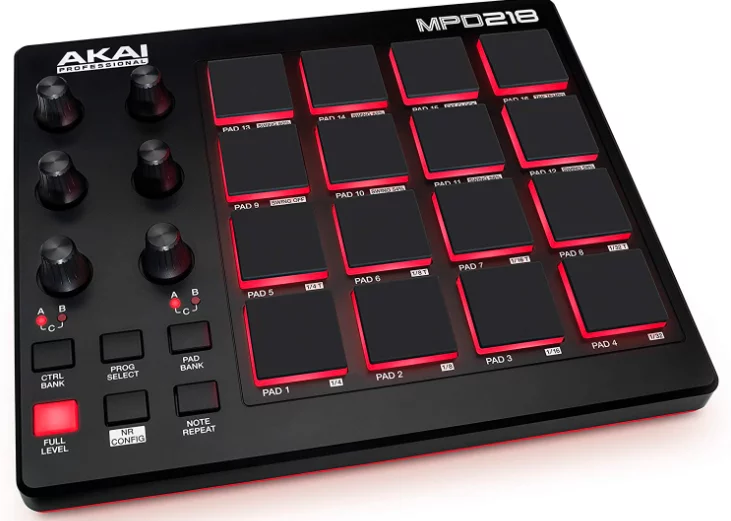
They allow you to record and compose melodies, basslines, and chords. Some models also include built-in sequencers that can trigger music software and other hardware. This article discusses what you need to consider when buying the best MIDI pad controller.
How to choose the best MIDI pad controller
With so much equipment on the market, it can be hard to find the best controller, because the right choice depends on how it fits your style. You see, MIDI pad controllers usually serve the same key function, so you need to focus on the major aspects of each one that can improve your workflow.
Ideally, if you desire to have a basic drum pad controller, you should avoid buying something that has a steep learning curve and CV/gate control. This is because these can only slow down your creative process. Instead, you can choose the MIDI pad controller that provides the most for your budget, workflow, style of music, and studio setup.
The features to consider when buying a MIDI pad controller
It’s easy to think that many MIDI pad controllers perform in the same way by sending MIDI messages. However, the truth is that these controllers have some major functional variations that you need to consider before buying them.
Firstly, you need to figure out whether or not you should have velocity sensitivity in your MIDI pad controller. This means you should determine whether or not your controller pads can sense how hard you press them.
Velocity sensitivity is close to essential if you want to play expressive drum grooves or melodic parts. But if your priorities are clip-launching and step-sequencing, perhaps this is a feature that you can afford not to have.
Another feature worth considering is the customizable and back-lighting color coding of the pads. While this may look like a purely cosmetic feature, it also serves a practical purpose.
Here is the deal: if you intend to use it live, then the ability to color-code controls can make a difference when you’re on stage with unpredictable lighting.
As you can see, when choosing the best MIDI pad controllers, there are various features worth considering besides the pads themselves, such as screens, rotaries, and many more.
Hence, you should always decide exactly what you want in the MIDI pad controllers to achieve your goals, and then figure out how each device can help you do this.
When it comes to the studio or live performance, moving back and forth between the computer and your hardware can slow your workflow, so a MIDI pad controller that maps well to your software helps keep studio jam sessions and live performances seamless.
What Is a MIDI Pad Controller?
A MIDI pad controller is a hardware device with a grid of rubber or silicone pads that sends MIDI note and control messages to a computer, tablet or hardware instrument. The controller produces no sound itself. According to Akai Professional’s MPD218 user guide, the pads are used to “trigger drum hits or other samples” in software or an external MIDI sound module.
MIDI (Musical Instrument Digital Interface) is the protocol behind every such device. The MIDI specification was published in August 1983 and is maintained by the MIDI Manufacturers Association. A single MIDI link carries 16 independent channels, so one controller can address several instruments at once.
Where Pad Controllers Came From
The pad layout most producers know comes from the Akai MPC. The first model, the MPC60 (MIDI Production Center), was designed by American engineer Roger Linn and released in December 1988, according to Wikipedia. It used a 4×4 grid of large pressure-sensitive rubber pads and originally retailed for $5,000.
Dedicated pad controllers later separated the pads from the sampler. Today’s models range from compact 16-pad units to 64-pad grids built around software such as Ableton Live, whose Session View arranges clips in a grid that a pad controller can trigger directly.
Velocity, Aftertouch and MPE Explained
Pad sensitivity is the single biggest difference between a controller that feels like an instrument and one that feels like a row of switches. Three levels of expression exist.
Velocity sensitivity
Velocity measures how hard or fast a pad is struck. According to the MIDI Association, MIDI 1.0 stores note velocity as a 7-bit value from 0 to 127, while MIDI 2.0 Channel Voice messages use 16-bit velocity from 0 to 65,535. MIDI 2.0 was introduced at the 2020 Winter NAMM Show, but the MIDI Association notes that true high-resolution MIDI 2.0 depends on operating-system support and compatible devices.
Channel and polyphonic aftertouch
Aftertouch is the pressure applied after the initial strike. Channel aftertouch reports one pressure level for the whole device, while polyphonic aftertouch gives each note its own pressure sensor, so each pad can be shaped separately. Novation, for example, lists the Launchpad X as having 64 velocity-sensitive pads with polyphonic aftertouch.
MPE (MIDI Polyphonic Expression)
MPE goes further by sending several dimensions of movement per note. Ableton describes the Push 3 pads as MPE-enabled, capturing pitch, slide and pressure per pad. MPE is useful for melodic playing and sound design; it matters less if you only program drum patterns.
Step-by-Step: How to Choose a MIDI Pad Controller
- Define the main job. Finger drumming and beat making favor 16 sensitive pads; clip launching and melodic grid playing favor 64 pads.
- Check pad sensitivity. Confirm velocity sensitivity, then decide whether you need channel aftertouch, polyphonic aftertouch or MPE.
- Count banks and controls. The Akai MPD218 offers 16 pads across 3 banks (48 pads in total) and 6 knobs across 3 banks (18 parameters), which shows how banks multiply a small surface.
- Look for MPC-style workflow features. Note Repeat retriggers a held pad at a rate based on the current tempo, and Full Level mode makes every hit play at the maximum velocity of 127.
- Check DAW integration. A controller with a dedicated script or mapping for your DAW (for example, Push or Launchpad with Ableton Live) needs less setup than a generic one.
- Confirm connection and power. Many modern pad controllers, including the MPD218 and Launchpad X, connect and draw power over a single USB cable; check whether you also need 5-pin MIDI or tablet support.
- Compare the software bundle. Bundled DAWs and instruments can add value for beginners; the Launchpad X, for example, ships with Ableton Live Lite.
MIDI Pad Controller Comparison
The table below compares three widely used designs, using the manufacturers’ own specifications as of October 2026. Prices change often, so check current retailer prices before buying.
| Controller | Pads | Expression | Notable features | Best for |
|---|---|---|---|---|
| Akai Professional MPD218 | 16 (3 banks, 48 total) | Velocity and pressure sensitive | 6 knobs in 3 banks, Note Repeat, Full Level, USB powered | Finger drumming on a budget |
| Novation Launchpad X | 64 RGB pads | Velocity sensitive, polyphonic aftertouch | USB-C, bus powered, Ableton Live Lite included | Clip launching and melodic grids |
| Ableton Push 3 (released May 2023) | 64 pads | MPE: pitch, slide and pressure per pad | Available as a computer-tethered controller or a standalone version that runs without a computer | Deep Ableton Live workflows and performance |
Common Mistakes When Buying a Pad Controller
- Buying for pad count alone. Sixty-four insensitive pads are less useful for drumming than 16 responsive ones.
- Ignoring DAW fit. A controller designed around one DAW may need manual mapping in another.
- Paying for expression you will not use. MPE and polyphonic aftertouch help melodic players; step-sequencing and clip launching rarely need them.
- Overlooking banks. Pad and knob banks let a compact controller cover far more sounds and parameters.
If you are building skills alongside your gear, our beginner’s guide to ear training helps with playing melodies on pads, and the roundup of DJ mixer software covers programs you can pair with a controller. For performing live, see the stages of music performance, and for samples to load onto your pads, browse these royalty-free stock music sites.
Frequently Asked Questions
Does a MIDI pad controller make sound on its own?
No. A MIDI pad controller only sends MIDI data. Sound comes from a DAW, a software instrument or an external MIDI sound module that receives those messages.
What is the difference between a pad controller and an MPC?
An MPC, such as the original Akai MPC60 from 1988, combines pads with a sampler in one unit. A pad controller provides the pads and controls but relies on software or other hardware for sound, although some, like the standalone version of the Push 3, run without a computer.
Should I get 16 pads or 64 pads?
Sixteen pads in a 4×4 grid suit finger drumming and sample triggering. Sixty-four pads in an 8×8 grid suit clip launching in Ableton Live’s Session View and playing scales or chords across the grid.
What does velocity 127 mean?
Velocity 127 is the maximum note velocity in MIDI 1.0, which uses values from 0 to 127. A Full Level button, found on controllers such as the Akai MPD218, forces every hit to play at 127.
Do I need MIDI 2.0 or MPE?
Most producers do not need either to start. MIDI 2.0 adds 16-bit velocity resolution but depends on operating-system and device support, and MPE mainly benefits expressive melodic playing.

Justwebworld has published guides since 2012. How we write and update articles Report an error
