

When buying a smart TV, check five things first: a screen size that suits your viewing distance, 4K resolution with a real HDR format (HDR10, Dolby Vision or HDR10+), the HDMI 2.1 features you need for games or a soundbar, current Wi-Fi, and how many years of software updates the brand promises. Then compare picture quality in person.
Key Takeaways
- Match size to distance: SMPTE suggests sitting about 1.6 times the screen diagonal away, THX about 1.2 times.
- HDR is a format, not a slogan: HDR10 is the baseline, while Dolby Vision and HDR10+ add dynamic metadata.
- Gamers and soundbar owners should look for HDMI 2.1 features such as 4K at 120 Hz, VRR, ALLM and eARC.
- Software support differs by brand: Samsung promises seven years of Tizen OS upgrades on its 2024 AI TVs, and LG’s webOS Re:New program offers four upgrades over five years on eligible models.
- A streaming stick or box can make an older TV smart without replacing it.
Smart TVs may have already hit a plateau in terms of the improvements added to them. Manufacturers still add features every year, from voice control to longer software-update promises. However, this does not mean all the smart TVs you find in the market have already reached their optimum potential. Some are just better than others.
There are still many that have not even been equipped with all the features expected of a TV manufactured in the last couple of years.
Smart TV Buying Guide: Top Things You Need to Know
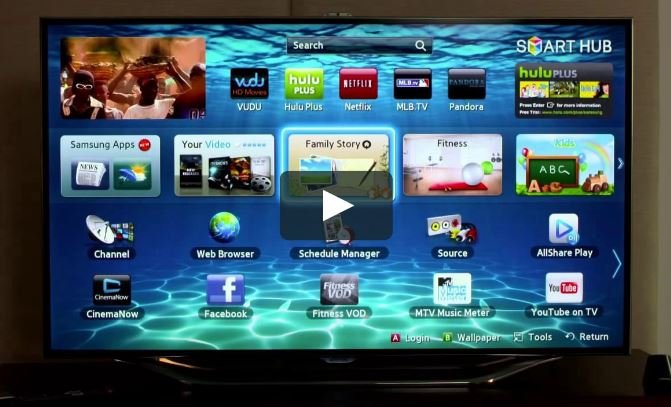
If you are shopping for a smart TV, there are things you need to watch out for. Consider the following pointers as you go over your options.
1) Size and Resolution
The size of the TV you buy is obviously a choice you have to make based on your own needs and preferences. Just remember that bigger isn’t always better. If your space isn’t wide enough to accommodate a 65” panel, maybe you should settle with a 40” model.
Also, bear in mind that you are buying a smart TV and not just a TV for watching shows or movies. You will usually want to use your smart TV at a closer distance especially when you browse the Internet.
For smart TVs, it’s preferable to choose those with high resolutions. If you can afford it, go for a 4K (3840 × 2160, also called Ultra HD) TV. A 4K panel also lets you sit closer before you notice individual pixels.
1080p screens are not bad, though, especially if you can’t afford to spend more to buy 4K content. The best 40” TV is not necessarily a 4K or UHD model. There are many great options out there. You just have to find the one that best suits your space and preferences.
2) Picture Quality
Smart TVs are still TVs and one of the most important things you should be evaluating in a TV is its picture quality. This is something you can’t properly scrutinize just by looking at technical specifications and promo images or videos. You really need to see the TV itself in person.
The ideal TV picture quality should have a good contrast ratio, which makes it possible to have a punchy and crisp picture, with deep blacks. The higher the contrast ratio is, the better the resulting picture would be. Also, higher refresh rates (120 Hz or higher) are preferable for the TV to display smooth images.
If you can find a TV model that has wide color gamut, then go for it. A wide color gamut supposedly makes images look realistic. It’s something everyone supposedly appreciates but not many can easily distinguish wide color gamut pictures from standard ones.
Again, it’s better if you personally examine the picture quality instead of looking at marketing materials, which usually contain a lot of jargon and technical details that don’t mean anything much.
On the other hand, you also have to check the viewing angles. Observe the panel you consider buying from various angles. There should be no color and contrast shifting. Most TVs nowadays already come with wide viewing angles but there are still those that suffer from viewing angle problems.
Moreover, if you find a TV with HDR feature and a great price deal, get it. HDR means high dynamic range, a video standard that lets a TV show a wider range of brightness and color than standard dynamic range (SDR). The main HDR formats are HDR10, HDR10+, Dolby Vision and HLG, and the formats a TV supports matter more than an HDR sticker. It enhances the range of brightness, darkness, colors, and details you see on your TV.
3) Dongle to Make Your Idiot Box Smart
Suppose you already have a reliable TV with stunning picture quality, but it is dumb. It’s a mere TV that can only show TV programs and connect to your Blu-Ray player and gaming console. It does not have the qualities of a smart TV such as the ability to connect to the Internet and have apps installed. Should it be replaced with a smart TV?
Not necessarily. Plug-in HDMI streaming sticks and boxes can make a non-smart TV smart. Good examples are Google Chromecast and various Android sticks.
These dongles can let your old but still good TV gain the functions of a smart TV. Note that Google ended production of the Chromecast line on August 6, 2024 and replaced it the same day with the Google TV Streamer, so new buyers will find the Streamer, Roku, Amazon Fire TV and Apple TV devices on shelves instead. The user experience may not be as great as having a full-fledged smart TV but it should be an excellent compromise if you are tight on your budget.
4) Connectivity
A smart TV isn’t smart if it does not come with the connectivity options expected of it, especially those that make it connect with other smart devices. It should have Bluetooth, Wi-Fi, USB ports, and an HDMI port. Having an ethernet port would also be advantageous. It’s not enough to simply have these connectivity features, though. Newer versions are faster and more reliable.
As of October 2026, look for Bluetooth 5.0 or newer (Bluetooth 5 was released in December 2016) and Wi-Fi 6 (802.11ax) or newer; Wi-Fi 5 (802.11ac) still works for 4K streaming on a good connection, and Wi-Fi 7 (802.11be) has been certified by the Wi-Fi Alliance since January 2024. For HDMI, check which ports support HDMI 2.1 features. USB ports on TVs are mainly for media playback and power, so their version matters less. It doesn’t have to be a USB Type-C if your other devices are not using Type-C yet.

5) Hardware
Smart TVs are essentially like computers. They come with internal hardware or components similar to what you will find in other computing devices. To make sure that your smart TV operates smoothly and responsively, it should have a fast processor.
Higher-end smart TVs generally use multi-core processors with more memory and app storage than budget models, but makers rarely publish full specifications, so menu speed and app loading times in reviews are a better guide. As the original author noted on the Techi Signals blog, it’s not only the display that matters. The internal components of a TV also mean something.
6) Software
Smart TVs come with operating systems or software platforms. It could be Google TV or Android TV, Panasonic’s My Home Screen, Samsung’s Tizen, LG’s webOS, Roku TV or Amazon’s Fire TV. Apple’s tvOS runs only on the Apple TV set-top box, not built into televisions. The major platforms offer broadly similar core streaming apps, so the choice often comes down to preference, the interface and how long the maker will keep updating it.
Some platforms do not have as many apps or features as others, so check that the services you use (including regional apps) are available before you buy. If you use the TV daily, the speed of the interface and the number of years of updates have a real effect on the experience.
7) The Best Prices
If you want your smart TV options to be available at the best prices, you may want to wait for the holidays. In the US, for example, prices start dropping as Black Friday draws near. The prices tend to remain low throughout the holiday season, until the New Year. You can buy smart TVs and gadgets at discounted prices.
Before buying a smart TV or other consumer electronics, be sure to carefully sort and evaluate your options. Make an informed purchase decision by doing your research and using a reliable tech review and information sources. Find useful information and insights on various tech products, tech news, as well as reviews of appliances, gadgets, and other consumer electronics. 🙂
How Big Should Your Smart TV Be for Your Room?
Screen size should follow viewing distance. Two common industry guidelines give a range: SMPTE recommends a seat where the screen fills about 30 degrees of your field of view, which is roughly 1.6 times the screen diagonal for a 16:9 TV. THX recommends about 40 degrees, roughly 1.2 times the diagonal, for a more cinematic view.
| Screen size (diagonal) | THX distance (about 1.2x) | SMPTE distance (about 1.6x) |
|---|---|---|
| 43 inches | about 4.3 ft (1.3 m) | about 5.8 ft (1.8 m) |
| 55 inches | about 5.5 ft (1.7 m) | about 7.3 ft (2.2 m) |
| 65 inches | about 6.5 ft (2.0 m) | about 8.7 ft (2.6 m) |
| 75 inches | about 7.5 ft (2.3 m) | about 10 ft (3.0 m) |
If your sofa sits farther away than the SMPTE figure, a larger screen will usually feel more immersive. For a room-by-room approach, see our guide on choosing the right TV for your room size and usage. If you plan to wall-mount the set, read about TV wall mounts for a home theater setup.
Which HDR Formats Should a Smart TV Support?
HDR support is one of the clearest quality signals on a spec sheet, but only if you know which formats are listed. Four formats are in common use:
| Format | Developed by | Metadata | Notes |
|---|---|---|---|
| HDR10 | Consumer Technology Association | Static | Open standard and the most widespread HDR format |
| HDR10+ | Samsung | Dynamic | Adjusts scene by scene; positioned as a lower-cost alternative to Dolby Vision |
| Dolby Vision | Dolby Laboratories | Dynamic | Proprietary, licensed to manufacturers |
| HLG (Hybrid Log-Gamma) | BBC and NHK | None | Royalty-free; backward compatible with SDR displays |
A TV that supports Dolby Vision or HDR10+ in addition to HDR10 can adjust brightness scene by scene when the content carries that metadata. Panel technology also matters for HDR; our guide to QLED, OLED and LED TVs explains the differences.
Do You Need HDMI 2.1 on a Smart TV?
HDMI 2.1 matters most if you game on a current console or PC, or use a soundbar or AV receiver. HDMI 2.1, released in November 2017, raised maximum bandwidth to 48 Gbit/s and added:
- 4K at 120 Hz and 8K at 60 Hz support for smoother high-frame-rate video and games.
- VRR (Variable Refresh Rate), which reduces lag, stutter and screen tearing in games.
- ALLM (Auto Low Latency Mode), which lets a console switch the TV into a low-latency mode automatically.
- eARC (enhanced Audio Return Channel), which carries uncompressed 5.1 or 7.1 sound, Dolby TrueHD and DTS-HD Master Audio to a soundbar or receiver.
Many TVs offer these features on only some of their HDMI ports, so check which port does what. A newer version, HDMI 2.2, was released in June 2025, but HDMI 2.1 features remain the practical checklist for buyers as of October 2026.
How Long Will a Smart TV Get Software Updates?
A smart TV’s apps and security depend on software updates, and brand policies differ widely. Samsung announced in August 2024 that it would provide seven years of free Tizen OS upgrades, starting with its 2024 AI TV models and some 2023 models. LG’s webOS Re:New program offers four upgrades over five years on eligible models from 2022 onward. Many other brands do not publish an update period, so ask before buying, and remember that an external streaming device can replace outdated built-in apps later.
Smart TV Privacy Settings to Check
Most smart TVs can collect viewing data. A common method is automatic content recognition (ACR), which identifies what is on screen to target ads and recommendations. A 2019 study by researchers at Princeton University and the University of Chicago found that many streaming devices sent user data to advertising and tracking services. During setup, read the privacy prompts and switch off viewing-data, ACR and ad-personalization options you do not want; they can usually be changed later in the settings menu. Our article on how to check whether your Wi-Fi is secure covers the network side.
Smart TV Buying Checklist
- Measure the viewing distance and pick a size within the SMPTE to THX range.
- Choose 4K resolution and check which HDR formats are supported.
- See the TV in person, or read reviews, for contrast, brightness and viewing angles.
- Confirm HDMI 2.1 features on the ports you will use (gaming, eARC).
- Check for Wi-Fi 6 or newer, Bluetooth 5 or newer and an Ethernet port.
- Confirm your streaming apps are on the platform and ask how long updates last.
- Review privacy settings during setup.
- Compare prices around major sales such as Black Friday, but buy on features, not discount size.
If your current TV is still good, a streaming device may be the cheaper upgrade; see our roundup of streaming TV devices.
Frequently Asked Questions
What is the most important thing to look for in a smart TV?
Picture quality is the most important factor, because the smart features can be replaced with a streaming stick but the panel cannot. Check contrast, HDR format support and viewing angles in person or in independent reviews, then compare software and connectivity.
Is 4K worth it on a smart TV?
Yes, for most buyers. A 4K (3840 × 2160) TV lets you sit closer before pixels become visible: the optimum viewing distance for 4K is about 1.6 picture heights, versus 3.2 picture heights for 1080p.
Which smart TV operating system is best?
No single smart TV operating system is best for everyone. Google TV, Tizen, webOS, Roku TV and Fire TV all carry major streaming apps; choose based on the apps you need, the interface you prefer and the brand’s update policy.
Can I make a regular TV smart?
Yes. A regular TV with an HDMI port can become smart with a streaming device such as the Google TV Streamer, a Roku player, an Amazon Fire TV stick or an Apple TV box. Google stopped making the Chromecast in August 2024.
Do smart TVs track what you watch?
Many smart TVs can track what you watch through automatic content recognition (ACR) if you allow it during setup. You can usually turn ACR and ad personalization off in the TV’s privacy settings.
What refresh rate should a smart TV have?
A 120 Hz panel is preferable for smoother motion, sports and games, and is needed to use 4K at 120 Hz from a console over HDMI 2.1. A 60 Hz panel is fine for everyday streaming.

Justwebworld has published guides since 2012. How we write and update articles Report an error
