

Note (September 2026): This review was first written for Filmora 7.8. The current release is Filmora 16 (September 2026), and the old pricing, editing modes and export options described below have changed, so those passages have been updated from Wondershare’s official pages.
Wondershare Filmora is a beginner-friendly video editor for Windows and Mac made by the Chinese software company Wondershare. The latest version is Filmora 16, released in September 2026. A free version exports with a watermark; as of September 2026, paid plans start at US$49.99 a year, with a US$79.99 one-time Perpetual license. Prices change often.
Key Takeaways
- Current version: Filmora 16 (September 2026) added camera tracking, color masks, 360-degree video reframing and AI media analysis, according to Wondershare.
- Free version: all basic editing features are free, but exported videos carry a watermark.
- Plans (as of September 2026, US store): Basic US$49.99/year, Advanced US$59.99/year, Perpetual US$79.99 one-time (updates within Filmora 16 only). Prices change.
- Hardware: Wondershare lists 8 GB of RAM as the minimum and 16 GB for HD and 4K editing.
- Best for: beginners, YouTubers and social creators who want templates and AI tools rather than a professional editing suite.
Someone might have told you that a quality video editing is a time-consuming process which requires high skills for using complex software. It might be possible that the person has already filled you up with lots of misconceptions which somehow might also discourage you from within that even you feel afraid for trying your hands on with some basic edits as well.
What if I tell you people about software which helps in quick and easy video editing with the same efficiency?
Filmora Wondershare Video Editing Software
YES!
Software about which I am talking is Filmora. It is effective professional video editor software by Wondershare. Filmora is aimed at beginners and everyday creators who want a clean, approachable editor rather than a professional suite. Its plans and prices have changed several times since this review was first written; the current ones are covered in the pricing section below.
One thing that makes Filmora stand out against its competitors is its simplicity. Reviews of Wondershare Filmora typically describe it as easy to use, though with less fine control than professional editors.
There is a number of softwares available in the market which serves you with best applications. Filmora is one of the options pitched at both personal and semi-professional use. This article is an in-depth review of Filmora video editing software by Wondershare.
Features or Highlights of Filmora
Older releases of Filmora, such as the 7.x versions this review was written for, greeted users with two options on launch: Easy Mode and Full Feature Mode. Easy Mode offered the basic and most important features, while Full Feature Mode offered everything. Wondershare’s startup-window guide for later versions (Filmora 9 and 10) no longer mentions these modes; it describes a Project section for starting a new project by aspect ratio, a Tools section with shortcuts such as Auto Highlight, PC Screen recording and Instant Cutter, and a News section.
Music Flow
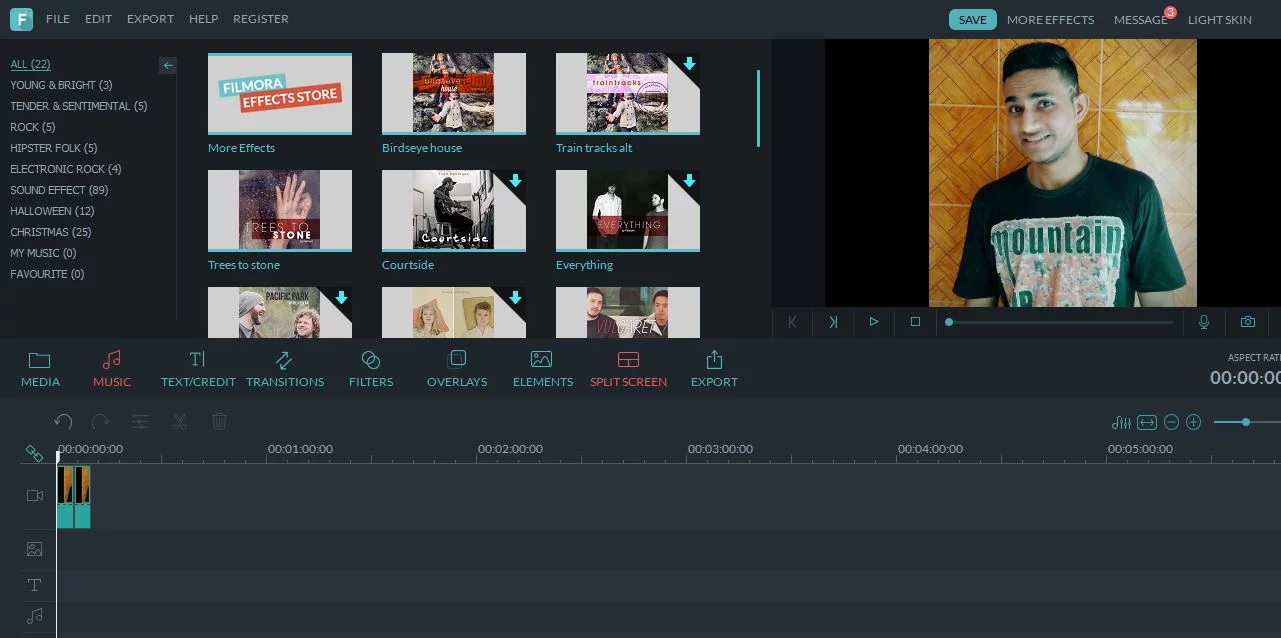
Before accessing the features of Filmora, you need to import a video by browsing using the software and it will take few seconds to get ready. You will see music editor as the first option in the tray which allows you to add the music to the video. It even offers few music files to try on with them which you need to download. Also, it allows the user to import the music files from the system.
Torment with a Text
Filmora offers the users with a huge collection of text. Trying the word art in Filmora is easy and simple. It looks professional as well as beautiful. You just have to choose the text format from the options, add the text and add it anywhere in the video.
Filmora’s text and title library is large. As of September 2026, Wondershare’s plan comparison lists 6,000+ title templates for free users and 52K+ for paid plans.
Fine Filters
It is quite a mandatory option for the designers and video editors to use the filters. And even the filters are not just limited to the photo editors now as it has entered into the videos too. Filmora offers the users with a fine and huge collection of filters which are appealing and do a fine job in beautifying the video as well as hiding the minor glitches.
Thus, it is better to use the filters for the videos.
Natural looking Overlays
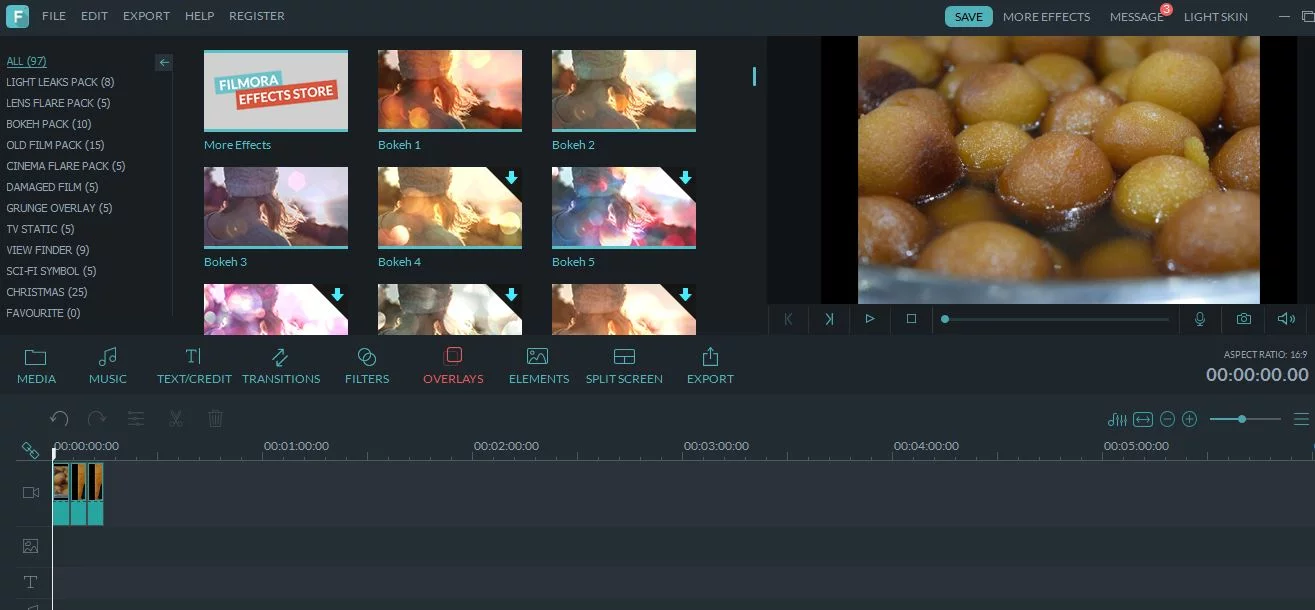
I hope that you are aware of the overlays. But if not, then an overlay is a coating which significantly covers everything. In this case, overlays significantly help in making the videos look more natural. Do you ever noticed those bubbles on the screen while watching movies which you think are the result of the sun rays falling on camera, but in actual, they are the overlays. Using overlays in your videos will help you in giving a video a perfectly professional look which adds a beauty to it.
300+ Elements
Though the elements look childish at times, but they are crucial as well. You can use the elements to make your video shine and creative. Older versions of Filmora offered 300+ elements, including a simple arrow, balloon, airplane, flag and much more. As of September 2026, Wondershare says its plans include access to 2.9M+ Filmora Creative Assets, although the full library requires a paid plan. You must use the elements at a specific time period and make them swoop or swirl around the video for a specific duration.
Transitions and Screen Splitter
Filmora video editor offers the inbuilt transitions which can make your video look better. You will find the similar transitions like the one you find in the Microsoft PowerPoint and the only difference is the variety. It even offers an option for screen splitter which actually helps us in using the multiple screens in a video. The screen splitter of Filmora helps in dividing the video screen beautifully and perfectly.
Easily Video Export

When you are done editing in Filmora, you can export the finished video directly to an online platform. Wondershare’s current technical specifications list direct export to YouTube, Vimeo and TikTok (Facebook, which older versions supported, is not among the listed targets). DVD export is still available as a DVD disc, DVD folder or ISO disc image, and device presets cover iPhone, iPad, Apple TV, Samsung Galaxy, Google Pixel, Xbox One, PlayStation 4 and smart TVs.
Filmora is one of that video editing software available in the market which does perform perfectly with its basic as well as advanced editing. It does allow us to do anything with the videos.
Filmora offers a frame by frame editor for modifying all the little moments in the video easily as well as allow controlling the speed and quality of the videos. It provides the audio enhancer as well as a separator. Also, it can easily help in saturation, trim, brightness, crop, contrast, aspect ratio, fade, volume control, fade and much more.
I just loved one of its advanced features, Green Screen which helps in removing a particular color from the video. What I actually mean to say that if you want to change the background in the video, then this feature comes in handy.
Apart from this, it offers a Picture-in-Picture feature which helps in adding a particular video into another. Older versions allowed a maximum of 10 videos in one frame; Wondershare’s own overlay guide now says the desktop editor can layer up to 100 overlay tracks. This feature comes in handy when you have to explain multiple things at once.
Pricing
When this review was first written, Filmora cost $29.99 for a 1-year license and $49.99 for a lifetime license per PC, with a $120 license for 5 PCs, for personal use. Those plans are no longer sold. As of September 2026, Wondershare’s US store lists a free version (exports carry a watermark), a Basic plan at US$49.99 a year, an Advanced plan at US$59.99 a year (shown reduced from US$69.99) and a Perpetual license at US$79.99 one-time. Prices change and promotions are frequent, so check the official store before buying. Team, business and education plans are sold separately.
Filmora 7.8 Features (an Older Release)
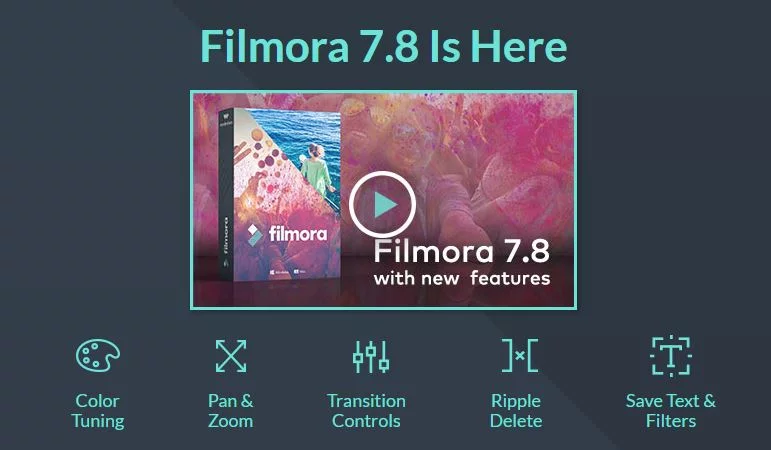
1) Advanced Color Editing
- New advanced color tuning features (Temperature, Tint, Lights, HSL, Vignette and more).
- 45 color presets and supports loading 3D LUTs (Lookup table files) for tuning color of videos and images.
2) Pan and Zoom
New Pan and Zoom feature for adding and customizing animation for still images!
3) Save Customized Text
Supports customize animation, font, size or color of Text effects and save as new presets.
4) New Transition Controls
New transition modes without affecting total duration of the two clips.
5) Ripple Delete
New Magnetic Timeline to make texts, effects and overlays bound up with clips on main video track.
6) Supports adjusting frame rate and resolution when recording from WebCam.
7) UI modification for some popup windows.
8) Adds Arabic Localization.
Verdict
Filmora video editing software by Wondershare is a complete package which can do literally everything to your videos. It is extremely intuitive video editing software. Filmora is a no-frills, approachable editor that suits beginners and everyday creators; reviewers generally praise its ease of use while noting that it offers less control than professional editors. It does provide all the essential functions which are needed in video editing software.
This review set out to show that basic video editing does not have to be difficult. The free version, which exports with a watermark, is the simplest way to judge whether Filmora suits a particular workflow before paying for a plan. 🙂
A hands-on review of Wondershare Filmora goes through the editing features in practice.
What Is Wondershare Filmora?
Wondershare Filmora is a paid video editing application made by the Chinese company Wondershare, with a free version that adds a watermark to exports. According to Wikipedia, the software was first released as Video Studio Express in 2010, renamed Wondershare Vivideo in 2011 and renamed Wondershare Filmora in 2015.
Wondershare later released FilmoraPro, a more advanced edition, in 2019, and discontinued it in 2022 when its features were folded into the main Filmora app. With Filmora 12 in late 2022, Wondershare moved to a subscription-led model, a change that drew complaints from users who had expected free upgrades. Today Filmora runs on Windows and Mac, with mobile apps for iOS, iPad and Android and an online version, according to Wondershare’s features page.
What’s New in Filmora 16 and Filmora 15?
Filmora 16 is the latest major version, released in September 2026. Wondershare lists these headline additions:
- Camera Tracking – tracks a subject on screen and keeps the camera framing it.
- Color Mask – applies color adjustments to one selected area at a time.
- 360-degree video reframing – turns 360-degree footage into standard shots for the timeline (on Mac this needs an Apple M1 or later chip).
- AI Media Analysis – labels and scores clips by content so the right shots are easier to find.
- Smart Text Correction – checks captions for errors and fixes them in one click.
- Multi-Source Recording – records screen, camera and audio sources together in one take.
Filmora 15, released in November 2025, added AI Extend (continuing video and audio clips on the timeline), a Pen Tool for drawing paths and shapes, animated charts generated from imported data, dual-timeline editing with compound clips in tabs, and importing other project files as subprojects.
Across recent versions, Wondershare’s features page also lists green screen, split screen, keyframing, motion tracking, speed ramping, auto beat sync, audio ducking, AI noise removal, LUT-based color grading, auto captions, AI Speech-to-Text, AI Text-to-Video and an AI music generator. Many AI tools are paid for with AI credits rather than included outright.
Filmora Plans and Prices Compared
As of September 2026, Wondershare’s US online store lists four plans for individuals. Prices change and discounts are frequent, so treat these figures as a snapshot, not a quote.
| Plan | Price (US store, September 2026) | Updates and upgrades | AI credits | Cloud storage |
|---|---|---|---|---|
| Free | US$0 (watermark on exports) | Basic editing features | AI features paid by credits | Not included |
| Basic | US$49.99 per year | All future versions during the subscription | AI features paid by credits | 1 GB |
| Advanced | US$59.99 per year (shown reduced from US$69.99) | All future versions during the subscription | 1,000 per month | 10 GB |
| Perpetual | US$79.99 one-time | Updates within Filmora 16 only | 1,000 one-time | 1 GB |
Two licensing details matter. First, the Basic and Advanced subscriptions cover both Windows and Mac, while a Perpetual license is device-specific: a Windows license works only on Windows and a Mac license only on Mac. Second, Wondershare distinguishes updates (bug fixes and minor changes) from upgrades (a new major version such as Filmora 15 to Filmora 16). Perpetual plans include updates to the current major version but not upgrades to future major versions.
According to Wondershare, subscription AI credits are issued every 30 days from the purchase date, and unused credits from the previous period are reclaimed when new ones arrive.
How Much Content Does the Free Version Include?
The free edition gives access to Filmora’s basic editing features, but it adds a watermark to exported files, and the full creative-asset library and cloud storage require a paid plan. Wondershare’s plan comparison, as of September 2026, lists these asset counts:
| Asset type | Free | Paid plans |
|---|---|---|
| Effects and filters | 1,500+ | 18K+ |
| Transitions | 1,200+ | 11K+ |
| Titles | 6,000+ | 52K+ |
| Music tracks | 9,600+ | 45K+ |
| Sound effects | 6,600+ | 19K+ |
| Stock media | 600+ | 1.1M+ |
Filmora System Requirements
Filmora is heavier than it was in the 7.x era. Wondershare’s published requirements, as of September 2026, are:
| Requirement | Windows | Mac |
|---|---|---|
| Operating system | Windows 11, 10, 8.1 or 7 (x64); Windows 11 or 10 on ARM | macOS 26 Tahoe down to macOS 10.15 Catalina |
| Processor | Intel 6th Gen or AMD Ryzen 3 1300X minimum; Intel 9th Gen or newer recommended for HD/4K | Intel or Apple M-series (M1 or later for 360-degree video) |
| Memory | 8 GB minimum; 16 GB for HD/4K; 32 GB or more for 8K | 8 GB minimum; 16 GB for HD/4K |
| Graphics | 2 GB VRAM minimum (e.g. GeForce GTX 1050 Ti or Intel UHD Graphics 630); 4 GB recommended | Iris Plus Graphics 645 or AMD Radeon Pro 555 or later, 2 GB VRAM (4 GB for HD/4K) |
| Disk space | At least 10 GB free | At least 10 GB free; SSD suggested |
Supported export formats include MP4, AV1 MP4, HEVC, MOV, MKV, WEBM, AVI, WMV and MPEG-2, among others. AI Speech-to-Text supports 27 languages and Text-to-Speech 28 languages, according to Wondershare.
Filmora Pros and Cons
Pros
- Easy to learn, with a drag-and-drop timeline and a large template and effects library.
- Free version with all basic editing features, so it can be tried before buying.
- Subscriptions cover both Windows and Mac and include new major versions.
- Broad AI toolset: auto captions, speech-to-text, text-to-video, AI music and more.
Cons
- Free exports carry a watermark.
- Perpetual licenses do not include the next major version, so upgrades cost extra.
- Many AI features consume paid AI credits.
- Less fine control than professional editors, according to most reviews.
Who Should Use Filmora?
Filmora suits beginners, YouTubers and social media creators who want quick results from templates, effects and AI tools. Anyone new to the workflow can start with this guide on how to make a YouTube video and these practical tips and tricks used by video editors.
Editors who need deeper control over color, audio and large projects may prefer a professional tool; see this walkthrough on installing Adobe Premiere Pro. For another beginner-friendly option, compare the Movavi Video Editor review. Wondershare also runs a browser-based Filmora Meme Maker for quick memes.
Frequently Asked Questions
Is Wondershare Filmora free?
Wondershare Filmora has a free version that includes all basic editing features, but it adds a watermark to exported videos. Removing the watermark, unlocking the full creative-asset library and getting cloud storage require a paid plan.
What is the latest version of Filmora?
The latest major version is Filmora 16, released in September 2026. It followed Filmora 15, released in November 2025.
How much does Filmora cost?
As of September 2026, Wondershare’s US store lists Basic at US$49.99 a year, Advanced at US$59.99 a year and a Perpetual license at US$79.99 one-time. Prices change and promotions are frequent, so check the official store for the current price in your country.
Is the Filmora Perpetual license a lifetime license?
A Filmora Perpetual license lets you keep using one major version with a single payment, with updates within that version (currently Filmora 16). It does not include upgrades to future major versions, which require an additional payment.
Does one Filmora license work on Windows and Mac?
Yes for the Basic and Advanced subscriptions, which cover both Windows and Mac. No for the Perpetual license, which is tied to the platform it is bought for.
How much RAM does Filmora need?
Wondershare lists 8 GB of RAM as the minimum, 16 GB for HD and 4K editing, and 32 GB or more for 8K editing on Windows.

Justwebworld has published guides since 2012. How we write and update articles Report an error
