

Server location matters mainly for speed: the further your server is from your visitors, the longer each request takes to travel. For search engines, Google treats server location as only one weak signal of which country a site targets, and says it is not a definitive one. A content delivery network (CDN) can reduce the distance problem for many sites, and data protection rules may also affect where you choose to host.
So the practical answer is: host close to most of your visitors if you can, use a CDN if your audience is spread out, and do not choose a host’s data centre just for SEO. This guide explains each factor and how to decide.
Key takeaways
- Distance adds delay. MDN notes that geographical distance affects latency proportionally.
- For SEO, server location is a weak signal. Google calls it not a definitive signal.
- A CDN serves copies of content from servers closer to visitors.
- Time to First Byte is where server distance shows up most.
- Data rules may influence where you host personal data.
Why distance affects speed
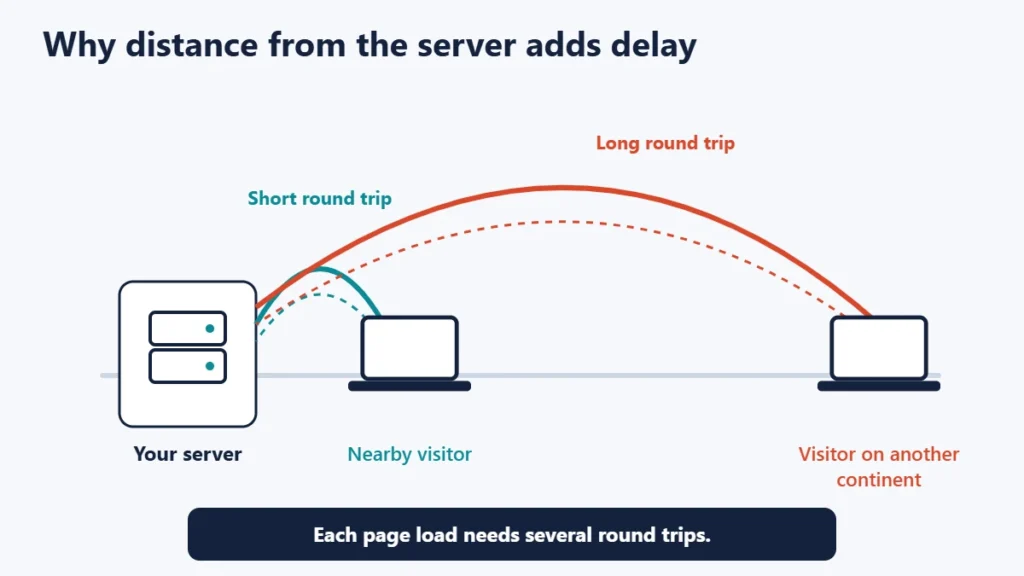
Data travels quickly, but not instantly. Loading a page is not a single trip: the browser looks up the domain, opens a connection, negotiates HTTPS and then requests the page, and several of those steps need a round trip to the server. MDN Web Docs states that geographical distance affects latency proportionally. If your server is on another continent from your visitors, every one of those round trips takes longer. Our guide to ping, jitter and latency explains these terms.
Where server location shows up: Time to First Byte
Time to First Byte (TTFB) measures how long it takes for the first byte of a page to arrive. web.dev, Google’s web performance site, lists its phases as redirect time, service worker startup time if applicable, DNS lookup, connection and TLS negotiation, and the request until the first byte of the response arrives. It says that, as a rough guide, most sites should aim for a TTFB of 0.8 seconds or less.
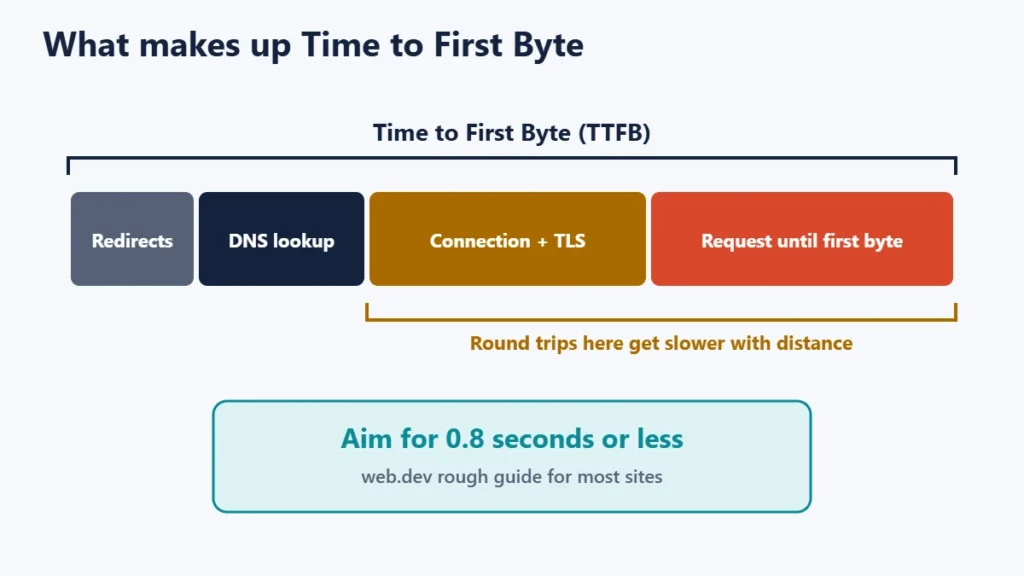
Distance mainly affects the connection steps and the trip for the request and response. A slow server, an uncached page or a heavy database query affects the rest. web.dev also notes that TTFB is not a Core Web Vitals metric, but because it comes first, a slow TTFB delays everything else, including Largest Contentful Paint (LCP). web.dev says LCP should occur within 2.5 seconds for a good user experience.
What Google says about server location and SEO
Google’s documentation on managing multi-regional sites lists server location, through the server’s IP address, as one of the signals it can use to understand a site’s intended audience. But it adds that some websites use distributed CDNs or are hosted in a country with better web server infrastructure, so it is not a definitive signal.
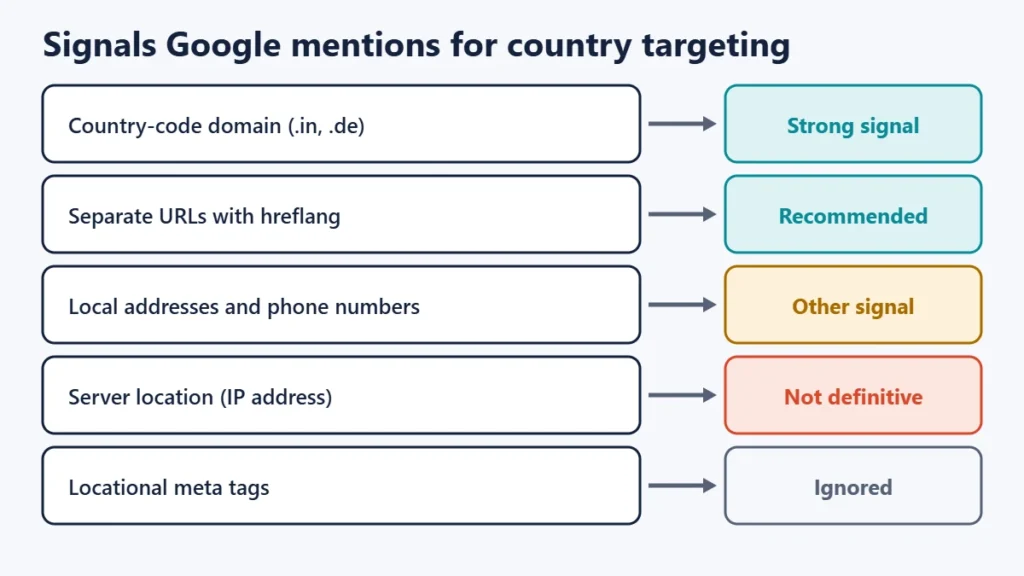
Google describes country-code top-level domains, such as .in or .de, as a strong signal, and mentions others such as local addresses and phone numbers on the page. It also says it ignores locational meta tags such as geo.position. For sites with versions for different languages or countries, Google recommends separate URLs with hreflang annotations.
In other words, moving your server to another country is not a reliable way to rank there. Content written for that audience, the right domain or URL structure and good page speed matter more.
How a CDN changes the picture
MDN defines a CDN as a group of servers spread out over many locations that store duplicate copies of data, so requests can be fulfilled by the servers closest to each visitor. Because most CDNs have servers around the world, they may be geographically nearer to your users than your own server.
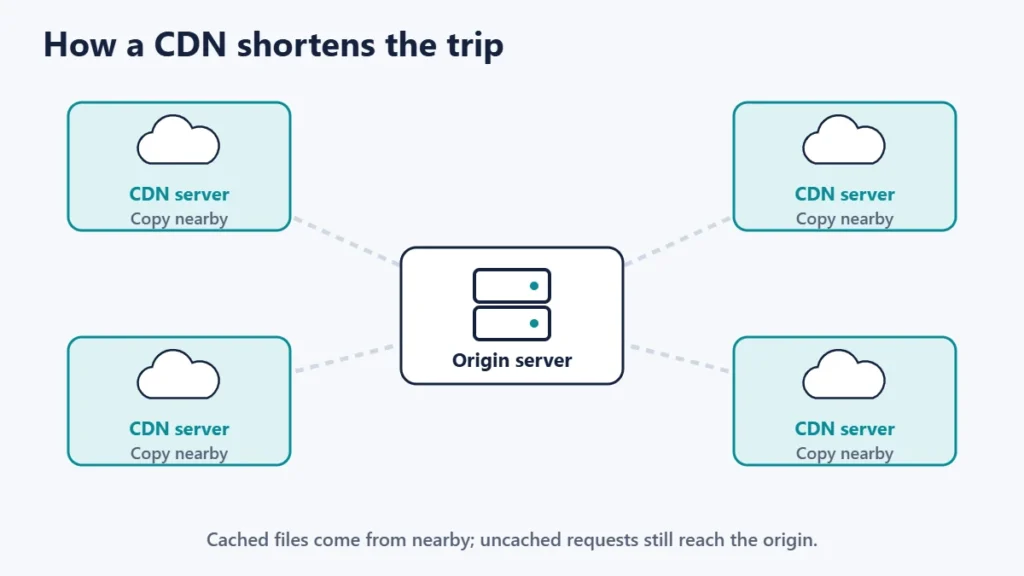
A CDN helps most with images, stylesheets, scripts and fully cached pages. Requests that cannot be cached, such as logged-in pages, shopping baskets and admin screens, still travel to your origin server, so its location continues to matter for those. MDN also warns that, contrary to popular belief, a CDN may sometimes reduce performance, so measure before and after. Our guide to CDNs covers how they work in more detail.
Data protection and legal considerations
Where you host can matter for personal data. The European Commission’s data protection pages explain that EU rules govern transfers of personal data outside the EU, using tools such as adequacy decisions and standard contractual clauses. These rules deal with how data is transferred and protected, rather than simply requiring EU hosting. Some sectors and countries have their own requirements. If your site collects personal data, check your obligations with a qualified adviser. Our guide to making a WordPress site GDPR compliant covers the website side.
How to choose a server location
| Your audience | Best approach |
|---|---|
| Mostly in one country or region | Host in or near that region |
| Spread across several continents | Host near the largest group and use a CDN |
| Mostly logged-in users or an online shop | Host near the main audience, as more requests reach the server |
| Mostly static or cached pages | A CDN matters more than the origin’s location |
| Handling regulated personal data | Check the rules before choosing a region |
- Find out where your visitors are. Your analytics shows the countries your traffic comes from.
- Check your host’s data centre options. Many hosts let you pick a region when you create a site.
- Measure TTFB from your main markets using a speed testing tool that lets you choose test locations.
- Add a CDN if your audience is spread out or your TTFB is high far from the server.
- Fix the server side too. Caching and a fast server often help more than moving. Our website speed tips cover the main improvements.
Not sure where your site is hosted now? Our guide to finding who hosts a website shows how to check, though a CDN may hide the origin server’s location.
Common mistakes
- Moving servers only for SEO. Google calls server location a non-definitive signal.
- Assuming a CDN fixes everything. Uncached and logged-in requests still reach the origin.
- Choosing the cheapest region by default. A data centre far from your visitors adds delay to every request.
- Testing speed only from your own location. Test from where your visitors actually are.
- Ignoring data rules. Check obligations before moving personal data to another region.
Frequently asked questions
Does server location affect SEO?
Only slightly. Google’s documentation describes it as one signal of a site’s audience that is not definitive. Page speed, which distance affects, matters more.
Should my server be in the same country as my visitors?
Ideally it should be close to most of them. If they are spread out, host near the largest group and use a CDN.
Does a CDN make server location irrelevant?
No. It helps cached content, but uncached pages and logged-in requests still go to the origin server.
How do I know if my server is too far away?
Measure TTFB from your visitors’ locations. web.dev suggests aiming for 0.8 seconds or less.
Do I need to host in the EU for GDPR?
EU rules focus on how personal data is transferred and protected outside the EU, rather than requiring EU hosting. Get advice for your specific situation.
Can I change my server location later?
Yes, but it is a migration. Many hosts can move a site to another data centre, and a CDN can soften the change.
The short version
Server location matters because distance adds delay to every request, which shows up in Time to First Byte and everything after it. Host close to most of your visitors, add a CDN for a spread-out audience, and check any data protection obligations. Do not move servers just for SEO: Google treats server location as a weak signal. For the basics, see what web hosting is.

Justwebworld has published guides since 2012. How we write and update articles Report an error
