

Latency is the delay data takes to travel across a network. Ping is the usual way of measuring it, reported as a round trip in milliseconds. Jitter is how much that delay changes from one moment to the next. A connection can have a respectable average ping and still feel terrible on a video call, because low delay and steady delay are two different things.
Speed tests show these numbers side by side without saying what they mean or which one explains your problem. This guide does both, and shows why two tools can report very different jitter for the same connection.
Key takeaways
- Latency is the delay. It can be quoted one-way or round-trip, so check which.
- Ping is a test tool, and the word is also used for its result: a round-trip time in milliseconds.
- Jitter is variation in delay. It has no single formula, so numbers from different tools are not directly comparable.
- Bandwidth is a separate thing. A faster plan does not automatically lower your ping.
- Latency under load often explains lag better than the idle ping shown first on a speed test.
What is the difference between ping, latency and jitter?
Think of a courier service between two offices. Latency is how long one parcel takes to arrive. Ping is sending a parcel and timing how long it takes to get a reply. Jitter is whether parcels arrive on a dependable schedule or some take an hour and others take a day.
| Term | What it describes | Unit | Felt as |
|---|---|---|---|
| Latency | Delay across a network path, one-way or round-trip | ms | Delay before something responds |
| Ping | A tool that measures round-trip time, and its result | ms | The figure quoted for games and speed tests |
| Jitter | Variation in delay over time | ms | Robotic voices, stutter, sudden rubber-banding |
| Packet loss | Data that never arrives | % | Dropouts, freezes, warps |
| Bandwidth | How much data can move per second | Mbps | How fast large downloads finish |
If you are unsure how bandwidth figures work, our guide to Mbps vs MB/s covers the units and conversions.
What does ping actually measure?
The ping command sends an Internet Control Message Protocol (ICMP) echo request to another machine and displays the round-trip time when the reply comes back, as Microsoft’s documentation describes it. The result covers the whole journey out and back, plus the time the far end takes to respond.
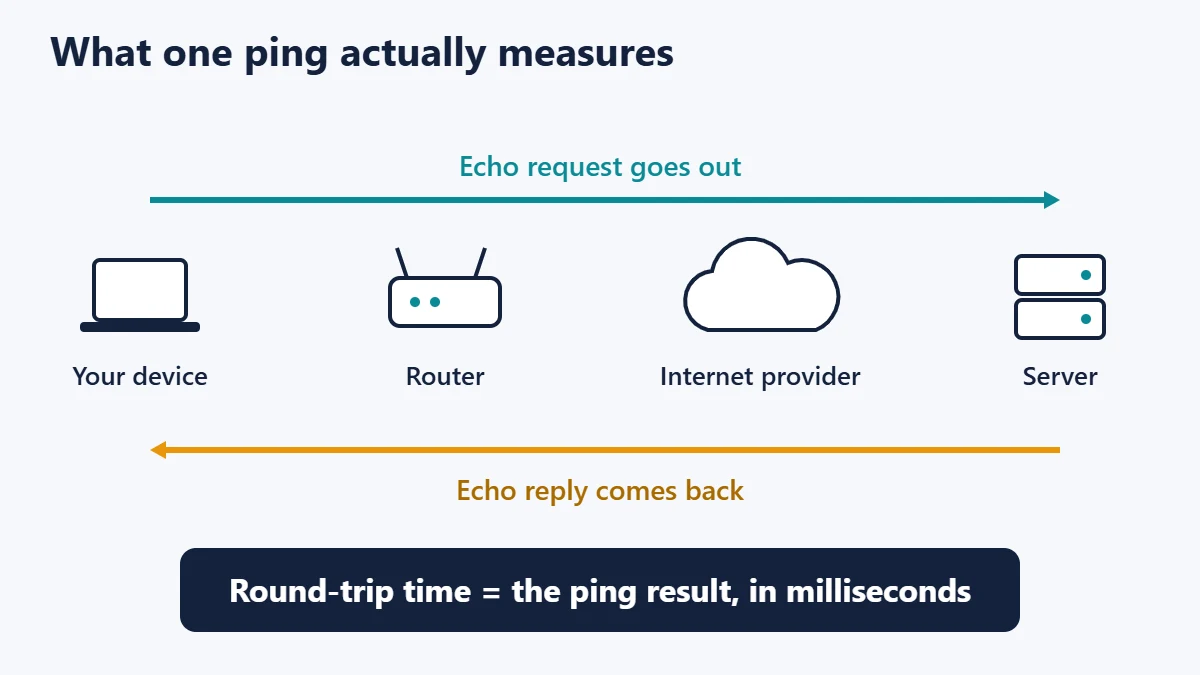
Round trip matters more than it sounds, because published latency limits are often one-way. The International Telecommunication Union’s G.114 recommendation, as summarised by Cisco, treats 0 to 150 ms of one-way delay as acceptable for most voice applications and 150 to 400 ms as acceptable with care. Above 400 ms is unacceptable for general network planning. If you compare a round-trip ping directly against that 150 ms figure, you are comparing two different measurements.
Why distance sets a floor on your ping
Signals take real time to cover real distance. A widely used planning estimate, also from G.114 via the Cisco paper, is about 6 microseconds per kilometre. That works out like this:
| Straight-line distance to server | One-way travel time | Round-trip minimum |
|---|---|---|
| 1,000 km | 6 ms | 12 ms |
| 5,000 km | 30 ms | 60 ms |
| 10,000 km | 60 ms | 120 ms |
Real cables rarely run in straight lines and every device along the route adds processing time, so actual pings are higher. No router upgrade can beat this floor. The practical fix for distance is choosing a closer server.
What is jitter, and why is there no single number?
Jitter is the variation in delay between packets. Real-time applications care about it because they need data to arrive at a steady pace. Apps compensate with a de-jitter buffer, which Cisco describes as turning variable delay into a fixed delay. If the buffer is too small, you get gaps in the audio. If it is too large, the whole conversation lags.
The term itself is less precise than speed tests imply. The Internet Engineering Task Force’s RFC 3393 deliberately avoids it, preferring “delay variation” because people use “jitter” to mean different things. Common tools each calculate it their own way:
- Cloudflare’s speed test reports the average variation between consecutive round-trip measurements.
- Linux ping prints
mdev, which its manual defines as a population standard deviation: how far each result sits from the mean. - Real-time media software commonly follows RFC 3550, which uses a smoothed estimate of one-way spacing differences, updating by one-sixteenth of each new change.
A worked example: same average, very different connection
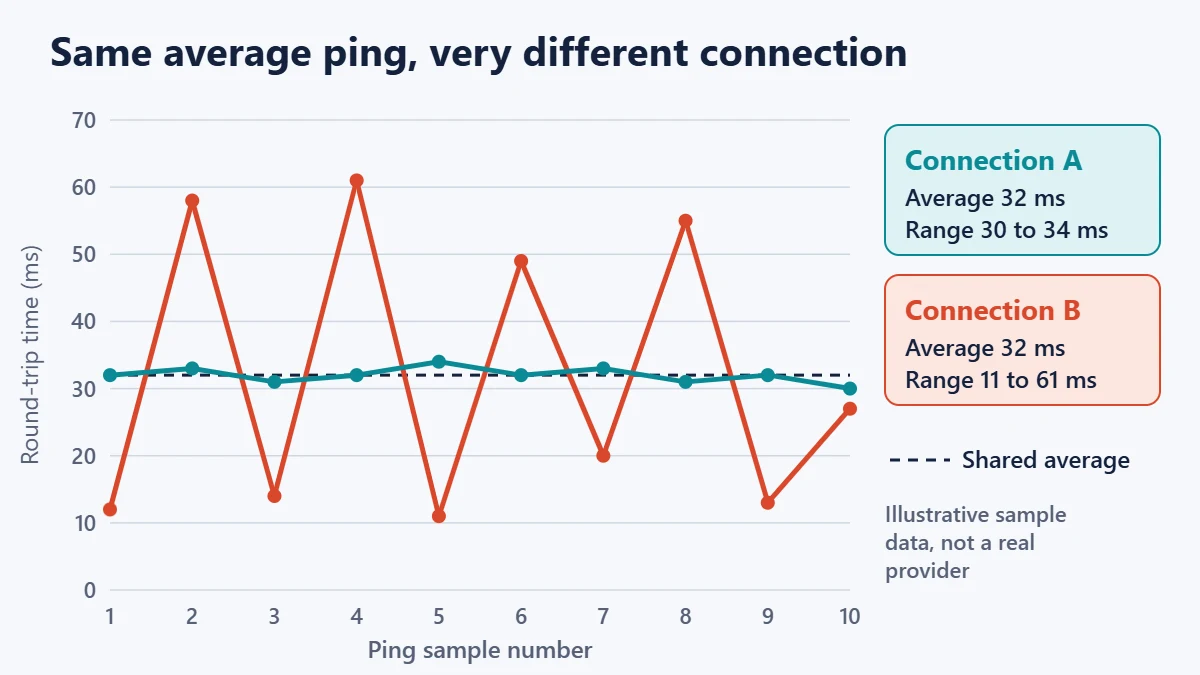
Here are ten illustrative ping results, in milliseconds, for two imaginary connections. These are example numbers chosen to show the maths, not measurements of any real provider.
| Connection | Ten round-trip times (ms) |
|---|---|
| A (steady) | 32, 33, 31, 32, 34, 32, 33, 31, 32, 30 |
| B (unstable) | 12, 58, 14, 61, 11, 49, 20, 55, 13, 27 |
Now apply the two most common calculations to the same data:
| Measure | Connection A | Connection B |
|---|---|---|
| Average ping | 32 ms | 32 ms |
| Lowest to highest | 30 to 34 ms | 11 to 61 ms |
Standard deviation (like mdev) |
1.10 ms | 20.07 ms |
| Average change between consecutive results | 1.56 ms | 38.33 ms |
Two lessons follow. The average hides the problem completely, and connection B’s “jitter” is either 20 ms or 38 ms depending purely on the formula. Compare jitter only between runs of the same tool.
What is a good ping and jitter?
No standards body publishes a universal “good ping” scale for home internet. The tables you see elsewhere are mostly vendor rules of thumb, and they disagree. The figures below are our practical starting points, not official limits.
| Activity | What matters most | Comfortable starting point |
|---|---|---|
| Web browsing, email | Latency, loosely | Round trip under about 100 ms feels quick |
| Streaming video | Bandwidth; players buffer ahead | Ping and jitter rarely matter |
| Video and voice calls | Jitter and loss, then latency | Round trip under about 150 ms, with jitter in the low tens of ms or less |
| Fast online games | Latency and jitter together | As low and steady as your server distance allows |
A stable connection with a moderately higher ping often plays better than a lower ping that spikes, since games and calls can adapt to consistent delay more easily than to unpredictable delay.
Why idle ping can be misleading
A speed test’s headline ping is often taken before the heavy transfer starts. Cloudflare calls this idle latency, the lowest expected latency, and separately measures loaded latency while the connection is busy.
The gap between them is often the real story. When data arrives faster than a router can send it, packets wait in a queue. When those queues grow too large, the effect is called bufferbloat, and everything sharing the connection slows down, including your call. This is why a family member’s upload can wreck your game despite a fast plan.
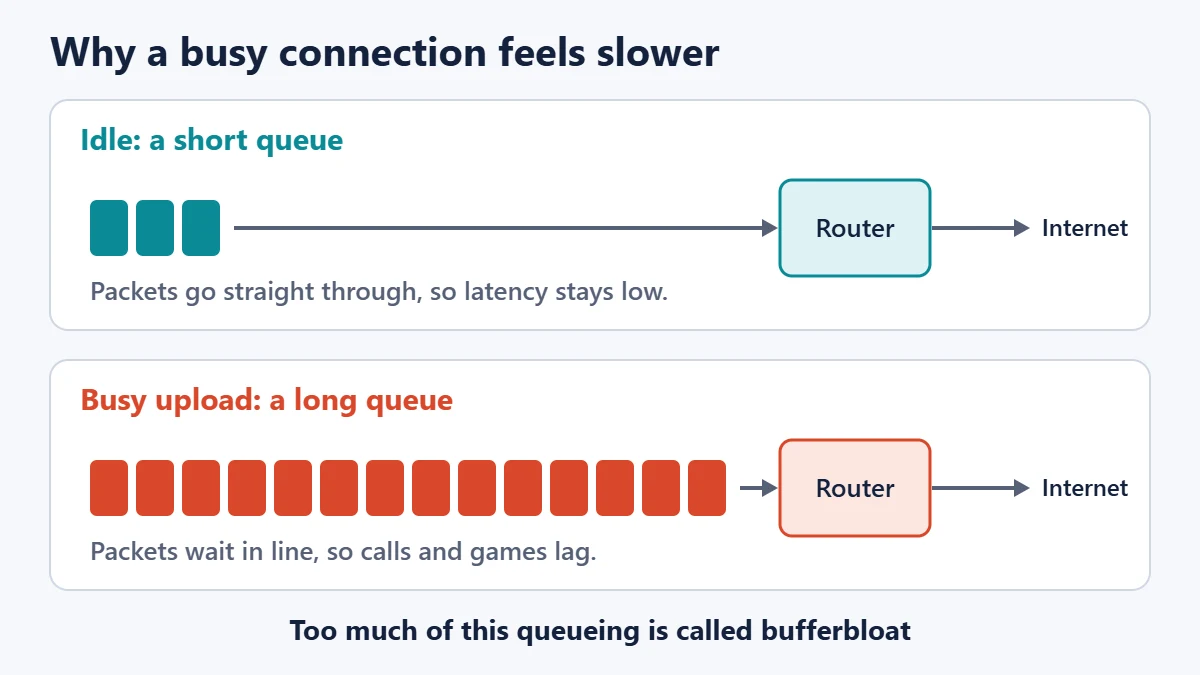
The volunteer-run Bufferbloat project suggests that if latency rises by less than 15 to 25 ms under load, it is well under control. Much larger rises point to queueing as a likely cause of lag.
How to measure ping and jitter yourself
A short run hides problems, so send at least 20 pings. The address 1.1.1.1 below is a public DNS service that is commonly used as a test target.
- Windows: open Command Prompt and run
ping /n 20 1.1.1.1. The summary gives minimum, maximum and average times but no jitter figure, so judge stability from the spread. - macOS: open Terminal and run
ping -c 20 1.1.1.1. The final line includesstddev. - Linux: run
ping -c 20 1.1.1.1. The final line includesmdev.
Run the test once while the connection is quiet, then again during a large upload or download. That simple comparison shows you loaded behaviour for your own network.
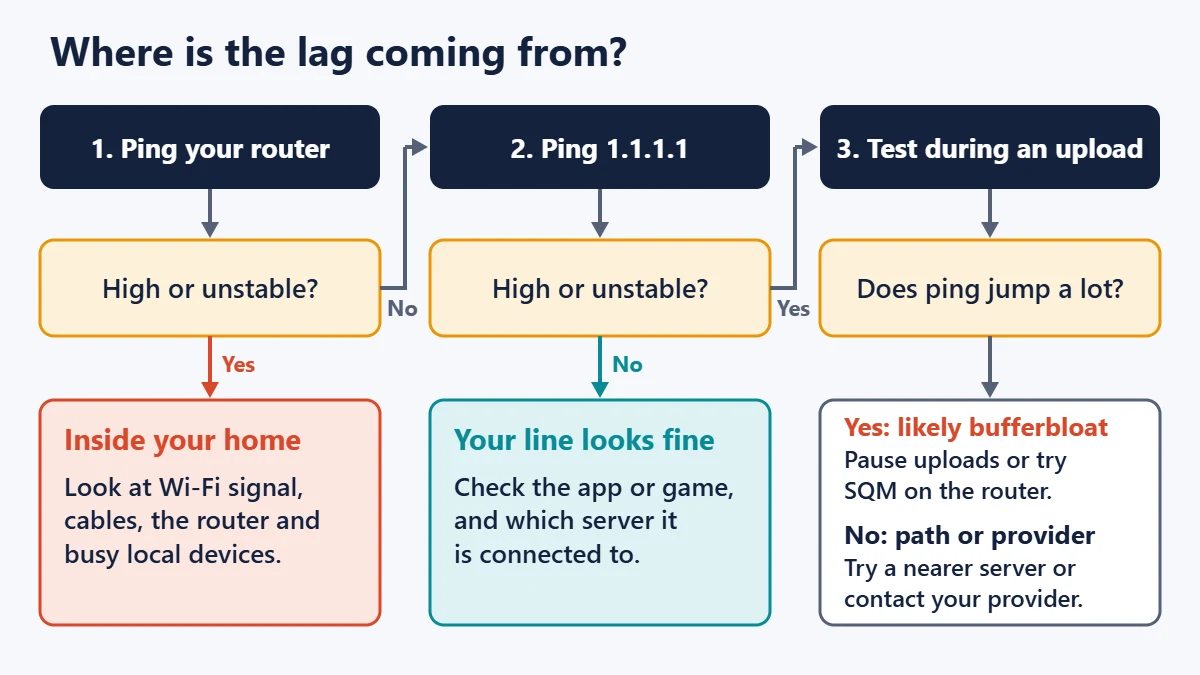
Find where the problem is
Pinging your own router first splits the problem in two. Your router’s address is usually listed as the “default gateway” in your network settings.
How to reduce latency and jitter
- Use Ethernet for the device that matters. Wi-Fi radios share airtime and take turns, which adds variation that a cable avoids.
- Improve the Wi-Fi if a cable is impossible. Move closer, reduce obstructions and try a less crowded band. Our guide on improving Wi-Fi signal covers placement, and Wi-Fi 6 vs Wi-Fi 7 explains what newer standards change.
- Stop big uploads during calls and matches. Cloud backups and video uploads are common culprits because home upload capacity is often limited.
- Enable Smart Queue Management if your router has it. It may appear as SQM or a similar quality-of-service option, and it targets queueing delay directly.
- Pick a nearer game or conferencing server when the app allows it.
- Restart equipment and update router firmware if problems appeared suddenly.
- Contact your provider with evidence. Timed results showing a steady router ping alongside an unstable internet ping are much harder to dismiss.
Changing DNS servers may speed up the moment a site name is looked up, but it does not lower your ping to a game server once connected. Our list of public DNS servers is useful for a different reason.
Common mistakes when reading these numbers
- Buying more bandwidth to cure lag. Bandwidth and latency are separate, so a faster plan may change nothing.
- Trusting one four-ping sample. Windows sends four by default, which is too few to reveal instability.
- Comparing jitter across tools. As the worked example shows, formulas differ widely.
- Panicking over one slow hop in a trace. Routers often give low priority to answering diagnostic traffic, so a slow middle hop that does not affect later hops is usually harmless.
- Comparing a game’s displayed ping with a command-line ping. Games may measure at the application level, to a different server.
Frequently asked questions
Is ping the same as latency?
Not exactly. Latency is the delay itself, while ping is a tool that measures round-trip latency. In everyday use, people treat the two words as interchangeable.
Is 20 ms of jitter bad?
It depends on the tool and the activity. Under a standard-deviation formula, 20 ms is significant variation for calls and fast games. The same connection can show a noticeably different value in another tool.
Does faster internet reduce ping?
Not directly. A higher-capacity plan can help if your connection is regularly saturated, because queues shrink. It cannot shorten the distance to a server.
Why is my ping fine but my call still choppy?
Check jitter and packet loss, and test while the connection is busy. A low idle ping says nothing about what happens during an upload.
What causes jitter?
Common causes are Wi-Fi interference and contention, congested links, overfilled router queues and changes in routing along the path.
Can a VPN lower my ping?
Usually a VPN adds a detour and raises it. Occasional exceptions occur when the VPN’s route happens to be better than your provider’s default path.
The short version
Start with what you are feeling. Delay before everything responds points to latency. Stutter and robotic audio point to jitter or packet loss. Test your router first, test again under load, and compare results only from the same tool. Those three habits will tell you more than any single number on a speed test.
Sources
- RFC 3393: IP Packet Delay Variation Metric (IETF)
- RFC 3550: RTP, section 6.4.1 on interarrival jitter (IETF)
- ITU-T G.114: One-way transmission time (ITU)
- Understanding Delay in Packet Voice Networks (Cisco)
- ping command reference (Microsoft Learn)
- ping(8) manual page (Linux)
- How does Cloudflare’s Speed Test really work? (Cloudflare)
- Bufferbloat FAQs (Bufferbloat.net)

Justwebworld has published guides since 2012. How we write and update articles Report an error
