

An affordable TV wall mount saves floor space and lets you set the screen at seated eye level, which is the basis of a home-theatre feel in a small room. Choose a mount that matches your TV’s VESA hole pattern, is rated above the TV’s weight without its stand, and fix it to a dry, sound wall.
Key Takeaways
- Match the mount to your TV’s VESA hole pattern (for example 200 x 200 mm or 400 x 400 mm) and its weight without the stand.
- Fixed mounts sit closest to the wall, tilting mounts suit TVs placed above eye level, and full-motion arms suit corners and multiple seating areas.
- Samsung suggests about 42 inches (around 107 cm) from the floor to the centre of the screen for a seated viewer.
- In the monsoon, avoid walls with damp or seepage; Samsung advises against installing TVs in high-humidity locations.
- Sound matters as much as the picture: a soundbar or a 5.1 speaker system does more for the home-theatre effect than a bigger screen.
You do not need expensive TV or audio equipment to give your living room a home-theatre feel, during the monsoon or at any other time of year.
In fact, you can invest in affordable TV wall mounts to maximise space and create a home theatre experience. Modern TVs are designed to be used either on a stand or on a wall mount, and some even come with wall mount brackets included.
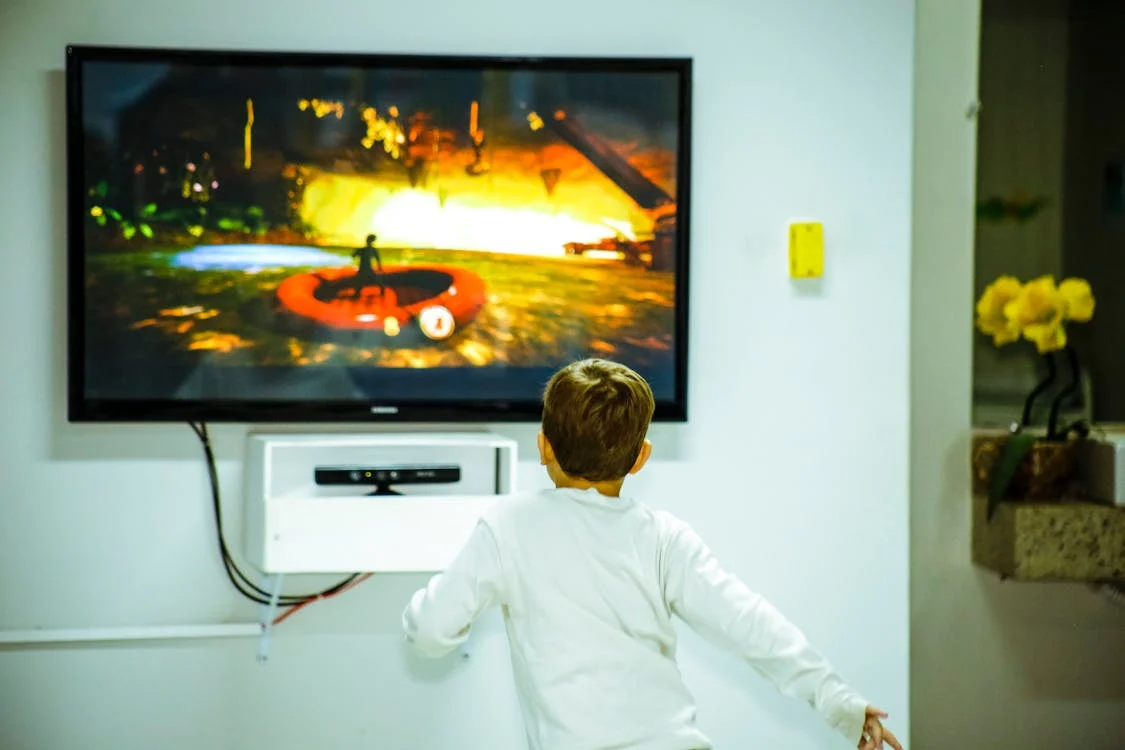
Why wall mount your TV
TVs used to be displayed mainly on stands or cabinets. Most TVs are now thin and lightweight enough to be easily mounted and they come with holes for TV mounting. While installing a TV on a stand is straightforward, the TV mount requires some expertise and effort but the result is an immersive viewing experience.
If your TV does not come with a wall mount bracket, budget mounts are widely sold. For example, Croma’s own-brand wall mount for 43-inch to 55-inch TVs was listed at Rs 1,199 with a 30 kg load rating when this article was first published in August 2024; prices change, so check the current listing and confirm that any mount matches your TV’s VESA pattern and weight. Wall mounting your TV offers many advantages and one such advantage is a home theatre-like experience. Here’s what you need to know.
Space saving
The biggest benefit of a wall-mounted TV is that it takes much less space than a TV on a stand. A wall-mounted TV takes up the space on the wall and does not encroach on your floor space. Because the TV is lifted off the floor and fixed to the wall, it is harder for small children to reach than a TV on a low stand, and the room feels more open and easier to arrange.
Ideal viewing experience
While it is easier than ever before to buy a big-screen TV, it remains a challenge to find that ideal viewing experience. A wall mount lets you set the screen height and angle to suit where people actually sit, instead of being limited by the height of a stand.
This can be in relation to where you sit to watch or with respect to the orientation of the room and furniture. A tilting or full-motion mount adds adjustment when the TV has to sit above eye level or be angled toward more than one seating area.
Modern look
With a wall mounted TV, you will free up floor space that can be used to give your living space a modern look. A wall-mounted TV suits small rooms and gives a cleaner, less cluttered look, especially when the cables are hidden.
LED TVs: Optimal placement of audiovisual equipment
Once you have wall-mounted your LED TV, the next step towards maximising space and creating a home theatre experience would require smart seating arrangement. One of the ways to do that is by choosing seats with a narrower profile to maximise floor space or opting for reclining chairs. While the LED TV is one part of the equation towards a home theatre experience, an even bigger role is played by audio equipment.
Built-in TV speakers are adequate for everyday viewing, but a dedicated soundbar or speaker system can produce clearer dialogue and stronger bass than the small speakers inside a thin LED TV.
In a small room, a compact system such as a soundbar mounted directly below the TV keeps the floor clear. Choose an audio system with immersive sound that will minimise clutter, maximise floor space, and let you enjoy a home theatre experience.
Maximising space is the ultimate quest for modern homeowners and the easiest way to do that is by carefully planning and creatively placing your devices. For audio, you can consider in-wall or ceiling speakers and position them carefully around the main seating spot.
How Do You Choose the Right TV Wall Mount?
A TV wall mount has to match three things: the hole pattern on the back of the TV, the TV’s weight, and the way you want the screen to move. Price matters less than getting these three right.
Check the VESA pattern
Almost all flat-screen TVs use the VESA Flat Display Mounting Interface, a set of standards from the Video Electronics Standards Association. The pattern is the spacing of the four threaded holes on the back of the TV, measured in millimetres. According to Samsung’s mounting guide, its TVs typically use 200 x 200 mm for 30 to 43-inch screens, 400 x 400 mm for 46 to 75-inch screens and 600 x 400 mm for 75 inches and larger. Other brands vary, so check the TV’s manual or measure the holes before buying.
Check the weight rating
Use the TV’s weight without its stand, not the boxed shipping weight. Mount-installation guides such as MountSpec’s recommend a mount rated at least 20% above that figure, so a TV weighing 16 kg calls for a mount rated for 20 kg or more.
Pick the mount type
| Mount type | Distance from wall | Movement | Best for |
|---|---|---|---|
| Fixed | About 1-2 in | None | Seating directly opposite the TV at eye level; slimmest look |
| Tilting | About 1.5-3 in | Tilts about 5-15 degrees down | TVs placed above eye level; reducing glare from windows or lights |
| Full-motion (articulating) | About 2-4 in folded | Extends about 15-25 in, swivels and tilts | Corners, open-plan rooms and several seating areas |
| Ceiling | Hangs on a pole | Swivels, tilts, height adjusts | Rooms where no wall can carry the load |
Ranges are typical figures from MountSpec’s mount-type guide; check the specification of the exact model you buy.
How High Should a Wall-Mounted TV Be?
Samsung recommends mounting a TV about 42 inches (around 107 cm) from the floor to the centre of the screen, which is roughly the eye level of a 5 ft 6 in adult sitting on a standard sofa. Samsung adds 4 to 6 inches if furniture will sit below the TV. The simplest check is to sit in your usual seat and have someone measure from the floor to your eyes; the centre of the screen should land close to that height.
Avoid mounting the TV high above a fireplace or cabinet just to fill the wall. A screen that forces viewers to look up for long periods is less comfortable, which is why tilting mounts exist for higher placements.
How Far Should You Sit From the TV?
Two common reference points are a 30-degree field of view, widely attributed to SMPTE, and the roughly 40-degree angle THX recommends for its “best seat”. On a 16:9 screen, these work out to about 1.6 times and 1.2 times the screen diagonal respectively.
| Screen size | About 1.6 x diagonal (30 degrees) | About 1.2 x diagonal (40 degrees, THX) |
|---|---|---|
| 43 inches | About 1.75 m | About 1.3 m |
| 50 inches | About 2.0 m | About 1.5 m |
| 55 inches | About 2.2 m | About 1.7 m |
| 65 inches | About 2.6 m | About 2.0 m |
Treat these as starting points rather than rules. If your sofa is fixed in place, the table also tells you roughly which screen size suits the room; for help choosing the set itself, see this guide on choosing the right TV for your room size and usage.
Wall Mounting During the Monsoon: What to Check
Monsoon humidity and wall seepage are the main extra risks when mounting a TV in the rainy season. Samsung’s mounting guide says its TVs should not be installed in bathrooms or other high-humidity environments, and that a TV should never exceed 104°F (40°C).
- Inspect the wall first: do not mount a TV on a wall that shows damp patches, peeling paint, white salt deposits or seepage, and fix the leak before mounting anything.
- Prefer an inside wall: an internal wall is usually less exposed to rain than an external one that takes the full force of the weather.
- Keep electrics dry: place the power outlet and set-top box where water from windows or the ceiling cannot reach them, and use a surge protector if your area sees frequent power cuts during storms.
- Use the right fixings: Samsung advises fixing the mount into a stud on stud walls; on brick or concrete walls follow the mount maker’s instructions for masonry anchors, and do not drill into damp or crumbling plaster.
- Get help: lifting a TV onto a bracket is a two-person job, and Samsung recommends a professional installer if you are not comfortable doing it yourself.
Which Audio Setup Gives the Best Home-Theatre Effect?
A soundbar is a wide, slim loudspeaker that combines several drivers in one cabinet and is usually placed or mounted directly above or below the TV; a separate subwoofer is often included or can be added. A 5.1 surround system uses five full-range channels (front left, front right, centre, surround left and surround right) plus one low-frequency effects channel for a subwoofer, which is the “.1”.
| Option | Floor space used | Effect | Suits |
|---|---|---|---|
| TV’s built-in speakers | None | Basic | Casual viewing, news, small rooms |
| Soundbar (wall-mounted under the TV) | None, or a small subwoofer | Clearer dialogue, wider sound | Most small and mid-size living rooms |
| 5.1 speaker system | Speakers around the seating area | True surround sound | Dedicated movie or gaming rooms |
| In-wall or ceiling speakers | None | Surround with no visible boxes | Renovations where wiring can be hidden |
If you run wired speakers, plan cable routes before mounting; this guide to coaxial speaker cable types and connectors explains the common options.
Step-by-Step: Setting Up a Wall-Mounted Home Theatre
- Note the TV’s VESA pattern and its weight without the stand from the manual.
- Choose the mount type (fixed, tilting or full-motion) based on where you sit.
- Pick a dry wall without seepage and confirm there are no hidden pipes or wires where you will drill.
- Mark the height so the centre of the screen sits near seated eye level.
- Fix the wall plate with the correct anchors for your wall, check it is level, then hang the TV with a helper.
- Route power and HDMI cables neatly and add a soundbar or speakers.
- Arrange seating at a comfortable distance using the table above.
Common Mistakes to Avoid
- Buying a mount by screen size alone without checking the VESA pattern and weight rating.
- Mounting the TV too high, especially above a fireplace or tall cabinet.
- Drilling into a damp wall during the monsoon.
- Leaving no space or socket for a soundbar, set-top box or streaming device.
For the wider room, ideas on interior design on a limited budget and minimalist design with a cozy feel pair well with a wall-mounted TV. If you are still deciding on a panel type, compare QLED, OLED and LED TVs.
Frequently Asked Questions
Is it better to wall mount a TV or use a stand?
Wall mounting is better when floor space is limited or you want the screen at a precise height and angle. A stand is simpler and needs no drilling, which suits renters and people who move the TV often.
How do I know which wall mount fits my TV?
A wall mount fits when it supports your TV’s VESA hole pattern and is rated for more than the TV’s weight without its stand. Both figures are in the TV’s manual or specification sheet.
How high should I mount a 55-inch TV?
Samsung’s general guidance, which applies regardless of screen size, is about 42 inches (around 107 cm) from the floor to the centre of the screen for a seated viewer, adjusted to your own seated eye level.
Can I wall mount a TV during the monsoon?
Yes, as long as the wall is dry and free of seepage. Avoid walls with damp patches, keep the power outlet away from water, and remember Samsung advises against installing TVs in high-humidity environments.
Do I need a soundbar with a wall-mounted TV?
A soundbar is not required, but it is the easiest upgrade for a home-theatre feel because it improves dialogue and fullness without taking up floor space when mounted under the TV.

Justwebworld has published guides since 2012. How we write and update articles Report an error
