

The cloud is computing power, storage and software that you rent over the internet from a provider’s data centers instead of running on your own hardware. NIST defines cloud computing as on-demand network access to a shared pool of computing resources that can be provisioned quickly with minimal effort. Gmail, iCloud, Dropbox and Netflix all run on it.
Key Takeaways
- The cloud is not one place: it is a network of provider-owned data centers whose servers, storage and applications you use over the internet on a pay-as-you-go or subscription basis.
- NIST’s standard definition (SP 800-145, September 2011) names five essential characteristics, three service models (IaaS, PaaS, SaaS) and four deployment models (public, private, hybrid, community).
- Consumer clouds are usually free to start: Google gives 15 GB, Apple iCloud and Microsoft OneDrive 5 GB each, and Dropbox Basic 2 GB (provider websites, September 2026).
- Amazon Web Services, Microsoft Azure and Google Cloud held 28%, 20% and 15% of the cloud infrastructure market in Q2 2026, according to Synergy Research Group.
- Cloud storage protects against a failed hard drive, but not against a weak password, a lapsed subscription or a provider outage, so keep a second backup of anything important.
The Cloud is such a common phrase, casually being spoken by office colleagues and the tech industry alike. However, despite it becoming a frequently used term, many people are still up in the air when it comes to putting the Cloud into concise words.
What exactly is it? What does it do? Business jargon aside, when it comes down to what the Cloud entails it couldn’t be clearer.
Cloud Definition
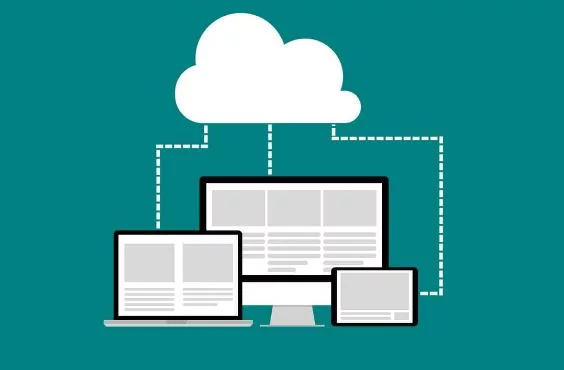
When people refer to the Cloud they mean computing resources (servers, storage, databases and software) that run in a provider’s data centers and are used over the internet. The US National Institute of Standards and Technology (NIST) defines cloud computing as a model for on-demand network access to a shared pool of configurable computing resources that can be rapidly provisioned and released with minimal management effort (NIST SP 800-145, September 2011). A simple way to picture it is renting time on somebody else’s computer instead of buying your own.
It opens up the world of the office and allows lots of different people – from all over the country, or potentially all over the planet – to work on the same project. Not to mention it makes a very reliable saving system.
Everyday Life
The Cloud may seem like it’s in the world of massive corporate companies or endeavouring tech start-ups. However, the chances are you have used a Cloud system without realising it. Say for instance if you’ve backed up your photos online – that means you’ve been on the Cloud.
A huge benefit of using the Cloud is the peace of mind that comes with it. As long as you have an internet connection, you can always access your most important files.
You don’t have to worry about a corrupted hard drive or breaking a memory stick. It also can save you money as you don’t have to worry about investing in these pieces of technology, your work can always be accessed online.
Potential
Embracing Cloud technology acts as such a good door for a business. Not just because it can allow so many individuals in, but also because it shut out the people it needs to. The original 2018 version of this article cited a Telegraph feature calling the hybrid Cloud the future. Hybrid cloud, which combines a private environment with public cloud services, is one of the four deployment models NIST describes, and it remains a mainstream choice because it lets a business keep sensitive workloads in-house while using public cloud for everything else.
It can allow public access, and allow people to work together but also keep all these projects private when needed. The Cloud removes the risk of a broken hard drive, but it does not remove every security risk: large providers secure their data centers and networks, while you remain responsible for your password, two-factor authentication and sharing settings. Most account breaches start with a weak or reused password rather than a break-in at the data center.
With companies such as Redcentric getting involved with the hybrid Cloud is now a mainstream option for UK businesses; Redcentric is a managed services provider headquartered in Harrogate, England, that has operated since 1997 and offers private, public, hybrid and UK sovereign cloud services (company website, September 2026). The wider industry keeps growing: Synergy Research Group reported that enterprise spending on cloud infrastructure passed $143 billion in the second quarter of 2026, up 43% year on year.
What Is the Cloud in Simple Terms?
The cloud is a collection of very large data centers, owned by companies such as Amazon, Microsoft and Google, whose computers you use remotely over the internet. Instead of installing software or saving files on the device in front of you, the work happens on the provider’s machines and the result is sent back to your screen. The word “cloud” comes from the cloud-shaped symbol engineers used in network diagrams to represent the internet; Wikipedia traces the metaphor to General Magic in 1994.
Three ideas make the cloud different from ordinary web hosting. You pay only for what you use (measured service), you can add or remove capacity in minutes (rapid elasticity), and you set it up yourself through a website or API without waiting for a technician (on-demand self-service). Those terms come from the NIST definition, which is still the reference most textbooks and certifications use.
What Are the Five Essential Characteristics of Cloud Computing?
NIST Special Publication 800-145 lists five characteristics that a service must have to count as cloud computing:
- On-demand self-service: a user can provision computing capability, such as server time or storage, automatically without human interaction with the provider.
- Broad network access: the service is available over the network from standard devices such as phones, tablets and laptops.
- Resource pooling: the provider’s resources serve many customers at once, with capacity assigned and reassigned according to demand.
- Rapid elasticity: capacity can be scaled out and back in quickly, so to the customer it appears unlimited.
- Measured service: usage is metered, monitored and billed, typically per gigabyte, per hour or per user.
What Are the Three Cloud Service Models: IaaS, PaaS and SaaS?
Cloud services are usually grouped by how much the provider manages for you. The three NIST service models are Infrastructure as a Service, Platform as a Service and Software as a Service, and most people use all three without noticing.
| Model | What you get | What you manage | Typical examples | Who uses it |
|---|---|---|---|---|
| IaaS (Infrastructure as a Service) | Virtual servers, storage and networking on demand | Operating system, applications, data | Amazon EC2, Azure Virtual Machines, Google Compute Engine | IT teams, developers, hosting companies |
| PaaS (Platform as a Service) | A managed environment (runtime, database, web server) for running your own code | Your application and its data | Google App Engine, Azure App Service, AWS Elastic Beanstalk | Software developers |
| SaaS (Software as a Service) | A finished application used through a browser or app | Only your own content and settings | Gmail, Microsoft 365, Dropbox, Salesforce, Netflix | Everyone |
A fourth, newer category is serverless computing, also called Function as a Service (FaaS). ISO/IEC 22123-2 describes it as a cloud service where the customer supplies only application code or data and never provisions or manages hardware or software resources. AWS Lambda, introduced on November 13, 2014, is the best-known example (Wikipedia, September 2026).
Public, Private, Hybrid and Community Cloud: What Is the Difference?
NIST also defines four deployment models, which describe who owns the infrastructure and who can use it:
- Public cloud: infrastructure owned by a provider and shared by many customers over the public internet, paid or free. Amazon Web Services, Microsoft Azure and Google Cloud are public clouds.
- Private cloud: infrastructure operated for a single organization, either on its own premises or hosted by a third party such as a managed services provider.
- Hybrid cloud: a combination of a private environment and a public cloud, joined so that data and applications can move between them. A common pattern keeps customer records in a private cloud and runs the public website in a public cloud.
- Community cloud: infrastructure shared by several organizations with common requirements, such as a group of hospitals or government agencies.
Many businesses now also describe themselves as multicloud, meaning they buy services from two or more public providers to avoid depending on one vendor. If your company is weighing these options, the guide to why small businesses choose cloud computing and storage covers the trade-offs in more depth.
How Much Free Cloud Storage Do You Get?
For most people, the first contact with the cloud is a free storage account attached to a phone or email address. The free allowances below were checked on each provider’s website in September 2026; paid tiers and prices change, so confirm before buying.
| Service | Free storage | Entry paid plan (US, September 2026) | Notes |
|---|---|---|---|
| Google Drive (Google One) | 15 GB | Paid plans vary; see Google One | Shared across Drive, Gmail and Google Photos |
| Apple iCloud | 5 GB | iCloud+ 50 GB for $0.99 a month; 200 GB $2.99; 2 TB $9.99 | Larger 6 TB and 12 TB tiers also offered |
| Microsoft OneDrive | 5 GB | Microsoft 365 Personal includes 1 TB | Separate 15 GB for Outlook.com email; Family plan gives 1 TB each for up to 6 people |
| Dropbox | 2 GB (Basic) | Plus: 2,000 GB for $9.99 a month billed monthly | Business plans priced per user |
Because photos and videos fill 5 GB quickly, most people who back up a phone end up on a paid tier within a year or two. Before paying, check what is actually consuming space; deleting old device backups and large email attachments often frees several gigabytes.
Who Are the Biggest Cloud Providers?
The public cloud infrastructure market is dominated by three US companies. According to Synergy Research Group figures reported on August 1, 2026, enterprise spending on cloud infrastructure services passed $143 billion in the second quarter of 2026, a year-on-year growth rate of 43%. Amazon Web Services held 28% of that market, Microsoft 20% and Google 15%, giving the big three 67% between them; Oracle held 4% and CoreWeave 2%. Synergy attributed most of the incremental growth to demand for AI services.
- Amazon Web Services (AWS): launched Amazon S3 on March 14, 2006 and EC2 in August 2006, and reported revenue of $128.7 billion for 2025; it operates 38 geographic regions with 120 availability zones (Wikipedia, September 2026).
- Microsoft Azure: announced in October 2008, launched commercially as Windows Azure on February 1, 2010 and renamed Microsoft Azure on March 25, 2014; Microsoft reported more than 400 data centers across 70 regions at the end of its 2025 fiscal year.
- Google Cloud: began with Google App Engine, announced in April 2008, and reported 2025 revenue of $58.7 billion in Alphabet’s Form 10-K.
Cloud skills are in demand as a result. If the provider names above are new to you, Justwebworld’s guides on how to start a career in cloud computing and AWS Cloud Practitioner certification training explain the entry-level paths.
What Are the Risks and Limits of the Cloud?
The cloud is reliable, but it is not risk-free, and a beginner’s guide should say so. The main limitations, drawn from the Wikipedia article on cloud storage and provider terms, are:
- You need a connection. Files in the cloud are only available when the device is online, unless the app keeps a local copy.
- Account security is your job. Providers secure their data centers; a stolen or reused password still exposes everything in the account. Turn on two-factor authentication.
- Outages happen. Provider service-level agreements typically exclude planned maintenance and external network problems, and compensation is usually service credits rather than cash.
- Vendor lock-in. Moving large amounts of data or a custom application to another provider takes time and can incur data-transfer charges.
- The provider can change or close. Companies get acquired, change focus or shut services down, so data should not live in only one place.
- Legal and privacy questions. Data stored in another country can fall under that country’s laws; regulated businesses need to check where their data is held.
The practical answer is the 3-2-1 backup rule: three copies of important data, on two different types of storage, with one copy off-site. A cloud account can be the off-site copy, but it should not be the only copy. See why it is important to back up and recover data in the cloud and how to minimize security risks when using the cloud for the next steps.
How Do You Start Using the Cloud?
- Check what you already have. A Google, Apple or Microsoft account already includes free cloud storage; open Google Drive, iCloud or OneDrive on your device and see what is stored there.
- Turn on automatic photo backup in the app for your phone’s platform so a lost or broken phone does not mean lost pictures.
- Enable two-factor authentication on the account before uploading anything sensitive.
- Keep a second copy of irreplaceable files on an external drive or a second service.
- For a business, start with SaaS tools (email, documents, accounting) before moving servers; most small companies never need IaaS at all.
Frequently Asked Questions
Where is the cloud actually located?
The cloud is located in physical data centers owned or leased by providers. Amazon Web Services alone lists 38 geographic regions with 120 availability zones, and Microsoft reported more than 400 data centers across 70 regions at the end of its 2025 fiscal year. Your files sit on servers in one or more of those buildings and are copied between them for resilience.
Is the cloud the same as the internet?
No. The internet is the network that connects devices; the cloud is a set of computing services delivered over that network. You use the internet to reach the cloud, but a website, a video call or a plain email exchange is not by itself cloud computing.
Is cloud storage safe?
Cloud storage from major providers is generally safer than a single hard drive, because data is copied across multiple machines and locations. The weak point is usually the account itself: a strong unique password and two-factor authentication matter more than the provider’s data center security. Keep a separate backup of anything you cannot afford to lose.
What is the difference between cloud storage and cloud computing?
Cloud storage is one type of cloud computing: keeping files on a provider’s servers so they can be reached from any device. Cloud computing is the broader idea and also includes renting servers (IaaS), development platforms (PaaS) and complete applications such as email or accounting software (SaaS).
How much does the cloud cost?
Consumer cloud storage starts free: 15 GB from Google, 5 GB from Apple iCloud and Microsoft OneDrive, and 2 GB from Dropbox, with paid tiers from about $0.99 a month for 50 GB of iCloud+ as of September 2026. Business cloud services are metered, so costs depend on how much computing, storage and data transfer you use each month.
If you are unsure how MB, GB and TB compare, or why a device can show a slightly smaller number than its label, our guide to metric prefixes explains it.
Who invented the cloud?
No single person invented the cloud. Wikipedia credits General Magic with the cloud metaphor in 1994, while the modern commercial cloud began when Amazon launched S3 and EC2 in 2006, followed by Google App Engine in 2008 and Windows Azure in 2010.

Justwebworld has published guides since 2012. How we write and update articles Report an error
