

Modern conference rooms have become hubs for hybrid collaboration, hosting laptops, wireless presentation devices, video bars, document cameras, and streaming media players in a single session. Coordinating those sources across multiple screens used to mean swapping cables, fumbling with dongles, and pausing meetings to reconnect equipment.
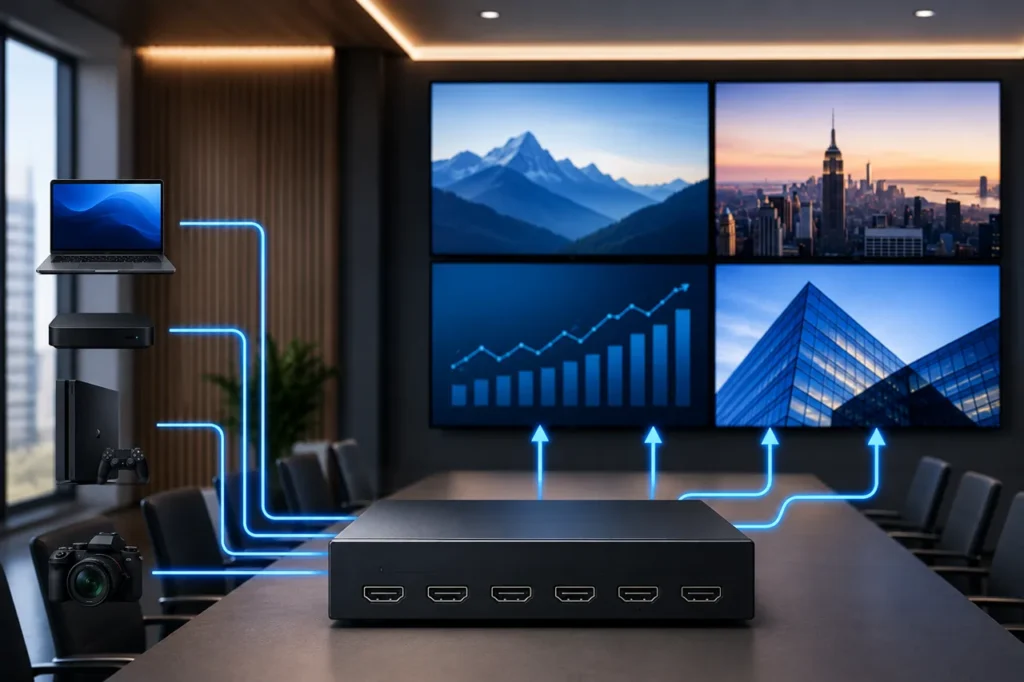
A matrix-based routing solution removes that friction, giving facility teams a clean, software-controlled way to send any input to any output on demand. The result is a meeting environment that feels organized, predictable, and ready for whatever the next presenter brings into the room. For organizations that rely on consistent, professional in-room experiences, understanding how this technology fits into the broader AV stack is a useful first step toward smarter collaboration spaces.
How a Matrix Switcher Routes Signals in a Meeting Space
At its core, a matrix switcher is a centralized hub that accepts several HDMI inputs and distributes them to multiple outputs independently. Unlike a simple splitter, which sends one source to every screen, a matrix lets each display receive its own dedicated signal at the same time. The unit handles signal regeneration, resolution negotiation, and HDCP authentication behind the scenes, so the operator only has to choose which source should appear on which screen. Many integrators rely on a professional-grade HDMI matrix to coordinate signal flow between presenter laptops, room cameras, and shared displays without requiring physical recabling between meetings.
Devices commonly connected to a routing hub in a conference room include:
• Laptops and BYOD presenter inputs through wall plates or table boxes.
• Video conferencing codecs and PTZ cameras.
• Media players, signage appliances, and streaming boxes.
• Document cameras and visualizers for training sessions.
• Recording or live streaming encoders for hybrid audiences.
Practical Benefits for Modern Meeting Spaces
Once routing is centralized, the entire AV experience becomes faster and more reliable. Meetings start on time because presenters do not have to crawl under tables searching for the correct cable, and IT teams gain visibility into which sources are active on each display. Cable runs are concentrated in a rack rather than scattered across the room, which improves both aesthetics and long-term serviceability.
Key advantages organizations notice almost immediately include:
• Flexible signal routing between any input and any output.
• Cleaner installations with hidden, rack-mounted hardware.
• Simplified source management through touch panels or web control.
• Faster meeting setup using one-touch presets and saved layouts.
• Improved oversight during presentations and collaboration sessions.
These benefits compound in rooms that host frequent or back-to-back meetings, where every minute lost to AV troubleshooting becomes a visible disruption to the agenda. Administrators also appreciate the audit trail that modern control systems provide, since usage logs make it easier to plan upgrades, schedule maintenance, and justify future investment in additional displays or sources.
Conference Room Scenarios Where Matrix Routing Excels
The flexibility of centralized routing makes it valuable across nearly every type of professional meeting environment. Smaller huddle spaces benefit from quick source switching, while larger venues use the same architecture to feed several displays or projectors at once. The pattern repeats whether the space is built for executives, students, or large audiences.
Typical deployments include:
• Boardrooms with dual displays, confidence monitors, and integrated conferencing systems.
• Training rooms that mirror an instructor feed to several breakout screens.
• Hybrid meeting spaces blending remote participants with in-room content.
• Classrooms and lecture halls combining a computer signal with a camera feed.
• Corporate presentation areas, lobbies, and command centers featuring video walls.
In each setting, routing intelligence reduces the operator burden and gives the room a polished, broadcast-quality feel that supports both internal teams and visiting clients. The same hardware can scale from a quiet executive suite to a large auditorium, which makes standardization across a campus or corporate portfolio far easier to maintain.
Choosing the Right Solution for Your Room
Selecting the correct switcher requires more than counting ports on a datasheet. Buyers should consider the immediate needs of the space and how the system will evolve over the next several years. A unit that fits perfectly today can quickly fall short if new cameras, higher resolutions, or additional displays are added later, so planning ahead protects the original investment.
Important factors to evaluate during the specification stage include:
• Input and output count, with headroom for future growth.
• Supported resolutions, including 4K60 4:4:4 for fine text and detailed graphics.
• HDCP 2.3 compatibility for protected sources such as streaming services.
• EDID management to ensure consistent handshake behavior across mixed displays.
• Embedded and de-embedded audio handling for ceiling speakers or DSP integration.
• Control options such as RS-232, TCP/IP, web GUI, and third-party drivers.
• Scalability through cascading, modular cards, or HDBaseT extension over Cat6.
Working with a vendor that specializes in professional AV signal management ensures the chosen platform aligns with both the technical specification and the room’s long-term roadmap. A short consultation early in the design phase can also surface integration details that affect rack space, cooling, network bandwidth, and the type of control processor required to tie everything together.
Building a More Reliable AV Environment
A well-chosen routing platform quietly becomes the backbone of a productive meeting space. By centralizing distribution, standardizing control, and eliminating the cable-shuffling that interrupts so many sessions, it lets presenters focus on their content and participants stay engaged with the discussion. Centralized hardware also simplifies remote troubleshooting, since technicians can verify input status and reassign outputs without entering the room. For conference rooms that demand reliability, scalability, and a professional finish, investing in a properly specified routing solution is one of the most effective upgrades an organization can make to its modern collaboration environment.

Justwebworld has published guides since 2012. How we write and update articles Report an error
