

Use JPG for photographs, PNG for graphics that need sharp edges or transparency, and WebP when you want smaller files for a website. WebP can do the jobs of both: lossy for photos and lossless for graphics, and it supports transparency and animation too. All current major browsers support it.
The right format depends on what the image shows and where it will be used. This guide compares the three formats side by side, explains the trade-offs with each, and gives you a simple way to choose.
Key takeaways
- JPG (JPEG): lossy, small files, ideal for photos, and no transparency.
- PNG: lossless and sharp, supports transparency, but produces larger files.
- WebP: lossy or lossless, transparency and animation, typically smaller files.
- Keep an original. Every time you re-save a lossy file, a little more quality is lost.
- For email or older software, JPG and PNG remain the safest choice.
PNG vs JPG vs WebP at a glance
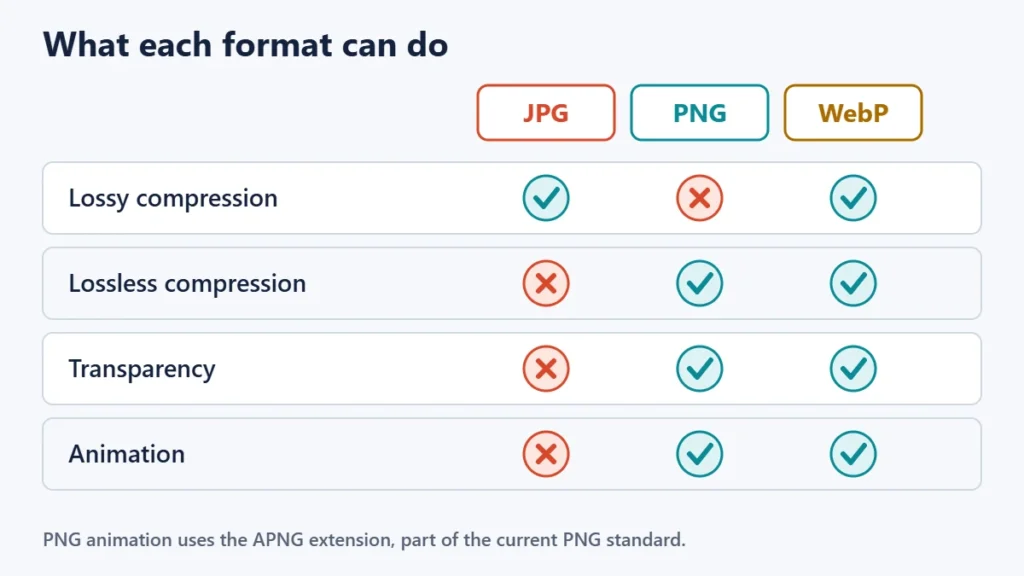
| JPG / JPEG | PNG | WebP | |
|---|---|---|---|
| Compression | Lossy | Lossless | Lossy or lossless |
| Transparency | No | Yes | Yes |
| Animation | No | Yes, as APNG | Yes |
| Best for | Photographs | Screenshots, logos, diagrams, text | Most images on websites |
| File size | Small | Larger | Usually smallest |
| Compatibility | Almost universal | Almost universal | Current browsers; some older apps lack it |
Lossy vs lossless: the difference that matters
Lossless compression shrinks a file without discarding any detail, so the image is reproduced exactly. Lossy compression throws away detail that the eye is less likely to notice, producing much smaller files. Our guide to lossy vs lossless compression explains the methods in more depth.
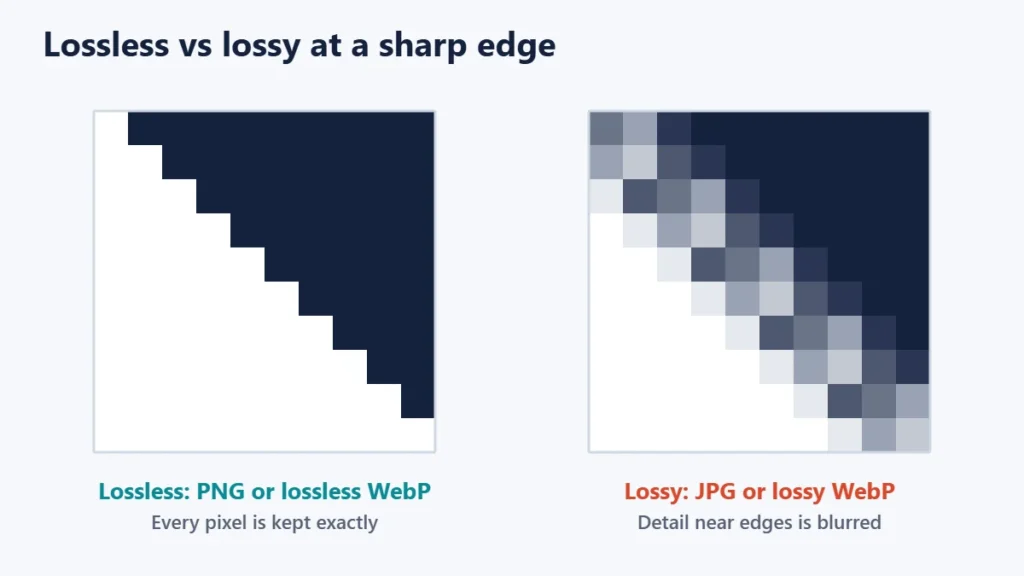
This is why JPG suits photographs but not screenshots. MDN Web Docs notes that applying lossy compression to content that needs sharpness, such as diagrams or charts, can produce unsatisfactory results. Photographs have soft gradients and texture that hide small losses well.
JPG (JPEG): best for photographs
JPEG is the most widely used lossy format for still images. It produces small files with good quality for photos, and almost every device, app and website accepts it. It does not support transparency, so a JPG always has a solid background.
Avoid editing and re-saving the same JPG repeatedly. Each lossy save discards a little more detail, so keep your original and export a new copy from it when you make changes.
PNG: best for sharp graphics and transparency
PNG is lossless and supports full transparency, which makes it the traditional choice for logos, icons, screenshots and anything with text. The trade-off is file size, especially for photographs, where a PNG can be many times larger than a JPG of the same image.
The format is still developing. The third edition of the PNG specification became a W3C Recommendation on 24 June 2025. It formally includes animated PNG (APNG), adds support for HDR images in two formats called HLG and PQ, and adds a chunk for storing Exif photo information.
WebP: the flexible web format
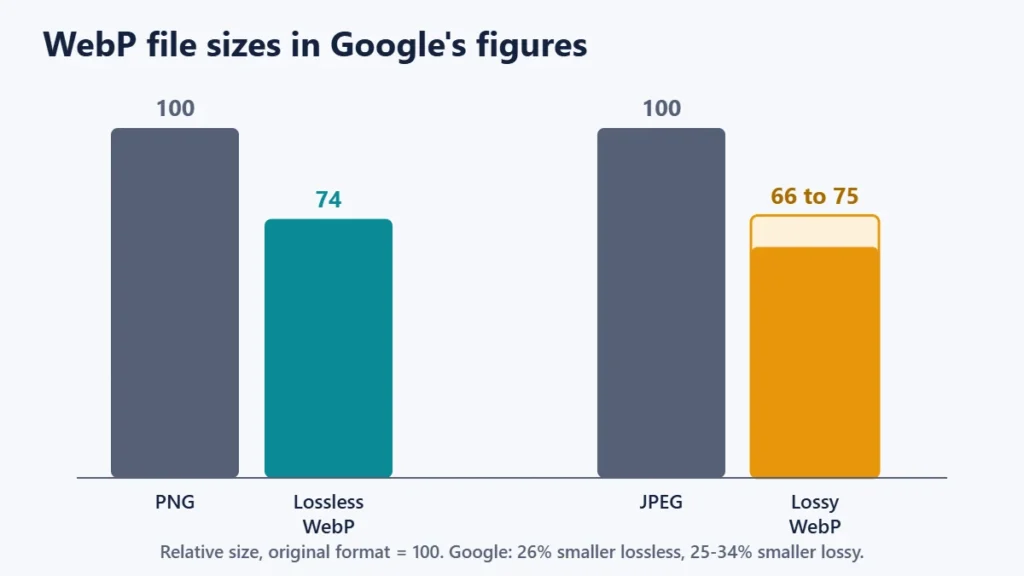
WebP was developed by Google and can work in either mode. Google’s figures say that lossless WebP images are 26% smaller than PNGs, and that lossy WebP images are 25 to 34% smaller than comparable JPEGs at equivalent quality, measured using a quality index called SSIM. Your own savings will depend on the image and the settings.
WebP supports transparency in both modes, and animation. Google says lossless WebP transparency costs only about 22% more bytes, and lossy WebP with transparency is typically about three times smaller than an equivalent PNG. The maximum image size is 16,383 × 16,383 pixels.
Browser support is broad. WebP works in current versions of Chrome, Edge, Firefox, Opera and Safari. On Apple devices, Google’s FAQ lists Safari 14 or later, on macOS Big Sur or iOS 14 and later. Some older desktop software and email clients may still fail to open WebP files.
Which format should you use?
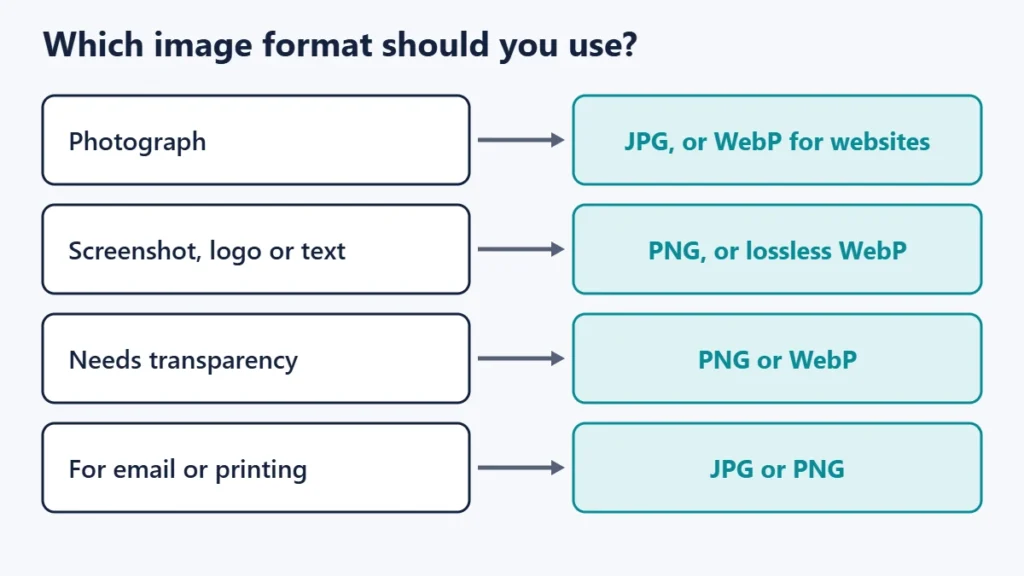
| Image | For a website | For email, documents or sharing |
|---|---|---|
| Photograph | WebP (lossy), or JPG | JPG |
| Screenshot with text | WebP (lossless), or PNG | PNG |
| Logo or icon with transparency | WebP or PNG; SVG if it is vector art | PNG |
| Chart or diagram | WebP (lossless), or PNG | PNG |
| Short animation | WebP or a video file | Depends on the app |
| Master copy for later editing | A lossless format, such as PNG or your editor’s own format | |
MDN also recommends AVIF, a newer royalty-free format, as a good choice for images and animations. It can compress even further than WebP, though support in older software is weaker. If your website platform creates AVIF versions automatically, it is worth using alongside WebP or JPG fallbacks.
Image formats and website speed
Images are often the heaviest part of a web page, so format choices affect how quickly pages load, especially on mobile connections. Switching photographs to WebP and resizing images to the size they are actually shown at are two of the most effective changes you can make. Our guides to improving website speed and optimising images for SEO cover the wider picture.
Many content management systems and image tools can convert uploads to WebP automatically, and many editors, including several of the online photo editing sites we have covered, can export it. If you convert manually, check the result at full size, since overly aggressive lossy settings can produce visible blur or banding.
Common mistakes
- Saving screenshots as JPG. Text and sharp edges pick up blurry artefacts. Use PNG or lossless WebP.
- Using PNG for large photos on a website. The quality gain is invisible, but the file is far larger.
- Expecting transparency from a JPG. Transparent areas become solid, usually white.
- Re-saving JPGs repeatedly. Quality drops with each lossy save. Edit from the original.
- Renaming a file extension. Changing “.png” to “.webp” does not convert the file. Export it in the new format.
- Uploading huge dimensions. A 6,000-pixel-wide image displayed at 800 pixels wastes data in any format.
Frequently asked questions
Is WebP better than PNG?
For websites, usually yes: lossless WebP keeps the same quality in smaller files, according to Google’s figures. PNG remains more widely compatible with older software and is a safe choice outside the web.
Is JPG or PNG better quality?
PNG preserves every pixel exactly, so it is technically higher quality. For photographs, a well-compressed JPG usually looks the same to the eye at a fraction of the size.
Does WebP lose quality?
Only in lossy mode. WebP also has a lossless mode that preserves the image exactly.
Why can’t I open a WebP file?
The app may be too old to support it. Open the file in a current web browser, or convert it to JPG or PNG with an image editor.
Which format supports transparency?
PNG and WebP support transparency. JPG does not.
Should I use WebP for my website?
In most cases, yes. It is widely supported in current browsers and usually produces smaller files than JPG or PNG for the same visual quality.
The short version
Photos go in JPG or lossy WebP. Sharp graphics, text and transparency go in PNG or lossless WebP. For a website, WebP is usually the best all-round choice, while JPG and PNG remain the safest for email and older software. Whatever you pick, keep a high-quality original so you can export again without losing detail.

Justwebworld has published guides since 2012. How we write and update articles Report an error
