

Note (September 2026): AceThinker’s paid downloader, Video Keeper, is now sold as Aqua Clip, and the free online tool’s limits have changed (30 minutes per clip, 720p, 5 files per day as of October 2026); the details below have been corrected.
AceThinker Free Online Video Downloader is a browser-based tool that saves videos from supported sites without installing software. As of October 2026, AceThinker limits the free version to clips of up to 30 minutes, 720p video and 128 kbps audio, 5 files per day and 20 supported sites. Longer, HD, playlist and batch downloads need its paid desktop app, Aqua Clip.
Key Takeaways
- The free online tool works in any modern browser; AceThinker says it runs on Windows, Mac, Android and iOS.
- Free limits as of October 2026: 30 minutes per clip, 720p video, 128 kbps audio, 5 files per day, no playlists or batch downloads.
- AceThinker Video Keeper has been replaced by Aqua Clip (Media Downloader), which supports 1,000+ sites and up to 8K video.
- Aqua Clip’s free trial allows 10 downloads; paid plans were listed from $9.95 a month in October 2026.
- YouTube’s Terms of Service forbid downloading except where YouTube expressly allows it, so check each site’s rules and copyright before saving a video.
Streaming video is entertaining, which is why it became so popular. People have different things that interest them, so the video they stream can be a funny video, tutorials, nature, pets, sports, etc. You can only stream videos when you have an internet connection.
As a result, a lot of people prefer downloading online videos to watch when offline. Downloading videos online to watch offline is not that easy. It will be good to have a reliable and safe online video downloader to handle the task.

This guide covers AceThinker’s free online video downloader and its paid desktop counterpart, including the current limits, prices and the legal points to check before saving videos from streaming platforms. Once you are done reading, downloading videos from your favorite video streaming platform will no longer be a challenge.
About AceThinker Free Online Video Downloader
- System OS: runs in a web browser; AceThinker says it works on Windows, Mac, Android and iOS, in browsers such as Chrome, Firefox, Edge, Opera and Safari.
- Free limits (as listed by AceThinker in October 2026): clips of up to 30 minutes each, up to 5 files per day, video up to 720p and audio up to 128 kbps, with no playlist or batch downloads.
- Unique feature: You can use this tool to download videos on your device without downloading or installing any software or application. Download is fast and free.
AceThinker Online Video Downloader is a free, browser-based downloader from AceThinker, a multimedia software company founded in 2015 whose old acethinker.com addresses now redirect to acethinker.ai. AceThinker says the free online version supports 20 sites, and its supported-sites list includes YouTube, Facebook, Instagram, 9GAG and others; Crunchyroll, named in earlier versions of this article, does not appear on AceThinker’s supported-sites list as of October 2026.
The platform can be accessed through web browsers like Firefox, Chrome, Edge, Safari, etc. As of October 2026, the free online tool is limited to 720p video and 128 kbps audio; 1080p, 4K and 8K downloads need the paid desktop app, Aqua Clip. AceThinker Free Online Video Downloader also permits saving downloaded videos in MP4 format, and users can extract audio (and save in MP3) from music using this tool.
This multipurpose online video downloader can be used by anyone to download their favorite videos and watch later offline. Continue reading to learn how to use AceThinker Free Online Video Downloader.

How to use AceThinker Free Online Video Downloader on your device
Step one – Visit AceThinker Free Online Video Downloader website.
To use this tool, you will have to visit the official site of AceThinker Free Online Video Downloader. On the homepage, you will see a URL bar as well as a download button.
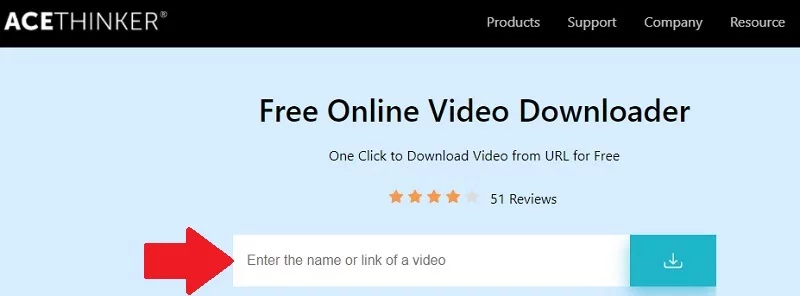
Step two – Begin to download your videos.
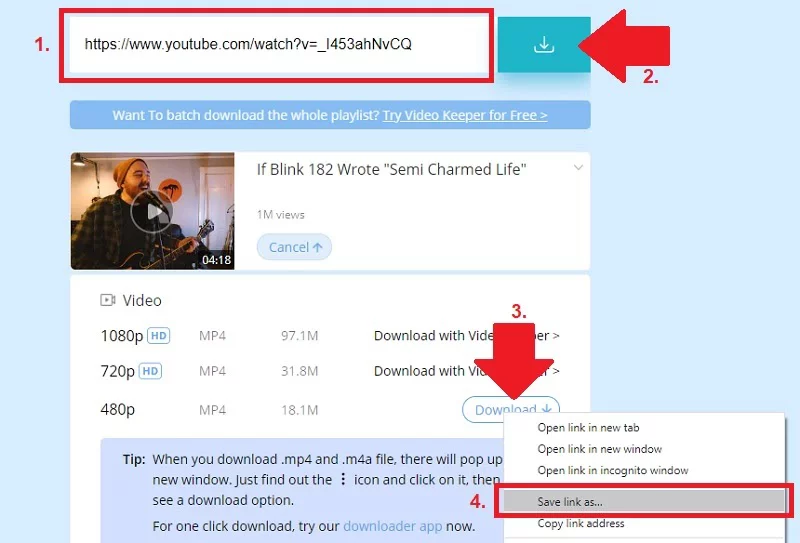
AceThinker lists YouTube among its supported sites, but YouTube’s Terms of Service do not allow downloading content except where the service expressly authorizes it (such as offline downloads in the YouTube app with YouTube Premium) or with prior written permission from YouTube and the rights holders. All you need to do is to copy the link of the video you want to download from YouTube and paste it on the URL bar of AceThinker Free Online Video Downloader.
Click on the download button to initiate download after pasting the link. Select the video quality and format you want. Now, right-click on “Download” and click on “Save link as…” and choose the folder you want to save your video.
Step three – Download videos from another website.
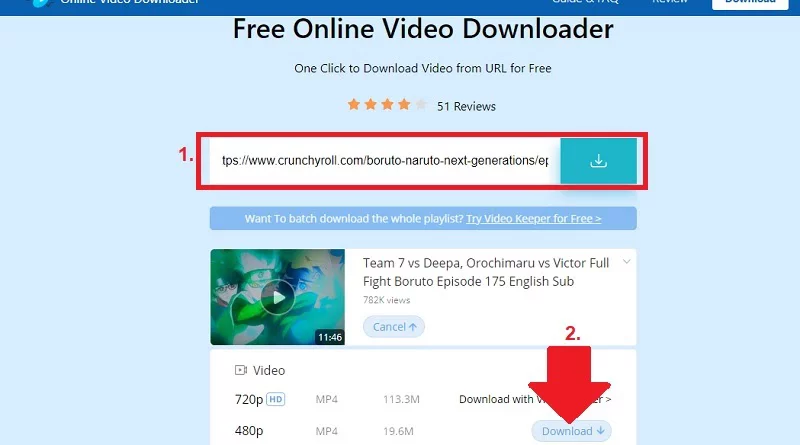
The same steps work for other sites on AceThinker’s supported-sites list, such as Vimeo, Dailymotion, Instagram or TikTok; Crunchyroll is not on that list as of October 2026. The step is the same as downloading videos from YouTube. Copy the link of the video you want to download from the supported site and click the download button to analyze the video.
Select the format and quality you want. You can also save in audio format (MP3) if you are downloading a music video. Click “save link as…” when you right-click on the download icon.
Step four – Play the video you downloaded.
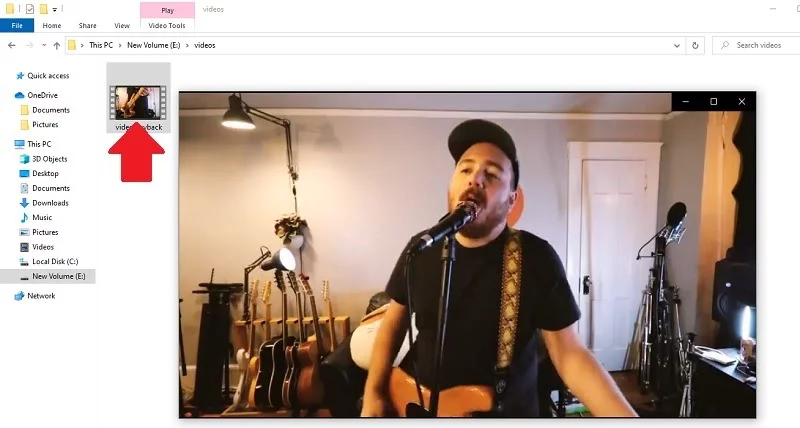
After your download is complete, go to the folder you saved the video. You can double-click on the video to open it immediately, or you can open the video using your favorite video player when you right-click on it.
Step five – Transfer downloaded clip to your preferred device.
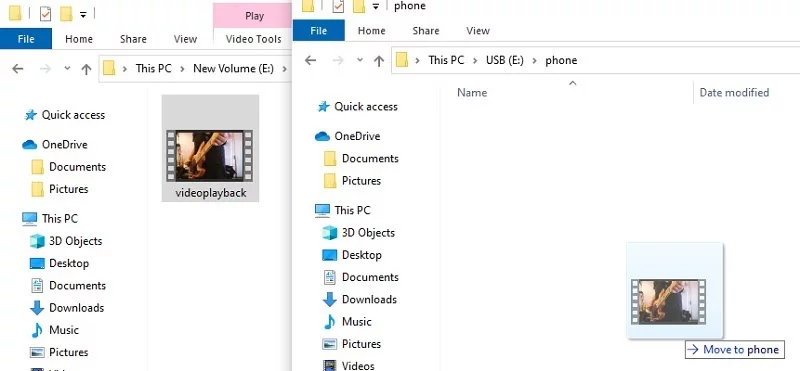
You can transfer the video you downloaded from the folder to your mobile device. All you need to do is connect your phone to your PC using a USB cable, then drag the video and drop it in any folder you want on your mobile device storage. After the transfer is complete, you can directly play the video from your mobile device since it supports MP4 format.
Note: The free online tool tops out at 720p, so it cannot download 1080p, 4K or 8K video. There is also a limit to how you download free videos. If you want Full HD or Ultra HD files, you need the paid desktop app, now sold as Aqua Clip (formerly AceThinker Video Keeper). You will know more about the Pro Version as you read.
AceThinker Video Keeper
- System OS: Windows 11/10/8/7 and macOS 10.13 or later; AceThinker also says Aqua Clip has an Android app.
- Trial limit (Aqua Clip, as of October 2026): 10 downloads in total, including 5 HD video downloads and 5 320 kbps music downloads; playlist and channel downloads need the full version.
- Unique feature: Can be used to download a playlist from YouTube with just one click.
AceThinker’s paid desktop downloader was sold as AceThinker Video Keeper; the old Video Keeper page now redirects to Aqua Clip (also called Media Downloader), which offers batch downloads, playlist and channel downloads and support for 1,000+ sites. Aqua Clip supports 720p, 1080p, 4K and 8K downloads when the source video is available in that quality.
Aqua Clip also includes a built-in web browser. With this, you can search for videos from platforms like YouTube, Facebook, Vimeo, Dailymotion and others without leaving the built-in browser, and download them on your device while streaming.
AceThinker Video Keeper can be used to save videos in MP3 format. You can also download video subtitles if you download a TV series or movie. If you have a clip in mind but cannot remember the name or title, you can describe or search for the video using this tool’s search bar.
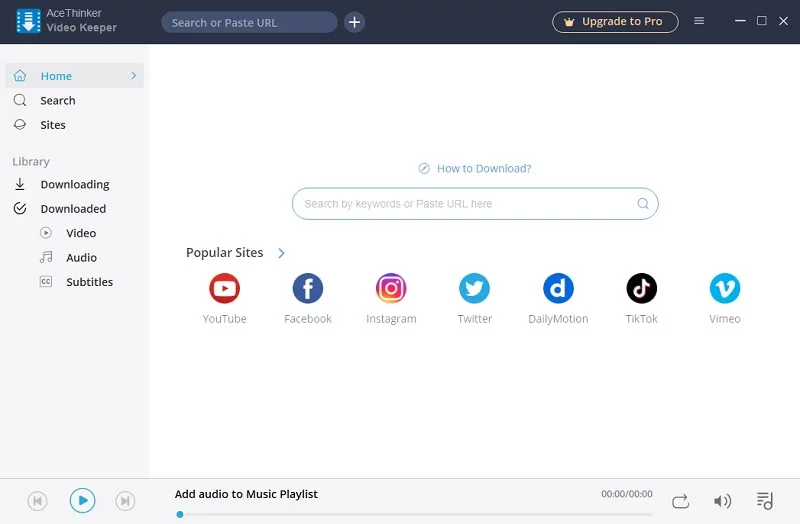
All you need to do is enter the keyword of the video you want to find, and AceThinker Video Keeper will provide a list of videos that are close to the keywords you searched for.
AceThinker Free Online Downloader vs Aqua Clip
The table compares the two AceThinker downloaders using the limits AceThinker published on its own pages in October 2026.
| Feature | Free Online Video Downloader | Aqua Clip (desktop, full version) |
|---|---|---|
| Installation | None, runs in the browser | Windows 11/10/8/7, macOS 10.13 or later |
| Clip length | Up to 30 minutes per file | No length limit |
| Daily limit | Up to 5 files per day | Unlimited |
| Maximum video quality | 720p | Up to 8K, if the source has it |
| Audio quality | 128 kbps | 320 kbps |
| Supported sites | 20 sites | 1,000+ sites |
| Playlists and batch downloads | No | Yes |
| Price | Free | Free trial (10 downloads), then paid |
How much does Aqua Clip cost?
As of October 2026, AceThinker listed Aqua Clip Personal plans at discounted prices of $9.95 for 1 month (list price $19.95), $19.95 for 1 year (list price $49.95) and $39.95 for a lifetime license (list price $69.95), with a 30-day money-back guarantee. Prices and promotions change, so check the current price before buying.
What the Free Online Tool’s Messages Mean
AceThinker’s online downloader shows a specific message when a download hits one of its limits. Knowing what each one means saves time.
- “This File is over 30 minutes”: the free tool only accepts clips up to 30 minutes long. Choose a shorter file or use the desktop app.
- “You’ve reached today’s free download limit”: the free tool allows 5 files per day, and AceThinker says the allowance resets the next day.
- “This link isn’t supported here”: the site or link is not among the free tool’s supported sources.
- Only 50 results: AceThinker notes that the website retrieves a maximum of 50 videos from a page.
What to Do After Downloading
AceThinker’s download page links to its free online tools for processing the file once it is saved. According to AceThinker, these include:
- Video Converter: converts downloaded videos to MP4, MOV, MKV, AVI and other formats.
- Audio Converter: converts audio to MP3, M4A, WAV, AAC and other formats.
- Video Cutter and Audio Cutter: trim unwanted parts of a clip.
- Video Resizer: changes the aspect ratio (9:16, 1:1, 16:9) for TikTok, YouTube Shorts, Instagram and Facebook.
- Video to GIF: turns a short clip into an animated GIF.
Mac users who end up with MKV files can also follow this guide to convert MKV to MP4 on a Mac. If you only need the audio, see the guide to the AceThinker MP3Juice downloader; to capture a stream that cannot be downloaded, AceThinker also offers a free online screen recorder.
Is It Legal to Download Online Videos?
Downloading is governed by copyright law and each website’s terms, not by the downloader you use. AceThinker itself tells users to follow copyright laws and the terms of service of the websites they download from.
YouTube’s Terms of Service say users may not access, reproduce or download any part of the service or its content except as expressly authorized by the service, or with prior written permission from YouTube and, where applicable, the rights holders. YouTube’s own authorized route is offline downloads in the YouTube app, a YouTube Premium benefit that also covers playlists.
Safer uses include your own uploads and videos the creator explicitly offers for download. For other options, see this walkthrough of the iTubeGo YouTube downloader or this overview of a free online video downloader for other websites.
Frequently Asked Questions
Is AceThinker Free Online Video Downloader really free?
Yes. AceThinker Free Online Video Downloader costs nothing and needs no installation, but as of October 2026 it is limited to clips of up to 30 minutes, 720p video, 128 kbps audio and 5 files per day.
What happened to AceThinker Video Keeper?
AceThinker Video Keeper is now sold as Aqua Clip (Media Downloader). The old Video Keeper web address redirects to the Aqua Clip page, which lists support for 1,000+ sites, playlist and channel downloads, and video up to 8K.
Can AceThinker download 1080p or 4K video?
Not with the free online tool, which is capped at 720p. AceThinker’s desktop app, Aqua Clip, supports 1080p, 4K and 8K downloads when the source video is available in that quality.
Does the AceThinker online downloader work on phones?
AceThinker says the online downloader works in browsers on Windows, Mac, Android and iOS. It also says Aqua Clip has an Android app.
Is it legal to download YouTube videos with AceThinker?
YouTube’s Terms of Service prohibit downloading content unless YouTube expressly authorizes it or you have written permission from YouTube and the rights holders. YouTube Premium’s offline downloads in the YouTube app are the authorized option.

Justwebworld has published guides since 2012. How we write and update articles Report an error
