

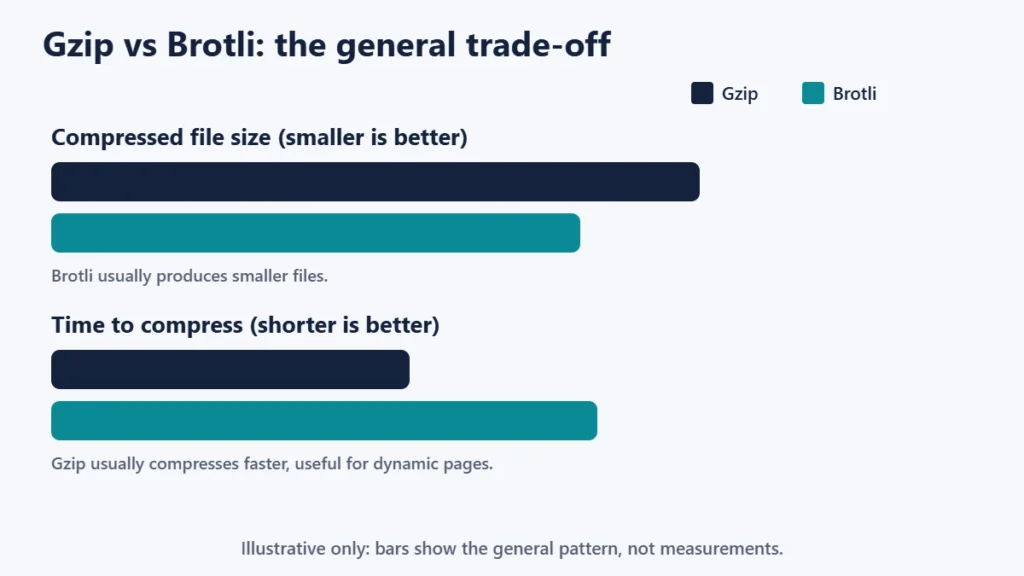
Gzip and Brotli are two ways your server can compress text files such as HTML, CSS and JavaScript before sending them, so pages load faster. Brotli usually makes files smaller, while gzip compresses faster and is supported almost everywhere. MDN Web Docs describes Brotli as a general-purpose lossless compression algorithm that is compatible with most modern browsers, though it suggests keeping a fallback.
In practice, most sites should serve Brotli where possible and gzip as the fallback, and many hosts and CDNs already do. This guide explains how compression works, how the two compare, and how to check what your site uses.
Key takeaways
- Compression shrinks text files before they are sent, then the browser unpacks them.
- Brotli usually makes smaller files; gzip is faster and universal.
- Use both: Brotli where supported, gzip as the fallback.
- Do not compress images or video that are already compressed.
- Your CDN or host may already handle it; check the response headers.
How website compression works
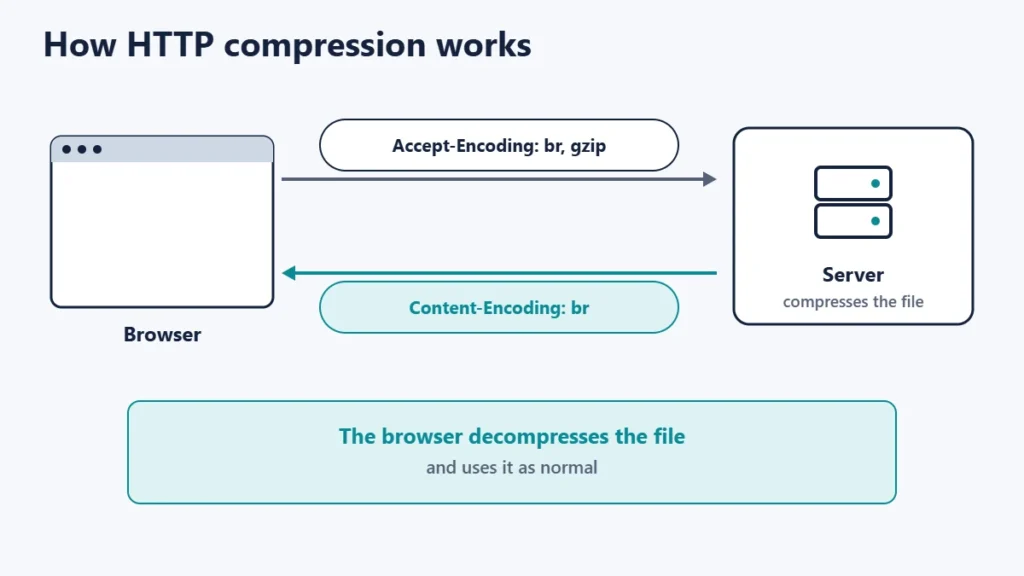
- The browser announces what it supports in the
Accept-Encodingrequest header, for examplebr, gzip. - The server picks a method it supports, compresses the response, and labels it with the
Content-Encodingheader, such asbrorgzip. - The browser decompresses it and uses the file as normal.
MDN lists the common values: gzip, a format using Lempel-Ziv coding (LZ77) with a 32-bit CRC; br, the Brotli format defined in RFC 7932; and zstd, the Zstandard format, a newer option.
Gzip vs Brotli at a glance
| Gzip | Brotli | |
|---|---|---|
| Header value | gzip | br |
| File size | Good | Usually smaller |
| Compression speed | Faster | Slower, especially at high levels |
| Browser support | Practically universal | Most modern browsers |
| Best for | Dynamic pages, fallback | Static files compressed in advance |
RFC 7932 describes Brotli as combining the LZ77 algorithm and Huffman coding, with efficiency comparable to the best general-purpose compression methods available. MDN notes that Brotli compression is slower than gzip, so gzip may be a better option when compressing content that cannot be cached and must be compressed on every request.
What to compress and what not to
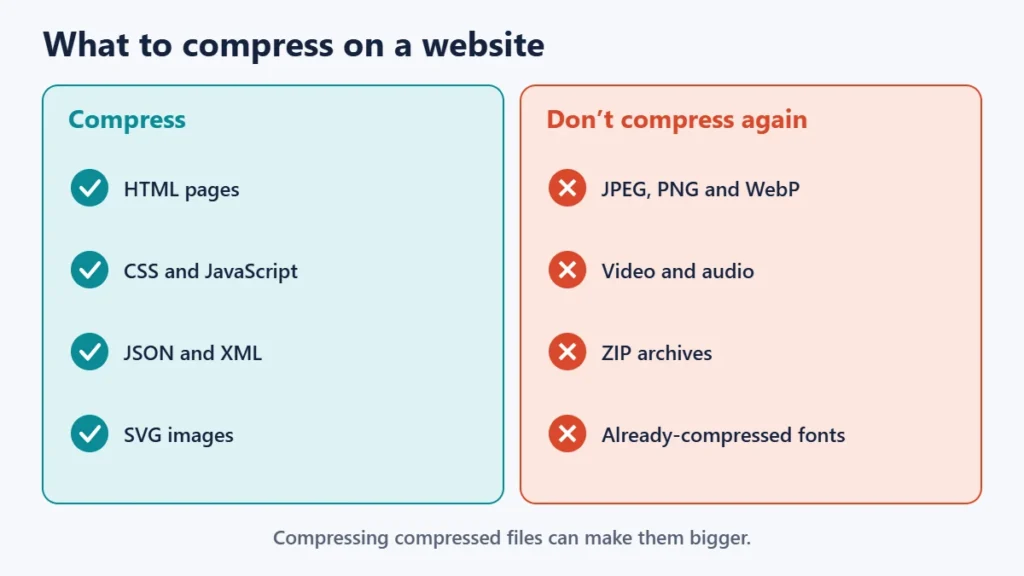
MDN recommends enabling compression for all files except those already compressed, such as images, audio and video, and notes these algorithms are optimised for text. It also warns that compressing already-compressed formats such as .zip or .jpeg is usually not appropriate and can even increase the file size.
To make images smaller, use the right format and compression settings instead; see our guides to PNG vs JPG vs WebP and lossy vs lossless compression.
How to check what your site uses
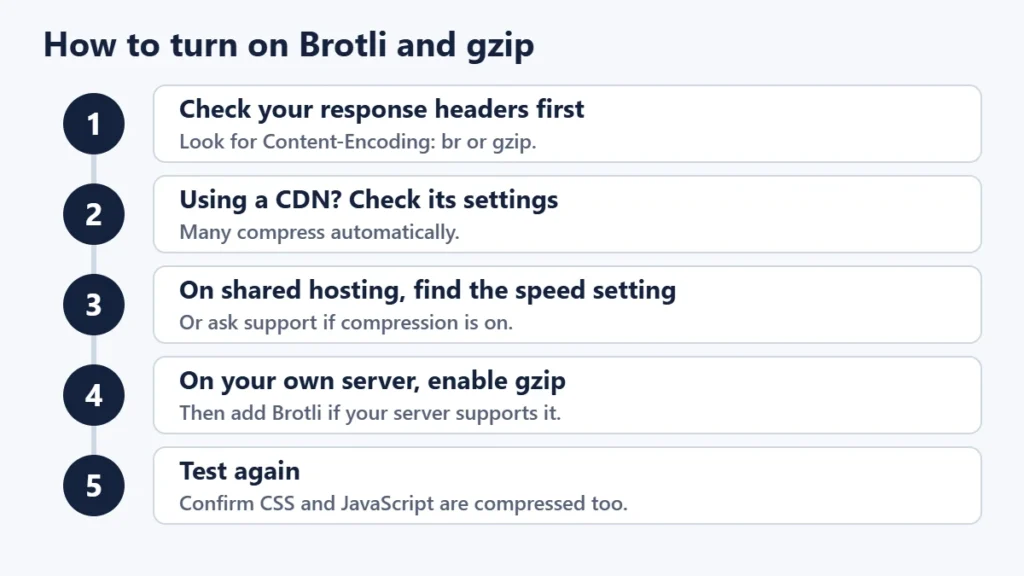
- Open your site and the browser’s developer tools.
- Go to the Network panel and reload the page.
- Click the main document or a CSS or JavaScript file.
- Look at the response headers for
Content-Encoding.brmeans Brotli,gzipmeans gzip, and no header usually means no compression.
How to turn compression on
Through a CDN
Many CDNs compress automatically. Cloudflare’s documentation says it supports gzip, Brotli and Zstandard when delivering content to visitors, choosing based on the plan and what the browser accepts. Our guide to CDNs explains how they sit in front of your site.
On your host
Many hosts enable compression by default, or offer it in a speed or optimisation setting. If you are not sure, check the headers or ask support.
On your own server
nginx’s gzip module, for example, is off by default. When enabled, its compression level defaults to 1 on a scale of 1 to 9, and it compresses text/html by default, so you add other text types such as CSS and JavaScript with the gzip_types setting. Brotli support depends on your server software and modules. Our comparison of Apache, Nginx and LiteSpeed covers the main servers.
Common mistakes
- Compressing images and video again, which wastes processing and can make files bigger.
- Only compressing HTML, and forgetting CSS and JavaScript.
- Turning off gzip when adding Brotli. Keep gzip as the fallback.
- Using the highest Brotli level on dynamic pages, which can slow responses.
- Double compression by both a plugin and the server. Check the headers.
Frequently asked questions
Is Brotli better than gzip?
Brotli usually makes smaller files, but gzip is faster to compress. Most sites benefit from offering both.
Do all browsers support Brotli?
MDN says Brotli is compatible with most modern browsers, and recommends a fallback such as gzip.
Does compression help SEO?
It helps page speed, which affects user experience. It is one of many speed improvements.
What is Zstandard?
A newer compression format that some browsers and CDNs support, labelled zstd in headers.
Should I compress images with gzip?
No. Formats like JPEG, PNG and WebP are already compressed. Optimise them with the right format instead.
Do I need a plugin for compression?
Often not. Your host or CDN may already compress files. Check the headers before adding a plugin.
The short version
Gzip and Brotli compress text files so pages load faster. Brotli usually produces smaller files; gzip is faster and works everywhere, so serve Brotli where supported and keep gzip as the fallback. Compress HTML, CSS, JavaScript and similar text, not images or video, and check the Content-Encoding header to see what your site already does. For more speed wins, see our website speed tips.

Justwebworld has published guides since 2012. How we write and update articles Report an error
