Close Menu
JustwebworldJustwebworld
  • Business
  • Food
  • Health
  • Lifestyle
  • Tech
  • Home
  • Travel
  • Culture
  • Money
  • People
  • Sports
  • Auto
  • Digital
  • Mind
  • Fashion
  • Gaming
  • Learn
Facebook X (Twitter) Instagram Pinterest YouTube LinkedIn WhatsApp Telegram
Friday, July 3
  • About Us
  • Contact Us
  • Advertise With Us
  • Disclaimer
  • Terms & Conditions
  • Privacy Policy
JustwebworldJustwebworld
  • Business
  • Food
  • Health
  • Lifestyle
  • Tech
  • Home
  • Travel
  • Culture
  • Money
  • People
  • Sports
  • Auto
  • Digital
  • Mind
  • Fashion
  • Gaming
  • Learn
JustwebworldJustwebworld
Home » Tech » Do Flash Drives Present A Security Risk?

Do Flash Drives Present A Security Risk?

Sophia Britt Tech 4 Mins Read
Facebook Twitter LinkedIn Telegram Pinterest Reddit WhatsApp
Follow Us
WhatsApp Telegram

Flash drives are small, portable storage devices that can also transfer data from one computer or storage device to another. They are sometimes called USB drives, pen drives, or thumb drives.

Flash drives have been around for decades and have become an important part of storing and transferring information. However, despite their long standing popularity, flash drives are not without risk.
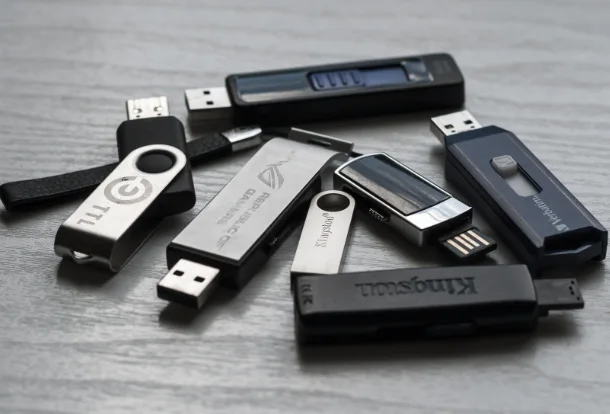
Flash Drives Present A Security Risk

Table of Contents

Toggle
  • Understanding Flash Drives: How Do They Work?
  • How Secure are USB Flash Drives?
  • The Bottom Line

Understanding Flash Drives: How Do They Work?

Flash drives are designed to store data on a small chip called an “electronic memory.” This storage is nonvolatile, meaning it does not lose its information when the computer is turned off or unplugged from power sources. Flash drives are useful for storing files that need to be accessed frequently but do not require constant power from batteries or other external devices.

When you connect a flash drive to your computer, the operating system automatically recognizes the device as removable media (like a CD or DVD). One important thing to know about flash drives is that they store data in binary code. Flash memory consists of a large number of transistors arranged in cells.

Typically, each cell stores one bit of data (0 or 1) and has a transistor with a floating and control gate, which controls the value of that bit.

Over the years, new flash drive technologies have hit the market, the most recent being the 3D NAND flash memory design. This technology has given rise to MLC, TLC, and QLC flash memory types that offer more storage capacity and greater cell reliability.

How Secure are USB Flash Drives?

USB flash drives are a convenient way to store and transfer your data, but they may not be as secure as you think or want them to be. They’re great for storing important documents, photos, videos, and music files, but the problem is that the stored data is often easily accessible.

If someone finds your USB drive, they can easily plug it into their computer and access your data. They can also copy all of your files onto their hard drive and then remove the USB drive from their computer, leaving you with no trace of what happened.

The security of USB flash drives also depends on the quality of the hardware and software used in their manufacture and design. USB flash drives can be found in any hardware store and online for incredibly low prices. That means there is no real way to know who made them or what quality to expect from them.

The same goes for encryption software: there’s no outright way to know if it was developed by a reputable company or one that will leave you vulnerable to hackers looking for an easy way into your data.

The other common security concern with flash drives (especially if you use them on multiple devices) is that they can cause or be used to spread malware infections, causing data loss, data leakage, reputational damage and compliance issues.

The Bottom Line

The first step to protecting your USB flash drive from any security issues is to be aware of all possible security incidents. For instance, to avoid data theft from your flash drive, you should use encryption software to encrypt all your files before storing them on the USB flash drive.

That will make it nearly impossible for anyone without a password to access any data stored on the device. Similarly, you should install anti-virus software on your flash drive and avoid sharing it or using it on devices you do not trust or personally own.

Flash drives are convenient, but they aren’t always very secure. Besides taking the steps we’ve highlighted above, you should consider backing up your data. You can also use cloud storage services or encrypted hard drives to store more sensitive or valuable data.

cards
Powered by paypal
Follow on WhatsApp Follow on Telegram
Share. Facebook Twitter Pinterest LinkedIn Tumblr Telegram WhatsApp Copy Link
Previous ArticleCountries That Start With P | List of All “P” Nations With Facts, Maps & Travel Info!
Next Article AceThinker iPhone Data Recovery Software Review
Sophia Britt

Sophia Britt is a versatile content writer with a talent for creating engaging and informative content across various topics. Her writing is clear, compelling, and designed to connect with readers. Whether it's tech, business, lifestyle, or travel, she knows how to make words work. Always curious and creative, Sophia delivers content that stands out.

Related Posts

How AI Website Builders Are Changing the Game for Local Small Businesses (2026)

Top UI/UX Design Agencies for SaaS Products in 2026

How to Choose the Right Mobile Recharge for Unlimited Data

The Cloud Control Gap: Why Enterprises Struggle to Balance Freedom and Standardization

HDMI Matrix for Conference Rooms: How to Route Multiple Sources to Multiple Displays

7 Best Providers of Legacy System Integration and API Transformation Services

Leave A Reply

Subscribe to Blog via Email

Enter your email address to subscribe to this blog and receive notifications of new posts by email.

Join 41.9K other subscribers
Categories
Latest Posts

5 Interior Design Elements You Should Be Aware of

10 Most Common Steps to Take In the House Buying Process

8 Signs You Should Call An Emergency Plumber Immediately

8 Simple Ways to Modernise and Add Value to Your Commercial Property In 2021!

What Is Stock Analysis Tool: Overview, Types, Benefits & More

How Do Electricity Tariffs Work In South Australia and How to Choose the Best One

MasterChef India Winners List of All Seasons With Pictures

Top 15 Most Beautiful British Women and Celebrities

Top 15 Most Beautiful Colorful Birds From Around The World

Nine Best Alternate Ingredients For A Healthier Meal

The content on this website is provided solely for educational and informational purposes. We do not promote, endorse, or deal in any products, services, or activities mentioned. While we strive to share accurate and up-to-date information, we make no warranties regarding completeness, reliability, or accuracy. Any action you take based on the information found here is strictly at your own risk, and we will not be liable for any losses or damages in connection with the use of our website.

DMCA.com Protection Status
Quick Links
Age Calculator
Angel Number Calculator
Case Converter
Sudoku Online
Word Counter
Love Calculator
Jack Doherty YouTuber
Snake Dream Meaning
Get Rid of Cockroaches
Indian Cricket Team Coaches
Best Volleyball Team Names
Useful Links
Number to Words
Period Calculator
Yes-No Picker Wheel
Demon Name Generator
Kingdom Name Generator
Harry Potter Name Generator
Daddy Yankee Biography
Crocodile Dream Meaning
Goa Budget Trip Guide
Maryse Mizanin WWE Diva
Best Cricket Team Names
Helpful Resources
Colors Name In English
Best Computer Brands
WhatsApp Web
Most Beautiful Beaches
Tesla Cybertruck Review
Richest Actors in the World
India Jarvis Actress
Cat Dream Meaning
Belmar Beach New Jersey
Aryna Sabalenka Tennis Superstar
Best WhatsApp Group Names
Explore More
Good Morning Handsome
Best English Songs of All Time
Cricket World Cup Winners
Ways to Say Rest In Peace
Britain’s Got Talent Winners
American Idol Winners
Dude Perfect Net Worth
Horse Dream Meaning
Ramakrishna Beach Visakhapatnam
Anastasia Potapova Tennis Star
Best Funny Team Names
Facebook X (Twitter) Instagram Pinterest YouTube Tumblr LinkedIn WhatsApp Telegram Threads RSS
  • About Us
  • Contact Us
  • Advertise With Us
  • Disclaimer
  • Privacy Policy
  • Terms & Conditions
  • Web Stories
Copyright © 2012-2026. JustWebWorld - All Rights Reserved. | Sitemap

Type above and press Enter to search. Press Esc to cancel.

−
×

📚 You May Also Enjoy

Discover a few more helpful articles selected for you 👇
Benefits to Web Scraping Automation
Recommended
The Benefits to Web Scraping Automation
Ways Technology Can Improve Your Business
Recommended
Ways New Technologies Can Help Your Business
Free photography apps android
Recommended
Top Free Android Photography Apps
Thanks for reading JustWebWorld ❤️