

A VPN kill switch is a feature that blocks your internet traffic if the VPN connection drops, so nothing is sent outside the encrypted tunnel. Proton VPN’s documentation describes its kill switch as a security feature that stops your real IP address from being exposed, by blocking all internet traffic on your device until you are reconnected. Without one, apps quietly carry on over your normal connection the moment the VPN fails.
If you use a VPN for privacy, especially on public Wi-Fi, a kill switch is worth turning on. This guide explains how kill switches work, the two main kinds, how they interact with split tunnelling, and how to set one up on common devices.
Key takeaways
- A kill switch blocks traffic when the VPN drops, preventing your real IP address from leaking.
- Standard kill switches act only when the connection drops unexpectedly.
- Stricter modes block all internet access unless the VPN is connected.
- Split tunnelling exceptions usually still reach the internet.
- Android has a built-in option called Block connections without VPN.
Why VPN connections drop
VPN connections can drop for everyday reasons: switching between Wi-Fi and mobile data, a weak signal, a router restart, a device waking from sleep, or the VPN server becoming busy. Usually the app reconnects within seconds. But during that gap, your device may send traffic over your normal connection, revealing your real IP address to whatever apps and websites are open.
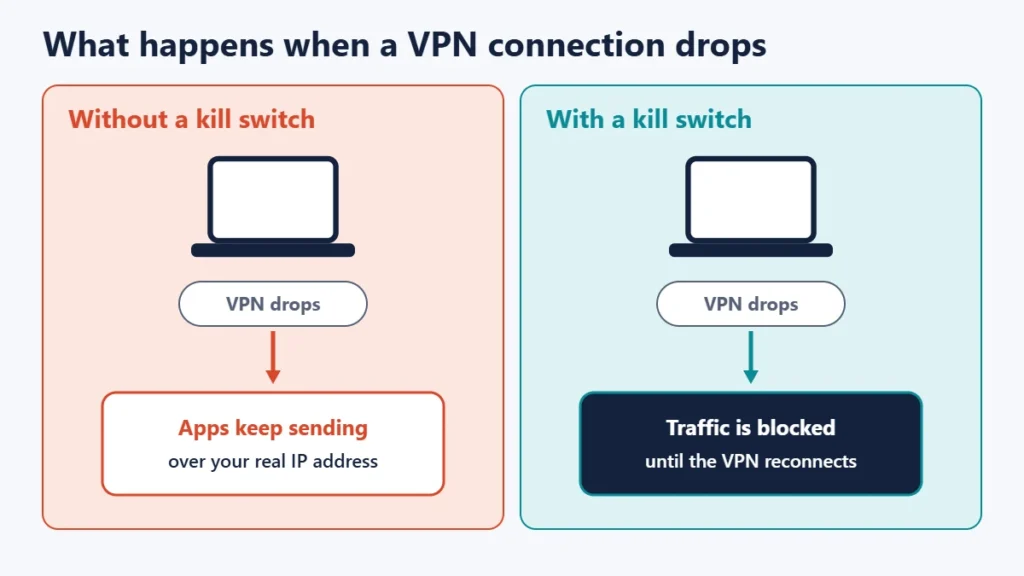
Because many apps sync in the background, this can happen even when you are not actively browsing.
How a kill switch works
A kill switch watches the VPN connection. When it drops, the switch stops traffic from leaving the device until the tunnel is restored. Proton’s documentation says its kill switch blocks all internet traffic on your device until you are reconnected if your VPN connection is lost. Mullvad’s app guide says its kill switch automatically blocks the internet upon VPN connection failure, so that traffic is not accidentally leaked outside the tunnel.
From your side, the internet simply stops working for a moment, then comes back once the VPN reconnects.
The two main types of kill switch
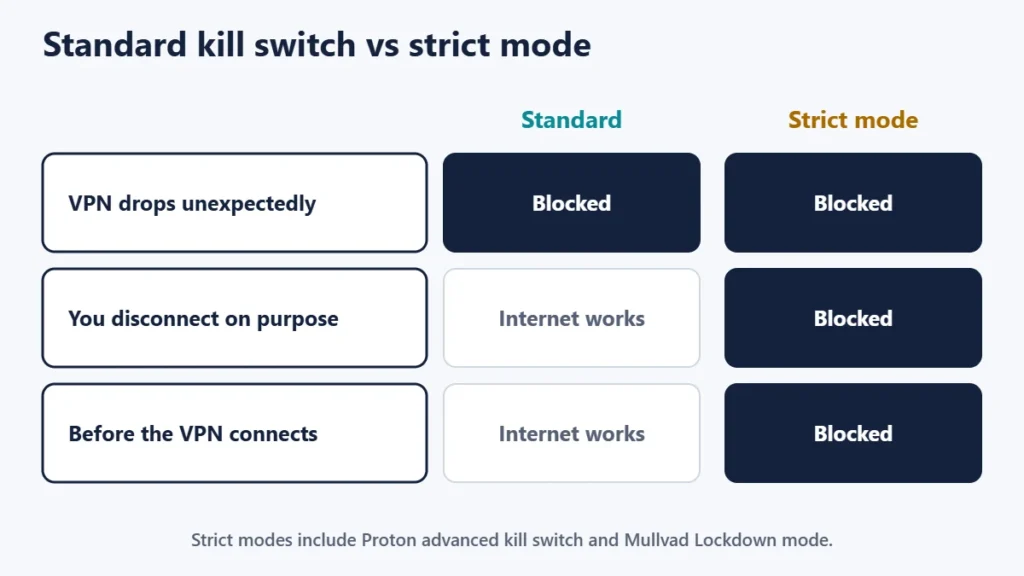
| Standard kill switch | Strict (always-on) mode | |
|---|---|---|
| When it blocks | Only when the VPN drops unexpectedly | Whenever the VPN is not connected |
| After you disconnect on purpose | Internet works normally | Internet stays blocked |
| Protection | Good | Strongest |
| Convenience | Easy | Can be confusing if you forget it is on |
Providers name these differently. Proton offers a standard kill switch, which is only activated when your connection drops by accident, and an advanced kill switch on some platforms that only allows internet access when connected to Proton VPN, with no exceptions, and stays active after a restart. Mullvad’s kill switch is always on while connected, and its optional Lockdown mode also blocks the internet after you click Disconnect or Quit.
Mullvad warns that with Lockdown mode on, your computer will always require a Mullvad VPN connection to reach the internet. That is the trade-off with any strict mode: maximum protection, but no internet at all until the VPN connects.
Kill switches and split tunnelling
Split tunnelling lets you choose apps or websites that bypass the VPN, such as a banking app that blocks VPN addresses or a local printer. Those exceptions are not covered by the kill switch in the same way. Mullvad’s documentation states that excluded apps still have access to the internet even with Lockdown mode enabled.
That is expected, but it means traffic from excluded apps always shows your real IP address. Keep the exclusion list short and review it occasionally.
How to turn on a kill switch
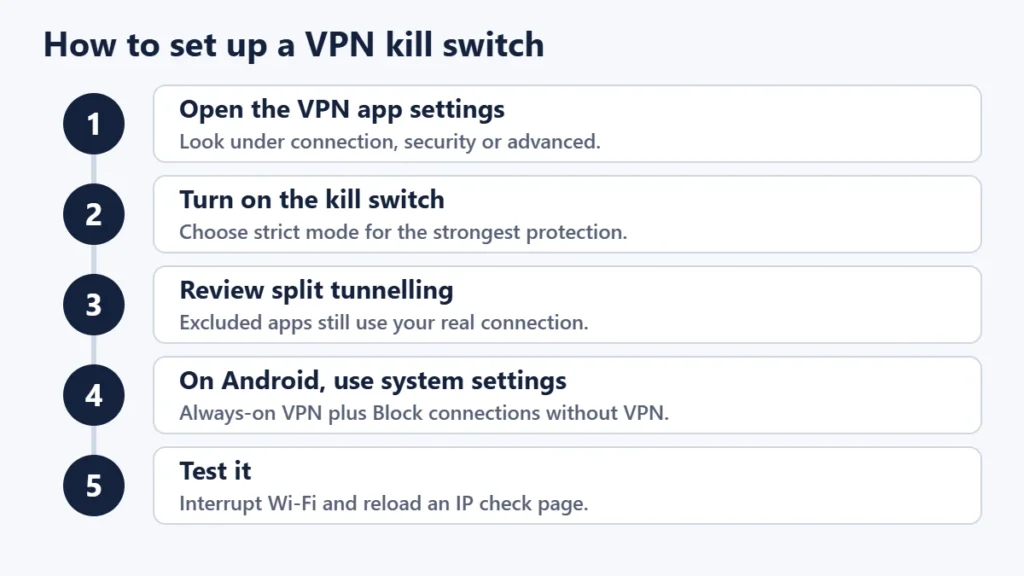
In the VPN app
On Windows, macOS and Linux, the kill switch is set in the VPN app itself, usually in the connection, security or advanced settings. Turn it on, and choose the stricter mode if the app offers one and you are happy with the trade-off. Some apps have it switched on by default.
On Android
Android has system-level options. Google’s help page shows the path: Settings, then Network and internet, then VPN, then the gear icon next to your VPN, where you can turn on Always-on VPN. For Android, Proton’s kill switch guide then has you enable both Always-on VPN and Block connections without VPN, which together act as a kill switch for the whole device. Proton notes that on Android its feature works more like the advanced kill switch than the standard one. Menu names vary between phone makers and Android versions.
On iPhone and iPad
Look in the VPN app’s own settings. Proton lists its advanced kill switch as available on iOS and iPadOS in beta.
On a router
If you run a VPN on your router, check whether its firmware can block traffic when the VPN is down. Our guide to VPN routers explains the set-up.
How to test your kill switch
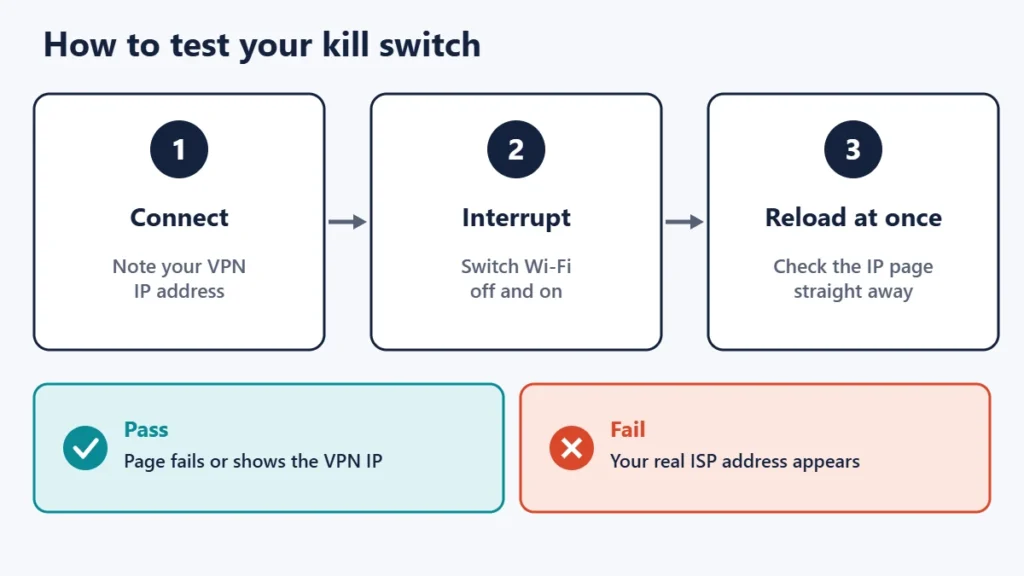
- Connect the VPN and open an IP lookup page. Note the VPN address.
- Interrupt the connection. Switch Wi-Fi off and on, or move between Wi-Fi and mobile data.
- Reload the IP page straight away. It should fail to load, or show the VPN address again once reconnected. If it shows your real ISP address, the kill switch did not catch the drop.
Combine this with DNS and WebRTC leak tests for a complete check, since a kill switch only covers connection drops.
Do you need a kill switch?
- Yes, if you use a VPN on public Wi-Fi or for privacy, because a drop could expose your real address. Our guide to staying safe on free Wi-Fi covers other precautions.
- Strongly yes, if keeping your real IP address private matters for your situation.
- Less important, if you use a VPN only to reach your work network or watch content, and a short drop does no harm.
For a broader look at what a VPN can and cannot do, read our guide to the pros and cons of using a VPN.
Common mistakes
- Assuming it is on by default. Some apps ship with it off. Check the settings.
- Using strict mode and forgetting it. If the internet stops working after disconnecting the VPN, this is usually why.
- Adding too many split tunnelling exceptions. Excluded apps always use your real connection.
- Never testing it. A short drop test takes a minute.
- Thinking a kill switch prevents every leak. DNS and WebRTC leaks can still happen while connected.
Frequently asked questions
What does a VPN kill switch do?
It blocks internet traffic when the VPN connection drops, so your real IP address is not exposed while the VPN reconnects.
Should I turn the kill switch on?
For most privacy uses, yes. It costs nothing and only takes effect when something goes wrong.
Why is my internet not working after I disconnect my VPN?
A strict kill switch mode, such as Mullvad’s Lockdown mode or Proton’s advanced kill switch, blocks internet access whenever the VPN is off. Turn it off, or reconnect the VPN.
Does a kill switch slow down my connection?
It does not affect speed while the VPN is connected. It only blocks traffic when the tunnel is down.
Do free VPNs have kill switches?
Some do and some do not. Check the app’s settings or the provider’s support pages.
Is Android’s Block connections without VPN the same as a kill switch?
It does the same job at the system level: used with Always-on VPN, it stops traffic leaving the phone without the VPN.
The short version
A VPN kill switch blocks your traffic when the VPN drops, so your real IP address does not leak during reconnection. Turn it on in your VPN app, choose a strict mode if you want protection even when the VPN is off, keep split tunnelling exceptions to a minimum, and test it by interrupting your connection. On Android, use Always-on VPN with Block connections without VPN.

Justwebworld has published guides since 2012. How we write and update articles Report an error
