

DNS over HTTPS (DoH) encrypts the lookups your device makes to turn website names into IP addresses, so other people on your network and your internet provider cannot read or tamper with them. RFC 8484, the standard that defines DoH, describes it as a protocol for sending DNS queries and getting DNS responses over HTTPS. Without it, most DNS lookups travel unencrypted.
DoH is a useful privacy upgrade, but it is not a VPN. The DNS provider you choose still sees your lookups, and the sites you connect to are not hidden in other ways. This guide explains how DoH works, how it compares with DNS over TLS and a VPN, and how to turn it on.
Key takeaways
- DoH encrypts DNS lookups between your device and a DNS resolver.
- It hides lookups from your network and ISP, but not from the DNS provider you use.
- It is not a VPN. The addresses you connect to are still visible.
- DNS over TLS (DoT) does a similar job on its own port, 853.
- Many browsers and systems support DoH; Chrome calls it Use secure DNS.
Why ordinary DNS is not private
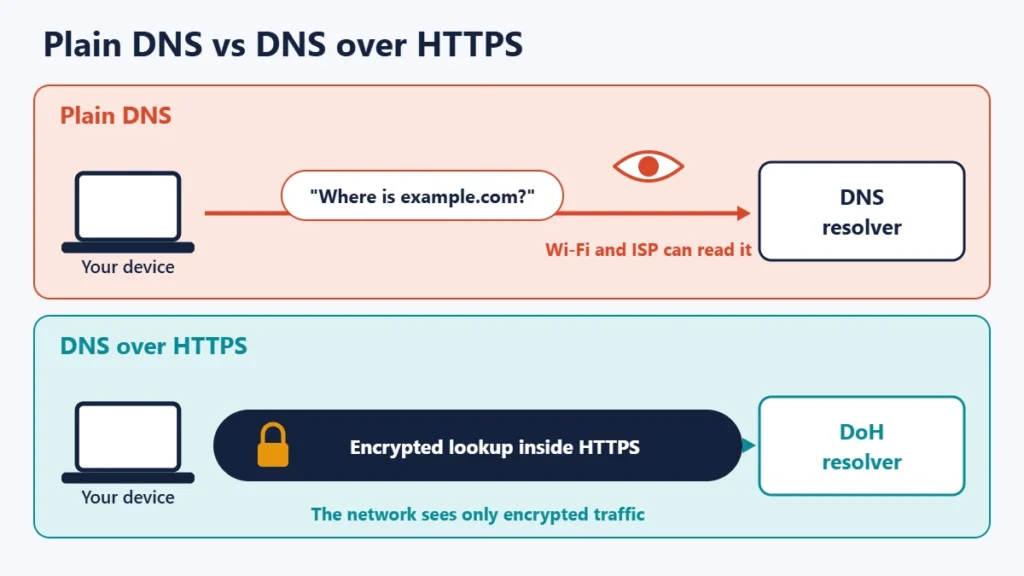
Every time you visit a website, your device first asks a DNS resolver for that site’s IP address. Traditionally, that question and its answer are sent in plain text. Anyone who can see your traffic, such as your internet service provider (ISP), the operator of a public Wi-Fi network or an attacker on the same network, can read which names you look up. In some cases, the answers can also be altered to send you to the wrong place. Our guide to major DNS attack types covers those risks.
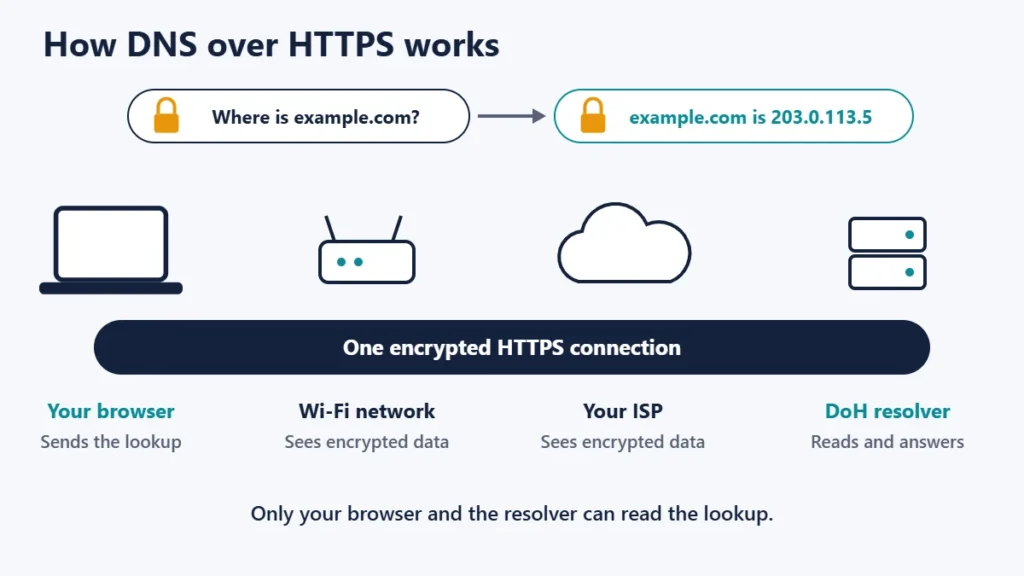
How DNS over HTTPS works
With DoH, your browser or operating system sends DNS questions to a resolver over an ordinary encrypted HTTPS connection, the same kind of connection used for secure websites. RFC 8484 explains that each DNS query-response pair is mapped into an HTTP exchange. Because the traffic looks like other HTTPS traffic and is encrypted, people on the network cannot read the lookups.
The resolver is usually a public DNS service. For example, Google Public DNS lists its DoH address as https://dns.google/dns-query. Your browser or system needs to know which DoH resolver to use, either automatically or because you choose one.
What DoH protects and what it does not
| Plain DNS | DNS over HTTPS | |
|---|---|---|
| Wi-Fi operator can read lookups | Yes | No |
| ISP can read lookups | Yes, if you use any resolver over plain DNS | No, unless the ISP is your DoH provider |
| DNS provider sees lookups | Yes | Yes |
| Lookups can be altered in transit | Possible | Much harder, thanks to encryption |
| IP addresses you connect to are visible | Yes | Yes |
| Hides your IP address from websites | No | No |
The key point is that DoH moves trust rather than removing it. Your lookups are hidden from the network, but the DoH provider can still see them, so choose one whose privacy policy you are comfortable with. Our guide to the best DNS servers compares popular resolvers.
DoH vs DNS over TLS vs a VPN
| DNS over HTTPS | DNS over TLS | VPN | |
|---|---|---|---|
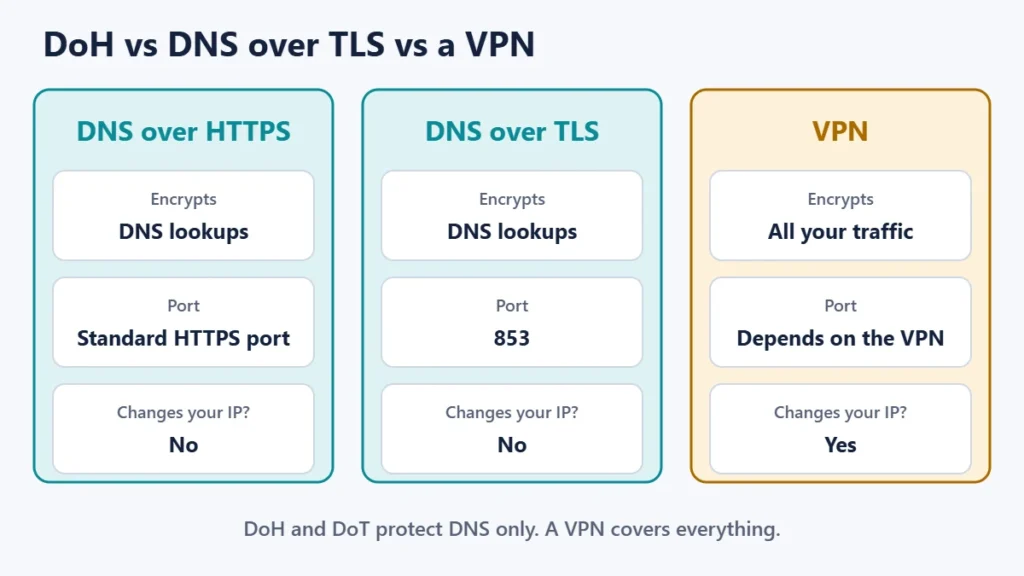
| What is encrypted | DNS lookups | DNS lookups | All traffic |
| Port | Standard HTTPS port | 853 | Depends on the VPN |
| Easy for networks to spot and block | Harder, as it blends with HTTPS | Easier, because of its own port | Varies |
| Changes the IP address websites see | No | No | Yes |
| Typical cost | Free | Free | Often paid |
DNS over TLS is defined in RFC 7858, which says a server that supports it listens for connections on port 853 by default. Both DoH and DoT encrypt the same thing. A VPN goes further by encrypting all of your traffic and replacing the IP address websites see, and good VPN apps also send DNS through the tunnel. For more on what VPNs do, see our guide to the pros and cons of using a VPN.
How to turn on DNS over HTTPS
In Chrome
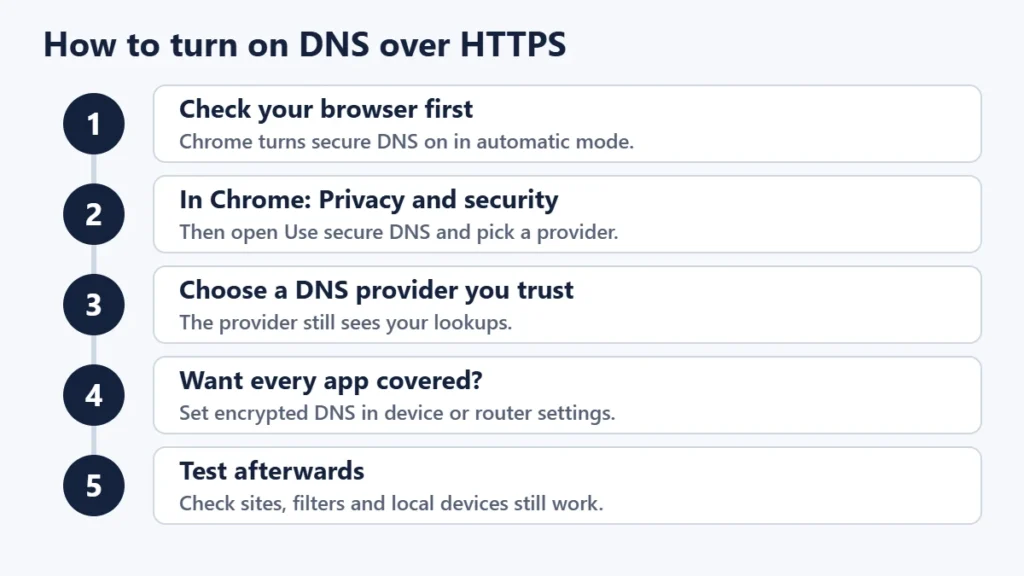
Google’s Chrome help says that by default, secure DNS in Chrome is turned on in automatic mode. To choose a provider yourself, open Settings, then Privacy and security, then Use secure DNS, and select your current provider or another service. Google notes that if your device is managed or parental controls are on, you may not be able to use the feature.
In other browsers
Other major browsers include a similar setting, usually in their privacy or network settings and described as secure DNS or DNS over HTTPS. Check your browser’s help pages for the current menu names.
For the whole device
A browser setting protects only that browser. Some operating systems let you set encrypted DNS for the whole device in their network settings, and some routers support it for every device on the network. If you use a VPN, its app normally handles DNS for you.
Things to know before you switch
- Parental controls and work filters may stop working if they rely on your network’s DNS. That is why managed devices often disable DoH.
- Local network names may not resolve if they are only known to your router’s DNS.
- Your DNS provider changes if you pick a new one, so its privacy policy now matters.
- DoH does not check that answers are genuine at the source. That is the job of DNSSEC, which signs DNS records.
Common mistakes
- Thinking DoH makes you anonymous. Websites still see your IP address.
- Turning it on in one browser only and assuming other apps are covered.
- Choosing a resolver without reading its privacy policy.
- Breaking a family filter by accident. Check whether your network relies on DNS filtering first.
- Confusing DoH with DNSSEC. One encrypts lookups; the other proves records are authentic.
Frequently asked questions
Is DNS over HTTPS safe?
Yes. It adds encryption to lookups that are otherwise sent in plain text. The main trade-off is that you trust the DoH provider with your lookups.
Does DoH hide my browsing from my ISP?
It hides your DNS lookups, but your ISP can still see which IP addresses you connect to. A VPN hides more.
Does DoH slow down browsing?
Usually not noticeably. Speed depends mostly on how fast and close the resolver is.
Do I need DoH if I use a VPN?
Usually not, because a good VPN sends DNS through its encrypted tunnel. Run a DNS leak test to make sure.
What is the difference between DoH and DoT?
Both encrypt DNS. DoH uses HTTPS and blends in with web traffic, while DoT uses its own port, 853.
Should I turn DoH on?
For most people, yes, especially on public Wi-Fi. Leave it to your administrator on work or school devices.
The short version
DNS over HTTPS encrypts the lookups your device makes, so your network and ISP cannot read or alter them. It is free, built into Chrome as Use secure DNS and available in other browsers and systems, but it is not a VPN: your DNS provider still sees lookups and websites still see your IP address. Turn it on, choose a resolver you trust, and check that any family or work filters still work. For how domains point to servers, see our guide to nameservers and A records.

Justwebworld has published guides since 2012. How we write and update articles Report an error
