

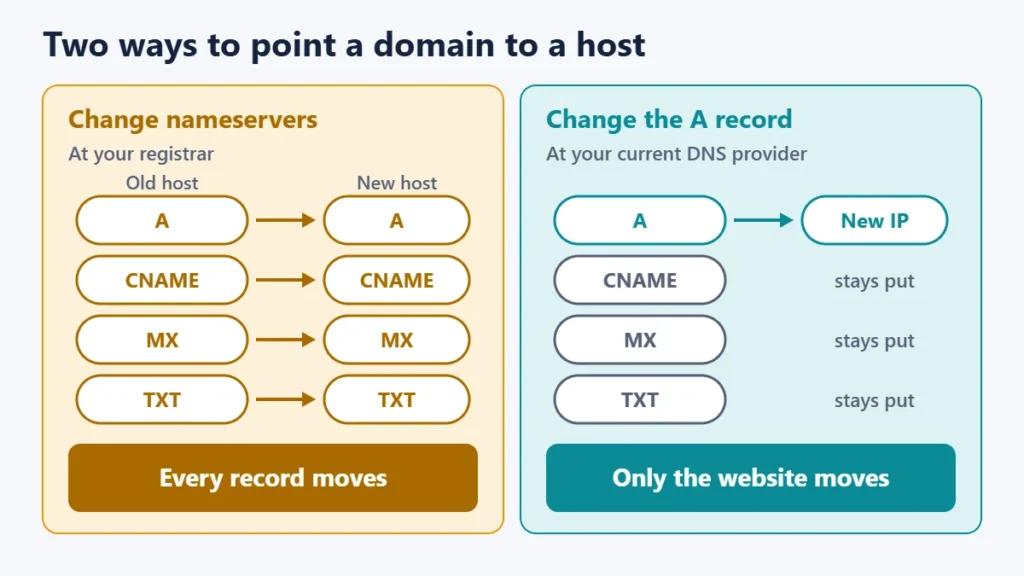
There are two ways to point a domain to your web host. You can change the domain’s nameservers to your host’s, which hands all of your DNS to the host, or you can keep your DNS where it is and change the A record to your host’s IP address. Nameservers decide who answers questions about your domain. The A record is one of those answers: the address where your website lives.
Both methods work. Which one you choose affects your email, how much you control and what can go wrong. This guide explains the difference, gives step-by-step instructions for each method, and covers the mistake that most often breaks email during a move.
Key takeaways
- Nameservers decide which company’s DNS servers answer for your domain.
- An A record maps your domain to an IPv4 address; an AAAA record does the same for IPv6.
- Changing nameservers moves all of your records, including the ones that deliver your email.
- Changing only the A record moves the website and leaves everything else untouched.
- Copy your existing records before any switch, and allow time for caches to update.
Nameservers vs A records: what is the difference?
Think of DNS as a directory service. The nameservers are the directory office in charge of your domain, and the records are the entries in its directory. One entry, the A record, says where to find your website.
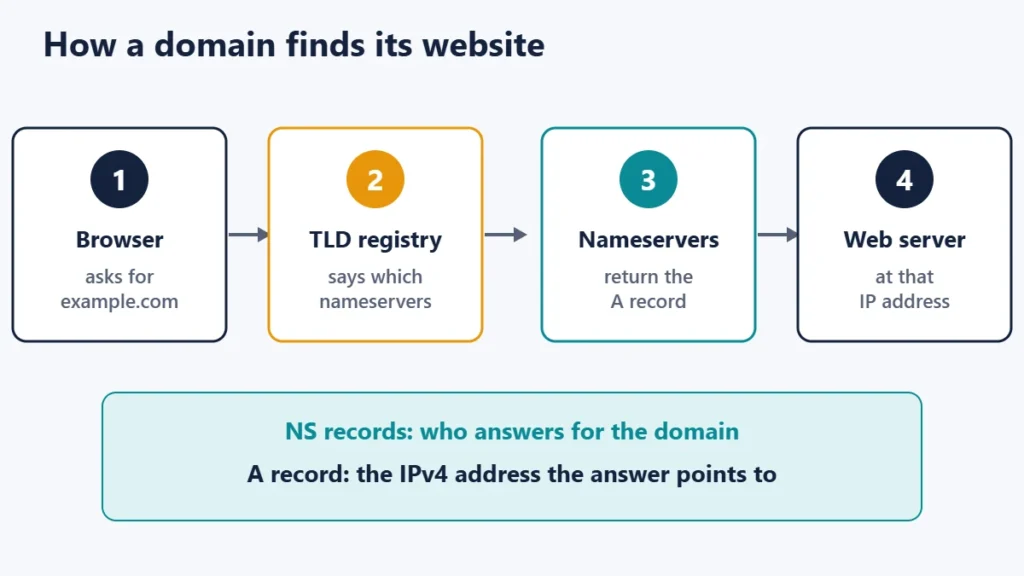
The technical standards put it simply. RFC 1034, the core DNS specification, describes an NS record as naming “the authoritative name server for the domain”. RFC 1035 describes an A record as holding a 32-bit internet address, which is an IPv4 address. RFC 3596 defines the AAAA record, which stores an IPv6 address.
Two organisations are involved behind the scenes. ICANN describes a registrar as the organisation through which you register a domain, and a registry as the master database for a top-level domain such as .com. When you change nameservers at your registrar, the registrar passes the change to the registry, which is what the rest of the internet consults to find your nameservers.
| Change nameservers | Change the A record | |
|---|---|---|
| Where you make the change | At your domain registrar | Wherever your DNS is currently managed |
| What moves | Every DNS record for the domain | Only the website’s address |
| Moves too, so its records must be recreated | Unaffected | |
| Who manages DNS afterwards | Your new host | The same provider as before |
| Typical use | Hosting everything with one company | Keeping DNS, email or a CDN where it is |
Method 1: change your nameservers
This is the option most hosting companies suggest, because it lets them manage every record for you.
- Record your current DNS settings. Export or screenshot every record at your current DNS provider, especially MX, TXT and CNAME records.
- Find your host’s nameservers. They appear in your hosting dashboard or welcome email, usually as two or more names such as ns1 and ns2 at the host’s domain.
- Recreate your other records at the new host first. Add the MX and TXT records for email, and anything else you rely on, before switching.
- Update the nameservers at your registrar. Replace the existing entries with your host’s, and remove any old ones you no longer use.
- Wait, then check. Resolvers that cached the old details may keep using them for a while.
Method 2: change the A record
Choose this option if your DNS sits with a separate provider, for example because you use a CDN or security service, or because your email depends on records you would rather not move.
- Get your host’s IPv4 address, and its IPv6 address if it provides one.
- Edit the A record for the root domain, shown as @ or your bare domain, and enter the new IP address.
- Update or add an AAAA record if your host supports IPv6. Otherwise remove any old AAAA record, which could still send visitors to your previous server.
- Check the www address. It is usually either its own A record or a CNAME pointing to the root domain. Make sure it ends up at the new host too.
- Leave MX and TXT records alone, unless your email is moving as well.
A note on CNAME records
A CNAME makes one name an alias of another. RFC 1034 says that if a CNAME is present at a name, no other data should be present there. Because the root of every domain must hold NS and SOA records, a standard CNAME cannot be used on the bare domain, only on names such as www. Some DNS providers offer their own workaround under names like ALIAS or CNAME flattening, so check your provider’s documentation if your host asks you to use one.
The mistake that breaks email
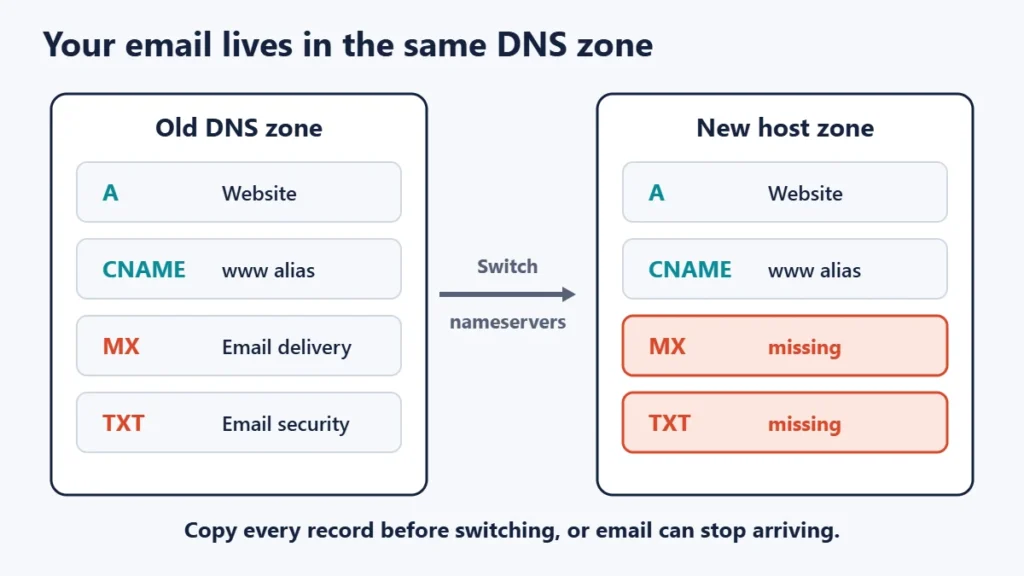
Your DNS zone holds more than your website address. MX records, which RFC 1035 describes as naming a host “willing to act as a mail exchange” for the domain, tell other servers where to deliver your email. TXT records often hold email security settings too.
When you switch nameservers, the internet stops reading your old zone and starts reading the new host’s. Any record you did not recreate there effectively disappears. That is how a website move can silently stop email from arriving. It is also why copying every record first is the most important step in Method 1. If your email uses a separate service, such as a dedicated business email provider, see our guide to business email settings for the kinds of records involved.
How long do the changes take?
DNS answers are cached. RFC 1035 defines each record’s TTL, or time to live, as the time a record may be cached before the source should be consulted again. Until cached copies expire, some visitors may still reach your old server.
A practical approach is to lower the TTL on the records you plan to change a day or so before the move, then raise it again afterwards. Our guide on how long DNS propagation takes explains typical timings and what you can and cannot speed up. Keep your old hosting active until traffic has fully moved over.
How to check your current settings
You can see what the internet sees with the built-in nslookup command on Windows, macOS and Linux. Replace example.com with your domain.
nslookup -type=NS example.com
nslookup example.com
nslookup -type=MX example.com
The first command lists your nameservers, the second shows the IP addresses your domain points to, and the third shows where your email is delivered. Here is how results might look, using addresses reserved for documentation examples:
example.com    nameserver = ns1.examplehost.net
example.com    nameserver = ns2.examplehost.net
Address:       203.0.113.10
example.com    MX preference = 10, mail exchanger = mail.example.com
If the addresses do not match what your host gave you, either the change has not been saved or cached answers have not yet expired. Using a public resolver can help you compare results; our list of public DNS servers includes common ones.
Which method should you choose?
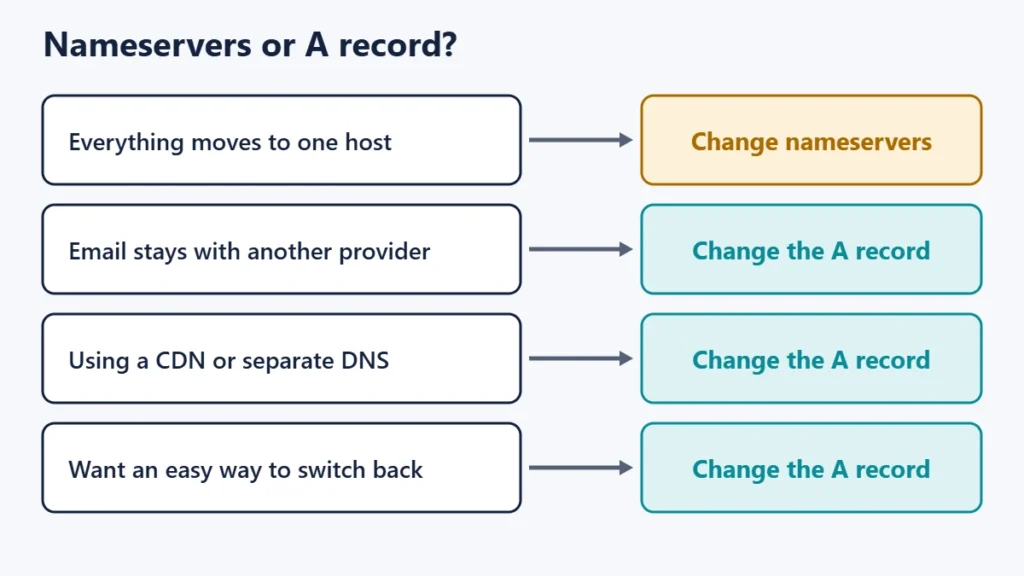
| Your situation | Better choice |
|---|---|
| New domain with no email yet | Change nameservers |
| Moving website and email to the same host | Change nameservers, after copying records |
| Email stays with a separate provider | Change the A record |
| Using a CDN or DNS service in front of the site | Change the A record at that service |
| Want a quick switch back if something goes wrong | Change the A record |
New to hosting? Our introduction to what web hosting is explains the basics, and our guide to forwarding a domain covers sending one domain to another website.
Common mistakes
- Switching nameservers without copying records. Email and verification records are the usual casualties.
- Mixing nameservers from two providers. Each may give different answers, producing inconsistent results.
- Forgetting the www version. The bare domain works, but www still points to the old server.
- Leaving an old AAAA record. Visitors on IPv6 can still reach the previous host.
- Cancelling old hosting too early. Cached answers can send some visitors there for a while.
- Editing records at the wrong company. Changes only take effect at the provider your nameservers point to.
Frequently asked questions
Do I need to change both the nameservers and the A record?
No. Choose one approach. If you switch nameservers, the new host usually creates the A record for you. If you change the A record, leave the nameservers as they are.
Will changing nameservers affect my email?
It can. Your email records move to the new provider’s zone, so recreate them there before switching, or email may stop arriving.
What is the difference between a registrar and a host?
The registrar is where you register and renew the domain name. The host stores and serves your website’s files. They can be the same company or different ones.
What is a good TTL before moving?
Lowering it to a few minutes, roughly a day before the change, helps the switch spread faster. Raise it again once everything works.
Can I point a domain to a host using a CNAME?
Only for subdomains such as www. A standard CNAME cannot sit at the root of the domain, though some DNS providers offer alternatives.
How do I know which method my host wants?
Your host’s setup instructions normally list either nameservers or an IP address. Nameservers mean Method 1, and an IP address means Method 2.
The short version
Nameservers decide who runs your DNS, while the A record says where your website is. Switch nameservers when everything is moving to one host, after copying every record. Change just the A record when your DNS, email or CDN should stay where they are. Either way, check with nslookup, give caches time to update, and keep the old hosting running until the move is complete.

Justwebworld has published guides since 2012. How we write and update articles Report an error
