Close Menu
JustwebworldJustwebworld
  • Astrology
  • Business & Finance
    • Cryptocurrency
    • Make Money
    • Entrepreneur
    • Brands
    • Companies
    • Personal Finance
      • Banking
      • Insurance
      • Trading and Investing
  • Tech
    • Computing
    • Cybersecurity
    • Electronics
    • Android
    • Apple
    • Gadgets
    • Social Media
    • Mobile Apps
    • Softwares
  • Education
    • Vocabulary
    • Abbreviations
    • General Knowledge
    • Writing & Translation
  • Lifestyle
    • Beauty & Cosmetics
    • Fashion & Style
    • Furniture & Decor
    • Luxury
    • People & Relationships
    • Pets and Animals
    • Shopping
    • Parenting
    • Gardening
    • Birthdays
  • Health
  • Travel
  • Auto
  • Gaming
  • Food
  • Entertainment
  • Sports
Facebook X (Twitter) Instagram Pinterest YouTube LinkedIn WhatsApp Telegram
Wednesday, January 14
  • About
  • Contact Us
  • Advertise With Us
  • Disclaimer
  • Terms & Conditions
  • Privacy Policy
JustwebworldJustwebworld
  • Astrology
  • Business & Finance
    • Cryptocurrency
    • Make Money
    • Entrepreneur
    • Brands
    • Companies
    • Personal Finance
      • Banking
      • Insurance
      • Trading and Investing
  • Tech
    • Computing
    • Cybersecurity
    • Electronics
    • Android
    • Apple
    • Gadgets
    • Social Media
    • Mobile Apps
    • Softwares
  • Education
    • Vocabulary
    • Abbreviations
    • General Knowledge
    • Writing & Translation
  • Lifestyle
    • Beauty & Cosmetics
    • Fashion & Style
    • Furniture & Decor
    • Luxury
    • People & Relationships
    • Pets and Animals
    • Shopping
    • Parenting
    • Gardening
    • Birthdays
  • Health
  • Travel
  • Auto
  • Gaming
  • Food
  • Entertainment
  • Sports
JustwebworldJustwebworld
Home » Internet » TP-Link Router Login and Common Modem Issues

TP-Link Router Login and Common Modem Issues

Shailja SharmaBy Shailja Sharma Internet Computing
Facebook Twitter LinkedIn Telegram Pinterest Reddit Email WhatsApp
Follow Us
WhatsApp Telegram
Share
Facebook Twitter LinkedIn Pinterest Reddit Telegram WhatsApp

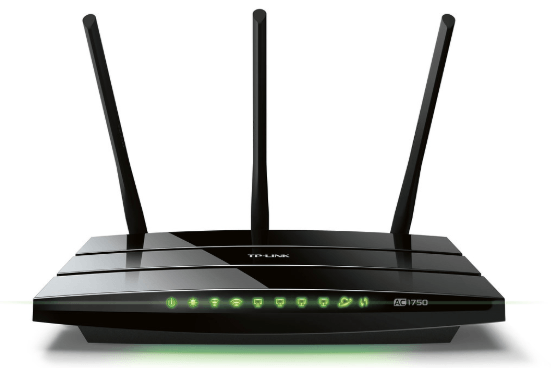
TP-Link Routers are quite popular. These are used worldwide. These routers have big antennas and high speed internet connectivity. Although TP-Link Routers boast of high quality however there can be minor glitches at times. But the good news is that these issues can be fixed easily. This can mostly be done without an expert technician.

Table of Contents

Toggle
  • TP-Link Login, Admin, Password and Settings
    • How to Setup a TP-Link Router?
    • Salient Features of TP-Link Router
    • Common Issues with TP-Link Router
    • Troubleshooting TP-Link Router Login and Modem Issues
    • TP Link Default Login and Password and IP List

TP-Link Login, Admin, Password and Settings

 Tp link login username and password

We have compiled some TP-Link Router login and modem issues that users generally face. We have also mentioned the solution for some of these. Read on to find out the same.

How to Setup a TP-Link Router?

Setting up TP-Link Router is easy. You require following the simple steps mentioned below to set up the same.

Fetch an Ethernet cable to start with the process. Attach an active data jack or a modem to the Ethernet port on the TP-Link Router via this cable. Now, plug in the router and turn the power on. This can be done by using the power button affixed on the backside of the router.

Consequently, you require connecting the wireless network broadcasted by the router. Check the bottom of the router to see the default SSID and WPA2 Key. Thereafter, log on to tplinkwifi.net and enter the username and password and click login. The default username and password is “admin”. You will find the center panel labelled as Quick Setup. Just click on the Next tab and begin the process.

Choose an SSID for your router and enter it in the Wireless Network Name field. You should not enter any personal information here. This is because your SSID is visible to the nearby computer systems. Also, do not mention any information about the kind of router you are using.

Also Read: Increase Your Computer Speed By Disabling Indexing Increase Your Computer Speed By Disabling Indexing

Enter the new password in the WPA-PSK/WPA2-PSK field. Choose one that is hard to crack. Avoid using your name, date of birth or any such information as password. This is because it is easy to guess. Thereafter, click Next and then Click Finish. The set up is complete!

Since you have changed the ID and password, you will now get a prompt to login again. Now, log in using your new SSID and password and start using it.

Salient Features of TP-Link Router

TP-Link has a wide range of routers that are loaded with different features. Here is a look at the salient features of these routers.

  • TL-WR1043N and TL-WR1043ND offer speed up to 450Mbps. They come with three antennas and a USB port each. These antennas offer larger wireless coverage. They also have five gigabit ports embedded in them.
  • TL-WR941 HP and TL-WR841HP are high powered routers. They offer great coverage. Their special antennas cut through various obstacles such as walls to offer good Wi-Fi connectivity and speed.
  • TP Link MU-MIMO routers are designed to associate with four devices at a time. This is why they are called multi user, multi input, multi output routers. Archer C5400, Archer C 3150 and Archer C2300 facilitate the aforementioned. Archer C 3150 and Archer C2300 have dual band. They offer speed up to 3.15 Gps and 2.25 Gbps respectively. Archer C5400 is tri band. It offers speed up to 5.334 Gbps.
  • There are many other TP-Link Routers in the Archer range. These include C 3200, C 1200, C 60, C 59, C 50, C 25, C 20, C9, C7, C5 and C2. Many of them offer gigabit speed. They also come with nifty features.
  • TP Link Compact and 4G LTE Routers are powered by 3G or 4G mobile broadband plan. It offers quick internet access. Some of these models are portable. They are a great option for frequent travelers. However, other models in this category are good for small office or residential space.

Common Issues with TP-Link Router

TP-Link Routers are highly efficient. However, they can act problematic at times. Here are some of the common issues that may arise in a TP-Link Router.

Also Read: What is Click Fraud and How It is Harmful For Advertiser? What is Click Fraud and How It is Harmful For Advertiser?
  • There is no internet access.
  • An orange light flashes on the TP router.
  • Problem resetting the TP-Link router.
  • Issues updating the firmware of the TP-Link router.
  • Issues logging in to the TP-Link router management web page.

Troubleshooting TP-Link Router Login and Modem Issues

Now, that you know the common issues that arise in TP-Link Router, let us have a look at how to solve them. Here are simple troubleshooting steps for some of the common TP-Link router login and modem issues.

If there is no internet access then try to reboot your router. Also, check that the firmware is updated. For this, open the TP-Link Router login page and go to its management page. Look for “firmware update”. Thereafter, follow the given instructions.

If an orange light flashes on the TP-Link Router it means there is no connection between router and your system. It may be due to some hardware or firmware issue. Besides, there is also a chance that the connection between the router and device may be loose. In this case, just plug out the Ethernet cable and plug it in again.

If you aren’t able to update TP-link Router firmware then here is what to do.

  • Type 192.168.1.1 in the address bar.
  • Key in the user id and password and click login.
  • On the router’s dashboard, just move the cursor to the ‘Advanced’ tab.
  • Now click on ‘System Tools’.
  • Thereafter, you will get the firmware upgrade option.
  • Check if you require updating any version. In case you do then open it and follow the given instructions.

TP Link Default Login and Password and IP List

The default IP address of most of the TP-Link routers is 192.168.1.1. However, some models also use the following IP address by default.

Also Read: New 5G Innovations Releases By ZTE New 5G Innovations Releases By ZTE
  • 192.168.0.1
  • 192.168.0.254
  • Default Username: admin
  • Default Password: admin

Use these to login to the TP-Link router and get started!

All Router manufacturers such as TP-Link, Cisco, D-Link, Linksys, Netgear, Belkin, Asus all have the admin login printed on the router.
Router ManufacturerIP addressUser NamePassword
TP-Link192.168.1.1
192.168.1.254
adminadmin/password
Cisco192.168.1.1adminadmin
Linksys192.168.1.1
192.168.1.10
192.168.1.254
192.168.2.1
adminadmin
Netgear192.168.1.1adminadmin/password
Asus192.168.1.1
192.168.2.1
10.10.1.1
adminadmin
Belkin192.168.1.1
192.168.2.1
10.0.0.2
10.1.1.1
(none)MiniAP
Billion192.168.1.254adminadmin
iBall192.168.1.1adminadmin

You may also like:

  • How to Reset Router Properly.
  • Linksys Router Login.

cards
Powered by paypal
Follow on WhatsApp Follow on Telegram
Share. Facebook Twitter Pinterest LinkedIn Tumblr Email Telegram WhatsApp Copy Link
Previous Article3 Awesome Benefits of Using Chatbots In Your Business
Next Article Is Your Website Lacking the Visitor Numbers You Hoped For?
Shailja Sharma

Shailja is a post graduate in English Literature. Writing comes naturally to her and she is content doing what she does best - writing and editing. An avid reader, a nature lover and a travel enthusiast are some of the other terms that describe her.

Related Posts

Ultimate Guide to CapCut Templates 2025 | Create Viral Reels, TikToks & Shorts with Free Trending Video Edits!

15+ Ghibli AI Image Generator: Top FREE Alternatives to ChatGPT & Grok (Apps & Websites)

Airtel Broadband: The Best Unlimited Data Plans for Your Home Internet

How to Choose the Best Proxy Provider for Your Needs

Unlocking Boundaries: Best Ways to Access GEO-Restricted Resources

Rotating Datacenter Proxies Vs. Static Proxies: Why Dynamic Rotation Matters

Leave A Reply

Subscribe to Blog via Email

Enter your email address to subscribe to this blog and receive notifications of new posts by email.

Join 43.4K other subscribers
Categories
Latest Posts

Understand How Wind Emulators Upgrade Renewable Energy Training In Institutes

Expert Tips On Proper Use Of Septic System Cleaning Products

Discover Why An Online Tutor Job In Bangalore Is A Flexible Earning Option

Group Vs Customised Australia Trips: How to Decide What Suits You

What to Know About Choosing the Right Support Path

How to Keep Your Yamaha Bike Running Smoothly in Indian Weather Conditions

Is Celebrity Culture Dying? Why People Are Losing Interest in Famous Stars in 2026

Why Your Brain Feels Overloaded All the Time – The Real Cost of Modern Stress & Burnout

Ever Wondered Why Travel Feels So Meaningful? The Truth Might Surprise You

Ford Territory Automatic: The Perfect SUV for Filipino Families

The content on this website is provided solely for educational and informational purposes. We do not promote, endorse, or deal in any products, services, or activities mentioned. While we strive to share accurate and up-to-date information, we make no warranties regarding completeness, reliability, or accuracy. Any action you take based on the information found here is strictly at your own risk, and we will not be liable for any losses or damages in connection with the use of our website.

DMCA.com Protection Status
Quick Links
Age Calculator
Angel Number Calculator
Case Converter
Sudoku Online
Word Counter
Love Calculator
Jack Doherty YouTuber
Snake Dream Meaning
Get Rid of Cockroaches
Indian Cricket Team Coaches
Best Volleyball Team Names
Useful Links
Number to Words
Period Calculator
Yes-No Picker Wheel
Demon Name Generator
Kingdom Name Generator
Harry Potter Name Generator
Daddy Yankee Biography
Crocodile Dream Meaning
Goa Budget Trip Guide
Maryse Mizanin WWE Diva
Best Cricket Team Names
Helpful Resources
Colors Name In English
Best Computer Brands
WhatsApp Web
Most Beautiful Beaches
Tesla Cybertruck Review
Richest Actors in the World
India Jarvis Actress
Cat Dream Meaning
Belmar Beach New Jersey
Aryna Sabalenka Tennis Superstar
Best WhatsApp Group Names
Explore More
Good Morning Handsome
Best English Songs of All Time
Cricket World Cup Winners
Ways to Say Rest In Peace
Britain’s Got Talent Winners
American Idol Winners
Dude Perfect Net Worth
Horse Dream Meaning
Ramakrishna Beach Visakhapatnam
Anastasia Potapova Tennis Star
Best Funny Team Names
Facebook X (Twitter) Instagram Pinterest YouTube Tumblr LinkedIn WhatsApp Telegram Threads RSS
  • About
  • Contact Us
  • Advertise With Us
  • Disclaimer
  • Privacy Policy
  • Terms & Conditions
  • Web Stories
Copyright © 2012-2026. JustWebWorld - All Rights Reserved. | Sitemap

Type above and press Enter to search. Press Esc to cancel.

×

👇 Bonus Reads for You 🎁

Google Docs
Using Google Docs To Manage Your Marketing Campaigns
Increase the Appeal of Your Online Service
How to Increase the Appeal of Your Online Service
CashBack & Coupons On CashKaro
Get CashBack & Coupons at Top Brands On CashKaro
Future Of Computing And AI