

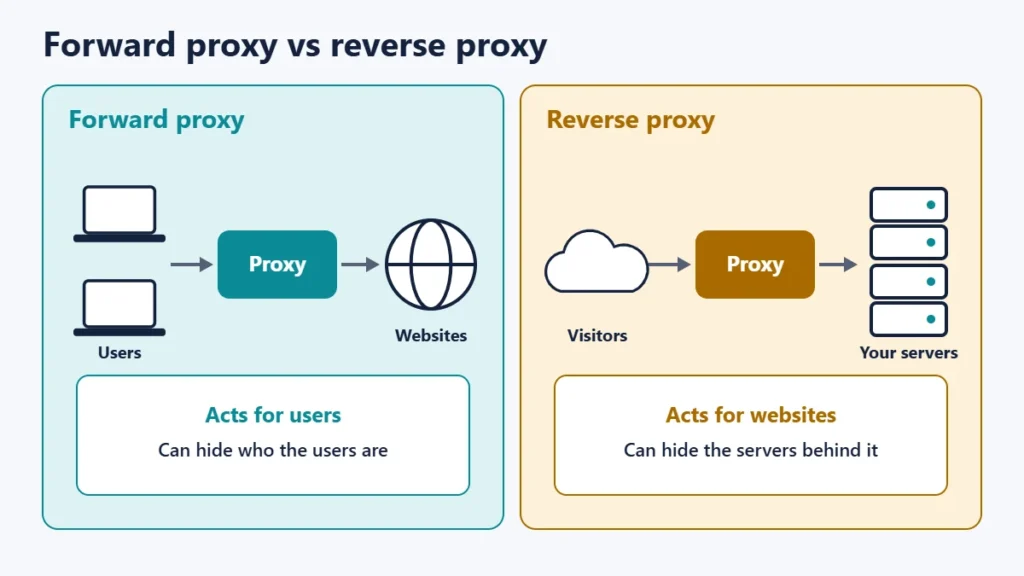
A reverse proxy is a server that sits in front of your web servers and receives visitors’ requests on their behalf, passing each one to a server behind it and returning the response. A forward proxy works for users; a reverse proxy works for websites. MDN Web Docs explains that reverse proxies are used to control and protect access to a server for load balancing, authentication, decryption or caching.
You may already use one without knowing: CDNs, many security services and a lot of hosting set-ups work as reverse proxies. This guide explains how a reverse proxy works, how it differs from a forward proxy, what it is used for, and what to watch out for.
Key takeaways
- A reverse proxy receives requests for a website and forwards them to servers behind it.
- A forward proxy acts for users; a reverse proxy acts for servers.
- Common uses: load balancing, caching, compression, security and central login.
- Visitors see the proxy, not the servers behind it.
- Your site sees the proxy’s IP address unless it reads forwarding headers correctly.
How a reverse proxy works
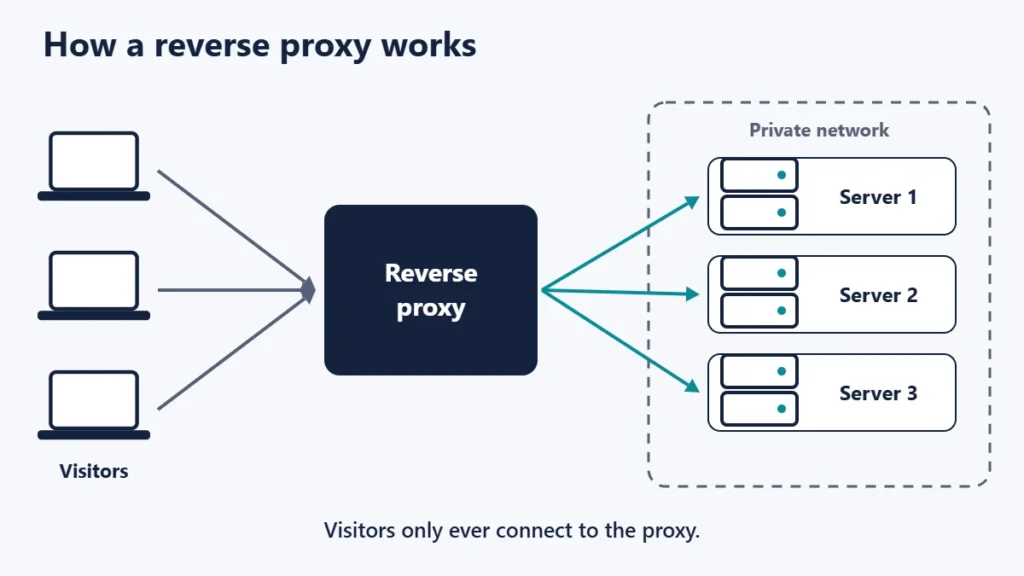
When someone visits your site, their browser connects to the reverse proxy rather than directly to your web server. The proxy decides where the request should go, forwards it, receives the response and sends it back to the visitor. The Apache HTTP Server documentation describes it as forwarding each client request to one or more backend servers that have no direct connection to the external network.
From the visitor’s side, nothing looks different. Apache’s guide puts it this way: as far as the client is concerned, the reverse proxy is the sole source of all content.
Reverse proxy vs forward proxy
| Forward proxy | Reverse proxy | |
|---|---|---|
| Works on behalf of | Users | Websites and servers |
| Set up by | The user or their organisation | The website owner or host |
| Hides | The users’ identities | The servers’ identities |
| Typical uses | Filtering, privacy, reaching blocked content | Load balancing, caching, security |
MDN sums up the difference: forward proxies can hide the identities of clients, whereas reverse proxies can hide the identities of servers. If you are curious about the forward kind, our guide to changing your IP address with a proxy covers it.
What a reverse proxy is used for
Load balancing
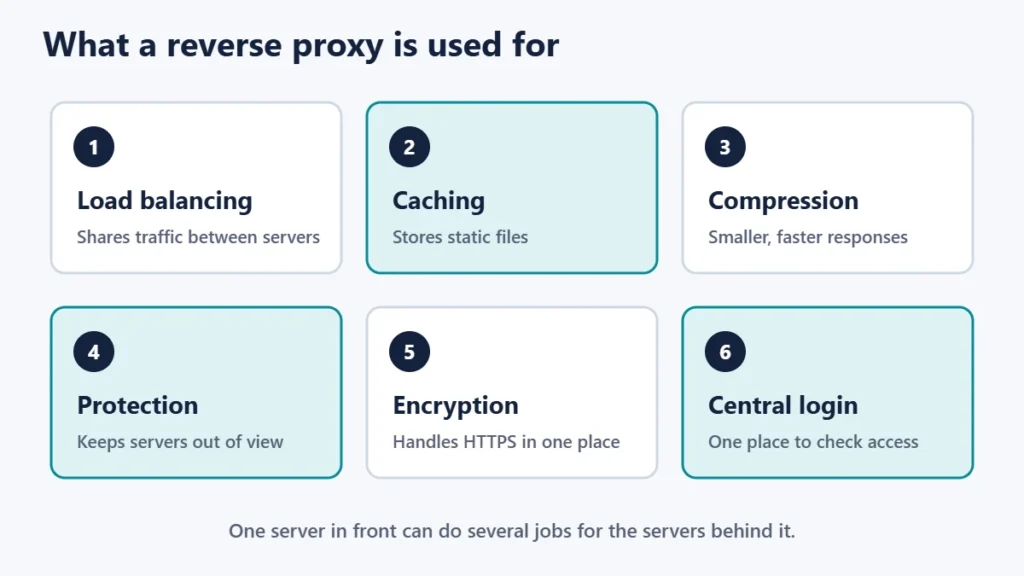
A reverse proxy can share traffic between several servers, so no single one is overloaded and the site keeps working if one fails. The nginx documentation lists methods including round-robin, least-connected, where the next request goes to the server with the fewest active connections, and ip-hash, where a hash function decides which server receives each visitor.
Caching and compression
MDN notes that a reverse proxy can cache static content like pictures, offloading the web servers, and compress content to speed up load time. nginx’s proxy module includes caching settings for this purpose. Our website speed tips explain why caching matters.
Security
Because visitors only reach the proxy, the servers behind it can stay off the public internet. Apache lists security, high availability, load balancing and centralised authentication as common reasons for using a reverse proxy. Many web application firewalls also sit in front of a site in the same way.
Handling encryption
A reverse proxy can handle the HTTPS connection with visitors, which MDN refers to as decryption, so the certificate and encryption settings are managed in one place. Our guide to fixing “Not secure” warnings covers certificate problems.
Routing to different apps
A single address can be split between different systems, for example sending most of a site to one server and a path such as /shop to another. This is one way to run a section in a subdirectory even when it is on a different platform; see our guide to subdomains vs subdirectories.
Common reverse proxy software and services
- Web server software: nginx’s proxy module allows passing requests to another server, and Apache can act as a reverse proxy too. Our comparison of Apache, Nginx and LiteSpeed explains the differences.
- CDNs and security services: when you point your domain at one, it becomes the reverse proxy for your site. See our guide to CDNs.
- Load balancers from hosting and cloud providers.
The visitor IP address problem
Behind a reverse proxy, your web server sees the proxy’s IP address on every request. MDN explains that this is often of little use, which is why proxies add the visitor’s address in a header. The common one is X-Forwarded-For; a standardised version, Forwarded, is defined in RFC 7239 but used less often.
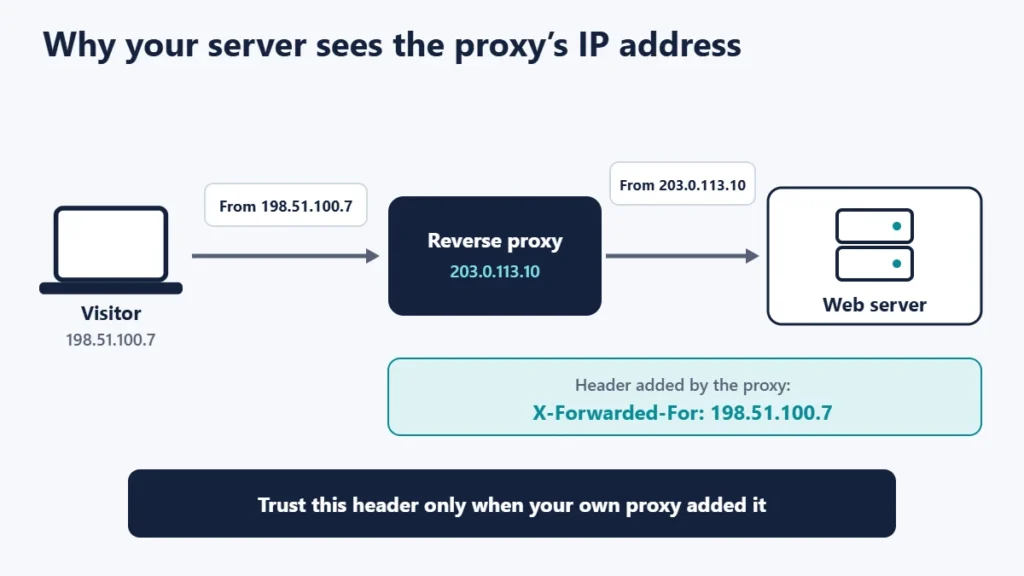
These headers need care. MDN warns that any part of the header not added by a trusted proxy may be spoofed, and that if the server can be reached directly from the internet, none of the list can be trusted for security uses. Using untrustworthy values can lead to problems such as rate-limit avoidance or access-control bypass. In practice:
- Configure your server or application to read the visitor address only from your own proxy.
- Block direct access to the backend server, so all traffic must go through the proxy.
- Check that logs, security plugins and analytics show real visitor addresses after setting up a proxy.
Do you need a reverse proxy?
- Small sites on shared hosting: you probably already have one through your host or CDN, and do not need to set one up.
- Growing sites: a CDN or a host’s built-in caching proxy is the easiest way to get the benefits.
- Sites on several servers: a reverse proxy or load balancer becomes essential.
- Mixed platforms: a reverse proxy can bring different apps together under one domain.
Common mistakes
- Leaving the backend server open to the internet. Attackers can bypass the proxy.
- Trusting forwarding headers from anyone. Accept them only from your own proxy.
- Caching pages that should be private, such as basket or account pages.
- Causing redirect loops when the proxy and server disagree about HTTPS. See our guide to too many redirects.
- Forgetting timeouts. A slow backend can make the proxy return gateway errors.
Frequently asked questions
Is a CDN a reverse proxy?
Many CDNs work as reverse proxies: visitors connect to the CDN, which fetches content from your server when needed.
Is a load balancer a reverse proxy?
A load balancer is a common type of reverse proxy whose main job is spreading traffic across servers.
Does a reverse proxy make a site faster?
It can, through caching and compression, especially when it sits closer to visitors than the server.
Why does my site show the same IP address for every visitor?
It is seeing the proxy’s address. Configure it to read the visitor address from your proxy’s forwarding header.
What errors can a reverse proxy cause?
Gateway errors such as 502 and 504 often come from a proxy that cannot reach the server behind it. Our guide to 502, 503 and 504 errors explains them.
Is a VPN a reverse proxy?
No. A VPN works for the user, which makes it closer to a forward proxy.
The short version
A reverse proxy sits in front of your web servers, receives every request and forwards it to the right server. It is used for load balancing, caching, compression, security and central control of HTTPS. If you use one, block direct access to the servers behind it and trust forwarding headers only from your own proxy. For hosting basics, see what web hosting is.

Justwebworld has published guides since 2012. How we write and update articles Report an error
