

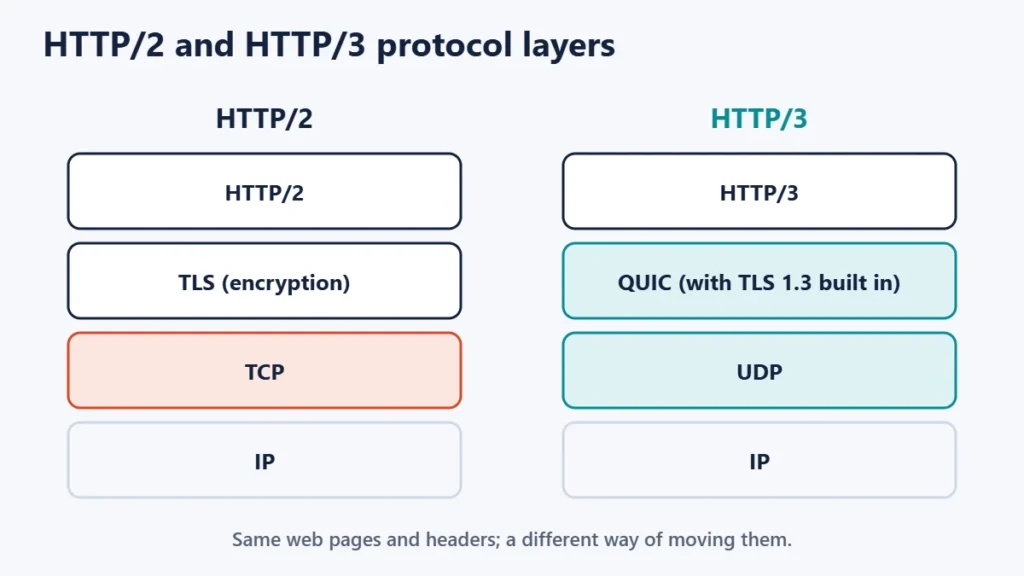
HTTP/3 is the newest version of the protocol browsers use to load websites, and its main change is that it runs over a transport called QUIC instead of TCP. MDN Web Docs explains that HTTP/3 uses QUIC over UDP instead of TCP, which reduces latency and eliminates the head-of-line blocking problem in HTTP. The pages themselves are the same; what changes is how the data travels.
For most website owners, turning on HTTP/3 is a setting at the host or CDN rather than a project. This guide explains what HTTP/3 and QUIC are, how they differ from HTTP/2, when they help, and how to check whether your site already uses them.
Key takeaways
- HTTP/3 uses QUIC over UDP instead of TCP.
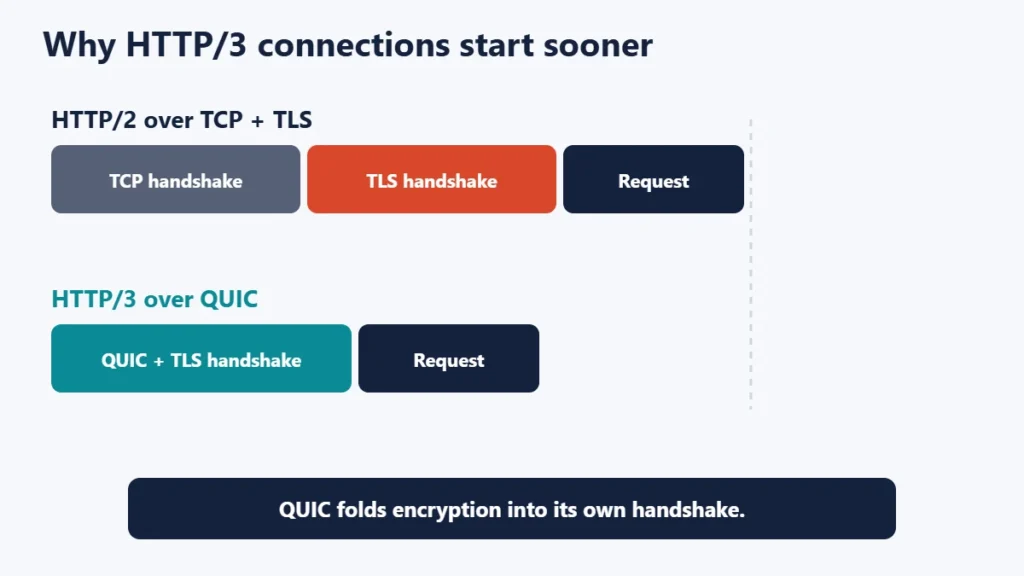
- Faster connection set-up: QUIC combines the encryption handshake with its own.
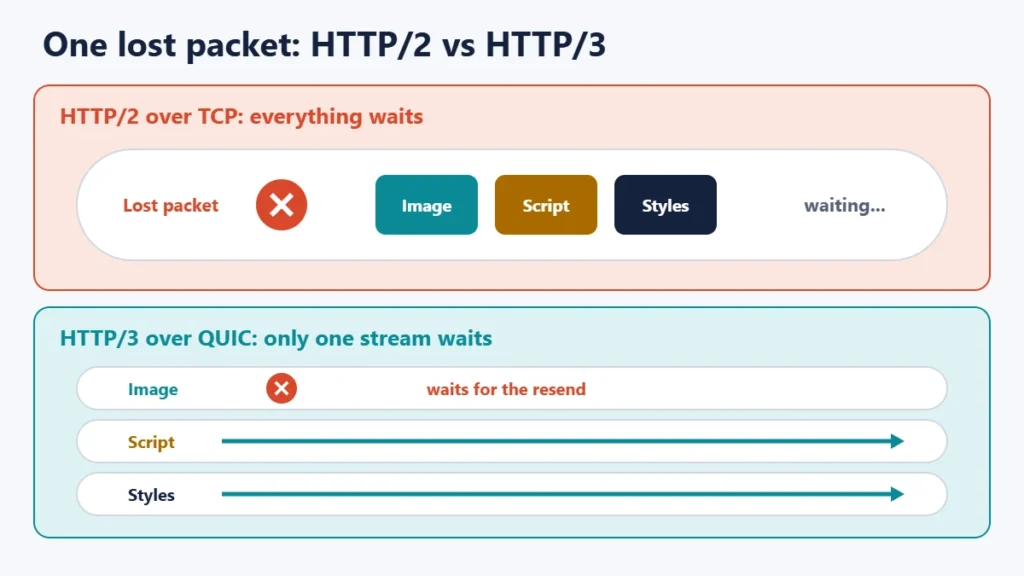
- Less blocking on lossy networks: a lost packet holds up only its own stream.
- Browsers fall back automatically to HTTP/2 or HTTP/1.1 when HTTP/3 is unavailable.
- Most sites get it through their CDN or host, often with one setting.
What HTTP/3 changes
HTTP/1.1, HTTP/2 and HTTP/3 all carry the same requests and responses: the same pages, headers and status codes. MDN’s history of HTTP says HTTP/3 has the same semantics as earlier versions but uses QUIC instead of TCP for the transport layer. RFC 9114, the HTTP/3 standard, describes it as a mapping of HTTP semantics over QUIC.
What QUIC is
MDN defines QUIC as a multiplexed transport protocol implemented on UDP. RFC 9000, the QUIC standard, says it provides flow-controlled streams, low-latency connection establishment and network path migration, and that it includes security measures for confidentiality, integrity and availability. In practice, QUIC brings two main improvements.
1. Faster connection set-up
With TCP and TLS, a browser completes one handshake to open the connection and another to set up encryption. MDN explains that QUIC integrates the TLS handshake into the initial QUIC handshake, reducing the number of messages exchanged during set-up. That shaves time off the first visit to a site, which matters most on high-latency connections.
2. No head-of-line blocking between streams
HTTP/2 sends many files over one TCP connection. If one packet is lost, TCP holds back everything behind it until that packet is resent, even data for other files. MDN notes that with QUIC, packet loss only blocks the particular stream whose packets were lost. Cloudflare’s documentation makes the same point, saying performance over lossy networks can be better.
HTTP/1.1 vs HTTP/2 vs HTTP/3
| HTTP/1.1 | HTTP/2 | HTTP/3 | |
|---|---|---|---|
| Transport | TCP | TCP | QUIC over UDP |
| Many files on one connection | Limited | Yes | Yes |
| Lost packet blocks other files | Yes | Yes, at the TCP level | No, only its own stream |
| Encryption | Optional (TLS) | TLS in practice | Built into QUIC |
| Fallback needed | No | Rarely | Yes, if UDP is blocked |
When HTTP/3 helps most
- Mobile and patchy connections, where packet loss is common.
- Visitors far from your server or CDN, where every round trip takes longer. Our guide on whether server location matters explains why distance adds delay.
- Pages with many files, such as images, scripts and stylesheets.
On fast, stable connections close to the server, the difference may be small. HTTP/3 is one part of speed; caching, image sizes and server response time usually matter more. Our website speed tips cover the bigger wins.
How browsers find HTTP/3
Browsers usually make their first connection to a site over HTTP/2 or HTTP/1.1. The server can then tell the browser that HTTP/3 is available using the Alt-Svc response header, which MDN describes as a way for a server to say that another network location can be used for future requests. If HTTP/3 fails, for example because a network blocks UDP, the browser keeps using the older version, so visitors are not locked out.
How to turn on HTTP/3
Through a CDN
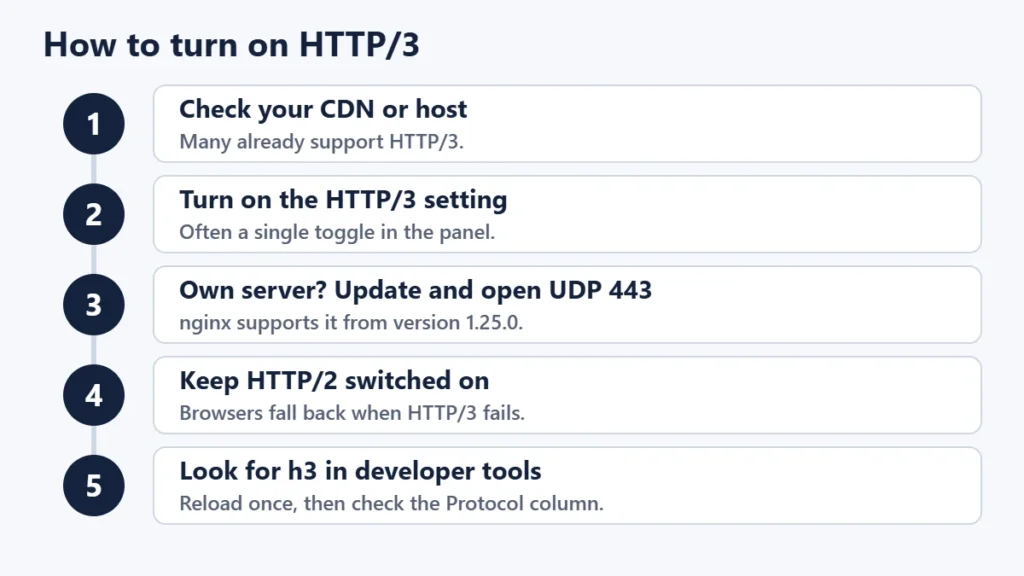
Many CDNs offer HTTP/3 as a setting. Cloudflare, for example, has an HTTP/3 toggle in its speed settings. Its documentation notes that the setting covers the connection between the user and Cloudflare, and that HTTP/3 to the origin server is not yet supported. That is fine: visitors still get HTTP/3 to the nearest CDN location. Our guide to CDNs explains how they sit in front of your site.
Through your host
Some hosts enable HTTP/3 by default, and others offer it as an option. Check your host’s documentation or control panel. Our comparison of Apache, Nginx and LiteSpeed explains the server software differences.
On your own server
nginx’s documentation says support for QUIC and HTTP/3 is available since version 1.25.0, and its HTTP/3 module page still describes the support as experimental. You also need to allow UDP traffic on port 443 through your firewall, and advertise HTTP/3 with an Alt-Svc header.
Check that it works
Open your site, then open the browser’s developer tools, go to the Network panel and show the Protocol column. Responses served over HTTP/3 are listed as h3. You may need to reload once, because the first visit often uses HTTP/2.
Common mistakes
- Expecting a big speed jump on every page. Gains depend on the network and the page.
- Blocking UDP port 443 on your own server’s firewall.
- Testing on the first visit only. Browsers often switch to HTTP/3 after discovering it.
- Turning off HTTP/2. Keep it as the fallback.
Frequently asked questions
Is HTTP/3 faster than HTTP/2?
It can be, especially on mobile or lossy connections and for distant visitors. On fast, stable connections the difference may be small.
Does HTTP/3 help SEO?
Not directly. It can help page speed, which affects user experience.
Do all browsers support HTTP/3?
Major current browsers support it, and those that cannot use it fall back to HTTP/2 or HTTP/1.1.
Is HTTP/3 secure?
Yes. Encryption is built into QUIC, so HTTP/3 is always encrypted.
What is the difference between QUIC and HTTP/3?
QUIC is the transport that moves the data; HTTP/3 is the version of HTTP that runs on top of it.
Why does my site still show HTTP/2?
HTTP/3 may be off at your host or CDN, UDP may be blocked on your network, or the browser may not have switched yet. Reload and check again.
The short version
HTTP/3 is the latest version of HTTP, running on QUIC over UDP instead of TCP. It sets up connections faster and stops one lost packet from holding up every file, which helps most on mobile and distant connections. Turn it on at your CDN or host, keep HTTP/2 as a fallback, and check for h3 in your browser’s developer tools. For hosting basics, see what web hosting is.

Justwebworld has published guides since 2012. How we write and update articles Report an error
