

Note (October 2026): Twitter was renamed X in July 2023, and this guide has been updated for X. An earlier version told readers to enter their Twitter password into a third-party tool; connect apps only through X’s own authorization page instead.
X (formerly Twitter) does not notify you when someone unfollows you, and it keeps no unfollow history. To find who unfollowed you, either check your followers list and the other person’s Following list by hand, or connect a third-party follower tracker such as Circleboom, which compares saved snapshots of your follower list and lists accounts that are no longer there.
Key Takeaways
- Twitter was renamed X in July 2023; X does not send a notification when someone unfollows you.
- For a single account, open their profile and check whether you appear in their Following list.
- For many accounts, third-party trackers such as Circleboom compare follower snapshots over time and list who left.
- Authorize trackers only through X’s own authorization page, never by typing your password into another site, and revoke access you no longer use.
- X’s rules prohibit bulk, aggressive or indiscriminate unfollowing, so do not mass-unfollow everyone who left.
Back in the school days, wasn’t it hurting to get an unsatisfactory reply from a friend who is too close to you? Didn’t it dishearten you any-day when your friend starts ignoring you?
Find Out Who Unfollowed You on Twitter

Almost all of us has gone through such a situation. Now with the help of technologies, one can stay connected to his loved ones, even when the distance separates’ them drastically.
But it is not always necessary that a person treats you the same way you treat him. So let’s relive our school days, and do exactly what we did then.
Let’s be the best of friends with the ones who are good to you, and treat the others differently.
1] Social Media – Our best friend
It is very aptly said that one should keep his friends close and enemies closer. Our social media account has always been one such friend who was there with us when no one else was.
It has seen all our ups and downs, all our highs and lows. Since years it has been undemanding friend of ours, which is continuously trying to bridge the gap between our friends and us. And because it has been such a wonderful friend of ours, we owe it some care too.
2] X (formerly Twitter) is an influential social media platform
Twitter, one of the most active social networks, was long known as the “in the moment” platform. The company announced its rebrand to X on July 22, 2023, and its domain moved from twitter.com to x.com on May 17, 2024, so the steps below refer to X. Looking after an account means keeping track of your followers, keeping it as free of spam as possible and knowing who unfollowed you on X (formerly Twitter). It can also show which connections have quietly drifted away.
3] Why is it useful to know who unfollowed you on X?
In this ever growing world, it is very meaningful to know who your real well-wishers are, both in your personal life and your corporate one. A basic first step is knowing who unfollowed you on X.
But don’t you think keeping a track of your followers will be a time consuming task? Checking a long follower list by hand is slow, which is why third-party tools such as CircleBoom (now styled Circleboom) compare saved snapshots of your follower list over time.
CircleBoom is one of several third-party tools marketed for this job, and it aims to make its users’ social media experience more manageable by showing who has stopped following them. An unfollow is not always personal: X says it removes locked accounts from follower counts, so a drop can happen without anyone choosing to leave.
4] Why CircleBoom ?
- It is a third-party dashboard for managing an X (formerly Twitter) account.
- It offers a free tier, which the company says it is committed to keeping; check its current plans to see which features are included.
- It provides follower analysis intended to support organic growth; no tool can guarantee growth, and X’s rules prohibit apps that claim to get users more followers.
- Helps you find accounts on X by keywords and trending topics, according to the company.
- Lists recent unfollowers (its “Who Unfollowed Me” view) and flags accounts it classes as fake, spam or inactive.
- Helps you schedule your tweets and posts well in advance.
- Gives access to analytics about your X account.
- According to the company, unfollowers can also be tracked from a smartphone.
5] How to see who unfollowed you on X using CircleBoom
If you want to know who unfollowed you, a follower-tracking tool such as CircleBoom is one option.
CircleBoom lists accounts you might choose to unfollow, including accounts that recently stopped following you. Here are some of the examples of services provided by CircleBoom.
- Unfollow accounts on twitter that is not following you.
- Unfollow the fake and inactive accounts from your twitter profile.
- Also Unfollow all those twitter accounts that are too noisy.
- Unfollow all the accounts on twitter that posts inappropriate and irrelevant articles.
- Unfollow accounts in these categories in bulk. Circleboom says bulk runs are paced at 50 unfollows every 15 minutes, up to 800 a day, and X’s automation rules prohibit following or unfollowing in a bulk, aggressive or indiscriminate manner, so use bulk tools sparingly.
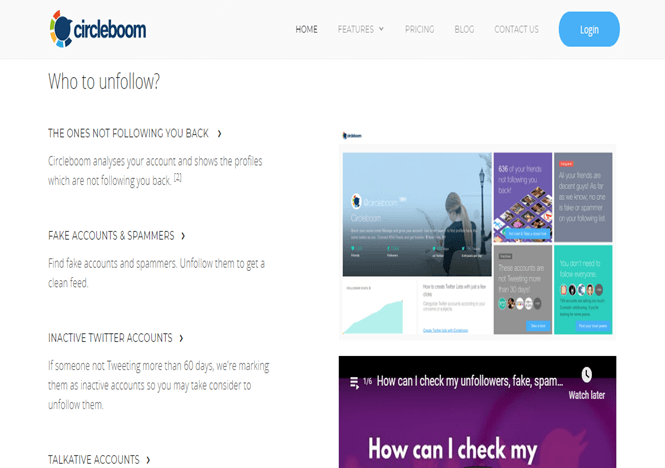
CircleBoom is simple to use. To see the accounts not following you back, connect it through X’s own sign-in and authorization page, and never enter your X password anywhere except on X itself.
Once you authorize it, CircleBoom can read your X account data and shows statistics under the headings listed above. You can review or revoke its access at any time in the Apps and sessions section of your X account settings.
One can obviously go through these simple statistics related to their social media accounts before taking any necessary actions.
6] Moving ahead of these statistics
In the 2019 version of CircleBoom shown in these screenshots, the feature menu sat on the left side of the screen; menu names in the current version may differ.
One of the many features displayed in this list is “UNFOLLOW – Find out who to Unfollow.” On clicking on this feature will display different subheads like:
- Not Following Back.
- Fake/ Spam.
- Inactives.
- Too Actives.
- Eggheads.
- All the ones I follow.
- Whitelist.
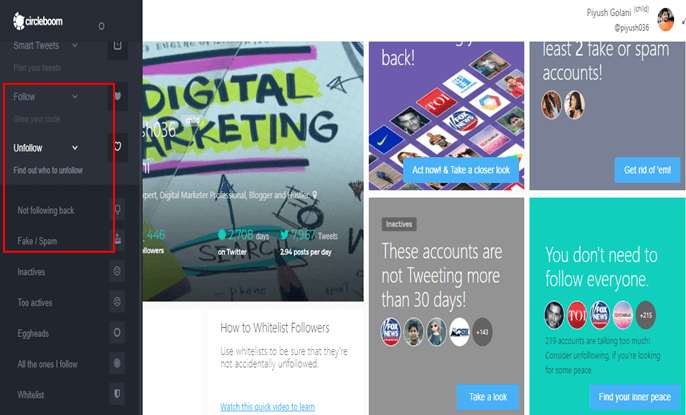
These categories group the accounts you might choose to unfollow to tidy up your X account.
Amongst the above mentioned subheads, one needs to go to the very first category that says “Not following you back” to get to know about the accounts that had recently unfollowed you.
In that 2019 version, clicking this category offered four filters:
- Not to include the accounts that you have started following lately.
- Preventing the verified accounts from being a part of the counting.
- Include the twitter accounts whitelisted by you.
- Only include the verified twitter accounts.
Once you choose the filters, the matching accounts are displayed, and you can unfollow them or keep following them.

CircleBoom describes itself as a twitter unfollow tool for managing an X account, including unfollowing accounts that no longer follow you.
CircleBoom is one option for an X account; compare it with other tools and check what account access it requests before connecting.
Happy CircleBooming!
Does X Notify You When Someone Unfollows You?
No. X’s Help Center states that X does not send a notification when you unfollow someone, and the same applies when someone unfollows you. By default, X sends an email when someone new follows you, and you can change that in your email preferences, but there is no matching alert or log for unfollows.
That is why every unfollow checker works the same way: it records your follower list, records it again later, and reports the accounts that disappeared between the two snapshots. A tracker cannot show unfollows from before you first connected it.
How to See Who Unfollowed You on X Without an App
The manual method is free and needs no third-party access. It works best when you suspect one or two specific accounts.
- Open your profile on X and select the followers link, which shows how many followers you have and who they are.
- Search the list for the account you are wondering about.
- If the account is missing, open that account’s profile and select its Following list to confirm whether you still appear there.
- If the account is protected or no longer exists, you may not be able to see its lists at all, which is not proof of an unfollow.
Why Your Follower Count Dropped When Nobody Unfollowed You
A falling follower count does not always mean people chose to leave. According to X’s Help Center, when accounts are locked, X removes them from follower counts across profiles globally, so if an account that follows you is locked, the number on your profile may go down.
Circleboom also notes that X’s data occasionally lists an account as an unfollower when it has not left, and that the next day’s check usually corrects it. Check twice before acting on a single result.
Manual Check vs Third-Party Unfollow Tracker
| Factor | Manual check on X | Third-party tracker (e.g. Circleboom) |
|---|---|---|
| Cost | Free | Free tier available; check current plans |
| Account access | None needed | You authorize the app to read your account data |
| Best for | Checking one or two accounts | Large accounts and ongoing monitoring |
| Unfollow history | None | Only from the day you first connect it |
| Main risk | Time-consuming | Data access and rule-breaking bulk actions |
How API Changes Affected Unfollow Apps
Unfollow trackers depend on access to the X API. According to TechCrunch, on February 8, 2023 Twitter said it was ending free API access and would charge $100 per month for the basic tier, extending the deadline for free access from February 9 to February 13. Check that a tool is still maintained before connecting it.
X Rules to Know Before You Unfollow in Bulk
Knowing who unfollowed you is allowed; how you react can break the rules. X’s follow-limit page sets these limits and prohibitions, as of October 2026:
- Daily limit: every X account can follow up to 400 accounts per day.
- Follow ratio: every account can follow up to 5,000 accounts; after that, further follows depend on the account’s own ratio of followers to following.
- Follow churn: following and then unfollowing large numbers of accounts to inflate your own follower count is prohibited.
- Indiscriminate following: following or unfollowing many unrelated accounts in a short time, particularly by automated means, is prohibited.
- Follower apps: using or promoting third-party services or apps that claim to add followers is prohibited.
X’s automation rules add that you may not follow or unfollow accounts in a bulk, aggressive or indiscriminate manner, and that you are responsible for actions taken by applications associated with your account. X says violations can lead to action including suspension of the account.
How to Use an Unfollow Tracker Safely
- Authorize on X, not on the app’s site. X’s Help Center says that connecting a third-party app grants it access to your account, and that you can decline by selecting cancel on the authorization page.
- Read the permissions. Depending on its permissions, an app may be able to read your posts, see who you follow, update your profile, post on your behalf or access your Direct Messages. A tracker only needs to read your account.
- Review connected apps regularly. You can review and revoke app access in the Apps and sessions section of your X account settings.
- Act slowly. Unfollow a few accounts at a time instead of mass-unfollowing everyone on the list.
If you are tidying your wider online presence, our guide on how to scrub your social media profiles covers privacy across networks, and how social media affects your focus is worth reading if follower counts are becoming a source of stress.
What to Do After Someone Unfollows You
An unfollow is usually about the other person’s feed, not about you. Before reacting, consider these steps:
- Confirm the unfollow is real by checking again the next day, since locked accounts also vanish from follower counts.
- Decide whether you still value their posts; if you do, keep following them.
- Look for patterns: if many people leave after a certain type of post, adjust your content. Our tips on how to increase your social media engagement can help.
- Do not pressure people to follow you back; X’s Help Center notes there is no way to send a request for other people to follow you.
For more on X, see how to download Twitter videos and the reasons to get your social media account verified; note that on X, verification has been tied to a paid subscription since November 9, 2022.
Frequently Asked Questions
Can you see who unfollowed you on X without an app?
Yes, but only by hand. Open your followers list on X and look for the account, or open that account’s Following list to see whether you still appear. X itself keeps no record of unfollows.
Does X tell someone when you unfollow them?
No. X’s Help Center states that X does not send a notification when you unfollow someone. The other person would only notice by checking their followers list or using a tracker.
Why did my follower count drop overnight?
Follower counts can drop without anyone unfollowing you. X removes locked accounts from follower counts across profiles, so if an account that follows you is locked, your displayed number can go down.
Is it safe to use a third-party unfollow tracker?
A tracker is safer when you connect it through X’s own authorization page, grant only the access it needs and revoke it when you stop using it. Never type your X password into a third-party website.
Can a tracker show who unfollowed me before I signed up?
No. Unfollow trackers compare snapshots of your follower list, so they can only report unfollows that happen after their first snapshot of your account.
Can I get suspended for unfollowing people?
Normal unfollowing is fine, but X’s rules prohibit following or unfollowing in a bulk, aggressive or indiscriminate manner and “follow churn” used to inflate follower counts. X says violations may result in suspension.

Justwebworld has published guides since 2012. How we write and update articles Report an error
