

Note (September 2026): Two of the five keyboards below (the JetBox and ZA Apps Studio apps) no longer load on Google Play, and the Bharat Keyboards sticker app, described here as ad-free, now states on its listing that it contains ads. The affected text has been updated and currently available options have been added.
The easiest way to type Bengali (Bangla) on Android is a dedicated keyboard app. As of September 2026, the most widely installed options on Google Play are Gboard (Google, 10B+ downloads, supports Bengali), Ridmik Keyboard (100M+, Avro-style phonetic typing) and Desh Bangla Keyboard (10M+). Two apps from the original 2020 list are no longer on Google Play.
Key Takeaways
- Still available (September 2026): Desh Bangla Keyboard, Bangla Keyboard by Simple Keyboard, theme & emoji, and Bangla Keyboard (Bharat).
- No longer on Google Play: Bangla Keyboard by JetBox and Bangla English Keyboard by ZA Apps Studio.
- Big-name alternatives: Gboard lists Bengali among its languages, and Ridmik Keyboard offers Avro-style phonetic, National and Probhat layouts.
- Ads: every third-party Bangla keyboard checked here carries a “Contains ads” label on Google Play; Gboard’s listing does not.
- Two ways to type: phonetic (type Bengali sounds in English letters) or a fixed Bengali layout such as the National (Jatiyo) layout.
Bengali is just as sweet as the sweets of Bengali people. It is one of those languages, that sound sweet even when you hear people quarrelling in it.
However, nowadays people don’t really write Bengali (or any regional language for that matters) mainly because typing has taken precedence. But communicating in your native language has a warm feeling, doesn’t it?
Best Bengali Typing Apps for Android
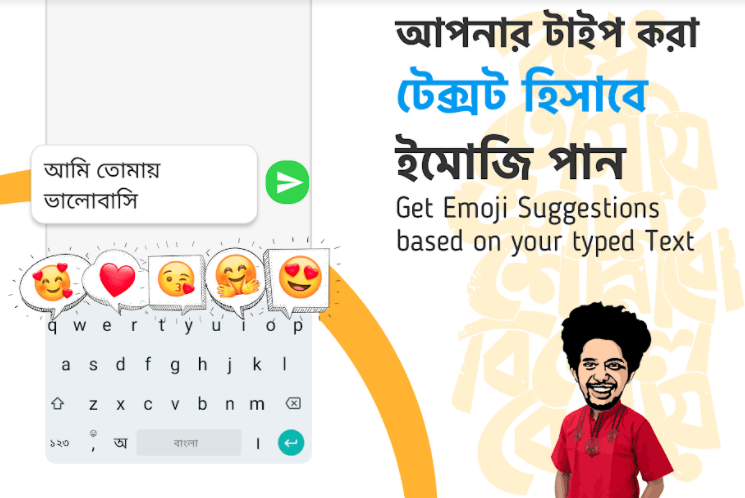
We especially long for this feeling when we are miles away from home sitting in your dorm room or alone in a city you are new to.
This is one reason Google’s own Android keyboard, Gboard, lists Bengali among its supported languages, alongside other major Indian languages such as Hindi, Tamil and Telugu. But a lot of people still find typing in Bangla quite difficult.
If you face a similar problem then it is time to switch your keyboard with a keyboard that is specially made for Bengali Audience.
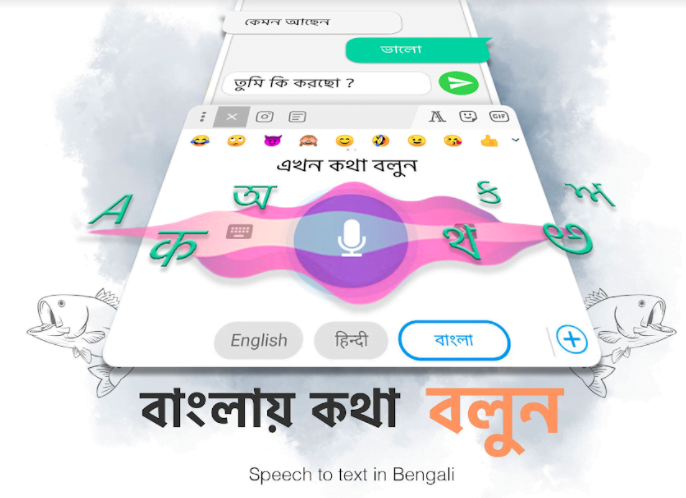
This list of five Bengali keyboards was first published in November 2020; each app’s Google Play availability was rechecked in September 2026, and the status is noted under each one.
Bangla Keyboard 2022 By JetBox
Play Store Rating – 4.4 (at the time of writing in 2020; the listing is no longer available on Google Play as of September 2026)
JetBox developers have developed language apps for many prominent languages. As of September 2026, the Google Play page for this JetBox Bangla keyboard no longer loads, so the app appears to have been withdrawn from the store; the original notes are kept below for reference. This keyboard was the first Bangla keyboard I ever tried. The app boasts of its ease and speed of typing Bangla.
It even supports phonetic Avro style typing. Some of its other features include glide typing, in-built Bangla dictionary for suggestions, customizable themes, and word correction.
The reason I had to switch from this app was similar to many other apps. After one of the updates, it stopped switching between English and Bangla. It voice typing feature didn’t work so well.
Bangla Keyboard 2022 By JetBoxBangla Keyboard byDesh Keyboards
Play Store Rating – 4.6 (the listing, now called Desh Bangla Keyboard, still showed about 4.6 on the US Google Play store in September 2026)
Desh Keyboards is yet another developer who have made keyboards for regional languages like Kannada, Tamil, Telugu, Gujrati, and Marathi. Its Bangla keyboard, now listed on Google Play as Desh Bangla Keyboard by Desh Keyboard, is popular: the listing showed 10M+ downloads and a September 2026 update. The current listing also advertises voice typing and a handwriting mode, so the voice-typing complaint below reflects the 2020 version.
The developers take pride in the speed of the keyboard. There are many features that are common among the keyboard apps including English to Bangla translation, phonetic Bangla transliteration, easy switch between English and Bangla Keyboards.
The problem with this keyboard is that it doesn’t work properly if your internet connection is switched off. It also didn’t have a good voice typing feature.
Bangla Keyboard byDesh KeyboardsBangla Keyboard by Simple Keyboard, theme and emoji
Play Store Rating – 4.5 (about 4.5 on the US Google Play store in September 2026)
This is another keyboard app that can help you type in Bengali with ease. As of September 2026 it is still on Google Play as Bangla Keyboard by the developer Simple Keyboard, theme & emoji, with 1M+ downloads, a last update in June 2026 and a listing that says it works offline. It is quite a feature-rich keyboard. Some of its amazing features include a complete dictionary, auto-correction, autosuggestion, more than 1000 plus Emoji’s, stylish stickers, customizable themes and so on. You can also choose keypress sound from a bunch of options available.
The problem I face with this app was that after updates one or the other key would stop working. It was quite nerve-wracking.
Bangla keyboard: Bengali Language KeyboardBangla English Keyboard by ZA Apps Studio
Play Store Rating – 4.8 (at the time of writing in 2020; the listing is no longer available on Google Play as of September 2026)
It was one of the less popular apps, with only 10,000 installs when this was written in November 2020. As of September 2026 its Google Play page no longer loads, so the app appears to have been removed and the button below may not work. But it works quite good and has basic good features that keyboard apps should have. ZA apps studio has also developed applications in languages including Hindi, Tamil, Telegu, bangla, and Marathi.
These developers take pride in the elegant UI and speed of their keyboards. The app comes with rich Bangla dictionary. It has features like Bangla words suggestion, spell check, and alternative local Bangla words. The thing I liked about the keyboard was how well it worked offline.
There are not any glitches that I faced with it but the only reason I switched this app was because of one feature that it did not have. Customizable Bangla Stickers!
Bangla English Keyboard by ZA Apps StudioBangla Keyboard with Bangla Stickers
Play Store Rating – 4.7 (at the time of writing in 2020; about 4.2 on the US Google Play store in September 2026)
This app is the reason I ditched the earlier app. It is truly one of the best Bangla apps on play store. It allows you to either write in Bangla directly or use its brilliant text to voice features and let the keyboard write for you. I prefer this keyboard for its amazing algorithm that really grasps the user intent and the Bangla accent.
But the best part about this application is that it allows you to create Animated photos/avatars of yourself. You can then use these pictures to generate personalized Bangla stickers (Stickers with your animated avatar head). You can also create similar stickers using photos of your friends and loved ones and add Bangla text of your choice.
Bangla Keyboard has a wide range of gifs and Bangla stickers for you to choose from. This app also allows its users to create a personalized theme for the Bangla Keyboard or choose from many default themes that come with the keyboard.
Bangla Keyboard with Bangla Stickers will enhance the chatting experience for its users entirely. With amazing fonts and Bigmoji’s that this keyboard lets you send you will stand out. The app is free to download, but as of September 2026 its Google Play listing, now titled Bangla Keyboard (Bharat) by Bharat Keyboards, states that it contains ads. The listing had last been updated on 15 February 2024.
Do give these keyboards a try and let me know which one worked out for you. Maybe the new updates will change my experience for some of these apps in future.
Download Bangla Keyboard with Stickers here!
Which Bengali Keyboards Are Still Available?
The table below shows the Google Play status of the five keyboards in this list, checked in September 2026. Ratings are those shown on the US Google Play store; ratings and download counts differ by country and change over time.
| App (current listing name) | Developer | Status, September 2026 | Downloads | Rating (US) | Last updated |
|---|---|---|---|---|---|
| Bangla Keyboard by JetBox | JetBox | Listing no longer loads | – | – | – |
| Desh Bangla Keyboard | Desh Keyboard | Available; contains ads and in-app purchases | 10M+ | about 4.6 | 24 September 2026 |
| Bangla Keyboard | Simple Keyboard, theme & emoji | Available; contains ads | 1M+ | about 4.5 | 24 June 2026 |
| Bangla English Keyboard | ZA Apps Studio | Listing no longer loads | – | – | – |
| Bangla Keyboard (Bharat) | Bharat Keyboards | Available; contains ads | 1M+ | about 4.2 | 15 February 2024 |
An app that has not been updated for more than two years, such as the Bharat Keyboards app, may still work for many users, but it receives no new fixes. Readers who want an actively maintained keyboard may prefer one of the options below.
Other Bengali Keyboards Worth Knowing
Gboard (Google)
Gboard is Google’s keyboard app for Android and iOS. Its Google Play listing names Bengali among its supported languages and lists Glide Typing, voice typing, handwriting, multilingual typing and built-in Google Translate. As of September 2026 the listing shows 10B+ downloads and does not carry a “Contains ads” label. Many Android phones already have Gboard installed, so many readers can add Bengali without installing a new app.
Ridmik Keyboard
Ridmik Keyboard, published by Ridmik Labs, is one of the most installed Bangla keyboards, with 100M+ downloads on Google Play as of September 2026. According to its listing, it offers a Bangla phonetic keyboard similar to Avro, the National and Probhat layouts, continuous voice typing, next-word suggestions, a clipboard and Arabic and Chakma add-ons. The listing shows ads and in-app purchases, and the developer states that the app has not collected personal data in its 11 years.
Quick comparison
| Keyboard | Phonetic typing | Fixed Bengali layouts | Voice typing | Ads label on Google Play |
|---|---|---|---|---|
| Gboard | Bengali supported | Not detailed on listing | Yes | No |
| Ridmik Keyboard | Yes (Avro-style) | National, Probhat | Yes | Yes |
| Desh Bangla Keyboard | Yes (type English, get Bangla) | Alphabet and handwriting modes | Yes | Yes |
| Bangla Keyboard (Simple Keyboard) | English-to-Bangla typing | Not stated on listing | Not stated on listing | Yes |
| Bangla Keyboard (Bharat) | Yes | Not stated on listing | Yes | Yes |
Phonetic vs Fixed Layouts: How Bengali Typing Works
Phonetic typing lets users type Bengali words as they sound in English letters, and the keyboard converts them into Bengali script. The best-known phonetic system is Avro Phonetic, part of Avro Keyboard, a free and open-source program by OmicronLab first published on 26 March 2003. According to Wikipedia, several other applications have adapted Avro’s phonetic layout for Android and iOS.
Fixed layouts map each key to a Bengali character. The Bangla Jatiyo (National) layout was developed by the Bangladesh Computer Council and is used as the official layout in Bangladesh; Probhat and UniJoy are other layouts. Fixed layouts take longer to learn but avoid the guesswork of converting English spellings.
Whatever the method, modern keyboards produce standard Unicode text. The Bengali Unicode block runs from U+0980 to U+09FF and is also used for Assamese and several other languages. The Unicode code point converter shows the code point behind any Bengali character.
Why a Good Bengali Keyboard Matters
Bengali, also called Bangla, is an Indo-Aryan language with over 242 million native speakers and another 43 million second-language speakers as of 2025, according to Wikipedia, making it the sixth most spoken native language in the world. It is the official and national language of Bangladesh and an official language of the Indian states of West Bengal and Tripura and of the Barak Valley region of Assam. The Government of India granted Bengali classical language status on 3 October 2024.
The Bengali script is an abugida: vowels mostly appear as marks attached to consonants, and the script has many conjuncts. That is why a keyboard with good suggestions and conjunct handling matters for everyday typing.
How to Set Up a Bengali Keyboard on Android
- Install the keyboard from Google Play, or open Gboard if it is already on the phone.
- Open the app after installing; apps such as the Bharat Keyboards app walk users through enabling it and choosing it as the default keyboard.
- Choose phonetic or a fixed layout (for example National or Probhat) in the keyboard’s settings, where the app offers a choice.
- Use the language key to switch between Bangla and English; on Desh Bangla Keyboard, the key to the left of the space bar toggles Bangla on and off.
- Practise with short messages first. The guide on how to type faster and the online typing speed test can help build speed.
Privacy and Safety Tips for Keyboard Apps
- Check the Data safety section on each app’s Google Play listing before installing, because a keyboard handles everything that is typed.
- Review permissions. Ridmik’s listing, for example, explains that it requests microphone and internet access for voice input and contacts access for name suggestions, which can be switched off in settings.
- Prefer maintained apps. Apps that no longer appear on Google Play, or that have not been updated for years, receive no new fixes.
- Expect ads in free apps. The third-party Bangla keyboards checked here are free with ads; some also sell extras as in-app purchases.
Readers who type in other Indian languages may also find the guide to seamless Malayalam typing useful, and the list of Android apps to boost productivity covers more everyday tools.
Frequently Asked Questions
Which is the best Bengali keyboard for Android?
There is no single best Bengali keyboard; it depends on how you type. As of September 2026, Gboard (10B+ downloads) suits people who want one keyboard for Bengali and English with no ads label, Ridmik Keyboard (100M+) suits Avro-style phonetic and National layout users, and Desh Bangla Keyboard (10M+) adds handwriting and sticker features.
Can I type Bengali with Gboard?
Yes. Gboard’s Google Play listing names Bengali among its supported languages, and it supports multilingual typing, so Gboard can suggest words from any enabled language without manual switching.
What is phonetic Bangla typing?
Phonetic Bangla typing means writing Bengali words as they sound using English letters, with the keyboard converting them into Bengali script. Avro Phonetic, released by OmicronLab in 2003, is the best-known system, and Android apps such as Ridmik Keyboard offer an Avro-style phonetic mode.
Is Avro Keyboard available for Android?
Avro Keyboard itself is desktop software for Windows, Linux and macOS. Its phonetic layout has been adapted by other applications for Android, including Ridmik Keyboard, whose listing describes its phonetic mode as similar to Avro.
Do Bengali keyboard apps work offline?
Some do: the Simple Keyboard Bangla app, for example, says on its listing that it works offline. Voice typing is different; Ridmik’s listing states that it uses internet access for voice input.
Are Bengali keyboard apps free?
The apps in this article are free to download. As of September 2026, the third-party Bangla keyboards checked here all carry a “Contains ads” label on Google Play, and Desh Bangla Keyboard and Ridmik Keyboard also offer in-app purchases.

Justwebworld has published guides since 2012. How we write and update articles Report an error
