

DNSSEC (Domain Name System Security Extensions) adds digital signatures to your domain’s DNS records, so resolvers can check that the answers they receive are genuine and have not been changed. ICANN explains that DNSSEC strengthens DNS authentication using digital signatures based on public key cryptography. It does not encrypt anything: RFC 4033, the standard that introduces DNSSEC, states plainly that these extensions do not provide confidentiality.
For a website owner, DNSSEC helps protect visitors from being sent to a fake server through forged DNS answers. It is usually a few clicks to turn on, but it must be handled carefully when you change DNS providers. This guide explains how it works, what it protects against, and how to enable it safely.
Key takeaways
- DNSSEC signs DNS records, proving they come from the domain’s real zone and were not altered.
- It does not encrypt DNS. That is what DNS over HTTPS and DNS over TLS do.
- It needs two parts: signed records at your DNS provider and a DS record at your registrar.
- Validating resolvers check the signatures; Google Public DNS is one.
- Turn it off properly before moving DNS, or your domain can stop resolving.
Why DNS needs protecting
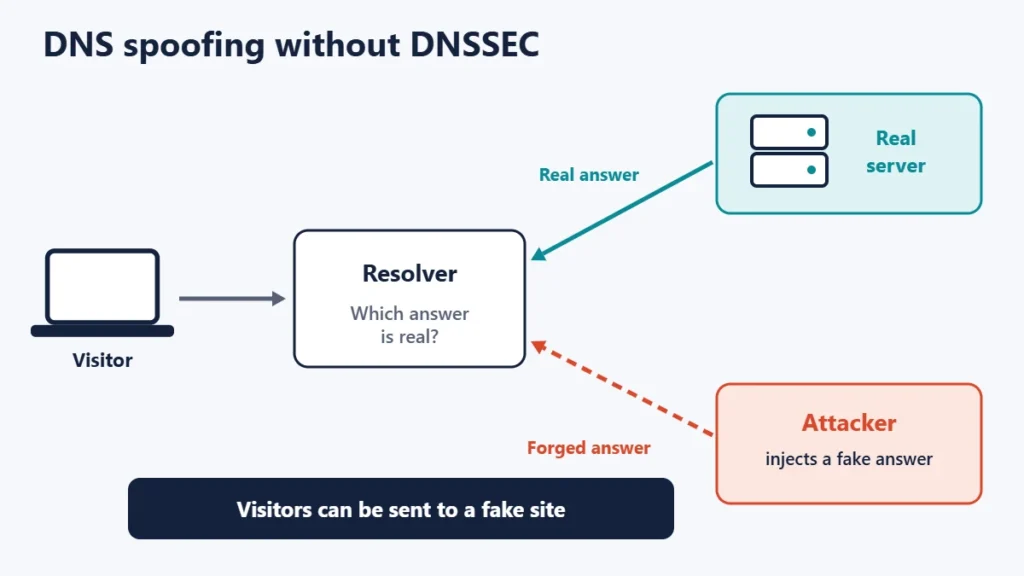
DNS was designed without a way to prove that an answer is genuine. If an attacker can inject a false answer, for example by poisoning a resolver’s cache, visitors who type your address could be sent to a server the attacker controls. Our guide to major DNS attack types describes these attacks in more detail.
How DNSSEC works
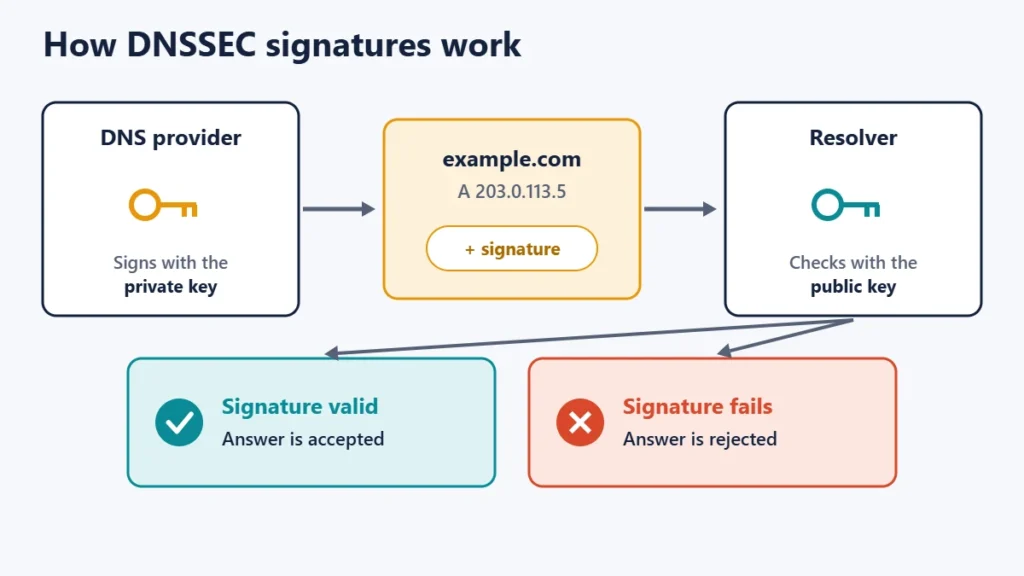
With DNSSEC, the zone that holds your domain’s records signs them with a private key. Resolvers use the matching public key to check each signature. ICANN describes the two guarantees this gives:
- Data origin authentication: a resolver can cryptographically verify that the data came from the zone it believes it came from.
- Data integrity protection: the resolver knows the data has not been modified in transit since the zone owner signed it.
The chain of trust
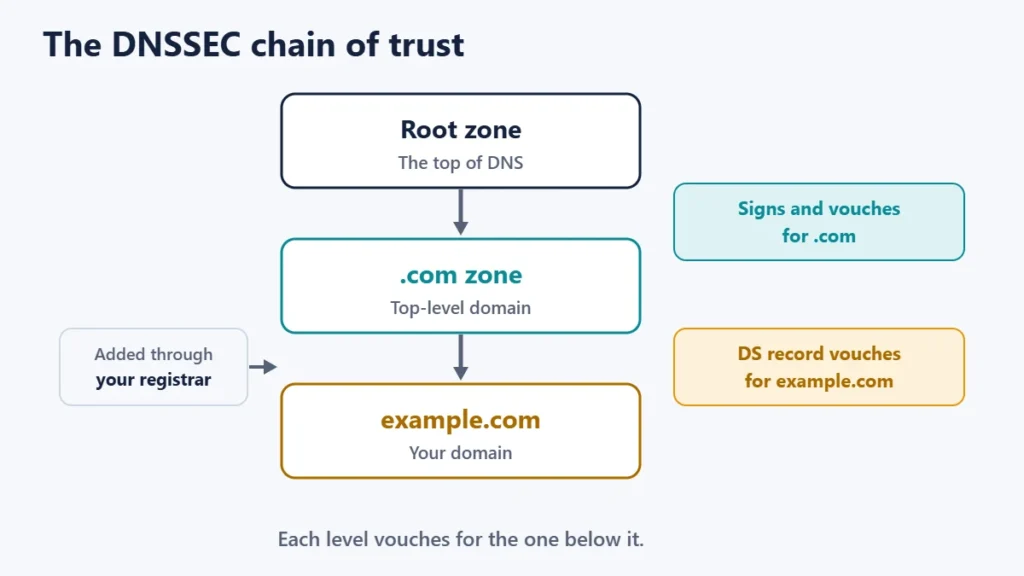
A resolver needs a way to trust your public key. DNSSEC solves this with a chain: the root zone vouches for top-level domains such as .com, and the top-level domain vouches for your domain through a DS (Delegation Signer) record that your registrar submits on your behalf. Each link is signed by the one above it.
DNSSEC vs DNS over HTTPS
| DNSSEC | DNS over HTTPS / TLS | |
|---|---|---|
| What it does | Proves DNS records are authentic | Encrypts lookups in transit |
| Hides which sites you look up | No | Yes, from the network |
| Stops forged answers | Yes, at validating resolvers | Only between you and your resolver |
| Set up by | The domain owner | The user or device |
The two work well together: DNSSEC proves the records are real, and encrypted DNS keeps your lookups private on the way. RFC 4033 notes that DNSSEC is not designed to provide confidentiality, so it is not a privacy tool.
Who checks DNSSEC signatures
Signatures only help if the resolver checks them. Google’s Public DNS FAQ describes it as a validating, security-aware resolver, and says all responses from DNSSEC-signed zones are validated unless the client explicitly asks it not to. When a resolver like this finds a bad or missing signature on a signed domain, it refuses to return the answer rather than pass on something that might be forged. Our guide to the best DNS servers compares popular resolvers.
How to turn on DNSSEC
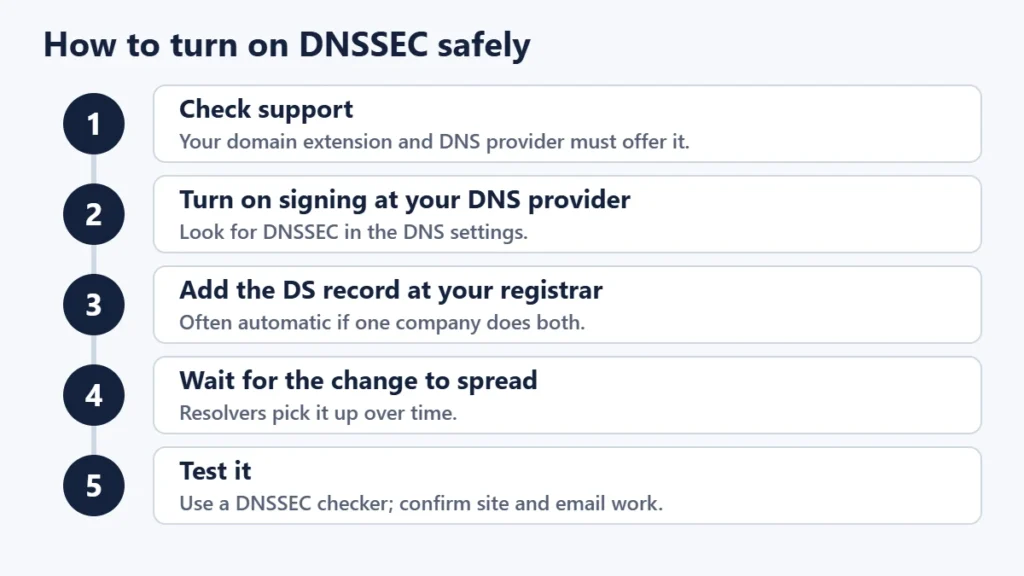
- Find out who runs your DNS. It may be your registrar, your host or a separate DNS service. Our guide to nameservers and A records explains how to check.
- Turn on DNSSEC signing at the DNS provider. Look for a DNSSEC option in the DNS settings.
- Add the DS record at your registrar. If your registrar also runs your DNS, this is often done automatically. Otherwise, copy the DS details from the DNS provider into the registrar’s DNSSEC settings.
- Wait for the change to spread. Our guide to DNS propagation explains timing.
- Test it with a DNSSEC checking tool, and confirm your website and email still work.
The big risk: changing DNS providers
The most common way DNSSEC causes problems is during a move. If the DS record at the registrar still points to the old provider’s keys after you switch nameservers, validating resolvers will treat your domain’s answers as invalid and refuse to return them. To visitors using those resolvers, your website and email simply stop working.
To move safely, either remove the DS record and wait before switching, then re-enable DNSSEC at the new provider, or follow your new provider’s documented process for moving a signed domain. If email is on a separate service, check our guide to email hosting vs web hosting so its records move too.
Should you turn on DNSSEC?
- Yes, if your DNS provider makes it simple and you do not change providers often.
- Especially yes for sites where impersonation would cause harm, such as shops, banks or login pages.
- Wait, if you are about to move DNS providers. Enable it after the move.
Common mistakes
- Switching nameservers without removing the old DS record. The domain can stop resolving.
- Enabling signing but never adding the DS record. Without it, the chain of trust is incomplete.
- Expecting privacy. DNSSEC does not encrypt anything.
- Thinking it replaces HTTPS. Visitors still need a valid certificate; see our guide to fixing “Not secure” warnings.
Frequently asked questions
Does DNSSEC encrypt DNS?
No. It signs records to prove they are genuine. Encryption comes from DNS over HTTPS or DNS over TLS.
Does DNSSEC affect SEO?
Not directly. It protects visitors from forged DNS answers, which helps trust and availability.
Does DNSSEC slow down my website?
It adds some extra data to DNS answers, but lookups are usually cached, so visitors are unlikely to notice.
What is a DS record?
It is the record at your domain’s parent zone, added through your registrar, that links your domain’s keys into the DNSSEC chain of trust.
How do I know if DNSSEC is working?
Use a DNSSEC checking tool, which shows whether your domain’s chain of trust validates.
Can DNSSEC break my website?
Only if it is misconfigured, most often when the DS record does not match the current DNS provider’s keys.
The short version
DNSSEC signs your domain’s DNS records so validating resolvers can reject forged answers. It does not encrypt anything, so pair it with HTTPS and encrypted DNS for privacy. Turn it on at your DNS provider, add the DS record at your registrar, test it, and always remove or update the DS record before moving to a new DNS provider. For hosting basics, see what web hosting is.

Justwebworld has published guides since 2012. How we write and update articles Report an error
