

Hostinger sells four VPS plans, KVM 1 to KVM 8, from $6.49 a month on a 24-month term in its current sale. With our extra 20% partner discount (code HARSHILBAROT), KVM 1 comes to $5.19 a month and renews at $11.99. Every plan gives you full root access, AMD EPYC processors, NVMe storage and free weekly backups. It is a self-managed server: you look after the software, and Hostinger looks after the hardware.
This guide covers every Hostinger VPS plan and price, what is included, which plan to choose, how to log in to your VPS and how backups work. All figures come from Hostinger’s own pages and help articles, checked on 22 October 2026, in US dollars before tax.
Hostinger VPS plans
| Plan | CPU | RAM | NVMe storage | Bandwidth |
|---|---|---|---|---|
| KVM 1 | 1 vCPU core | 4 GB | 50 GB | 4 TB |
| KVM 2 (most popular) | 2 vCPU cores | 8 GB | 100 GB | 8 TB |
| KVM 4 | 4 vCPU cores | 16 GB | 200 GB | 16 TB |
| KVM 8 | 8 vCPU cores | 32 GB | 400 GB | 32 TB |
Hostinger VPS pricing by term
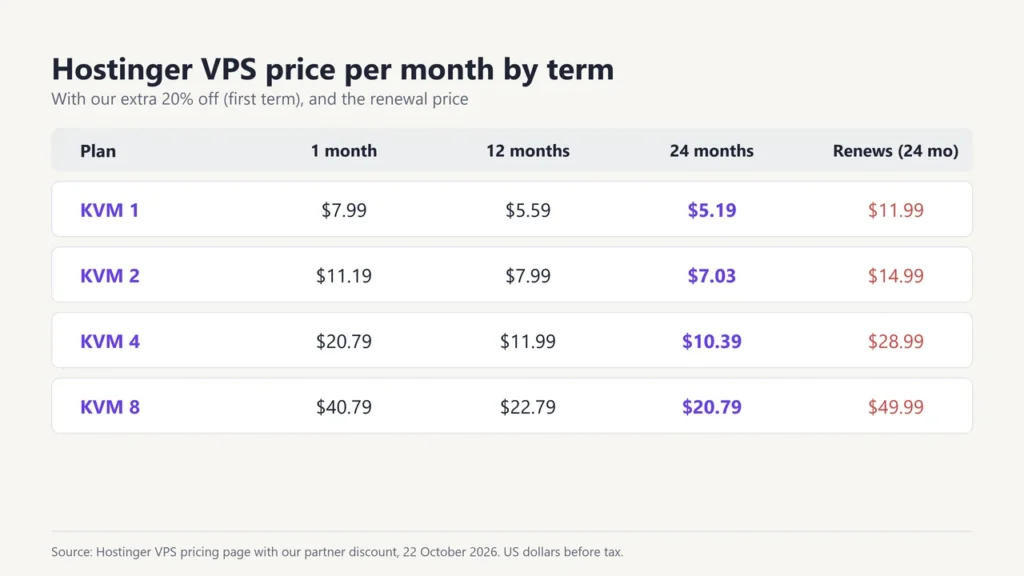
Hostinger sells VPS plans on 1, 12 or 24-month terms. These are the prices with our 20% partner discount applied, which Hostinger showed on every term:
| Plan | 1 month | 12 months | 24 months |
|---|---|---|---|
| KVM 1 | $7.99 (renews $19.49) | $5.59 (renews $12.99) | $5.19 (renews $11.99) |
| KVM 2 | $11.19 (renews $24.49) | $7.99 (renews $16.99) | $7.03 (renews $14.99) |
| KVM 4 | $20.79 (renews $42.99) | $11.99 (renews $30.99) | $10.39 (renews $28.99) |
| KVM 8 | $40.79 (renews $73.99) | $22.79 (renews $53.99) | $20.79 (renews $49.99) |
Without our discount, the sale price on 24 months was $6.49 a month for KVM 1 and $8.79 for KVM 2. The regular price of KVM 1 is $19.49 a month.
What every Hostinger VPS includes
- Full root access to set up the server your way
- AMD EPYC processors and NVMe SSD storage
- KVM virtualisation, which Hostinger says gives each VPS its own isolated environment
- Free weekly backups, restorable from the dashboard
- DDoS protection (Wanguard filtering) and firewall management
- 1 Gbps network speed and a public API
- AI web terminal, where you can run server tasks in plain language
- A free domain for 1 year
- A 30-day money-back guarantee
You can start from a plain operating system (such as Ubuntu, Debian or AlmaLinux) or from a ready-made template, including WordPress, Docker, n8n and control panels such as CloudPanel.
Is Hostinger VPS managed or self-managed?
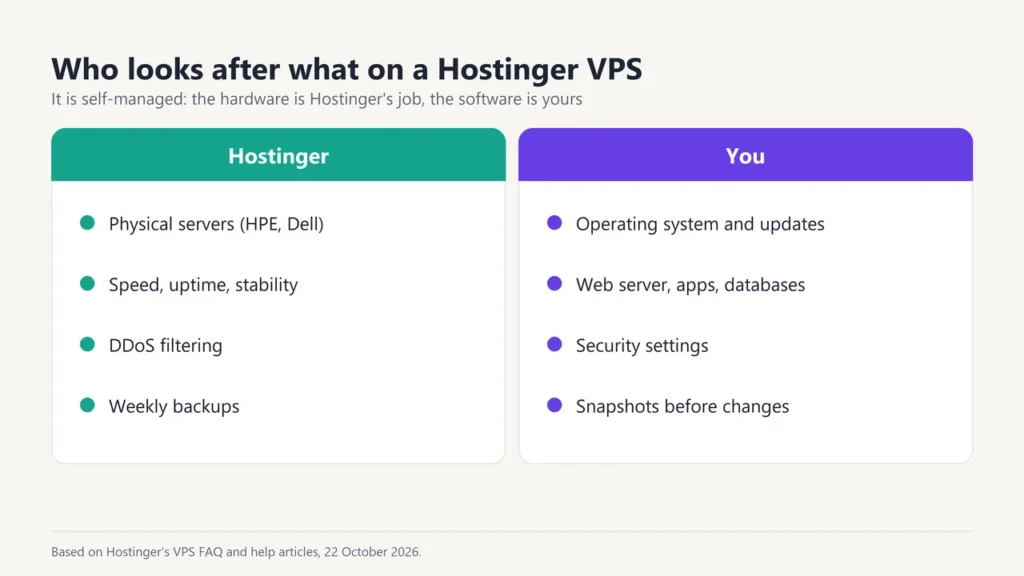
Self-managed. Hostinger’s FAQ says you are responsible for your virtual server, while Hostinger takes care of the speed, uptime and stability of the physical servers. That means you install updates, configure software and secure the server yourself (the AI terminal and templates help). Hostinger suggests moving to a VPS once normal web hosting no longer meets your needs and you know how to manage a server.
Which Hostinger VPS plan should you choose?
- KVM 1: a small website, a test server, or a light app such as a personal n8n setup.
- KVM 2: the plan Hostinger marks as most popular; a sensible start for a busy WordPress site, several small sites, or a small game server.
- KVM 4: online stores, bigger apps, or several busy sites.
- KVM 8: heavy workloads, such as large databases or running AI models.
If you are not sure you need a VPS at all, read our signs you need to upgrade to VPS hosting. Normal shared hosting is cheaper and fully managed (see our Hostinger plans and pricing guide).
How to get started with a Hostinger VPS
- Choose a plan and term, and complete your order.
- Finish the onboarding: pick an operating system or a template and set the root password for your server.
- Wait a few minutes. Hostinger says most servers are ready within minutes after onboarding, though payment checks or some templates can take longer.
- Open your server from VPS in the Hostinger dashboard.
How to log in to your Hostinger VPS
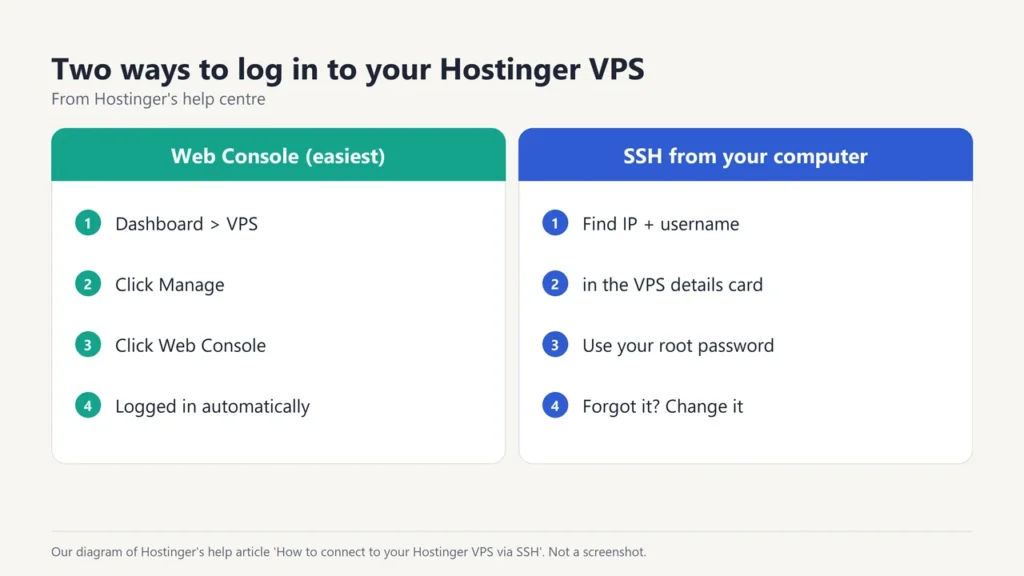
Hostinger’s help centre gives two ways:
- Web Console (easiest): go to VPS, click Manage next to your server, then click Web Console at the top right. It logs you in to the command line automatically.
- SSH from your computer: on the VPS Overview page, find the SSH username and IPv4 address in the VPS details card, then connect with your SSH client and the root password you set. Hostinger cannot show your password; if you forget it, click Change under Root password.
Hostinger VPS backups and snapshots
Hostinger’s help centre explains the difference:
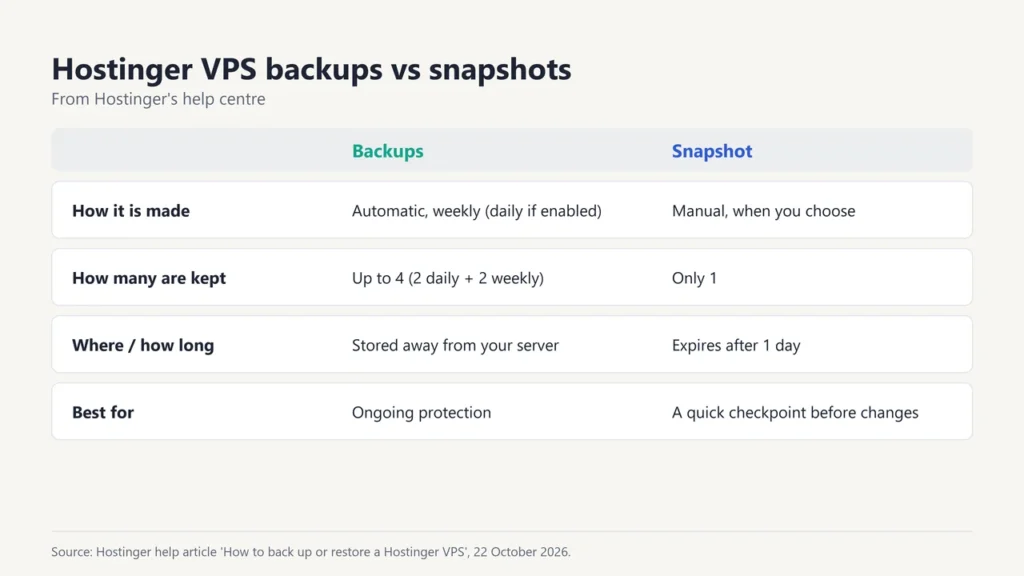
- Backups run automatically every week (or daily, if you turn daily backups on) and are stored away from your server. Up to four are kept: two daily and two weekly.
- Snapshots are a manual copy of your whole VPS that you take before a risky change. You can keep only one, it expires after 1 day, and it is deleted if you reinstall the OS or restore a backup.
Both live under Backups & Monitoring, then Snapshots & Backups, in your VPS dashboard. Restoring overwrites everything on the server and cannot be undone, so download any files you want to keep first.
Hostinger VPS prices in India
| Plan | Price (24 months) | Renews at |
|---|---|---|
| KVM 1 | ₹599/mo | ₹999/mo |
| KVM 2 | ₹779/mo | ₹1,199/mo |
| KVM 4 | ₹1,099/mo | ₹2,399/mo |
| KVM 8 | ₹2,199/mo | ₹4,399/mo |
Hostinger VPS coupon code
Our code HARSHILBAROT takes an extra 20% off the first term of any new VPS plan, on top of the sale price. Opening Hostinger through our link applies it automatically; if the cart does not show the 20%, type the code under “Have a coupon code?”. Hostinger says the discount does not apply to renewals, and other promo codes won’t add anything on top. More details are in our Hostinger coupon code guide.
Comparing VPS deals from other hosts? See our Black Friday VPS hosting deals, or our Hostinger alternatives guide for managed cloud options. To run WordPress on a VPS, our WordPress on Hostinger guide covers the VPS template.
Frequently asked questions
How much is Hostinger VPS?
On 22 October 2026, KVM 1 was $6.49 a month on 24 months in the sale, or $5.19 with our extra 20% off. It renews at $11.99 a month.
What does Hostinger KVM 2 include?
2 vCPU cores, 8 GB of RAM, 100 GB of NVMe storage and 8 TB of bandwidth, plus root access, weekly backups and DDoS protection.
How do I log in to my Hostinger VPS?
Go to VPS in your Hostinger dashboard, click Manage, then Web Console. Or connect by SSH with the username and IP address shown in the VPS details card and your root password.
Is Hostinger VPS managed?
No, it is self-managed. You manage the server software; Hostinger manages the physical hardware.
Does the Hostinger coupon work on VPS?
Yes. On 22 October 2026, our 20% partner discount showed on all four VPS plans and on all three terms (1, 12 and 24 months).
Can I pay for Hostinger VPS monthly?
Yes. KVM 1 was $7.99 for the first month with our discount, then $19.49 a month. Longer terms are much cheaper per month.
Does Hostinger VPS have backups?
Yes. Free automatic weekly backups are included, you can turn on daily backups, and you can take a manual snapshot before making changes.

Justwebworld has published guides since 2012. How we write and update articles Report an error
