

Affiliate disclosure: Some links in this review are referral links. If you buy through them, Justwebworld may earn a commission at no extra cost to you. That commission does not change our scores, and the criticisms in this review are the same ones we would publish without it. Our editorial policy explains how we handle this.
Prices verified 21 July 2026 in USD on hostinger.com. Hosting promotions change frequently and vary by country – always confirm the current price at checkout.
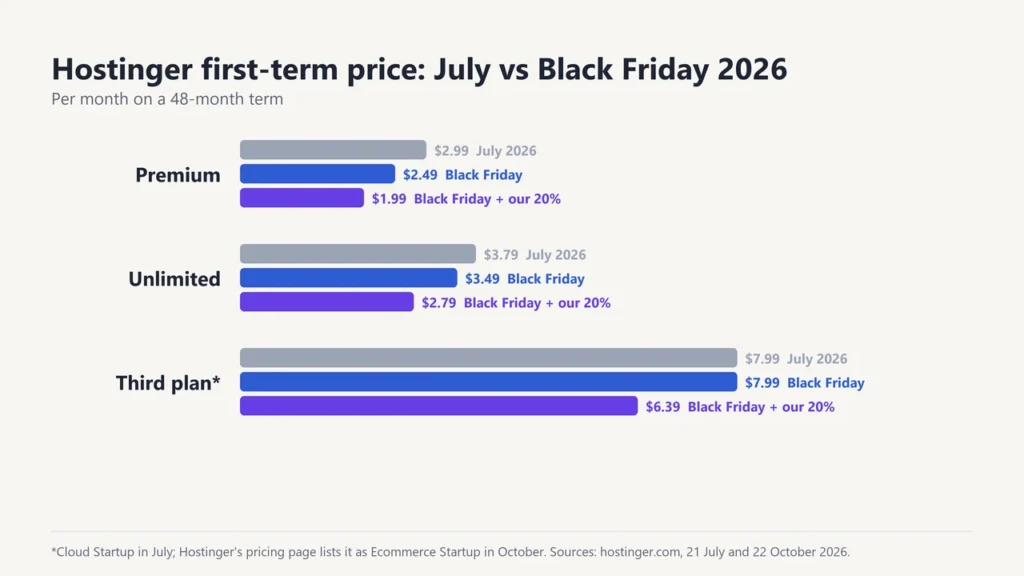
Black Friday update (22 October 2026): Hostinger’s sale runs from 19 October to 14 December 2026. During the sale, Premium costs $2.49 a month on a 48-month term, or $1.99 ($95.52 upfront) with our extra 20% partner discount. Unlimited is $3.49 ($2.79 with our discount). The third plan, which Hostinger’s main pricing page now lists as Ecommerce Startup, is $7.99 ($6.39). Renewal prices have not changed. The July 2026 figures in this review are Hostinger’s normal promotional prices, kept for comparison. Our Hostinger plans and pricing guide lists every term from 1 to 48 months.
If you are buying around November, check our list of Black Friday web hosting deals first.
Our Cyber Monday web hosting deals guide shows how long Hostinger’s sale runs.
For this year’s sale prices and dates, read our Hostinger Black Friday sale guide.
The Short Verdict
Hostinger is the best-value shared hosting you can buy right now if – and this is the part most reviews skip – you are willing to pay for four years upfront and you understand what happens when that term ends.
At $2.99/month on a 48-month term, the Premium plan is genuinely cheap: $143.52 for four years of hosting, a free domain for year one, and a stack (LiteSpeed, NVMe, HTTP/3) that most budget hosts charge more for. Very little else at that price competes.
Renewal is where the story changes. Premium renews at $10.99/month – 3.7x the promotional rate. That is not a scandal; nearly every budget host does it. But it means the honest way to describe Hostinger is cheap to start, mid-priced to keep, and a review that only quotes the $2.99 figure is telling you half the story.
- Buy Hostinger if you are launching a blog, portfolio, small business site, or a WordPress project doing under roughly 50k visits a month, and you want the lowest realistic four-year cost.
- Look elsewhere if you need month-to-month billing, phone support, a serious WooCommerce store, or guaranteed dedicated resources.
Our score: 8.3/10. Scoring method is explained at the end of this review.

Hostinger Pricing: The Numbers Most Reviews Leave Out
This is the section people actually come for, so it goes first rather than buried at position nine.
Current shared hosting prices
| Plan | Promo (48-mo term) | Renews at | Sites | Storage | Backups |
|---|---|---|---|---|---|
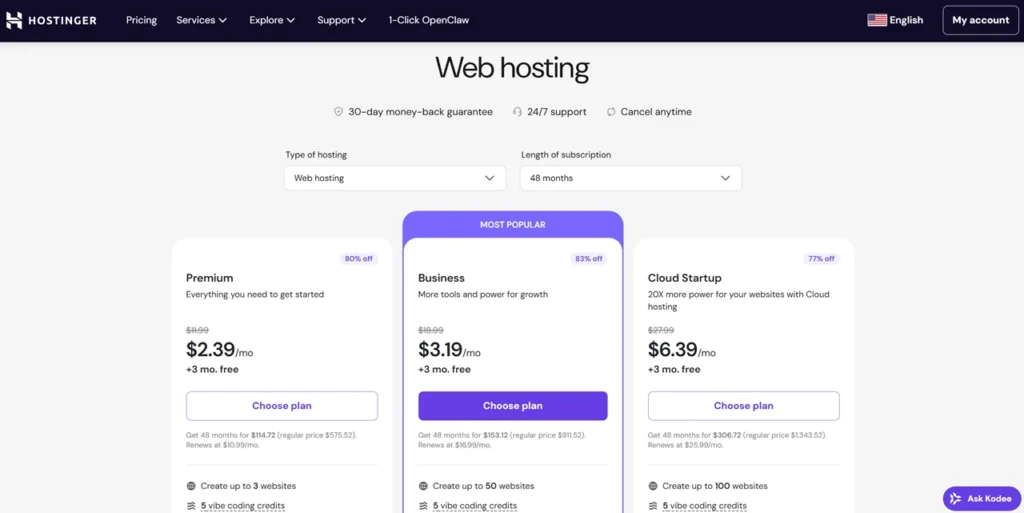
| Premium | $2.99/mo | $10.99/mo | 3 | 20 GB SSD | Weekly |
| Unlimited | $3.79/mo | $16.99/mo | Unlimited | 50 GB NVMe | Daily |
| Cloud Startup | $7.99/mo | $25.99/mo | Unlimited | 100 GB NVMe | Daily |
All plans include a free domain for the first year, free migration, and a 30-day money-back guarantee. Verified 21 July 2026. For every term (1, 12, 24 and 48 months) and current sale prices, see our Hostinger plans and pricing guide.
Two details in that table deserve more attention than they usually get.
Premium ships SSD, not NVMe. Hostinger markets NVMe storage heavily, and it is real – but on the entry plan you get 20 GB of standard SSD. The jump to NVMe happens at Unlimited. For a small blog the practical difference is modest, though it is worth knowing you are not getting the headline storage tech on the headline price.
Premium backs up weekly, not daily. If your site breaks on a Saturday and your last backup ran Monday, you can lose six days of work. For a site you post to regularly, that alone can justify the step up to Unlimited – or a backup plugin, which is free and something you should run regardless of host.
What Hostinger actually costs over eight years
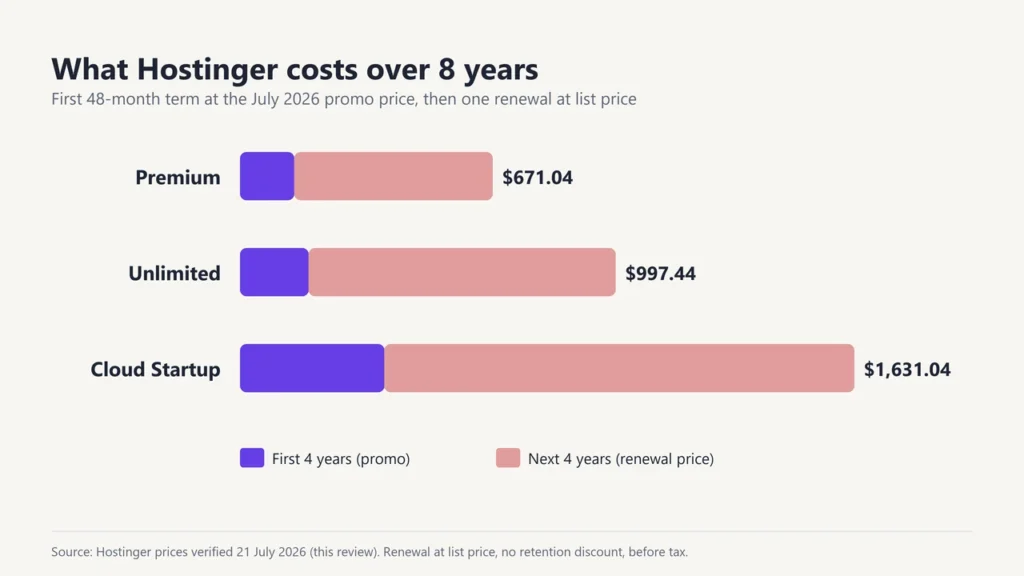
Here is the arithmetic no host puts on its pricing page. Buy a 48-month term, then renew once at standard rates:
| Plan | First 4 years | Next 4 years | 8-year total | Renewal multiplier |
|---|---|---|---|---|
| Premium | $143.52 | $527.52 | $671.04 | 3.7x |
| Unlimited | $181.92 | $815.52 | $997.44 | 4.5x |
| Cloud Startup | $383.52 | $1,247.52 | $1,631.04 | 3.3x |
Renewal figures assume list price with no retention discount applied.
Notice that Unlimited – the plan with the friendliest-looking promo price at $3.79 – carries the harshest renewal jump of the three, at 4.5x. The $0.80/month you save at signup costs you $288 more over the following four years. If you only need three sites, Premium is the better long-run buy, and it is not close.
Cloud Startup has the mildest multiplier, which makes it the plan that ages best. It is also the plan where Hostinger pricing stops looking remarkable next to managed competitors.
Is Hostinger actually cheap, then?
For the first term, yes – emphatically. Over eight years, it is ordinary. That is a more useful framing than “cheapest host,” because it tells you what to do about it: buy the long term, set a calendar reminder two months before renewal, and either negotiate, migrate, or accept the new rate as a deliberate decision rather than a surprise charge.
Hostinger is not being deceptive here – the renewal rate is disclosed at checkout. But it is disclosed in the way these things always are, and plenty of buyers miss it.
Check Hostinger current pricing
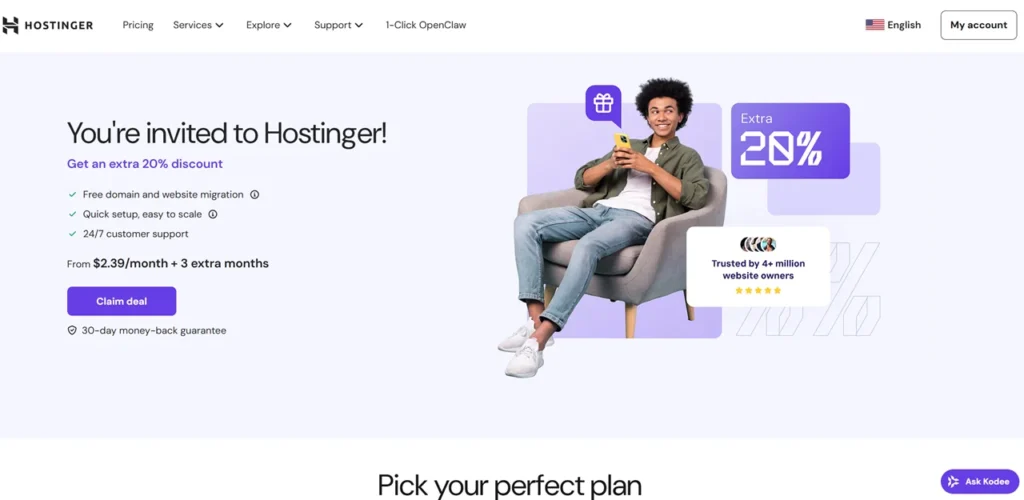
Looking for the lowest price? Use our coupon code HARSHILBAROT for an extra 20% off your first term. Our link applies it automatically. See our guide to the Hostinger coupon code, with current coupon prices and renewal costs.
Which Hostinger Plan Should You Buy?
Skip the feature matrices for a moment. In practice the decision comes down to three questions.
How many sites? Three or fewer, Premium. More than three, Unlimited. This is the only hard constraint in the lineup.
How often do you publish? If you touch the site weekly or more, daily backups matter and the Premium weekly cadence is a genuine risk. Either move to Unlimited or install a backup plugin and stop thinking about it.
How much traffic? Premium and Unlimited are shared hosting – your site sits on a server with other sites and competes for its resources. That is fine up to a point. Once you are consistently past roughly 50,000 monthly visits, or running anything transactional, the dedicated resource allocation on Cloud Startup stops being an upsell and starts being the reason your site stays up.
For most people reading a Hostinger review – someone launching a first or second WordPress site – Premium on the 48-month term is the right answer, with a backup plugin covering the weekly-backup gap.
Hostinger for WordPress
WordPress is where Hostinger has put most of its engineering effort, and it shows.
The managed WordPress layer includes automatic core, theme, and plugin updates; a one-click staging environment; WP-CLI and SSH access; Git integration; and PHP version control. That staging tool is the one I would highlight for beginners – being able to test a plugin update on a copy of your site before it touches the live one prevents the single most common way people break their own website.
Hostinger speed claims for WordPress rest on LiteSpeed servers with the LiteSpeed Cache plugin, which the company states delivers up to a 40% improvement. Treat vendor speed percentages as marketing rather than measurement – but the underlying technology is sound and well regarded, and LiteSpeed Cache is genuinely one of the better caching plugins available on any host.
Developer access is more generous than the price suggests. SSH, Git, and WP-CLI on a $2.99 plan is not typical at this tier; several better-known budget hosts still lock SSH behind higher plans.
Ready to set it up? Follow our guide to installing WordPress on Hostinger.
WooCommerce and online stores
Hostinger includes ecommerce integration across its plans and offers dedicated WooCommerce hosting. For a small catalogue and modest order volume, shared hosting handles WooCommerce adequately.
My honest recommendation is to be cautious here. WooCommerce is resource-hungry in ways a blog is not – uncacheable cart and checkout pages hit PHP and the database on every request. If your store is your income, the shared tiers are not where it belongs. Cloud Startup is the realistic entry point, and a managed host built for commerce may serve you better still.
Speed and Performance
The Hostinger performance stack is legitimately strong for the price. What it delivers on your site depends on your theme, plugins, images, and how far your visitors sit from your data center – variables no host controls.
The components that matter:
- LiteSpeed web server – an Apache alternative that handles concurrent connections more efficiently, paired with server-level caching through LiteSpeed Cache.
- NVMe storage (Unlimited and above) – meaningfully faster disk reads than SATA SSD, which shows up most in database-heavy work.
- HTTP/3 – reduced connection overhead, most noticeable on mobile networks.
- Object caching – caches repeated database queries, which is where WordPress spends much of its time on dynamic pages.
- Global data centers – choose the one nearest your audience. This single choice affects Time to First Byte more than most optimisation work you will do afterwards.
That last point is the practical advice worth taking away. Hosting a primarily Indian audience on a US server costs you a few hundred milliseconds of TTFB before your site does anything at all, and no caching plugin recovers that. Pick the region deliberately at signup – changing it later means a migration.
Core Web Vitals on a Hostinger site are within reach of “good” thresholds with a lightweight theme and LiteSpeed Cache configured properly – but LCP and INP are determined far more by your theme and plugin choices than by your host. A bloated page builder on premium hosting will lose to a lean theme on budget hosting most days of the week.
Uptime: What the 99.9% Guarantee Actually Means
Hostinger advertises a 99.9% uptime guarantee with 24/7 monitoring. Worth understanding what that number permits.
99.9% uptime allows roughly 43 minutes and 12 seconds of downtime per month – about 8 hours 45 minutes per year – before the guarantee is breached. That is the industry-standard figure and Hostinger is not an outlier. But “99.9% guaranteed” reads to most buyers as “essentially never down,” and the actual allowance is a working hour every month.
The other thing to know about uptime guarantees generally: the remedy is usually service credit, not a refund, and you typically have to claim it yourself. Nobody credits your account automatically.
hPanel and Ease of Use
Hostinger built its own control panel rather than licensing cPanel, and for beginners that was the right call. hPanel is cleaner, the navigation is in plain language, and the things a new site owner needs – installing WordPress, adding a domain, setting up email, pulling a backup – are reachable without knowing the vocabulary first.
The tradeoff lands on experienced users. If you have spent a decade in cPanel, muscle memory does not transfer and some tasks take longer until you relearn where things live. Agencies managing client sites across multiple hosts sometimes find the inconsistency more annoying than the panel itself.
WordPress installation is a genuine one-click affair, and the onboarding flow walks new users through domain, install, and theme selection without demanding decisions they are not equipped to make yet.
Security
Standard across plans: free SSL certificates via Let’s Encrypt with automatic renewal, DDoS protection at the network level, malware scanning, two-factor authentication on the account, and automated backups on the cadence described earlier.
This is a reasonable baseline and matches what most competitors provide at this price. What it is not is a substitute for a security plugin, sensible passwords, and keeping plugins updated – the overwhelming majority of WordPress compromises come through outdated plugins, not through the host.
One limitation worth naming: Hostinger does not include a full web application firewall of the kind Cloudflare or Sucuri provide. The Cloudflare free tier fills that gap and takes fifteen minutes to set up.
Hostinger AI Tools in 2026
Hostinger has leaned hard into AI, and the results are mixed in ways worth separating.
The AI Website Builder generates a functional site from a prompt. It is fine for a landing page or a simple brochure site, and genuinely useful if the alternative is having no site at all. It is not a WordPress replacement, and content it generates needs editing before it is worth publishing.
Kodee, the AI assistant, handles account and hosting questions and can perform some administrative tasks. In practice it works well for routine questions and becomes an obstacle when your problem is unusual – which is the general pattern with AI support tiers.
The AI troubleshooter and optimizer apply LiteSpeed configuration and flag slow database queries. This is the most genuinely useful of the three, because slow-query detection is something most site owners never do manually.
My read: treat the AI features as a convenience, not a reason to choose Hostinger. If they vanished tomorrow the value proposition would be roughly unchanged.
Customer Support
Support runs 24/7 through live chat and a ticket system in every plan. There is no phone support at any tier.
That absence is the thing to weigh. For most people chat is faster than phone anyway. But if you are the kind of person who wants to talk to a human when your site is down at 2am, this is a real limitation and you should factor it in rather than discover it during an outage.
The knowledge base is extensive and well-written, which matters more than it sounds – a good number of support tickets are avoidable if the documentation is searchable and accurate.
Pros and Cons
What Hostinger does well
- Genuinely low first-term pricing, with a four-year Premium term under $150 total
- LiteSpeed, NVMe, and HTTP/3 at a price where competitors ship older stacks
- hPanel is the most beginner-friendly control panel in the budget tier
- SSH, Git, WP-CLI, and staging included on inexpensive plans
- Free domain for year one and free migration
- Choice of global data centers, which meaningfully affects real-world speed
- 30-day money-back guarantee across shared and VPS
Where it falls short
- Renewal pricing is 3.3-4.5x the promotional rate
- The cheapest prices require paying for 48 months upfront
- Premium ships SSD rather than the advertised NVMe, and backs up only weekly
- No phone support at any tier
- Shared plans are not a sensible home for a serious WooCommerce store
- No built-in WAF – you will want Cloudflare in front of it
- Migrating away later is work; the 48-month term is a real commitment
Who Should Avoid Hostinger
Most reviews will not tell you this part, so here it is plainly. Hostinger is the wrong choice if:
You want to pay monthly. The economics only work on long terms. Month-to-month pricing at Hostinger is unremarkable, and you would be buying the brand rather than the value.
You are running a store where downtime costs money. Shared hosting is shared. Cloud Startup is the floor for commerce, and a purpose-built managed host is a defensible upgrade.
You need phone support. It does not exist here. That is a legitimate dealbreaker for some businesses and there is no workaround.
You manage client sites professionally. Agencies generally want cPanel consistency, white-label tooling, and staging workflows that the Hostinger panel does not fully match. Cloudways or a managed WordPress host fits that work better.
Your traffic is already substantial. Past roughly 100k monthly visits, you are shopping for VPS or managed cloud regardless of brand.
If one of these applies to you, our guide to Hostinger alternatives compares six other hosts on price, backups and support.
How Hostinger Compares
Hostinger vs Bluehost
The Bluehost advantage is phone support. Both Bluehost and Hostinger are listed on WordPress.org’s recommended hosting page (checked 22 October 2026), so that is no longer a difference between them. The Hostinger advantage is the technology stack and the price – LiteSpeed and NVMe against a more conventional Bluehost setup, at a lower first-term cost.
For a technically-minded buyer, Hostinger wins on merit. For someone who wants a phone number and a familiar brand name, the Bluehost case is not unreasonable.
For the full side-by-side with both hosts’ current prices, see our Hostinger vs Bluehost comparison.
Comparing Hostinger with GoDaddy instead? Our Hostinger vs GoDaddy comparison covers prices, cPanel, phone support and India.
Hostinger vs SiteGround
SiteGround has the better support reputation in the industry and it is largely deserved. It also costs considerably more, and its renewal pricing is steeper in absolute terms.
SiteGround is the pick if support quality is your primary criterion. Hostinger is the pick if value is. Both are competent hosts; this is a genuine preference rather than a right answer.
For a full side-by-side with both hosts’ current prices and renewals, see our Hostinger vs SiteGround comparison.
Hostinger vs Cloudways
Different products. Cloudways is managed cloud hosting on top of DigitalOcean, Vultr, and similar providers, billed monthly with no long-term commitment and no free domain. It offers better scaling and dedicated resources; it asks more of you technically and costs more.
If you have outgrown shared hosting, Cloudways is a logical next step. If you have not, you would be paying for capacity you are not using. Our Cloudways review covers that platform in detail.
Hostinger vs Kinsta and WP Engine
Not really competitors. Kinsta and WP Engine are premium managed WordPress hosts starting many times higher, aimed at businesses where an hour of downtime costs more than a year of hosting.
They are better hosts in most measurable ways. Whether they are better for you depends entirely on what your site earns. For a blog earning modest ad revenue, the premium is difficult to justify.
Is Hostinger Worth It in 2026?
For its intended buyer, yes – with the renewal caveat understood rather than glossed over.
What Hostinger has done well is refuse to treat “budget” as permission to ship old technology. LiteSpeed, NVMe, HTTP/3, staging, SSH, and Git at $2.99/month is a genuinely good deal, and several better-known hosts charge more for less.
The trade you are making is a four-year commitment for that price, and a renewal rate that lands you in ordinary territory afterwards. Made knowingly, it is a good trade. Made because a review quoted $2.99 and stopped there, it becomes an unpleasant surprise in year five.
If you have outgrown shared hosting entirely, our guide on moving from shared hosting to VPS walks through when that switch makes sense.
Remember to use our code HARSHILBAROT for an extra 20% off your first term.
Final Verdict
Hostinger earns 8.3/10.
| Criterion | Score | Reasoning |
|---|---|---|
| First-term value | 9.5/10 | Very little competes at $143.52 for four years |
| Renewal pricing | 5.5/10 | 3.3-4.5x increases; the weakest part of the offer |
| Performance stack | 9/10 | LiteSpeed, NVMe, HTTP/3, object cache, global regions |
| WordPress features | 8.5/10 | Staging, WP-CLI, Git, auto-updates; weekly backups on Premium |
| Ease of use | 9/10 | hPanel is excellent for beginners, an adjustment for cPanel veterans |
| Security | 8/10 | Solid baseline, no built-in WAF |
| Support | 7.5/10 | 24/7 chat and strong docs, but no phone support |
Buy Premium on the 48-month term, choose the data center closest to your readers, install a backup plugin to cover the weekly-backup gap, put Cloudflare in front of it, and set a reminder before renewal. Do those five things and Hostinger will serve a growing WordPress site well for years.
Need a professional address too? See our Hostinger business email guide.
Frequently Asked Questions
Is Hostinger good?
Yes, for its intended use. It offers a modern performance stack – LiteSpeed, NVMe, HTTP/3 – at the low end of the market, and hPanel is one of the easiest control panels for beginners. Its weaknesses are renewal pricing and the absence of phone support.
How much does Hostinger actually cost?
Premium is $2.99/month on a 48-month term ($143.52 total) and renews at $10.99/month. Unlimited is $3.79/month renewing at $16.99. Cloud Startup is $7.99/month renewing at $25.99. Prices verified 21 July 2026 and subject to change.
Is Hostinger good for WordPress?
Yes. It provides one-click installation, automatic updates, staging, WP-CLI, SSH, Git, and LiteSpeed Cache. For sites under roughly 50,000 monthly visits, the shared plans handle WordPress comfortably.
What are the disadvantages of Hostinger?
Renewal pricing rises 3.3-4.5x after the first term, the best prices require four years upfront, the Premium plan uses SSD rather than NVMe and backs up only weekly, there is no phone support, and no built-in web application firewall.
Is Hostinger fast?
The infrastructure is fast for the price – LiteSpeed servers, NVMe storage on Unlimited and above, HTTP/3, and object caching. Real-world speed depends heavily on your theme, plugins, and choosing a data center near your audience.
Does Hostinger offer free migration?
Yes. Free website migration is included on shared hosting plans, along with a free domain for the first year and a 30-day money-back guarantee.
Which Hostinger plan is best?
Premium for three sites or fewer, which suits most bloggers and small businesses. Unlimited if you need more than three sites or want daily backups. Cloud Startup once you exceed roughly 50,000 monthly visits or run a store.
Is Hostinger good for beginners?
Yes. hPanel avoids the jargon of traditional control panels, WordPress installs in one click, and the onboarding walks you through domain setup and theme selection.
Is Hostinger better than Bluehost?
On technology and price, yes – Hostinger ships LiteSpeed and NVMe where Bluehost uses a more conventional stack, and costs less in the first term. Bluehost offers phone support, which matters to some buyers. Both hosts are on WordPress.org’s recommended hosting page.
Can Hostinger handle high-traffic websites?
Shared plans are comfortable to roughly 50,000 monthly visits. Beyond that, Cloud Startup provides dedicated resources, and past about 100,000 visits a VPS or managed cloud platform is the appropriate choice.
Is Hostinger safe?
Yes. Plans include free SSL, DDoS protection, malware scanning, two-factor authentication, and automated backups. Adding Cloudflare provides the web application firewall Hostinger does not include.
How We Reviewed Hostinger
This review is based on published Hostinger plans and documentation, verified directly on hostinger.com on 21 July 2026, combined with our editorial experience running WordPress sites on shared, cloud, and managed hosting.
Scores reflect editorial judgement against seven criteria – first-term value, renewal pricing, performance stack, WordPress features, ease of use, security, and support – weighted toward what matters to a small-to-mid WordPress site owner rather than to an enterprise buyer.
Pricing is volatile in this industry. Every figure in this review carries the date it was verified, and we re-check them on each update. Where we have not measured something ourselves, we say so rather than presenting vendor claims as independent findings.
Last updated: 22 October 2026. We re-checked the Black Friday prices, the plan names on Hostinger’s pricing page and WordPress.org’s recommended hosts list; the July 2026 price tables are kept for comparison.

Justwebworld has published guides since 2012. How we write and update articles Report an error
