

“Too many redirects” means a website keeps sending your browser from one address to another in a loop, so the browser gives up. Chrome shows it as ERR_TOO_MANY_REDIRECTS. For visitors, clearing the site’s cookies often fixes it. For site owners, the cause is usually two settings that disagree, such as a CDN and a server each redirecting between HTTP and HTTPS.
This guide explains how redirect loops happen, what visitors can try, and how site owners can trace the loop and fix the setting that causes it.
Key takeaways
- A redirect loop sends the browser round in a circle until it stops trying.
- Visitors: clear the site’s cookies, try a private window, then wait or contact the site.
- Owners: the usual cause is conflicting HTTPS, www or CDN settings.
- Trace the chain with curl before changing anything.
- Change one setting at a time so that you know which one fixed it.
What a redirect loop is
A redirect tells your browser that a page has moved and gives it a new address. That is normal: most sites redirect http:// to https://, for example. A loop happens when the new address redirects back to the old one, or round a longer circle, so the browser never reaches a real page.
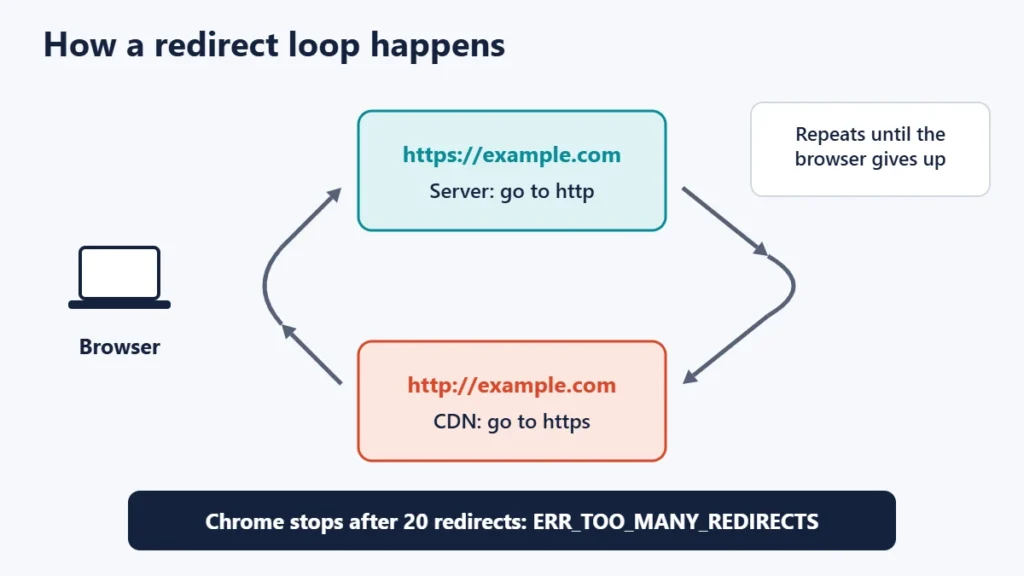
Browsers do not follow redirects forever. Chromium, the engine behind Chrome and Edge, has a built-in limit of 20 redirects and reports “too many redirects” when it runs out. The HTTP standard, RFC 9110, also expects clients to detect cyclical redirections and stop.
What to try as a visitor
- Delete the site’s cookies. A stale login or preference cookie can trigger a loop. In Chrome, open Settings, then Privacy and security, then Third-party cookies, choose “See all site data and permissions”, search for the site and delete its data. You may be signed out.
- Try a private window, which starts without the site’s cookies.
- Try another browser or device. If it works there, your browser’s saved data is the likely cause.
- Turn off extensions and VPNs that rewrite addresses or force HTTPS.
- Wait and contact the site if it fails everywhere. Our guide to checking if a site is down for everyone explains how to confirm it.
The most common causes for site owners
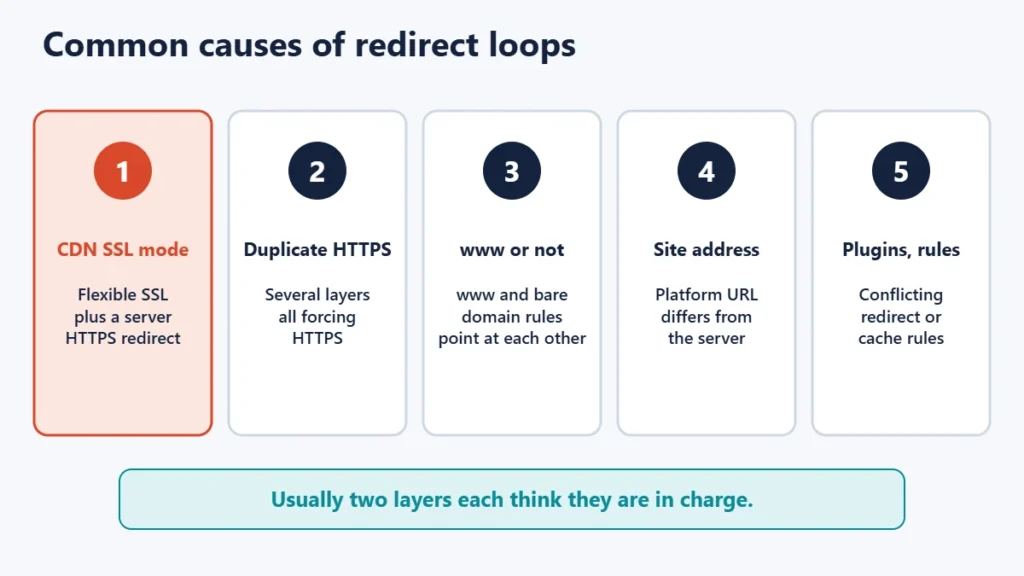
1. CDN SSL settings that fight the server
This is a classic loop for sites behind a CDN. Cloudflare’s documentation explains that with its Flexible SSL mode, the CDN talks to your server over plain HTTP. If your server also redirects all HTTP requests to HTTPS, every request bounces back and forth. Cloudflare’s fix is either to remove the HTTPS redirect from the server, or to switch the encryption mode to Full or higher, which requires a certificate on your server.
Cloudflare lists related loops too: a server redirecting HTTPS back to HTTP while “Always Use HTTPS” is on, HSTS combined with HTTP redirects, and conflicting redirect rules. Other CDNs have similar settings. Our guide to CDNs explains how they sit between visitors and your server.
2. Duplicate HTTPS redirects
A “force HTTPS” switch in the hosting panel, a rule in .htaccess and a plugin can all redirect at once. Usually that only adds extra hops, but if any of them is misconfigured, it can produce a loop. Keep one, preferably at the server or CDN level. Our guide to fixing “Not secure” warnings covers the HTTPS setup steps.
3. www and non-www pointing at each other
If one rule sends example.com to www.example.com while another sends www back to the bare domain, the browser goes round in a circle. Choose one version and make every rule agree with it. Our guide to nameservers and A records explains how both names are set up in DNS.
4. A site address that does not match
Many platforms store their own address. In WordPress, if the addresses under Settings, General use a different scheme or domain from the one the server enforces, the two can keep redirecting each other. WordPress’s own documentation warns that a site behind a reverse proxy providing SSL can fall into an infinite redirect loop unless it is set up to recognise the proxy’s HTTPS signal.
5. Plugins and redirect rules
Redirect managers, SEO plugins, membership plugins and caching layers can all add rules. A rule that sends a page to itself, or two rules that point at each other, creates a loop on just those pages.
How to trace the loop
Use curl, which is included in current Windows, macOS and Linux systems, to list every hop without the browser’s caches and cookies:
curl -I -L --max-redirs 10 http://example.com/-I shows headers only, -L follows redirects, and --max-redirs stops after ten. A healthy site shows one or two hops and then a 200 status:
HTTP/1.1 301 Moved Permanently
Location: https://example.com/
HTTP/2 200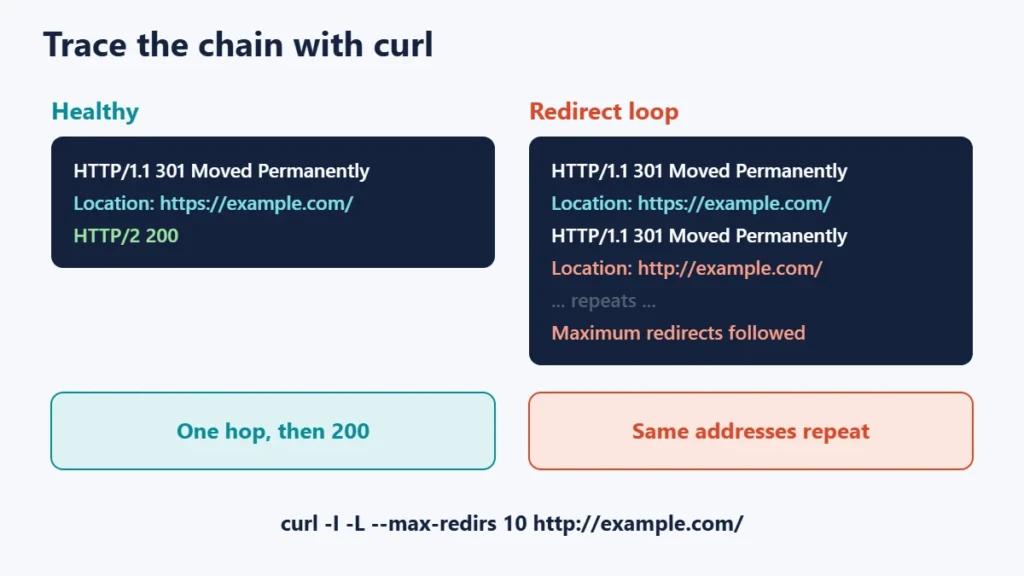
In a loop, you will see the same Location addresses repeat until curl reports that it hit the maximum. The addresses tell you which change is being undone. For example, https changing back to http points to a server rule, while www swapping back and forth points to conflicting domain rules. Our guide to 301 and 302 redirects explains the status codes you will see.
A fix order for site owners
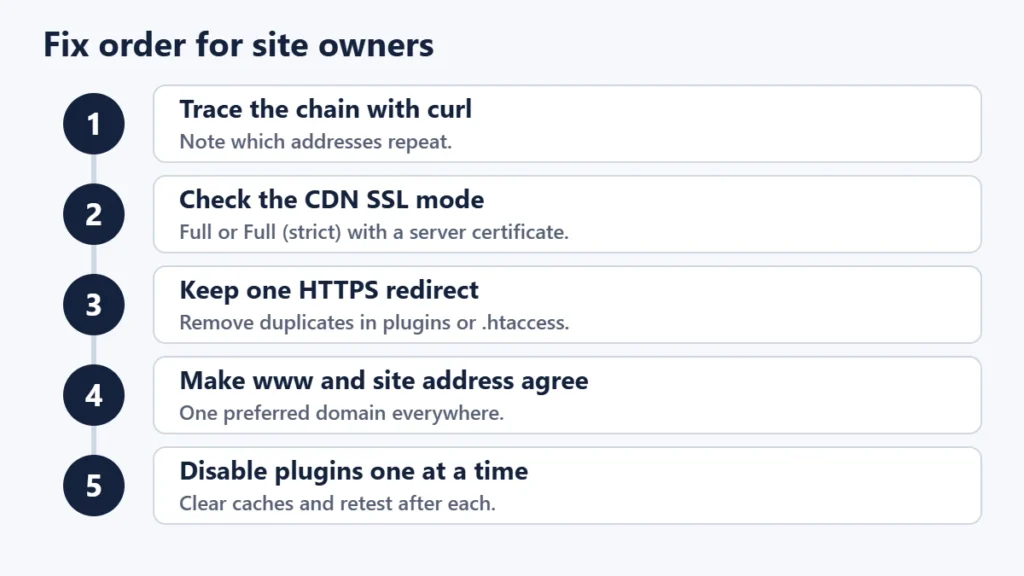
- Trace the chain with curl and note the repeating addresses.
- Check your CDN’s SSL mode. With a certificate on your server, Full or Full (strict) usually avoids the Flexible-mode loop.
- Keep a single HTTPS redirect, and remove duplicates from plugins or
.htaccess. - Make domain settings agree: one preferred version of www or non-www, matching the platform’s site address.
- Disable redirect and caching plugins one at a time, clear every cache, and retest after each change.
- Ask your host if the loop persists, sharing the curl output.
If you are locked out of WordPress’s admin by the loop, you can usually correct the site address through your host’s file manager or database tools. Make a backup first.
Why redirect loops matter for search engines
Google’s documentation says its crawlers follow up to 10 redirect hops by default. A page caught in a loop never returns content, so it cannot be indexed, and Google recommends permanent server-side redirects for pages that have genuinely moved. Keep redirects short and direct, ideally one hop from any old address to the final one.
Common mistakes
- Turning on every “force HTTPS” option at once. Several layers then compete.
- Using Flexible SSL with a server that forces HTTPS. This is a well-documented loop.
- Changing the site address without checking the server rules. The two must agree.
- Testing only in your usual browser. Cached redirects and cookies can hide or fake a fix.
- Making several changes together. You will not know which one helped, or which one broke something else.
Frequently asked questions
What does ERR_TOO_MANY_REDIRECTS mean?
It is Chrome’s message for a redirect loop: loading the address produced too many redirects, so the browser stopped.
Why does clearing cookies fix it?
Some loops depend on a cookie, such as an outdated login state. Removing it lets the site start fresh.
Is it my fault or the website’s?
If clearing cookies and using a private window do not help, and the site fails on other devices, the problem is on the website’s side.
Can Cloudflare cause too many redirects?
It can, when its settings conflict with your server’s. Flexible SSL combined with a server-side HTTPS redirect is the best-known example.
How many redirects are too many?
Chrome stops at 20 and Google’s crawlers follow up to 10. For a healthy site, aim for one hop from any old address.
Do redirect loops hurt SEO?
Yes, for the affected pages: search engines cannot reach the content, so it cannot be indexed until the loop is fixed.
The short version
A redirect loop means two rules keep undoing each other. Visitors should clear the site’s cookies and try a private window. Site owners should trace the chain with curl, check the CDN’s SSL mode, keep one HTTPS redirect, make www and site address settings agree, and change one thing at a time.

Justwebworld has published guides since 2012. How we write and update articles Report an error
