

Optical character recognition (OCR) converts images of typed, printed or handwritten text, such as scanned pages, PDFs and photos, into machine-encoded text. For a business, the main benefits are searchable digital records, less manual data entry from invoices and receipts, lower printing and storage costs, and easier backups. Accuracy is high on clean printed text and lower on handwriting, so results still need checking.
Key Takeaways
- OCR turns a picture of text into text a computer can search, copy and edit; a plain scan is only an image.
- Typical business uses are data entry from invoices, receipts, checks, bank statements and passports, and making archives searchable.
- Free options exist: the open-source Tesseract engine, Google Drive’s PDF and image conversion, and the Text actions feature in the Windows Snipping Tool.
- OCR is not 100% accurate, even on typed Latin text, and handwriting is harder, so build a checking step into the workflow.
- Digitizing paper does not change how long records must be kept; the IRS retention periods still apply to tax records.
Optical Character Recognition, or OCR (optical character reader) is technology that converts images of typed, printed or handwritten text, such as scanned documents and photos, into machine-encoded text that can be searched and edited on a computer. A scanner on its own produces only a picture of the page; OCR is the step that reads the characters in that picture. That is what makes saved records searchable instead of merely stored.
Optical Character Recognition Benefits for Your Business
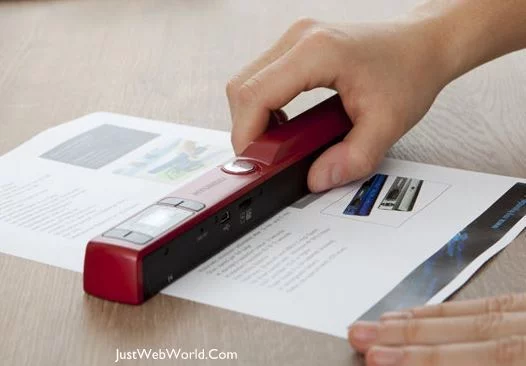
Scanning paper documents and running OCR on the images is a practical way to move paperwork into a company’s digital records, because the text inside each file becomes searchable. Common business uses include data entry from invoices, receipts, checks, bank statements and passports, and digitizing business cards and archives, according to Wikipedia’s overview of OCR applications.
Now in case you haven’t seen them yet, here are the other advantages of OCR that you can leverage for your business:
Increased Work Efficiency
The most direct benefit is that you can save time with OCR, because staff no longer have to retype text by hand. OCR Software allows people to save time and effort when creating, processing, or organizing documents. Searching a folder of OCR-processed files for a name or invoice number is a keyword search, while finding the same item in paper files means reading page by page. That frees staff time for work that needs human judgment.
Reduced Costs
An OCR workflow can reduce several recurring costs, although the size of the saving depends on how much paper a business handles. You can save on things like extra prints, mass copying, shipping costs and consumables. Against those savings, budget for scanners, software licenses, staff time for scanning and checking, and secure digital storage.
Save Office Space
Sometimes there will be a need to keep all of your documents in storage in case something needs to be revisited in the future. But imagine all of the wasted space you can get just from all those stacks of papers. If you use OCR, all those piles of papers can be scanned and converted into digital data, and you can save them in a drive somewhere in your business’ system. Now you have more space for physical necessities in your office, perhaps enough for a new desk and PC setup?
Availability
By saving your documents into your system, you just saved yourself the hassle of manually finding them in print. All your precious information is now just a few buttons away inside your computer. Because OCR makes the text searchable, staff can find a document by any word in it rather than only by its file name or folder.
Extra Security and Backup
Better to be safe than sorry. Sometimes things can go unintentionally wrong in a business, there’s no denying that. What if the physical documents end up being lost or destroyed? Once documents are digitized, you can keep backup copies in a separate location, such as an offsite drive or a cloud service, protected by access controls. OCR itself does not secure anything; the protection comes from how the files are stored and backed up.
The end result from learning to use OCR (Optical Character Recognition) software overall is self-explanatory. Data can become much easier and faster to manage and organize.
The benefits above can help a business become more productive and organized, provided the scanned files are named, filed and checked consistently. Businesses get the most from OCR when they treat it as one part of a wider document-management process rather than a stand-alone fix. If document handling is slowing your business down, OCR is worth testing on a sample batch of your own documents before committing to a paid tool. 🙂
How Does Optical Character Recognition Work?
Optical character recognition works in stages: the software cleans up the image, finds where the text is, and then identifies the characters. According to Wikipedia’s article on OCR, common preprocessing steps include:
- De-skewing – straightening a page that was scanned at an angle.
- Despeckling – removing spots and noise.
- Binarization – converting the image to black and white.
- Line removal – removing boxes and lines that are not characters.
- Layout analysis (zoning) – identifying columns, paragraphs and captions.
- Line, word and character segmentation – splitting the text into units the engine can recognize.
Modern engines such as Tesseract use neural network-based recognition for the final step, according to the Tesseract project’s documentation.
OCR vs ICR: Which Technology Reads What?
OCR is one of several related recognition technologies. Wikipedia’s OCR article distinguishes them as follows.
| Technology | What it reads | Unit recognized |
|---|---|---|
| Optical character recognition (OCR) | Typewritten or printed text | One character at a time |
| Optical word recognition (OWR) | Typewritten or printed text | One word at a time |
| Intelligent character recognition (ICR) | Handwritten print or cursive | One character at a time |
| Intelligent word recognition (IWR) | Handwritten print or cursive | One word at a time |
For a business, the distinction matters when choosing a tool: forms filled in by hand need ICR-capable software, while typed invoices and contracts can be handled by standard OCR.
Free and Built-In OCR Tools a Small Business Can Try
A business does not need to buy software to test OCR. The tools below were checked against their official documentation in October 2026.
| Tool | What it does | Key limits or notes |
|---|---|---|
| Tesseract | Open-source OCR engine and command-line program | Licensed under Apache 2.0; recognizes more than 100 languages out of the box; major version 5 has been the stable line since release 5.0.0 on November 30, 2021 |
| Google Drive | Converts PDFs and JPEG, PNG or GIF images into an editable Google Doc | Files should be 2 MB or smaller, text at least 10 pixels high, and pages right-side up; lists, tables, columns and footnotes are not likely to be detected |
| Windows Snipping Tool | Text actions button extracts text from a screenshot | Can copy selected or all text and redact email addresses and phone numbers; Microsoft says text recognition runs locally on the device |
Tesseract has a long history: it was developed at Hewlett-Packard between 1985 and 1994, open-sourced by HP in 2005, and developed by Google from 2006 until August 2017, according to the project’s official repository. For scanning workflows around PDFs, see our guide to extracting data from PDF files.
How Accurate Is OCR?
OCR accuracy depends mainly on the quality of the original document. According to Wikipedia’s OCR article, recognition of typewritten Latin-script text is still not 100% accurate, and handwritten cursive has lower recognition rates than hand-printed text. One study of 19th- and 20th-century newspapers cited there found character-by-character accuracy that varied from 81% to 99%.
Ways to improve results, based on Google Drive’s published guidance:
- Scan at a resolution where text is at least 10 pixels high.
- Use documents in common fonts such as Arial or Times New Roman where you control the original.
- Rotate pages so they are right-side up before processing.
- Expect simple formatting such as bold and italics to survive better than tables and columns, and check tables by hand.
How to Introduce OCR in Your Business
- Pick one document type first – for example supplier invoices or receipts – rather than the whole archive.
- Test free tools on a real sample of 20 to 50 pages and compare the output with the originals.
- Decide on naming and filing rules so every scanned file can be found later; a document management system helps once volumes grow.
- Add a checking step for numbers, names and amounts, because OCR errors in figures are easy to miss.
- Store and back up securely, for example in cloud storage with access controls, plus a separate backup copy.
- Check retention rules before shredding paper (see below).
Can You Throw Away Paper Records After Scanning?
Digitizing records does not shorten how long they must be kept. As of October 2026, the IRS says to keep tax records for 3 years in most cases, 6 years if income that should have been reported was not and it is more than 25% of the gross income shown on the return, 7 years for a claim for a loss from worthless securities or a bad debt deduction, and employment tax records for at least 4 years after the tax becomes due or is paid. The IRS page does not say whether digital copies replace originals, so confirm with an accountant or the relevant authority before destroying paper, and check the rules in your own country if you are outside the US.
OCR also pairs well with other paperless steps, such as electronically signing documents instead of printing them.
Frequently Asked Questions
What is OCR used for in business?
OCR is used in business to turn paper and scanned documents into searchable, editable text. Common uses include data entry from invoices, receipts, checks, bank statements and passports, digitizing business cards, and making archives searchable.
Is OCR the same as scanning?
No. Scanning creates an image of a page, while OCR reads the characters in that image and converts them into text a computer can search and edit. Many scanners and PDF tools combine the two steps.
Can OCR read handwriting?
Handwriting is harder than printed text. Software that reads handwriting is often called intelligent character recognition (ICR), and recognition rates for cursive are lower than for hand-printed text, so handwritten results need careful checking.
Is there free OCR software?
Yes. Tesseract is a free open-source OCR engine licensed under Apache 2.0, Google Drive can convert PDFs and images into editable text, and the Windows Snipping Tool has a Text actions feature that extracts text from screenshots.
How accurate is OCR?
OCR is very accurate on clean, printed text but not 100% accurate even then. Accuracy falls with poor scans, unusual fonts, complex layouts and handwriting; one study of historical newspapers found character accuracy between 81% and 99%.
Do I still need to keep paper originals after OCR?
Possibly. Scanning does not change record-retention periods, such as the IRS periods of 3 to 7 years for most tax records. Check with an accountant or the relevant authority before destroying originals.

Justwebworld has published guides since 2012. How we write and update articles Report an error

1 Comment
OCR software also helps in boosting productivity through speeding up the data retrieval process.Along, with that it also helps in cost reduction, since it enables the firm to cut down the manpower and carry out data extraction process. This also helps in reducing the costs associated with printing, shipping and copying etc.