Close Menu
JustwebworldJustwebworld
  • Astrology
  • Business & Finance
    • Cryptocurrency
    • Make Money
    • Entrepreneur
    • Brands
    • Companies
    • Personal Finance
      • Banking
      • Insurance
      • Trading and Investing
  • Tech
    • Computing
    • Cybersecurity
    • Electronics
    • Android
    • Apple
    • Gadgets
    • Social Media
    • Mobile Apps
    • Softwares
  • Education
    • Vocabulary
    • Abbreviations
    • General Knowledge
    • Writing & Translation
  • Lifestyle
    • Beauty & Cosmetics
    • Fashion & Style
    • Furniture & Decor
    • Luxury
    • People & Relationships
    • Pets and Animals
    • Shopping
    • Parenting
    • Gardening
    • Birthdays
  • Health
  • Travel
  • Auto
  • Gaming
  • Food
  • Entertainment
  • Sports
Facebook X (Twitter) Instagram Pinterest YouTube LinkedIn WhatsApp Telegram
Wednesday, January 14
  • About
  • Contact Us
  • Advertise With Us
  • Disclaimer
  • Terms & Conditions
  • Privacy Policy
JustwebworldJustwebworld
  • Astrology
  • Business & Finance
    • Cryptocurrency
    • Make Money
    • Entrepreneur
    • Brands
    • Companies
    • Personal Finance
      • Banking
      • Insurance
      • Trading and Investing
  • Tech
    • Computing
    • Cybersecurity
    • Electronics
    • Android
    • Apple
    • Gadgets
    • Social Media
    • Mobile Apps
    • Softwares
  • Education
    • Vocabulary
    • Abbreviations
    • General Knowledge
    • Writing & Translation
  • Lifestyle
    • Beauty & Cosmetics
    • Fashion & Style
    • Furniture & Decor
    • Luxury
    • People & Relationships
    • Pets and Animals
    • Shopping
    • Parenting
    • Gardening
    • Birthdays
  • Health
  • Travel
  • Auto
  • Gaming
  • Food
  • Entertainment
  • Sports
JustwebworldJustwebworld
Home » Internet » How to Change Your Skype Username

How to Change Your Skype Username

Ishi AgarwalBy Ishi Agarwal Internet
Facebook Twitter LinkedIn Telegram Pinterest Reddit Email WhatsApp
Follow Us
WhatsApp Telegram
Share
Facebook Twitter LinkedIn Pinterest Reddit Telegram WhatsApp

Skype is a very popular app that people use worldwide for personal and professional communication. The whole concept of Skype was to benefit international communication. This is not primarily being used as a business communication hub.

Table of Contents

Toggle
  • How To Change Skype Username
    • The distinction between the Skype username and display name
    • Changing Skype display name on Windows and Mac
    • Changing your username

How To Change Skype Username

How to Change Skype Username

This has ended up causing a massive dilemma for many people who are using Skype for personal communication. The major dilemma or concern is with the username. While signing up for a new account initially, the purpose could have been personal.

This is true for most old Skype account holders. In the current scenario, the Skype account is way more than personal and is hardly created just for fun.

Since companies are conducting initial interviews on Skype and it is being used as a primary connect platform by recruiting agencies, you might well be judged on the basis of your Skype account. The username created a few years ago for fun might lead to an embarrassing outcome in a professional interview.

The Skype username is usually something that cannot be changed and is locked with the initial information used to sign up. This is a Microsoft effect that has led to this phenomenon, as most usernames after Microsoft overtook Skype are outlook email ids.

However, it is important to understand the distinction between username and display name as both can be different. By default, the Skype username is the display name. This can lead to some embarrassment if your outlook email has some ‘not so professional’ arrangement of words and numbers.

Also Read: 7 Reasons to Advocate Stricter Guidelines for Forums & Communities 7 Reasons to Advocate Stricter Guidelines for Forums & Communities

The distinction between the Skype username and display name

You may have to sign up to a different Skype account if you wish to alter your username. However, you can edit and change your display name as many times as you like.

There is absolutely no restriction or limit to how your display name should be or how many times you are allowed to change the same in a particular time frame.

So, the username is something which is used for internal processing and the display name is something personal or professional, which can be arrived at, based on the need.

For instance, you are on Skype and you interact largely with strangers and do not want to expose your true name for potential stalking on other social media, you can use an adjective, alphabet-number mix or any something else as your Skype display name.

However, if you are using Skype largely for attaining professional objectives, office communication, interviews, business meets, etc., you had like your username to display your true name for easy and trustful identification.

The display name is the one which other members on Skype are able to view and not the username, unless and until display name and username are the same, which is the default state.

This arrangement minimizes the use of two separate accounts for professional and personal reasons, as your personal username can be ‘on’ for personal conversations and professional username for professional conversations.

So, no more juggling between Skype accounts henceforth, and no issues about losing your existing Skype contacts too.

Also Read: How to Change WiFi Password? How to Change WiFi Password?

Changing Skype display name on Windows and Mac

Knowing how to change Skype display name can be pretty useful, especially if there is more than one purpose of using the account.

The process of changing the display name for Mac and Windows users is pretty much the same as the app layout or the site is the same irrespective of the operating system. You can use these steps as a guide to update the display name.

  • Open your Skype app.
  • On the top right corner of the screen, you will find the profile image or display name.
  • To type a new display name just click on the Skype display name and start typing.
  • Use ‘Enter’ to confirm or the ‘Check’ sign towards the end of the display name input space. And you are done!

You can even change the display name on the web version of Skype. Compared to the app, this process is slightly lengthier. The steps for the same are as follows.

  • Open Skype.com from your web browser.
  • Log in to your account.
  • You will find your display name on the top left corner of the screen.
  • On clicking the display name, a drop-down menu appears.
  • Click on ‘My Account’ from the drop-down menu.
  • Once you are done, click on ‘Edit Profile’ option situated on the Bottom left corner.
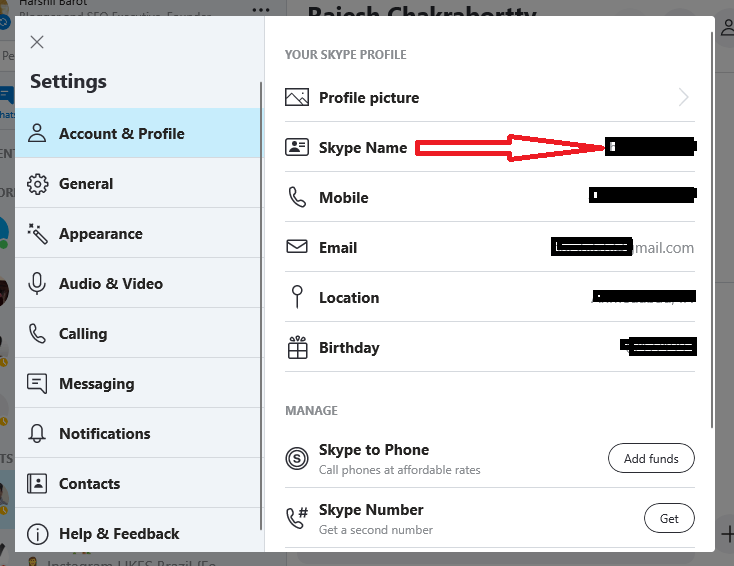
Edit Your Skype Display Name

  • Click on ‘Edit Profile’ again and update your new display name
  • Now click save and your new display name is active!

Updating the display name on your smartphone is the same as the steps discussed for Windows and Mac users. Do not forget to update a surname while updating the display name.

Also Read: To Blog, Or To Vlog? Which Is Better for You? To Blog, Or To Vlog? Which Is Better for You?

If you would like to skip the same, use a special character like (!), (?), (@), etc. So, this will be the first name that anyone will see when they add you on skype. However, they can give you a different name in their contact list as per their whims and fancies.

Changing your username

The username change would mean change of your email id. This is not a suitable solution, but in case you are using a new email now, and want to update the same or, if your previous username is so undesirable that you can forgo your email address, then changing your username is a viable option.

You can refer these points if you wish to change your username.

  • Open Skype.com on your browser.
  • Login with your credentials.
  • Look for your name on the top right corner of the site and click on it.
  • Click on the ‘My Account’ option from the drop-down menu.
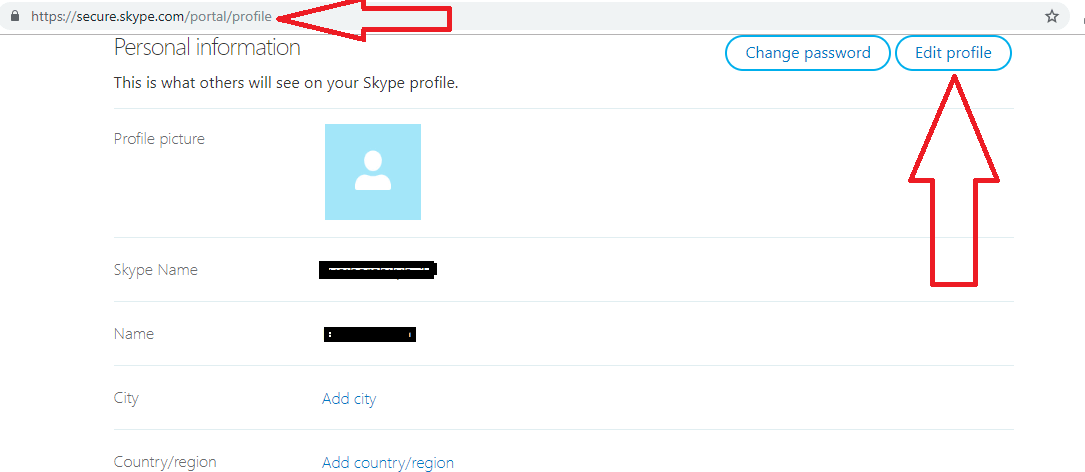
Find out my Skype ID

  • Move towards contact details and select ‘Edit Profile’ option.
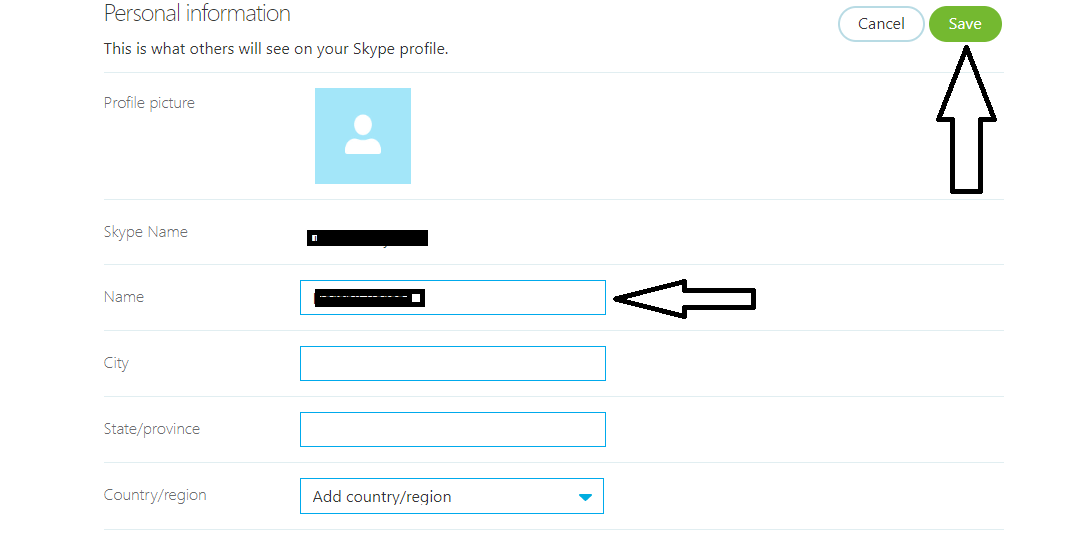
Change Your Skype Username - Skype.Com

  • Now input the new email id, you had like to replace the older one, the new email id will be your username henceforth.
  • After input, click on the save button located on the top right corner of the site.
  • Click the option ‘OK’ and confirm the changes made.

The above method might not be applicable for old accounts. The accounts created before Microsoft acquired Skype might not be able to change the username. But the guide to change the display name might ultimately solve the problem.

Also Read: Top 10 Indian CEOs of Global Tech Companies Top 10 Indian CEOs of Global Tech Companies

cards
Powered by paypal
Follow on WhatsApp Follow on Telegram
Share. Facebook Twitter Pinterest LinkedIn Tumblr Email Telegram WhatsApp Copy Link
Previous Article9 Tips Regarding Buying a Proxy For Your Business
Next Article What Makes a Good IPTV Service Provider?
Ishi Agarwal

Ishi is a Professional Content writer and an Editor. She loves curating articles on various niches to spread awareness among her readers based on her research. When she is not writing, she loves baking and is a professional chocolatier. She researches not only on technical niches but has also written many blogs on fashion, travel and self-help.

Related Posts

Airtel Broadband: The Best Unlimited Data Plans for Your Home Internet

How to Choose the Best Proxy Provider for Your Needs

SumoSearch: Ultimate Tool for Phone Number Tracking

Jazz Balance Save Code | Jazz Balance Saver Code | Charges & Details

Here’s What the Future of The Internet Will Look Like: A Pocket Guide

Transactional Emails: Types And Best Practices

Leave A Reply

Subscribe to Blog via Email

Enter your email address to subscribe to this blog and receive notifications of new posts by email.

Join 43.4K other subscribers
Categories
Latest Posts

Understand How Wind Emulators Upgrade Renewable Energy Training In Institutes

Expert Tips On Proper Use Of Septic System Cleaning Products

Discover Why An Online Tutor Job In Bangalore Is A Flexible Earning Option

Group Vs Customised Australia Trips: How to Decide What Suits You

What to Know About Choosing the Right Support Path

How to Keep Your Yamaha Bike Running Smoothly in Indian Weather Conditions

Is Celebrity Culture Dying? Why People Are Losing Interest in Famous Stars in 2026

Why Your Brain Feels Overloaded All the Time – The Real Cost of Modern Stress & Burnout

Ever Wondered Why Travel Feels So Meaningful? The Truth Might Surprise You

Ford Territory Automatic: The Perfect SUV for Filipino Families

The content on this website is provided solely for educational and informational purposes. We do not promote, endorse, or deal in any products, services, or activities mentioned. While we strive to share accurate and up-to-date information, we make no warranties regarding completeness, reliability, or accuracy. Any action you take based on the information found here is strictly at your own risk, and we will not be liable for any losses or damages in connection with the use of our website.

DMCA.com Protection Status
Quick Links
Age Calculator
Angel Number Calculator
Case Converter
Sudoku Online
Word Counter
Love Calculator
Jack Doherty YouTuber
Snake Dream Meaning
Get Rid of Cockroaches
Indian Cricket Team Coaches
Best Volleyball Team Names
Useful Links
Number to Words
Period Calculator
Yes-No Picker Wheel
Demon Name Generator
Kingdom Name Generator
Harry Potter Name Generator
Daddy Yankee Biography
Crocodile Dream Meaning
Goa Budget Trip Guide
Maryse Mizanin WWE Diva
Best Cricket Team Names
Helpful Resources
Colors Name In English
Best Computer Brands
WhatsApp Web
Most Beautiful Beaches
Tesla Cybertruck Review
Richest Actors in the World
India Jarvis Actress
Cat Dream Meaning
Belmar Beach New Jersey
Aryna Sabalenka Tennis Superstar
Best WhatsApp Group Names
Explore More
Good Morning Handsome
Best English Songs of All Time
Cricket World Cup Winners
Ways to Say Rest In Peace
Britain’s Got Talent Winners
American Idol Winners
Dude Perfect Net Worth
Horse Dream Meaning
Ramakrishna Beach Visakhapatnam
Anastasia Potapova Tennis Star
Best Funny Team Names
Facebook X (Twitter) Instagram Pinterest YouTube Tumblr LinkedIn WhatsApp Telegram Threads RSS
  • About
  • Contact Us
  • Advertise With Us
  • Disclaimer
  • Privacy Policy
  • Terms & Conditions
  • Web Stories
Copyright © 2012-2026. JustWebWorld - All Rights Reserved. | Sitemap

Type above and press Enter to search. Press Esc to cancel.

×

👇 Bonus Reads for You 🎁

YouTube Tools
5 Best YouTube Tools for Windows to Make YouTube Work Wonders for You
Best Fast Person Search Provider
How To Locate The Best Fast Person Search Provider Through The Internet?
Best Places Be Social Worker
The Best Places to Be a Social Worker [Infographic]
5G Innovations Releases By ZTE
New 5G Innovations Releases By ZTE