

Note (September 2026): Sumo’s list-building tool was renamed BDOW! in April 2024 and sumo.com no longer hosts it, and VWO now operates under the Wingify brand after combining with AB Tasty in 2026. The tool descriptions below have been updated to reflect this.
The best tools to grow an email list combine opt-in forms, landing pages and testing. This list covers Mailmunch, Unbounce, Sumo (renamed BDOW! in 2024), Visual Website Optimizer (VWO, now part of Wingify), OptinMonster, Woobox and Meta lead ads. As of September 2026, Mailmunch, BDOW! and Woobox offer free plans; the others are paid or quote-based.
Key Takeaways
- Forms and popups: Mailmunch, OptinMonster and BDOW! (formerly Sumo) turn website visitors into subscribers with popups, bars and embedded forms.
- Landing pages and testing: Unbounce builds dedicated sign-up pages, and VWO (now Wingify) tests which page or form version converts best.
- Beyond your website: Woobox runs giveaways, quizzes and polls, and Meta lead ads collect sign-ups inside Facebook and Instagram ads.
- Two names changed: Sumo became BDOW! in April 2024, and VWO combined with AB Tasty under the Wingify brand in 2026.
- Stay legal: build the list from people who opted in; the US CAN-SPAM Act requires a working opt-out honored within 10 business days.
Building an email list is one of the most reliable ways to market your content and drive sales, because you own the list and can reach subscribers directly. Done properly, it will develop your business.
Why Email Marketing?
The Email Marketing can enhance sales transformations. Marketing emails work well as part of your lead-nurturing efforts because they help move leads through the marketing funnel quickly and effectively. That is why email marketing is a practical way to drive sales.
Email encourages you to enhance your brand awareness. Also, you can easily manage the business database of different companies with the help of email marketing.
Also, by collecting the email ids of the client as well as the email list of companies by Industry, you are not only building up your email list but you are preparing an asset for your business. One caution: the list that works is one made of people who opted in. Major email services restrict bought lists; Mailchimp’s Acceptable Use Policy, for example, prohibits sending campaigns to purchased, rented or third-party lists.
Think of it as a fresh start. To build your email list the right way, and faster, you need the help of email list building tools.
Here is our list of 7 tools that can help you grow your email list, with each tool’s status checked in September 2026.
1] Mail Munch
Mailmunch (now written with a lowercase m) grows your list by converting website visitors into subscribers and customers. Mailmunch provides opt-in forms that capture a visitor’s email address before the visitor leaves.
According to Mailmunch, its form types include popups, embedded forms, top bars and slide boxes, and its popups are responsive and optimized for mobile. Its integrations page lists email services such as Constant Contact, Mailchimp, AWeber, ActiveCampaign, GetResponse and MailerLite, plus Zapier, so your leads go straight into your contact list.
Mailmunch includes analytics (basic on the free plan, advanced on the paid Premium plan, according to its pricing page), so you can replace guesswork with data and test which designs keep visitors engaged.
2] Unbounce
Landing pages are an effective way to attract whitepaper downloads, free-trial sign-ups and even purchases. Unbounce makes it simple to build attractive landing pages: you can choose from a library of templates (100+ on every plan, according to Unbounce’s pricing page) to match your campaign, or build a page from scratch with its drag-and-drop builder.
Unbounce also offers analytics and split testing (A/B testing), although as of September 2026 unlimited A/B testing is included only on its Experiment plan and above. For instance, you may design a page but be unsure which of several headlines will resonate more with your audience. With Unbounce, you can quickly duplicate the original page, change the copy in variants B and C, and then test how effective each one is.
3] Sumo
If you want to get the word out about your blog and a free giveaway, you have to make it simple for people to share. Sumo (formerly SumoMe) offered a range of free and paid tools to help spread the word about your blog and grow your list. On April 24, 2024, the product changed its name from Sumo to BDOW!; it is now run by Formilytics LLC, part of the Showit family, while the Sumo Group kept the Sumo name for AppSumo and KingSumo.
When this article was first written, Sumo required a paid plan for opt-in forms to connect to your email provider. As of September 2026, BDOW!’s pricing page lists a free plan for one site (up to 100 conversions and 500 emails a month) and paid plans from $19 a month billed yearly, or $39 month to month, with a 14-day free trial. Note that the Sumo button below still points to sumo.com, which now shows an unrelated AppSumo page rather than the list-building tool; the tool itself is at bdow.com.
4] Visual Website Optimizer (VWO, now Wingify)
Visual Website Optimizer (VWO) is an A/B testing tool designed so that marketers can run tests without developer help; its visual (WYSIWYG) editor lets you move and change parts of your pages on screen. In January 2026 VWO announced its combination with AB Tasty, an experimentation platform founded in Paris in 2014, and in September 2026 the combined company began operating under the Wingify brand. The vwo.com address now redirects to wingify.com.
You can use it to improve the placement of your opt-in forms or test other elements on any page of your site. Its campaign reports include heatmaps and session recordings that show where visitors spend their attention, plus detailed analytics. As of September 2026, Wingify does not publish list prices: its Growth, Pro and Enterprise plans are quote-based and priced on monthly active users, so it suits sites with steady traffic better than a brand-new blog.
5] OptinMonster
OptinMonster lets you create popup forms (lead-capture forms) for your web pages. The tool is simple to set up and use, and you do not need coding skills to build your first opt-in form.
OptinMonster also helps you analyze form conversions and A/B test which form types perform best (A/B testing starts on the Plus plan). You can also create exit-intent popups, which appear when a visitor is about to leave the page; according to OptinMonster’s pricing page, Exit Intent technology is included from the Pro plan up.
6] Woobox
Woobox helps you run sweepstakes, contests and giveaways. As of September 2026, Woobox describes itself as an AI campaign builder: you describe a campaign, and it builds and hosts surveys, sweepstakes, photo contests, trivia and personality quizzes, polls, forms, coupons, instant wins and landing pages.
Paid plans add more features, but the free account can still be useful: according to Woobox’s pricing page, the free plan covers one live site with up to 100 submissions and 1,000 views a month, and paid plans run from $29 to $499 a month. When this article was first written, the free plan let you create tabs for Twitter, Instagram, Pinterest and YouTube profiles and start collecting contact details; Woobox’s current site no longer lists those profile tabs, so check the feature list before relying on them.
7] Meta Lead Ads (Facebook and Instagram)
Promoting via social media might be the right approach if you already have a large following or a strong presence. Facebook’s Lead Ads, now called Meta lead ads, are useful for collecting newsletter sign-ups, follow-up call requests and other business information. Meta says lead ads run across Facebook, Instagram, WhatsApp and more.
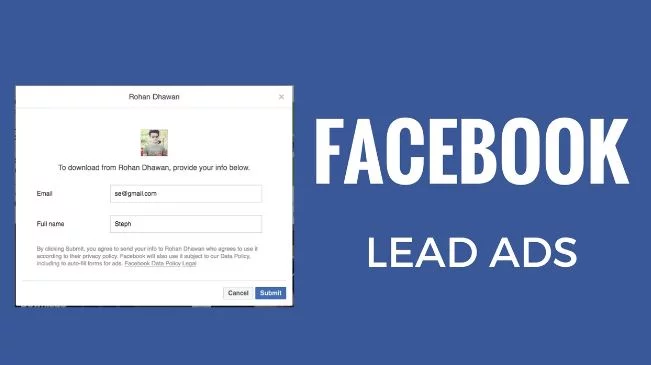
What makes lead ads useful is that the contact form (Meta calls it an instant form) is built into the ad, so it is easy to fill in after people tap it; according to Meta’s Business Help Center, people can answer your questions, edit prefilled information and submit. You can also add custom questions to learn more about new prospects and personalize later emails. Meta asks every advertiser to link to the business’s privacy policy when creating a lead ad.
Conclusion
With the right set of tools, you can build your email list cost-effectively and make sure it is valuable: full of people who have shown a genuine interest in your brand.
Building an email list takes time, but a list grows steadily and can bring in a considerable amount of business over the long term.
What Is an Email List Building Tool?
An email list building tool is software that captures the email addresses of website visitors, social media followers or ad viewers and passes them to your email marketing service. The main types are opt-in form and popup tools (Mailmunch, OptinMonster, BDOW!), landing page builders (Unbounce), testing tools that improve conversion rates (VWO), interactive campaign tools such as giveaways and quizzes (Woobox), and in-platform lead forms (Meta lead ads).
Most of these tools do not replace an email service provider. They collect the address and hand it to the service that sends your newsletters, which is why integrations matter when you compare them. For ideas on what to send once people join, see these business newsletter examples.
Email List Building Tools Compared
The table below summarizes each tool’s main use, status and entry pricing as published on the makers’ own pricing pages in September 2026. Prices change often and promotions are common, so check the current page before buying.
| Tool | Best for | Status (September 2026) | Free option | Entry price |
|---|---|---|---|---|
| Mailmunch | Popups, embedded forms, landing pages and email | Active | Free plan (with Mailmunch branding) | Premium $19.99/month, or $13.99/month billed annually; price rises with list size |
| Unbounce | Landing pages, popups and sticky bars | Active | Free start for new users (limited-time offer on its site) | Starter $29/month, or $22/month billed yearly; A/B testing from Experiment at $149/month |
| BDOW! (formerly Sumo) | Popups, forms, social sharing | Renamed from Sumo on April 24, 2024 | Free plan for one site | From $19/month billed yearly, or $39 month to month |
| VWO (now Wingify) | A/B testing, heatmaps, personalization | Combined with AB Tasty; Wingify brand since September 2026 | No public free plan listed | Quote-based, priced on monthly active users |
| OptinMonster | Popups, exit-intent campaigns | Active | No free plan; 14-day money-back guarantee | Basic normally $210/year, billed annually (first-year discounts often advertised) |
| Woobox | Giveaways, contests, quizzes, polls | Active; now an AI campaign builder | Free plan (100 submissions, 1,000 views a month) | Basic $29/month |
| Meta lead ads | Sign-up forms inside Facebook and Instagram ads | Active | None; it is a paid ad format | Depends on your ad budget |
How Do You Choose the Right Email List Building Tool?
The right email list building tool depends on where your audience already is and how much traffic your site gets. These steps narrow the choice quickly:
- Start with your traffic source. If most people find you through your website or blog, begin with a form and popup tool such as Mailmunch, BDOW! or OptinMonster. If they find you on Facebook or Instagram, Meta lead ads collect sign-ups without sending people to a website.
- Check the integration first. Confirm the tool connects to the email service you already use, or you will end up exporting and importing contacts by hand.
- Offer a reason to subscribe. A checklist, discount, template or giveaway converts better than a plain “subscribe” box; Woobox and Unbounce are built for this kind of offer page. Our round-up of free no-code landing page builders lists more options for sign-up pages.
- Test before you scale. Use the A/B testing in OptinMonster (Plus plan and up), Unbounce (Experiment plan and up) or VWO to compare headlines, offers and timing.
- Match the price to your stage. A new site can start on a free plan; quote-based platforms such as Wingify make more sense once you have steady traffic to test with.
How Do You Grow an Email List Legally?
Growing an email list legally means collecting addresses from people who chose to join and following email law on every message. In the United States, the Federal Trade Commission’s CAN-SPAM Act compliance guide says each separate email in violation of the Act is subject to penalties of up to $53,088.
According to the FTC guide, the main CAN-SPAM requirements include:
- Accurate header information (From, To, Reply-To and routing) that identifies who sent the message.
- Subject lines that accurately reflect the content of the message.
- A valid physical postal address in every message.
- A clear explanation of how to opt out of future marketing email, with opt-out requests honored within 10 business days.
- No selling or transferring the email addresses of people who have opted out.
Rules outside the US can be stricter, so check the law where your subscribers live. Two platform rules matter too: Mailchimp’s Acceptable Use Policy bans sending to purchased, rented or third-party lists, and Meta requires a privacy policy link on lead ads. Setting up sender authentication also helps your emails reach the inbox; see why email authentication matters for businesses.
Common Mistakes When Building an Email List
- Buying a list. Purchased addresses break the acceptable use policies of services such as Mailchimp and add people who never asked to hear from you.
- Relying on one form. A single sidebar box is easy to miss; combine an embedded form with a popup, bar or landing page.
- Ignoring mobile visitors. Choose forms that are responsive, as Mailmunch and OptinMonster advertise, and check them on a phone.
- Collecting addresses without a plan. Send a welcome email and a regular newsletter so new subscribers stay engaged; these email marketing strategies are a good starting point.
- Following outdated links. Old tool links break as products are renamed, as Sumo (now BDOW!) and VWO (now Wingify) show; confirm you are on the maker’s current site before signing up.
Email list building is one part of lead generation. For other ways to find prospects, read these proven lead generation strategies for small businesses.
Frequently Asked Questions
What is the best free tool to grow an email list?
Mailmunch, BDOW! (formerly Sumo) and Woobox all offer free plans as of September 2026. Mailmunch’s free plan includes forms, popups, landing pages and a welcome email with Mailmunch branding; BDOW!’s free plan covers one site; Woobox’s free plan allows 100 submissions and 1,000 views a month.
Is Sumo still available?
Sumo’s list-building tool still exists but is now called BDOW!. The name changed on April 24, 2024, and the product is run by Formilytics LLC, part of the Showit family. The sumo.com address now belongs to the Sumo Group’s AppSumo business and no longer hosts the list builder.
What happened to Visual Website Optimizer (VWO)?
VWO announced its combination with AB Tasty in January 2026, backed by Everstone Capital, and the combined company launched under the Wingify brand in September 2026. Wingify says the combined business has more than $100 million in revenue and 4,000+ customers, and vwo.com now redirects to wingify.com.
Does OptinMonster have a free plan?
OptinMonster does not list a free plan on its pricing page as of September 2026. Its Basic, Plus, Pro and Growth plans are billed annually, and the company offers a 14-day money-back guarantee.
Can I buy an email list to grow faster?
Buying an email list is a poor way to grow. Mailchimp’s Acceptable Use Policy prohibits sending campaigns to purchased, rented or third-party lists, and people on a bought list never agreed to hear from you. Build the list from visitors who opt in through forms, landing pages, giveaways or lead ads.
Do Facebook lead ads work for email sign-ups?
Meta lead ads can collect newsletter sign-ups directly inside Facebook and Instagram ads. The form opens within the ad and people can edit prefilled details before submitting, and Meta requires a link to your privacy policy on each lead ad. You then pass the leads to your email service.

Justwebworld has published guides since 2012. How we write and update articles Report an error
