

Note (October 2026): This guide previously advised cleaning any tracker band with 70% isopropyl alcohol; Apple says alcohol wipes should not be used on fabric or leather bands, and the advice now follows each maker’s guidance.
To wear a fitness tracker correctly, fasten it snugly but not tightly on the wrist with the sensor touching the skin, and move it two to three finger widths above the wrist bone during exercise. To clean it, wipe the device and band with fresh water (or a mild soap, if your brand allows), dry it fully, and follow the maker’s manual.
Key Takeaways
- The band should be snug but able to move back and forth on the wrist, with the back of the tracker touching the skin.
- For workouts, Fitbit recommends moving the band two to three finger widths above the wrist bone, then lowering it afterward.
- Clean the band and wrist after sweating; Fitbit advises fresh water, Garmin a mild detergent solution, Apple a lightly dampened lint-free cloth.
- Alcohol wipes suit hard surfaces on Apple Watch, but Apple says not to use them on fabric or leather bands.
- Calorie figures are rough: a 2017 study found median energy expenditure errors of 27.4% to 92.6% across seven wrist devices.
Many people now use fitness trackers to monitor their daily activity. This guide explains what a fitness tracker measures, how to wear one for more reliable readings, and how to clean it safely, based on the care instructions that Apple, Fitbit and Garmin publish.
A fitness tracker is a device that has different sensors. The sensors track movement, body orientation and other activity throughout the day, and the device turns that motion data into a daily step count.
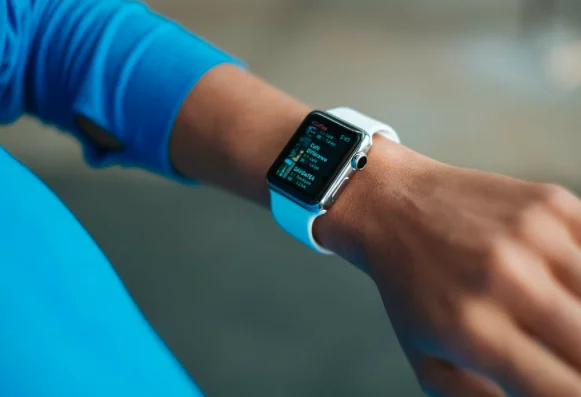
Some trackers also estimate sleep patterns and altitude. A fitness tracker can tell whether the wearer is stationary, moving or exercising. Shoppers on a budget often compare Smartwatches under 10,000 today.
A fitness tracker can also act as an alarm and send reminders to eat, sleep, exercise and stand up.
A tracker does not replace a qualified trainer, but it can help people with specific fitness goals see whether they are on track. The sections below cover its main uses, then how to wear and clean it.
How To Use A Fitness Tracker?
- A fitness tracker can help you to keep track of your progress. You have data to back you up. It handles some of the record-keeping a personal trainer would do, with first-hand data, statistics and reports. The data is an estimate rather than a perfect measurement, so it is most useful for spotting trends over weeks rather than judging a single day.
- Training alone can be demotivating, and a fitness tracker can act as a personal reminder. Most trackers come with preset daily goals, such as a step target, and let the wearer customize them.
- A fitness tracker also helps the wearer set achievable goals. A sedentary lifestyle raises the risk of weight gain, and the World Health Organization notes that physical activity helps prevent noncommunicable diseases such as cardiovascular disease and diabetes. Inactivity reminders prompt the wearer to get up after long periods of sitting, goals can be set to suit the wearer’s fitness level, and regular feedback can help with motivation.
- Most people cannot visit a clinic often, and most fitness trackers can monitor heart rate and estimate calories burned each day in between. Calorie figures are rough estimates (see the accuracy section below), so they should guide a diet rather than dictate it.
Use the fitness tracker regularly, because consistent wear produces more useful trend data. Personal goals give the numbers a purpose; the World Health Organization recommends that adults do at least 150 minutes of moderate-intensity physical activity per week.
According to the WHO, regular physical activity provides significant physical and mental health benefits. A fitness tracker is not required to be active, but it can make progress easier to see. Smartwatches under 10k (about ₹10,000) are one budget option; features vary by model, so compare the sensors before buying.
Wearing A Fitness Tracker
Most of the fitness trackers are wrist-based devices. Wearing one is similar to wearing a watch. Slide the bottom band through the loop, tighten the band until it sits comfortably on your wrist, press the peg into a hole, and pass the loose end through the second loop.
Moreover, you will find different types of bands in the market today. Some of them come with a clasp. Just wear it like a watch. Avoid wearing it too tight: Fitbit’s product care guidance says the band should be able to move back and forth on the wrist. Furthermore, you will find a few fitness trackers, which are clip-on. You can clip them onto your collar.
In the case of wrist-based devices or Smartwatches under 10k, ensure to keep them in contact with your skin. The back of the device should be in touch with the skin.
Good skin contact helps the optical sensor read heart rate. For exercise, Fitbit recommends moving the band two to three finger widths above the wrist bone for better sensor contact, then lowering it afterward. Fitbit also advises removing the device for an hour or so after extended wear to give the skin a rest.
In the case of clip-ons, if you feel uncomfortable on the skin, change the position. You can clip it onto your pocket. That way, it is easy. Many people wear the tracker on the non-dominant arm, which makes fewer incidental movements.
Wearing it on the non-dominant hand also reduces knocks to an expensive device. Some apps, including Fitbit’s, have a wrist setting: according to Fitbit, the dominant setting lowers step-counting sensitivity to reduce overcounting, and the non-dominant setting raises it to reduce undercounting. Most trackers connect to a phone over Bluetooth.
Keep the number of other paired devices nearby to a minimum, as they may interfere with the connection. Treat the numbers as estimates: accuracy varies by device and by measurement, and a tracker cannot produce the data that a pathology lab can.
Charge the tracker regularly, ideally before a workout or trip, so it does not switch off mid-activity.
Cleaning And Maintaining Your Fitness Tracker
- Regularly ensure to clean your fitness tracker band and your wrist. Remember to do it immediately after exercise. Fitbit recommends fresh water, with a hypoallergenic soap if necessary (but no soap on leather bands), while Garmin’s manuals say to wipe the watch with a cloth dampened with a mild detergent solution. Do not use harsh detergents. Air-dry the band and the wrist before you wear the tracker again. Do not soak the bands, especially leather ones, which Apple says are not water resistant.
- Moreover, you can rub very lightly. Do not expose your tracker to harsh weather. It may lead to discoloration. Additionally, do not expose the tracker for a long time to colored clothing, as color transfer may occur.
- One word of caution here. Clean your device with clean hands. You have got to wash your hands clean before attempting to clean the band. A device worn all day collects sweat and dirt, so regular cleaning matters.
- To disinfect hard surfaces, Apple says a 70 percent isopropyl alcohol wipe, a 75 percent ethyl alcohol wipe or Clorox Disinfecting Wipes may be used gently on the exterior of Apple Watch and compatible bands, but not on fabric or leather bands. Check your own brand’s manual first, because Fitbit’s guidance is to use fresh water.
Following these steps helps a tracker last longer and give more reliable readings. If you are shopping, compare Smartwatches under 10k by sensors, battery life and band materials.
How Should a Fitness Tracker Fit on Your Wrist?
A fitness tracker should fit snugly enough for the sensor on its back to stay in contact with the skin, yet loosely enough to move. Fitbit’s product care guidance says the band should be able to move back and forth on the wrist, and that a band which causes discomfort should be loosened or removed.
- Everyday wear: keep the device on top of the wrist with the back touching the skin.
- During exercise: slide it two to three finger widths above the wrist bone for steadier sensor contact (Fitbit).
- After exercise: lower it again and loosen it if it feels tight.
- Which wrist: choose one and set the matching dominant or non-dominant option in the app, if your brand offers it.
How to Clean a Fitness Tracker Step by Step
The safest way to clean a fitness tracker is to follow the maker’s instructions, because materials differ. This general routine reflects the guidance Apple, Fitbit and Garmin publish:
- Take the tracker off and, if the band is removable, detach it (Apple recommends removing the band before cleaning it).
- Wipe the device with a nonabrasive, lint-free cloth lightly dampened with fresh water.
- For silicone or sport bands, use water and, where the maker allows, a small amount of mild or hypoallergenic soap. Do not use soap on leather.
- Dry the device and band completely with a lint-free cloth before putting them back on.
- Wash and dry your wrist as well, especially after a workout.
What Not to Use
Apple says soaps, cleaning products, abrasive materials, compressed air, ultrasonic cleaning and external heat sources can damage Apple Watch, and that products containing bleach or hydrogen peroxide should not be used. Fitbit advises removing the device before applying sunscreen or insect repellent sprays.
Cleaning Guidance by Brand
| Brand | Everyday cleaning | Soap or detergent | Disinfecting |
|---|---|---|---|
| Apple Watch | Nonabrasive, lint-free cloth lightly dampened with fresh water | Mild hypoallergenic hand soap only for fluoroelastomer bands such as the Sport Band and Solo Loop | 70% isopropyl or 75% ethyl alcohol wipes, or Clorox Disinfecting Wipes, on exterior surfaces; not on fabric or leather bands |
| Fitbit (Google) | Fresh water | Hypoallergenic soap if necessary; no soap on leather bands | Not covered on the product care page; check the device manual |
| Garmin | Cloth dampened with a mild detergent solution, then wipe dry | Mild detergent solution | Not covered in the watch cleaning steps; check the device manual |
Guidance as of October 2026, from each company’s support pages and manuals. For third-party bands, follow the care information supplied with the band. Choosing the right strap material also makes cleaning easier; see what to check before buying Apple Watch straps.
What to Do About Skin Irritation
Skin irritation from a tracker is often linked to a band that is too tight, or to sweat and moisture trapped under it. Garmin’s manuals note that some users may experience skin irritation after prolonged use, especially with sensitive skin or allergies, and advise keeping the watch clean and dry and not overtightening it.
Fitbit says to remove the device if you notice redness, soreness, tingling, numbness, burning or stiffness, and to contact customer support or a dermatologist if symptoms persist.
How Accurate Are Fitness Trackers?
Fitness trackers are generally better at measuring heart rate than calories. In a 2017 study by Shcherbina and colleagues in the Journal of Personalized Medicine, 60 volunteers wore seven commercially available wrist-worn devices while sitting, walking, running and cycling. The researchers found that most devices measured heart rate adequately in the lab, but median energy expenditure errors ranged from 27.4% for the Fitbit Surge to 92.6% for the PulseOn.
The practical lesson is to use calorie numbers as a rough trend rather than a precise budget. For a deeper look, read whether fitness trackers accurately count calories.
Common Mistakes to Avoid
- Wearing the band so tight that it is uncomfortable or leaves marks.
- Leaving a wet band on after a shower or workout instead of drying it.
- Using alcohol wipes or soap on leather or fabric bands.
- Using household cleaners, ultrasonic cleaners or heat to dry the device.
- Letting the battery run flat before a long workout; see these tips to extend Apple Watch battery life.
- Skipping software updates; Garmin owners can sync and update through Garmin Express.
Today’s trackers build on decades of wearable devices; the history of wearable technology traces how they developed.
Frequently Asked Questions
How tight should a fitness tracker be?
A fitness tracker should be snug but not constricting. Fitbit says the band should be able to move back and forth on the wrist, and that a band causing discomfort should be loosened.
Can I clean my fitness tracker with alcohol?
It depends on the brand and band material. Apple allows 70% isopropyl or 75% ethyl alcohol wipes on Apple Watch exterior surfaces and compatible bands, but not on fabric or leather bands. Fitbit’s care guidance recommends fresh water instead, so check your manual first.
How often should I clean my fitness tracker band?
Clean the band regularly, especially after workouts or heavy sweating, and dry it fully before wearing it again. Fitbit and Garmin both link clean, dry bands to less skin irritation.
Which wrist should I wear a fitness tracker on?
Either wrist works if the app knows which one you use. Fitbit’s dominant-wrist setting lowers step-counting sensitivity to reduce overcounting, while the non-dominant setting raises it to reduce undercounting.
Why does my fitness tracker give me a rash?
A rash is often linked to a band that is too tight or to sweat and moisture trapped against the skin. Remove the device, keep the area clean and dry, and see a dermatologist if symptoms persist, as Fitbit advises.

Justwebworld has published guides since 2012. How we write and update articles Report an error
