

Note (October 2026): An earlier version said the Mobile Pixels Trio screen extender weighs about as much as half a pen. Mobile Pixels lists the original Trio at 1.8 lb and the current Trio 3 Pro at 4.13 lb, and the text has been corrected.
A triple monitor laptop setup uses a screen extender, such as the Mobile Pixels Trio 3 Pro, that clips to the back of a laptop and slides out two extra displays, giving three screens from one machine. It adds workspace for remote work, but it also adds weight (4.13 lb for the Trio 3 Pro), cost and power draw.
Key Takeaways
- A laptop screen extender adds one or two portable displays that attach to the laptop lid, turning one screen into two or three.
- According to Mobile Pixels, the Trio 3 Pro has two 14.1-inch 2240 x 1400 displays, weighs 4.13 lb, connects with a single USB-C cable and suits 15- to 16-inch laptops.
- As of October 2026, Mobile Pixels lists the Trio 3 Pro at $509.99 on sale (regular price $599.99); prices change often.
- Remote work is common but not universal: the US Bureau of Labor Statistics found 21.9% of people at work teleworked in September 2026.
- Check your laptop’s external-display support and your posture setup before buying; an extender does not fix a low, cramped screen position.
Everyone’s working remotely! Okay, maybe not everyone — but since the pandemic, companies and individuals have embraced the remote world much more than they ever used to.
If there’s to be a number on it, one widely cited survey reported that remote work opportunities roughly tripled after the COVID pandemic (a survey finding, not an official statistic), with 93% of previous full-time employees expressing their desires to go full or partially remote.
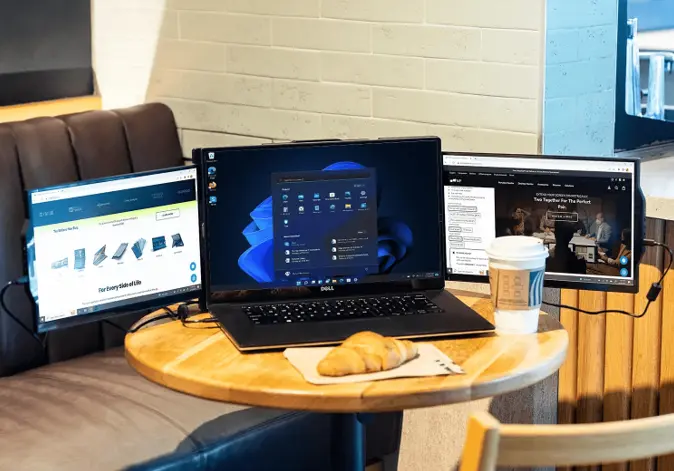
But if you want to be honest with yourself, you’ll know that working remotely is a little trickier because you won’t have an office desk to put your laptop on, a huge desk monitor, or even enough desk space. So what can you do?
One example of the product type is the Mobile Pixels Trio laptop screen extender, which adds two extra displays to a single laptop. This guide explains what such a setup does well, where it falls short and how to decide whether it suits the way you work from home.
The sections below cover how a triple monitor laptop setup works, the practical benefits for remote work, the real specifications and drawbacks, and the ergonomic basics that matter more than the number of screens.
Let’s discuss the triple monitor laptop setup.
A triple monitor laptop setup, also called a laptop screen extender, is a portable frame with two thin displays that attaches to the back of a laptop lid and slides out to either side. The laptop’s own screen sits in the middle, so one laptop drives three screens without a desk monitor.
But how does it work?
Setup is mostly mechanical. With the Mobile Pixels laptop screen extender, the general steps are below; always follow the guide in the box for your exact model.
- Attach the magnets supplied in the box to the back of your laptop’s lid, positioned as the Mobile Pixels guide shows (the current Trio 3 Pro box includes four laptop magnets).
- Attach the device to the back of your laptop and open your computer as you would. This would allow the stand at the back of the extender to open up.
- Slide out the two panels on each side of the device so that your laptop screen goes from one… to two… to three!
- Finally, connect the device to your laptop with the supplied cable. Mobile Pixels describes the Trio 3 Pro as a single USB-C cable setup and includes USB-A adapters for older ports.
- Arrange the three screens in your operating system’s display settings so the cursor moves between them in the right order.
Six reasons you need to start using the laptop screen extender for remote work.
Here are six practical effects of a triple monitor laptop setup on remote work, with the trade-offs noted where they apply.
Flexibility
Sure, the conventional laptop is flexible. But have you ever thought of being able to carry around your desk monitor? That’s how it would feel with this triple monitor setup. But instead of stuffing three monitors into your backpack, you’ll be carrying your laptop plus one extender unit. That unit is not featherweight: Mobile Pixels lists the original Trio at 1.8 lb and the Trio 3 Pro at 4.13 lb.
Less cluttering
Speaking of stuffing, there’s a common characteristic of all remote workers — multiple open tabs. If this is you, then you know how annoying it can be to open so many tabs that only the logos are displayed on top. Some people might prefer tab switching like that (clicking so many logos until reaching the jackpot), and others might open a separate window to split the tabs. But you’d still have to switch windows, right? The three-laptop screen setup gives you a side-by-side screen space to split your tabs and windows for better efficiency.
Better productivity
More screen area helps most with tasks that use several windows at once: a video call on one screen and notes on another, a spreadsheet beside a report, or code next to documentation. It helps less with focused single-document work, and the gain depends on the person and the task rather than on the screen count alone.
Collaboration is made easier
Another reason to consider the setup is in-person collaboration. Mobile Pixels lists four viewing modes for the Trio 3 Pro (landscape, collaboration, portrait and presentation), so a side screen can face a colleague sitting opposite instead of everyone crowding around one laptop.
Presentations on the go!
Also, if you need to show a project to a client, a professor or a manager in person, presentation mode lets one side screen face the other person while you keep your notes on the main screen. Simply tilt one of the two extended screens by 180o, and you’ve got yourself a personalized slide show monitor.
Portability
The device folds flat against the laptop for carrying, which makes it more portable than desk monitors. It still adds real weight and bulk: Mobile Pixels lists the Trio 3 Pro at 4.13 lb and 13.44 x 8.83 x 0.9 inches when folded, so check your bag and your back before planning to carry it daily.
Conclusion
A triple monitor laptop setup suits remote workers who juggle many windows and move between locations, and it suits less well anyone who works at one fixed desk, where full-size monitors are usually cheaper per inch of screen. The link at the top goes to the Trio page on the Mobile Pixels site; as of October 2026 the maker lists the Trio 3 Pro at $509.99 on sale (regular $599.99), and prices and discounts change often, so compare current prices before buying.
What Are the Real Specifications of a Triple Screen Extender?
The Mobile Pixels Trio line is the product this article was written around. The figures below come from the Mobile Pixels product and technical-specification pages, checked in October 2026.
| Model | Screen size | Resolution | Weight | Connection |
|---|---|---|---|---|
| Trio (original) | 12.5 inches | 1920 x 1080 | 1.8 lb | USB-C and USB-A |
| Trio Max | 14 inches | 1920 x 1080 | 2.0 lb | USB-C and USB-A |
| Trio 3 Pro | Two 14.1-inch screens | 2240 x 1400 each | 4.13 lb | Single USB-C cable, two USB-C ports with 65W pass-through charging |
The original Trio and Trio Max are listed as single-screen units, so a three-screen layout with them needs two units. The Trio 3 Pro carries both side screens in one frame, has a built-in kickstand and, according to Mobile Pixels, is designed for 15- to 16-inch laptops and works with macOS and Windows without drivers.
How Does a Triple Monitor Laptop Setup Compare With Other Options?
A screen extender is one of several ways to add screen space to a laptop. The right choice depends mostly on whether you work in one place or move around.
| Option | Best for | Main drawback |
|---|---|---|
| Laptop screen extender (two side screens) | Working from several locations with many windows open | Adds several pounds and costs more than a single portable monitor |
| Single portable monitor | Travel with one extra screen | Only one additional display |
| Full-size desk monitors | A fixed home office desk | Not portable; needs desk space and a dock or several ports |
| Laptop screen only, with virtual desktops | Light multitasking and travel | Constant window switching |
For a fixed desk, the site’s guide on how to add a monitor to your laptop covers the cable and port options for standard monitors.
What Should You Check Before Buying a Laptop Screen Extender?
- Laptop size. Extenders are sized for specific lid sizes; the Trio 3 Pro, for example, is listed for 15- to 16-inch laptops.
- External display support. The number of external screens a laptop can drive depends on the model. Apple, for example, says the MacBook Air with M4 or M5 chip supports up to two external displays alongside its built-in screen; check your own laptop’s specifications.
- Ports and power. Confirm your laptop has a port the extender supports. Pass-through charging, such as the 65W listed for the Trio 3 Pro, lets one cable carry power as well.
- Weight on the lid. A frame of several pounds hangs on the laptop lid, so a sturdy hinge and a stable surface matter.
- Total cost. Compare the extender’s price with two ordinary monitors if you mostly work at one desk.
You can also confirm your current display settings with the site’s screen resolution checker before matching a new screen to it.
How Should You Position Three Screens for Comfort?
More screens do not help if they strain the neck or eyes. The US Occupational Safety and Health Administration (OSHA) computer workstation guidance gives these basics for monitors:
- Keep a viewing distance of about 20 to 40 inches (50 to 100 cm) from the eyes to the screen.
- Place the top of the screen at or slightly below eye level, with the center about 15 to 20 degrees below horizontal eye level.
- Place monitors perpendicular to windows to reduce glare.
A laptop sitting flat on a table puts all three screens low, so a laptop stand with an external keyboard and mouse brings the setup closer to that guidance. The site’s home office setup tips for remote workers and guide to making a home office comfortable and functional cover the rest of the workspace.
How Common Is Remote Work Now?
According to the US Bureau of Labor Statistics Current Population Survey, 21.9% of people at work in the United States teleworked in September 2026, about 34.7 million people. Of all people at work, 10.7% teleworked for all of their hours and 11.2% for some of their hours. Earlier in the year, BLS reported a March 2026 rate of 22.6% and noted that the rate had stayed between 21.5% and 23.0% over the previous year.
In other words, remote and hybrid work has settled at roughly one in five US workers rather than becoming universal, and much of it is hybrid. For more on how schedules are changing, see the site’s article on remote work and flexible schedules replacing the 9-to-5.
Frequently Asked Questions
What is a triple monitor laptop setup?
A triple monitor laptop setup is a laptop plus two extra displays, usually from a screen extender that attaches to the back of the lid and slides out to each side. The laptop’s own screen stays in the middle, giving three screens from one machine.
How much does the Mobile Pixels Trio weigh?
Mobile Pixels lists the original 12.5-inch Trio at 1.8 lb, the Trio Max at 2.0 lb and the two-screen Trio 3 Pro at 4.13 lb. None of them is as light as a pen, so expect a noticeable addition to your bag.
Does a laptop screen extender work with a MacBook?
Mobile Pixels says the Trio 3 Pro works with macOS and Windows. Whether all screens work at once depends on how many external displays your Mac model supports; Apple says the MacBook Air with M4 or M5 supports up to two external displays alongside the built-in screen.
Does a laptop screen extender need its own power?
The Trio 3 Pro is described as a single USB-C cable setup with two USB-C ports offering 65W pass-through charging, so one connection can handle both video and charging. Older models connect over USB-C or USB-A; check the manual for your model’s power needs.
Is a triple monitor setup worth it for remote work?
A triple monitor setup is most useful for people who work with many windows at once and move between locations. For someone who always works at the same desk, full-size monitors usually give more screen area for the money and better ergonomics.

Justwebworld has published guides since 2012. How we write and update articles Report an error
