

Note (September 2026): This guide was updated with current prices and platform limits; several AirDroid monitoring features described below work only on Android child devices, and YouTube Kids filtering is not perfect, so the text now says so.
The best parenting apps cover three jobs: safety, learning and family organization. Start with the free built-in controls, Apple Screen Time on iPhone and Google Family Link on Android, and add a paid monitor such as AirDroid Parental Control only if you need more. Khan Academy Kids, Duolingo, Cozi and YouTube Kids cover early learning, languages, scheduling and filtered video.
Key Takeaways
- Free first: Apple Screen Time and Google Family Link cost nothing and handle app approvals, time limits and content filters on their own platforms.
- Platform matters: Family Link cannot supervise an iPhone, and AirDroid’s camera, audio, social-content and SMS monitoring work only on Android child devices.
- Prices as of September 2026: AirDroid Parental Control costs $59.99 a year, Cozi Gold $39 a year; Khan Academy Kids is free with no ads or subscriptions.
- Filters are not perfect: YouTube Kids and every other filter can miss content, so conversations and check-ins still matter.
- Be transparent: monitoring works best when children know what is switched on and why.
Struggling to keep up with your kids? Here’s your perfect family guide on the top 6 must-have parenting apps to stay on top of it all, with checked prices and platform limits.
Let’s face it: being a parent is more challenging than ever. Among other things, it requires constantly managing multiple responsibilities and tasks at the same time. Speaking of the kids’ school schedules, digital lives, and quality family time, it can feel like you’re juggling a million things at once. But then, your phone apps could be the solution to handling these parenting issues.
These apps for parents are designed to be your household organizer, helping you manage schedules, ensure your kids online safety, and make learning fun. You can be sure they bring all your parenting responsibilities into one place.
Now, not to worry about the endless list of parenting apps, this guide presents the 6 most indispensable apps for kids learning and safety. The apps were chosen for what they do, how easy they are to set up and what they cost, and each entry now notes current pricing and the devices it supports. Consider this your go-to resource for digital parenting, starting with the free controls already built into your family’s phones.
AirDroid Parental Control: Best For Comprehensive Parental Monitoring and Child Safety (Age: 5~18)
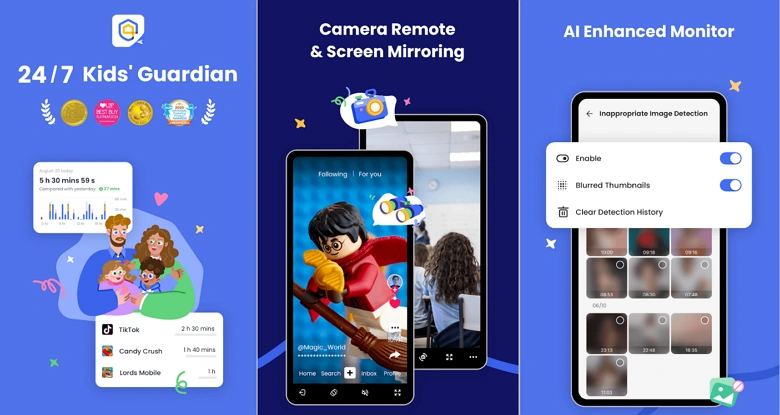
Without mincing words, AirDroid is one of the foremost must-have parenting apps to consider for effective parenting and kids’ online safety today. AirDroid Parental Control is a paid app: as of September 2026, AirDroid’s pricing page lists $9.99 a month (2 devices), $19.99 a quarter or $59.99 a year (10 devices). The parent app runs on Android, iPhone, iPad and the web, and the child app runs on Android 8.0+ and iOS/iPadOS 15+.
AirDroid’s Key Features
Remote camera and audio monitoring for offline safety: The app allows you to check in on your child’s surroundings remotely through their device’s camera and microphone for a quick safety check. According to AirDroid, this surroundings-monitoring feature works only when the child’s device runs Android, and it is the kind of feature families should discuss openly with their children.
Instant alerts for risky content on social apps and SMS: The app can notify you if your child encounters harmful or inappropriate keywords and content on supported social media platforms or in messages. AirDroid lists social content detection, calls and SMS monitoring, screen mirroring and notification syncing as Android-only features.
Screen time and app management: You can control your kids’ screen time by setting daily limits and scheduling time-outs. You can also block or limit specific apps without breaking a sweat.
Real-time location tracking & geofencing alerts: You get to see where your child is at all times. You can also set safe zones and get instant alerts if they enter or leave those areas.
Why Parents Love It
Among paid parenting apps, AirDroid goes beyond managing screen time by combining location, content alerts and device limits in one dashboard, although iPhone users get a smaller feature set than Android users. It provides true peace of mind about your child’s overall safety, both online and in the real world.
Google Family Link: Best For Free Basic Parental Control on Android Devices (Age: 5~18)
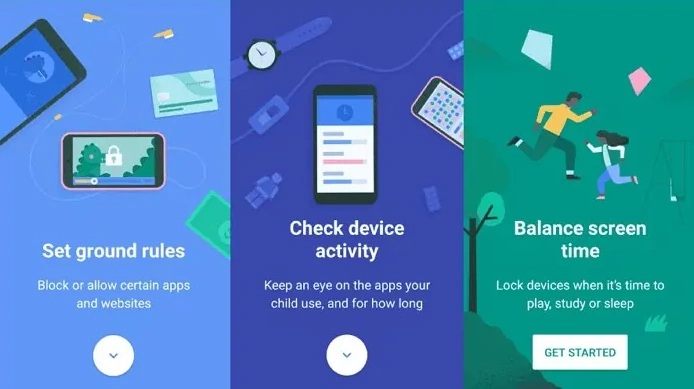
In addition to AirDroid, Google Family Link is another must-have parenting app, and it is free. It is particularly great for those who want a free tool that offers a strong foundation of parental controls. Find below the features you stand to benefit from all at no cost.
Family Link’s Key Features
Approve or block app downloads: You can easily approve or deny new apps your child wants to download from the Google Play Store directly through your phone.
Content Restriction: Restrict content in Google apps like Google Play and YouTube to ensure age-appropriate access for their children.
Daily screen time limits: You can set a total daily screen time limit for your child’s device. That helps to create healthy digital habits and balance for them.
Location tracking: You get to see your child’s real-time location on a map. You can also get notifications when they arrive or leave certain places.
Why Parents Love It
Family Link is simple to use and completely free. It provides essential, easy-to-use tools for controlling screen time and approving content on Android phones, tablets and Chromebooks. According to Google’s Family Link help pages, iPhones, iPads and computers other than Chromebooks cannot be supervised with Family Link, although a parent can run the Family Link app on an iPhone. Check here for other free options with free features or free trial.
Khan Academy Kids: Best For Free Early Learning (Age: 2~8)
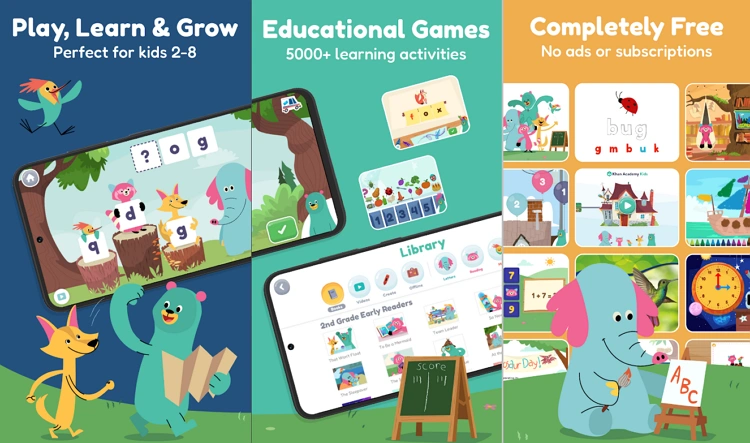
Do you feel your little child is ready to start learning, and you are wondering where to begin? Khan Academy Kids is undoubtedly one of the go-to apps for kids’ learning and safety, especially between ages 2 and 8.
Khan’s Key Features
Interactive lessons for math, reading, and social-emotional skills: It may interest you to see how the app uses fun characters and engaging activities to teach core subjects and essential life skills in a playful way.
Fun activities tailored for kids ages 2–8: The developmental stages of kids were factored into the app’s design. That means it’s designed to keep them glued day by day and to learn effectively.
Why Parents Love It
Khan is entirely free and has high-quality educational content that makes screen time feel truly productive. It offers a safe, trusted space for kids to learn and play without ads or hidden costs.
Duolingo: Best For Language Learning
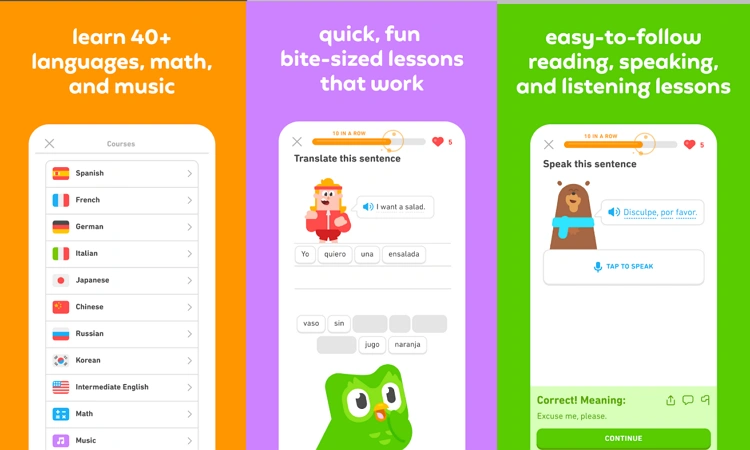
You should be interested in your kids learning a new language. Duolingo is the app that gives them a head start. Whether it’s Spanish, French, or dozens of other languages, the app makes language learning as fun and addictive as a game. It has short, bite-sized lessons. For children aged roughly 3 to 8 who are still learning to read, the separate Duolingo ABC app teaches English letters and phonics without ads or in-app purchases.
Duolingo’s Key Features
Fun, game-like lessons: As mentioned, the app turns learning into a game, complete with points, streaks, and levels. The fun keeps kids motivated and excited to practice every day.
Wide range of languages: Duolingo teaches more than 40 languages (Wikipedia counted 42 courses as of September 2026) and also offers math, music and chess courses. Surely, your family can learn everything from Spanish to Japanese, opening up a world of new cultures.
Why Parents Love It
Duolingo magically turns screen time into a productive language learning session. The core app is free with ads, while the paid Super and Max tiers add extras such as unlimited retries and, in Max, AI conversation practice; prices vary by country. Duolingo’s privacy policy treats children under 13 in the US (or under the local age of digital consent) as child users whose accounts need parental consent, so a parent should set up the account.
Cozi Family Organizer: Best For Family Scheduling and Coordination
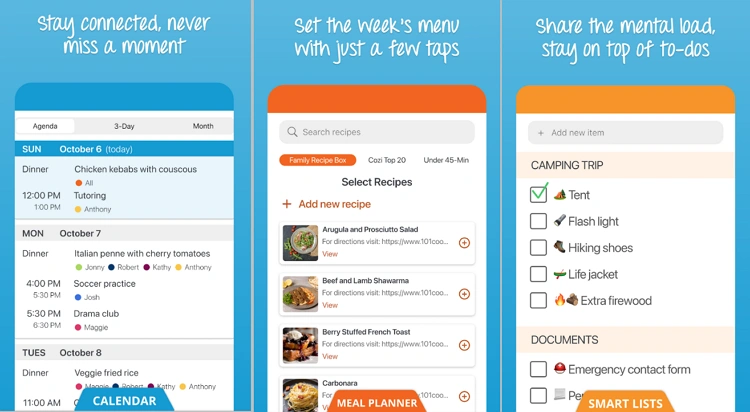
Cozi is that app that enhances your household’s coordination and makes your family life run much smoother. It is a true lifesaver, especially if your family is busy. This app brings everyone’s schedule and to-do lists into one central, easy-to-use place, helping you finally get everyone on the same page.
Cozi’s Key Features
Shared calendars, shopping lists, and to-do lists: Create a central hub where every family member can see and add to the family calendar, grocery list, and chore lists in real time.
Notifications and reminders for family members: Cozi automatically sends a reminder so no one forgets about an appointment or an item on the shopping list, keeping everyone on the same page.
Why Parents Love It
Cozi takes away much of the mental load of managing a household. As of September 2026, the free plan is ad-supported and, according to Cozi’s FAQ, its mobile Agenda view covers the next 30 days; Cozi Gold ($39 a year) removes ads and adds month view, calendar search and a birthday tracker, and Cozi Max ($79 a year) adds AI tools such as turning emails into calendar events. It keeps busy families well organized and reduces stress by ensuring everyone knows what’s happening.
YouTube Kids: Best For Safer Video Streaming
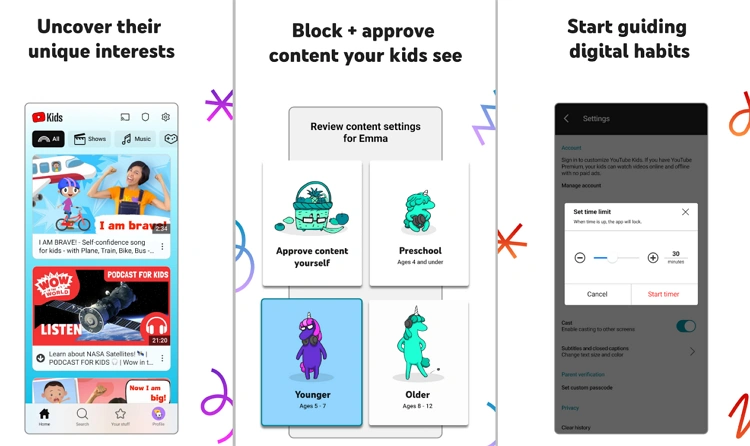
Many know about YouTube’s vast library of videos with diverse content. However, there’s an excellent version for your kids as well. YouTube Kids is a free, separate app from YouTube that offers a more controlled space for kids to explore. Parents pick a content level (Preschool for ages 4 and under, Younger for ages 5 to 8, Older for ages 9 to 12) or approve every video themselves, though no automated filter catches everything.
YouTube Kids’ Key Features
Curated content for children: YouTube Kids filters videos into age-based content levels, from educational shows and songs to cartoons. Because filtering is not perfect, the “approve content yourself” setting, which limits a profile to videos, channels and collections a parent has chosen, gives the most control.
Parental controls for screen time and search: The app allows you to set a timer to limit watching hours, and choose whether they can search for new videos or only watch what’s approved by you.
Why Parents Love It
YouTube Kids lets kids enjoy a large library of video in a more controlled environment than the main YouTube app, with profiles, timers and the option to block individual videos or channels. It is a sensible middle ground for younger children, as long as parents review the settings, turn off search for the youngest users and check in on what is being watched.
Final Remarks
As the ills and challenges of today’s world increase, anxieties and worries are rising in many parents. However, you do not have to be among them. By combining the free built-in controls with the right few of these 6 must-have parenting apps, parenting can get a lot easier, and you can streamline your family’s life and feel more confident.
From the peace of mind offered by AirDroid Parental Control, which also helps with real-world safety, to the organization of Cozi and the learning fun of Khan Academy Kids and Duolingo, these tools help you manage, protect, and empower your family in both the digital and real worlds.
How Do These 6 Parenting Apps Compare?
The six parenting apps in this guide do different jobs, so most families combine two or three. The table summarizes each app’s purpose, cost and supported devices as of September 2026.
| App | Main job | Cost (Sept 2026) | Child devices | Best age range |
|---|---|---|---|---|
| AirDroid Parental Control | Monitoring, location, screen time | $9.99/month, $19.99/quarter or $59.99/year | Android 8.0+, iOS/iPadOS 15+ (several features Android-only) | About 3 to 18 |
| Google Family Link | Free supervision of apps, time and location | Free | Android 6.0+, Chromebooks, compatible Fitbit devices; not iPhone or iPad | Children under 13, and teens with supervision |
| Khan Academy Kids | Early reading, math and social-emotional learning | Free, no ads, no subscriptions | iOS, Android, Amazon Appstore | 2 to 8 |
| Duolingo | Languages, plus math, music and chess | Free with ads; paid Super and Max tiers | iOS, Android, web | Older children with a parent-created account; Duolingo ABC for early readers |
| Cozi Family Organizer | Shared calendar, shopping and to-do lists | Free with ads; Gold $39/year; Max $79/year | iPhone, Android, web | The whole family |
| YouTube Kids | Filtered video with parental settings | Free | iOS, Android, web | Content levels for 4 and under, 5 to 8, and 9 to 12 |
Prices are the list prices published by each company and can change or differ by country and app store, so check the current price before subscribing.
What Free Built-In Parental Controls Should Parents Turn On First?
The free parental controls built into iPhone, Android and Windows cover most families’ basic needs: app approvals, daily time limits, content filters and purchase approvals. Setting these up first often makes a paid app unnecessary.
Apple Screen Time and Family Sharing (iPhone, iPad and Mac)
Apple Screen Time is the free parental control system built into iPhone, iPad and Mac, managed through Family Sharing. According to Apple Support, parents can use Ask to Buy to approve app downloads, Ask to Browse to approve new websites in Safari, communication limits to choose who a child can contact in Messages, FaceTime and Phone, schedules and time allowances to limit when and how long apps are used, and Content & Privacy Restrictions to set age ratings for apps, music, books, movies and TV shows. Apple states there is no cost to use these features.
Apple’s Communication Safety feature helps protect children from viewing or sharing photos and videos with detected nudity, and with the updates Apple released on 14 September 2026 it also covers gore and violence, including in live FaceTime calls. Apple notes that every device in the Family Sharing group must run iOS 27, iPadOS 27, macOS 27, watchOS 27 or visionOS 27 to use the Screen Time update. Family members can also share their location with each other through the Find My app.
Google Family Link and Android’s built-in controls
Google Family Link is Google’s free supervision tool for children’s Google Accounts on Android and ChromeOS. According to Google, parents can block or allow app downloads, set daily limits and bedtime, restrict mature content on Google Play, change app permissions and see the location of a supervised Android device or compatible Fitbit. Parents can manage Family Link from an Android phone, an iPhone or iPad running iOS 16 or later, or the Family Link website.
In June 2026, Google announced that its screen-time limits, downtime schedules, app restrictions and Google Play content filters are being built directly into the Settings of all Android 17 devices, protected by a PIN, and that these controls work alongside Family Link features such as School Time, purchase approvals and location alerts.
Microsoft Family Safety (Windows and Xbox)
Microsoft Family Safety is Microsoft’s free family tool for Windows PCs and Xbox consoles. It focuses on screen-time limits for devices, apps and games, content filters for Microsoft Edge, activity reports and spending controls. Microsoft has removed location sharing, location alerts and drive safety from the Family Safety app, so it is no longer a location-tracking tool.
How Do You Choose the Right Parenting App?
The right parenting app depends on your child’s age, the devices your family uses and the problem you are trying to solve. A simple way to decide:
- Toddlers and preschoolers (2 to 5): a learning app such as Khan Academy Kids, and YouTube Kids set to Preschool or approved content only, on a shared family tablet.
- Early primary (5 to 8): add built-in time limits and app approvals through Apple Screen Time or Google Family Link. Read our guide to recommended screen time by age before setting limits.
- Tweens (9 to 12): this is usually when a first phone arrives. Built-in controls plus location sharing cover most needs; see when to buy a child a first smartphone.
- Teens (13 to 17): shift from blocking to agreed rules and gradual independence. A paid monitoring app may make sense for specific safety concerns, ideally with the teen’s knowledge.
Mixed-device families should check compatibility first. Google Family Link cannot supervise an iPhone, and Apple Screen Time cannot supervise an Android phone, so a family with both may need a cross-platform app such as AirDroid, which offers fewer features on iOS.
How to Set Up Parental Controls in 5 Steps
- Create a child account. Add your child to Apple Family Sharing or create a supervised Google Account through Family Link, rather than handing over a device signed in to an adult account.
- Set content ratings. Choose age ratings for apps, films and websites, and turn on app-download approval.
- Add time limits and a bedtime. Use daily limits and downtime schedules, and keep devices out of bedrooms overnight if possible.
- Configure the apps your child actually uses. For example, set a YouTube Kids content level or approved-only mode and turn off search for young children.
- Explain the rules and review them regularly. Tell your child what is switched on and why, and loosen settings as they show they can handle more independence. Our internet safety rules for kids make a useful starting script.
What Are the Privacy and Trust Risks of Monitoring Apps?
Monitoring apps such as AirDroid Parental Control can access a child’s location, notifications, messages and, on Android, the device’s camera and microphone. That level of access is powerful, and it comes with trade-offs that parents should weigh before installing one.
- Trust: secret monitoring can damage a child’s trust if it is discovered. Many child-safety organizations recommend telling children what is being monitored.
- Data: a monitoring app stores sensitive family data on the vendor’s servers, so read the privacy policy and use a strong, unique password with two-step verification on the parent account.
- Law: rules on recording audio and video differ between countries and states. Parental monitoring tools are meant for your own minor child’s device; installing them on another adult’s phone without consent can be illegal.
For practical ways to lock down a child’s device without heavy monitoring, see how to make your kid’s phone a safe zone.
Common Mistakes Parents Make with Parenting Apps
- Paying before trying the free tools. Apple Screen Time and Google Family Link cover app approvals, time limits and content filters at no cost.
- Assuming every feature works on every phone. Many advertised monitoring features are Android-only because of Apple’s restrictions, so check the feature list for your child’s device.
- Treating filters as a guarantee. YouTube Kids and web filters reduce risk but can miss content.
If your child enjoys learning apps, our list of educational games for kids offers more ideas for productive screen time.
Frequently Asked Questions
What is the best free parental control app?
The best free parental control app is the one built into your child’s device: Apple Screen Time with Family Sharing for iPhone and iPad, and Google Family Link for Android phones and Chromebooks. Both let parents approve app downloads, set daily time limits and restrict mature content at no cost.
Can Google Family Link be used on an iPhone?
Google Family Link cannot supervise a child’s iPhone or iPad. According to Google, only Android devices, Chromebooks and compatible Fitbit devices can be supervised, although a parent can install the Family Link app on an iPhone to manage a child’s Android device.
How much does AirDroid Parental Control cost?
AirDroid Parental Control costs $9.99 a month for 2 devices, or $19.99 a quarter or $59.99 a year for up to 10 devices, according to AirDroid’s pricing page as of September 2026. Several of its monitoring features, including remote camera and SMS monitoring, work only on Android child devices.
Is Khan Academy Kids really free?
Khan Academy Kids is completely free, with no ads and no subscriptions, according to Khan Academy. The app is designed for children aged 2 to 8 and covers reading, math, phonics and social-emotional skills on iOS, Android and the Amazon Appstore.
Is YouTube Kids safe for young children?
YouTube Kids is safer than the main YouTube app for young children, but it is not risk-free because automated filters can miss content. Parents get the most control by choosing the “approve content yourself” setting, turning off search, setting a timer and blocking any video or channel they do not want their child to see.

Justwebworld has published guides since 2012. How we write and update articles Report an error
