

Note (September 2026): VMware Workstation Pro and Fusion Pro are now free for all users, while VMware Workstation Player and Windows Virtual PC have been discontinued and coLinux has not been updated since 2011; the old prices and descriptions below have been corrected.
The main VirtualBox alternatives are VMware Workstation Pro (free for all users since November 11, 2024, on Windows and Linux), Microsoft Hyper-V (built into Windows 10 and 11 Pro and Enterprise), QEMU and KVM (free and open source), and, on a Mac, VMware Fusion Pro or Parallels Desktop. Several older tools in this list are discontinued.
Key Takeaways
- VMware Workstation Pro (Windows and Linux) and VMware Fusion Pro (Mac) became free for commercial, educational and personal use on November 11, 2024, according to VMware by Broadcom.
- VMware Workstation Player was discontinued in 2024, and Windows Virtual PC was succeeded by Hyper-V starting with Windows 8.
- QEMU and KVM are free, open-source options; KVM runs only on Linux hosts.
- coLinux (last stable release April 9, 2011) and Portable VirtualBox are no longer current and are best treated as legacy tools.
- Hyper-V and the Windows Subsystem for Linux (WSL) are built into Windows, but Hyper-V cannot be installed on Windows 10 Home or Windows 11 Home.
Are you looking for VirtualBox Alternatives Softwares to run a second operating system on your computer? This guide compares the main options. VirtualBox is Oracle’s free, open-source hypervisor for running a second operating system inside the one you already use. Developers and testers use virtual machines like these to run a full copy of Windows, Linux or another system without changing their main setup. Several other programs can serve as an alternative to VirtualBox.
Cool VirtualBox Alternatives You Can Use
The right choice depends on your host operating system, your budget and what you need to run. Below is a look at the top 10 VirtualBox alternatives.
VMware Workstation Pro

VMware Workstation Pro is one of the best-known desktop hypervisors for Windows and Linux PCs. It is developed by VMware, which has been owned by Broadcom since November 2023. You can use this software to run other operating systems in virtual machines alongside your main one.
The same software also helps you replicate screens of tablets and mobiles. The best part is that you can sync this VMware Workstation using cloud so that you can use it anywhere you want to. This software is mostly aimed at developers and IT professionals. It used to be sold at $249 per license, but Broadcom made Workstation Pro free for personal use in May 2024 and free for all users, including commercial and educational users, on November 11, 2024; the paid versions are no longer sold.
QEMU

QEMU is one of the most heard names among software which let you use other OS than your original. It helps you use an OS as a virtual OS for development but, your main OS still remains different. It provides a lot of features which one can need for using a virtual OS on his machine.
The software is very well built and comes with a lot of tools which comes in handy for development purpose. The software is very popular but, still called complicated when comes to usage.
VMware Workstation Player
VMware Workstation Player was a light version of VMware Workstation Pro. It was discontinued in 2024 after Workstation Pro became free, so new users should download Workstation Pro instead. It also provides a lot of features and tools which you need to successfully run a second OS on the first one.
Workstation Player was a popular choice for personal use. It was free for personal use, while commercial use required a paid license; that distinction no longer matters because the free Workstation Pro covers both.
coLinux

coLinux is the way to use Windows and Linux at the same time. It is based on a modified Linux kernel that runs alongside Windows. The best part about coLinux is that this is free and open source so you do not have to worry about its cost.
coLinux was designed for Windows 2000 and Windows XP, and it never supported 64-bit Windows or more than 4 GB of memory. Its last stable release, version 0.7.9, came out on April 9, 2011, and the project is no longer actively maintained, so on current 64-bit Windows the Windows Subsystem for Linux (WSL) is the practical replacement.
VMware Fusion Pro
If you are a Mac user, VMware Fusion Pro is one of the main alternatives to VirtualBox. The standard (non-Pro) VMware Fusion edition has been discontinued and replaced by Fusion Pro. VMware Fusion Pro helps you run Windows or Linux on macOS, Apple’s Mac operating system, and it has supported Apple silicon Macs since version 13 (November 2022). This software is so well built you can run any Windows software on MAC without any problem and with ease.
Even if you want to use features like Cortana or Windows live search then, also VMware Fusion/Pro helps you do that. It once cost under $200 for Pro and $80 for the standard edition, but since November 11, 2024 VMware Fusion Pro has been free for commercial, educational and personal users, and the paid versions are no longer sold.
Windows Virtual PC
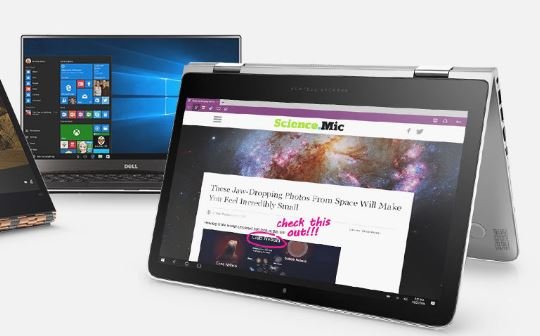
Windows Virtual PC was Microsoft’s tool for running older versions of Windows on Windows 7, and it powered Windows XP Mode, launched on July 22, 2009. Windows Virtual PC is now discontinued: its final release came out on February 14, 2011, and Hyper-V succeeded it starting with Windows 8.
Windows Virtual PC could not run 64-bit guest systems, and no Microsoft release of Virtual PC officially supported Linux. On Windows 10 and Windows 11 Pro or Enterprise, Microsoft’s built-in Hyper-V is the current equivalent.
Parallel Desktop

Parallels Desktop, made by Parallels, a subsidiary of Corel, is a direct competitor to VMware Fusion Pro. It helps MAC users to run Windows on their desktop and that too without compromising anything.
Not only Windows but, Parallel Desktop also allows you to run Linux and Chrome OS on your MAC. Even it has a coherence mode where you can use two different OS almost side by side. The software is very well built and very much recommended.
Kernel Virtual Machine
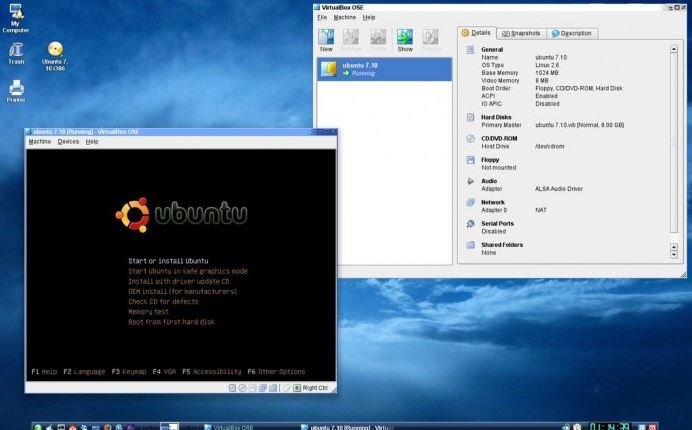
Kernel Virtual Machine is one of the most preferred virtual OS programs to run Linux on your current OS. It is very well built and provides a solid solution to run Linux or modified version of Linux. KVM has been part of the Linux kernel since version 2.6.20, released on February 5, 2007. It needs a processor with Intel VT or AMD-V, and besides x86 it has been ported to ARM, PowerPC, z/Architecture and RISC-V. KVM runs only on Linux hosts, not on Windows.
Portable VirtualBox

Portable VirtualBox is easy to understand from its name, it’s a VirtualBox program and it’s portable. The best part is that it’s free and open source so you can easily get it and use it.
Since it is a portable program, it doesn’t need to install before using. You can have it in a PenDrive or on the system. With Portable VirtualBox you do not need to worry about where the virtual machines are as it’ll take care of it on its own.
MobaLiveCD
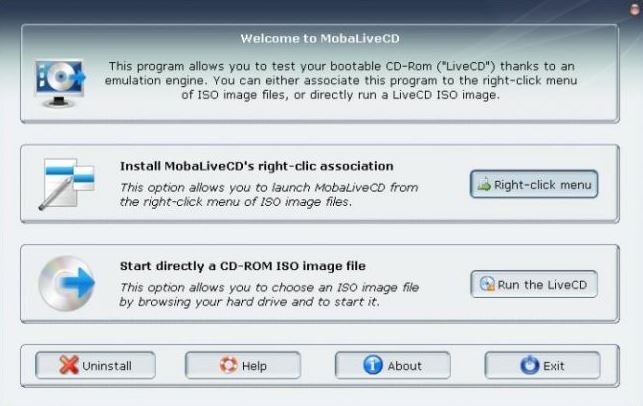
MobaLiveCD is a free, portable program from Mobatek that runs a Linux LiveCD ISO image on Windows without burning a CD or rebooting the computer. It is a single small executable that can start from a USB stick, and version 2.1 added support for testing bootable USB drives. It means that this program doesn’t need to be installed first. This program uses QEMU for being the engine of the virtual environment and the process goes smoothly.
These are the Top best VirtualBox alternatives which you can use without any hassle. Several of them are no longer maintained, so check the status table below before you choose one. 🙂
Which VirtualBox Alternatives Are Still Maintained?
Several tools in the list above have changed since it was first written. The table shows each one’s host platform, cost and status as of September 2026, based on the developers’ own pages and Wikipedia.
| Tool | Host system | Cost (as of September 2026) | Status |
|---|---|---|---|
| VMware Workstation Pro | Windows, Linux | Free for all users since November 11, 2024 | Active (Broadcom) |
| QEMU | Linux, Windows, macOS | Free, open source (GPL-2.0) | Active |
| VMware Workstation Player | Windows, Linux | No longer offered | Discontinued in 2024 |
| coLinux | 32-bit Windows (2000, XP) | Free, open source (GPL) | Inactive; last stable release 0.7.9 on April 9, 2011 |
| VMware Fusion Pro | macOS | Free for all users since November 11, 2024 | Active (Broadcom) |
| Windows Virtual PC | Windows 7 | Was free | Discontinued; succeeded by Hyper-V |
| Parallels Desktop | macOS (Intel and Apple silicon) | Annual subscription; prices vary | Active |
| KVM | Linux | Free, open source (GPLv2, part of the kernel) | Active |
| Portable VirtualBox | Windows (USB stick) | Free, open source | Newest download bundles old VirtualBox 5.1.22 |
| MobaLiveCD | Windows | Freeware | Still downloadable; latest version 2.1 |
What Is QEMU and How Does It Compare With VirtualBox?
QEMU is a free and open-source machine emulator and virtualizer created by Fabrice Bellard, whose first preview release appeared in 2003. QEMU runs on Linux, Windows, macOS and some other Unix platforms and is licensed under GPL-2.0, with some components under compatible licenses.
On its own, QEMU emulates hardware in software with its Tiny Code Generator (TCG). For near-native speed it can use a hardware accelerator: KVM on Linux, the Windows Hypervisor Platform (WHPX) on Windows, or Apple’s Hypervisor.framework (HVF) on macOS. VirtualBox offers a simpler graphical interface, which is why QEMU is often described as harder to set up.
For comparison, VirtualBox itself is developed by Oracle. Its base package is licensed under GPLv3, while the optional Extension Pack uses Oracle’s proprietary Personal Use and Evaluation License (PUEL). The current release listed on the VirtualBox downloads page in September 2026 is VirtualBox 7.2.20, and version 7.1 added virtualization on Apple silicon Macs.
Built-In Windows Options: Hyper-V and WSL
Windows already includes two tools that cover many of the jobs the older programs in this list were used for.
Microsoft Hyper-V
Hyper-V is Microsoft’s hypervisor, built into Windows as an optional feature, so there is nothing to download. According to Microsoft Learn, it requires:
- Windows 10 or Windows 11 Pro or Enterprise (it cannot be installed on Windows 10 Home or Windows 11 Home).
- A 64-bit processor with Second Level Address Translation (SLAT).
- CPU support for VM Monitor Mode Extension (VT-c on Intel CPUs).
- At least 4 GB of memory.
Hyper-V can be switched on from Control Panel under Turn Windows features on or off, or with the PowerShell command Enable-WindowsOptionalFeature -Online -FeatureName Microsoft-Hyper-V -All, followed by a restart. If you run into boot problems with a Hyper-V virtual machine, see this guide to the Hyper-V error loading operating system.
Microsoft warns that apps such as VMware Workstation and VirtualBox rely on the same processor features, so their virtual machines might not start or might run unreliably while the Hyper-V hypervisor is running.
Windows Subsystem for Linux (WSL)
The Windows Subsystem for Linux (WSL) is a Windows feature that runs a Linux environment, such as Ubuntu, Debian or Kali, without a separate virtual machine or dual booting. WSL 2, the default, runs a real Linux kernel inside a lightweight utility virtual machine, and WSL is open source. For developers who only need Linux tools on Windows, WSL is usually simpler than a full virtual machine; for example, you can follow a guide to install MongoDB on Ubuntu inside a WSL distribution.
How to Choose a VirtualBox Alternative
- Windows or Linux PC, free, full-featured: VMware Workstation Pro.
- Windows 10 or 11 Pro or Enterprise, no extra software: Hyper-V.
- Linux tools on Windows without a full VM: WSL 2.
- Linux server or open-source stack: KVM with QEMU.
- Mac, free: VMware Fusion Pro.
- Mac, commercial with support: Parallels Desktop, sold as an annual subscription with Standard, Pro and Business editions and a free trial.
- Quickly test a Linux live ISO on Windows: MobaLiveCD.
Before installing any of these, check that hardware virtualization (Intel VT-x or AMD-V) is enabled in your PC’s firmware settings, and avoid running two hypervisors at the same time. Businesses weighing a wider rollout can read about why companies implement desktop virtualization, and anyone who wants to run Android apps rather than a full operating system can compare the best Android emulators for Windows.
Legacy Tools: What Changed
Portable VirtualBox is still offered as free, open-source software on its project site, but the newest download listed there bundles VirtualBox 5.1.22, several major versions behind Oracle’s current 7.2 series. MobaLiveCD remains available from Mobatek’s labs page as freeware for personal or professional use, and it uses QEMU as its engine. coLinux and Windows Virtual PC should be treated as historical options only.
Frequently Asked Questions
Is VMware Workstation Pro free now?
Yes. VMware Workstation Pro and VMware Fusion Pro have been free for commercial, educational and personal users since November 11, 2024, according to VMware by Broadcom. The paid versions are no longer sold, and free users get community forums and documentation rather than support tickets.
What replaced VMware Workstation Player?
VMware Workstation Pro replaced it. Workstation Player was discontinued in 2024 because Workstation Pro became free, first for personal use and then for all users.
Can I use Hyper-V on Windows 11 Home?
No. Microsoft states that Hyper-V can’t be installed on Windows 10 Home or Windows 11 Home. It needs Windows 10 or 11 Pro or Enterprise, a 64-bit CPU with SLAT and at least 4 GB of memory. Home users can use VMware Workstation Pro, VirtualBox or WSL instead.
Is Windows Virtual PC still available?
No. Windows Virtual PC, which ran on Windows 7, had its final release on February 14, 2011, and Hyper-V succeeded it starting with Windows 8. It also could not run 64-bit guest operating systems.
What is the best VirtualBox alternative for Mac?
VMware Fusion Pro is the free option and Parallels Desktop is the main paid option; both run Windows and Linux on macOS. On Apple silicon Macs, Parallels runs only ARM-compatible operating systems in virtual machines, such as ARM versions of Windows and Linux.
Does VirtualBox work on Apple silicon Macs?
Yes. VirtualBox 7.1 added ARM virtualization on Apple silicon Macs, so VirtualBox itself is now an option on newer Macs as well as on Windows, Linux and Solaris hosts.

Justwebworld has published guides since 2012. How we write and update articles Report an error
