

Quick answer: The T.J.Maxx credit card is managed at tjx.syf.com, the account portal run by Synchrony Bank, which issues the card. Register once with your card number and personal details to create online access, then sign in with your user ID and password to check your balance, pay your bill, track Rewards certificates and update your details. Store-card holders can call 1-800-952-6133 and TJX Rewards Platinum Mastercard holders 1-877-890-3150, both available 24 hours a day.
Last verified: 10 September 2026. The card issuer, the tjx.syf.com portal address, the rewards rate of 5 points per $1, the $10 certificate per 1,000 points and both customer service numbers were checked against Synchrony’s TJX pages and TJX’s own brand sites on this date. Card terms, rates and rewards are set by Synchrony Bank and can change without notice — always confirm against your cardholder agreement before acting on anything here.
TJX Rewards Credit Card at a Glance
| Detail | What to know |
|---|---|
| Card issuer | Synchrony Bank |
| Account portal | tjx.syf.com |
| Card options | TJX Rewards Credit Card (store only) and TJX Rewards Platinum Mastercard |
| Rewards rate in TJX stores | 5 points per $1 spent |
| Rewards rate elsewhere | Platinum Mastercard only: 2 points per $1 on gas, groceries and restaurants; 1 point per $1 everywhere else |
| Certificate value | A $10 Rewards certificate for every 1,000 points |
| Stores accepted | T.J.Maxx, Marshalls, HomeGoods, Sierra and Homesense |
| Store card service line | 1-800-952-6133 |
| Mastercard service line | 1-877-890-3150 |
Rates, fees and terms are set by Synchrony Bank and can change. Figures here reflect the card terms published by Synchrony and TJX at the time of writing — check your own cardholder agreement before relying on any of them.
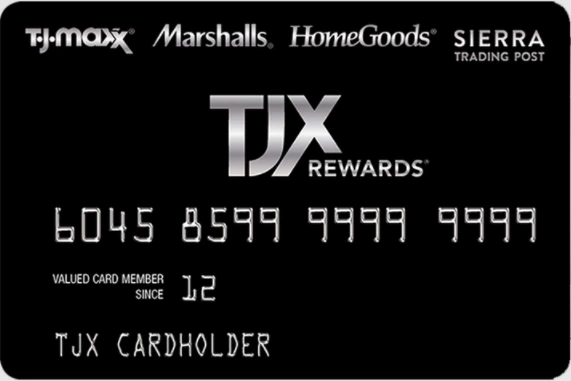
What Is the TJX Rewards Credit Card?
The TJX Rewards credit card is a retail card built for people who shop regularly across the TJX family of stores. It is issued by Synchrony Bank rather than by TJX itself, which is why your statements, payments and login all run through Synchrony’s portal at tjx.syf.com rather than through tjmaxx.com.
There are two versions, and knowing which one you hold matters because they earn differently, they are serviced by different phone numbers, and only one of them works outside TJX stores.
TJX Rewards Credit Card vs TJX Rewards Platinum Mastercard
| Feature | TJX Rewards Credit Card | TJX Rewards Platinum Mastercard |
|---|---|---|
| Where it works | TJX stores and websites only | TJX stores plus anywhere Mastercard is accepted |
| Points in TJX stores | 5 per $1 | 5 per $1 |
| Points on gas, groceries, restaurants | Not applicable | 2 per $1 |
| Points on other spending | Not applicable | 1 per $1 |
| Certificate | $10 per 1,000 points | $10 per 1,000 points |
| Customer service | 1-800-952-6133 | 1-877-890-3150 |
Both cards use the same tjx.syf.com portal and the same registration steps, so the instructions below apply whichever one you hold.
Where You Can Use Your TJX Card
The store card is accepted across every brand in the TJX group, which is what makes it more useful than a single-store card:
- T.J.Maxx — apparel, home goods and accessories
- Marshalls — clothing, footwear and home items
- HomeGoods — furniture, decor and kitchenware
- Sierra — outdoor gear and activewear
- Homesense — larger-format home furnishings
Points earned at any of these count towards the same Rewards balance, so a HomeGoods purchase and a Marshalls purchase both move you towards the same certificate.
How to Register Your TJX Credit Card at tjx.syf.com
Registration is a one-time step that creates your online access. You need the physical card in front of you, because the account number and the personal details on file have to match exactly what Synchrony holds.

- Go to tjx.syf.com and choose the option to register or set up online access.
- Enter your TJX credit card account number.
- Supply the identifying details requested — typically the last four digits of your Social Security number, your date of birth and your ZIP code.
- Create a user ID and password, and set up the security questions used to verify you later.
- Confirm your email address so that statements and alerts reach you.
- Submit the form. Once it is accepted you can sign in straight away.
If registration is rejected, the usual cause is a mismatch between what you typed and what the bank has on file — a ZIP code from a previous address is the most common culprit. Rather than repeating the attempt, call the number on the back of your card and have them confirm the details on the account.
How to Log In to Your TJ Maxx Credit Card Account
Once registered, signing in takes a few seconds.

- Open tjx.syf.com in your browser.
- Enter your user ID in the first field.
- Enter your password.
- Select Secure Login.
Inside the account you can view your current balance and available credit, make a payment or schedule autopay, download statements, check the Rewards certificates you have earned, update your address or phone number, and set up account alerts.
Can’t Log In? How to Fix the Most Common Problems
Most sign-in failures come down to one of five things. Work through them in order.
Forgot Your Password
- On the tjx.syf.com sign-in page, select Forgot Password.
- Enter your user ID and ZIP code when prompted.
- Select Continue and follow the verification steps on screen.
- Set a new password, then sign in with it.
Forgot Your User ID
- Select Forgot User ID on the sign-in page.
- Provide your account number, ZIP code and the identifying details requested.
- Your user ID will be shown or sent to the email address on the account.
If the email never arrives, check the spam folder before trying again — repeated requests can temporarily lock the account.
Account Locked After Failed Attempts
Too many incorrect attempts will lock online access as a security measure. This is not something you can reset yourself from the login page. Call the service number for your card — 1-800-952-6133 for the store card, 1-877-890-3150 for the Platinum Mastercard — and ask them to unlock it after they verify your identity.
The Page Will Not Load or Keeps Signing You Out
- Clear your browser cache and cookies, then reopen the site.
- Try a different browser, or a private window with extensions disabled.
- Turn off any VPN — banking portals frequently block VPN traffic.
- Check your device clock is correct; a wrong system time breaks secure connections.
You Are Sure the Details Are Right and It Still Fails
At that point stop guessing and phone the number on the back of your card. Continuing to retry risks locking the account, and the agent can see whether the problem is the login itself or something on the account.
How to Activate a New TJX Credit Card
A newly issued or replacement card has to be activated before it will work at the register.
- Online: sign in at tjx.syf.com and follow the activation prompt shown on the account dashboard.
- By phone: call the number printed on the activation sticker on the card, or the service number for your card type, and follow the automated prompts.
Activation asks you to confirm details already held on the account, so no new information is needed. Keep the card to hand for the account number and expiry date.
How to Pay Your TJ Maxx Credit Card Bill
Synchrony offers several payment routes. Online is fastest; mail is slowest and needs the most lead time.
Pay Online
- Sign in at tjx.syf.com.
- Select the payment option on the dashboard.
- Choose the amount — minimum due, statement balance or a custom figure.
- Select the bank account to pay from, confirm the date, and submit.
You can also set up autopay so the minimum or full balance is taken automatically each month, which is the simplest way to avoid a missed payment.
Pay by Phone
Call 1-800-952-6133 for the store card or 1-877-890-3150 for the Platinum Mastercard, then follow the automated payment prompts. Have your account number and bank details ready. Note that some card issuers charge a fee for agent-assisted payments — ask before you confirm if you are transferred to a person.
Pay by Mail
Send a cheque or money order, never cash, with your account number written on it. Use the payment address printed on your current statement rather than one copied from elsewhere, because remittance addresses change. Allow at least seven to ten days for delivery and processing so the payment is not recorded late.
Pay in Store
Payments can be made at the register in any T.J.Maxx, Marshalls, HomeGoods, Sierra or Homesense store. Bring the card and keep the receipt as proof.
How TJX Rewards Points and Certificates Work
The rewards structure is simple, which is its main strength:
- You earn 5 points per $1 spent at T.J.Maxx, Marshalls, HomeGoods, Sierra and Homesense.
- With the Platinum Mastercard, you also earn 2 points per $1 on gas, groceries and restaurant spending, and 1 point per $1 everywhere else Mastercard is accepted.
- Every 1,000 points converts to a $10 Rewards certificate.
In practical terms, $200 of spending in a TJX store earns 1,000 points and therefore a $10 certificate — an effective return of about 5% in store. Certificates are issued automatically rather than on request, and they carry expiry dates, so check the date printed on any certificate before planning a trip around it.
One caution worth stating plainly: a rewards rate only works in your favour if the balance is cleared in full each month. Retail cards typically carry high interest rates, and carrying a balance will cost you far more in interest than 5% in certificates returns. If you are weighing that trade-off, our guide to paying bills with a credit card and the piece on improving your credit score both cover the mechanics.
Make Sure You Are on the Real TJX Login Page
Retail card portals are a standard phishing target, and a fake login page is designed to look exactly like the real one. A few habits make it very hard to be caught out:
- Type the address yourself. Reach tjx.syf.com by typing it into the address bar or using your own bookmark — not from a link in an email, a text message or a search advertisement.
- Check the domain carefully. The genuine portal sits on syf.com, Synchrony’s domain. Look-alike addresses that add words or swap characters are the usual trick.
- Never share a one-time passcode. Synchrony will not phone you and ask for an OTP, your full card number or your password. Anyone who does is not your bank.
- Be wary of urgency. “Your account will be closed today” is a pressure tactic, not a bank process.
- Avoid signing in over public Wi-Fi. If you must, use mobile data instead — our guide on how to tell if a Wi-Fi network is secure explains what to look for.
If you think you have entered your details on a fake page, call the number on the back of your card immediately and change your password. For more on how these scams are built, see our breakdown of a package-tracking text scam and our guide to safe online shopping.
TJX Credit Card Customer Service and Login Help
| What you need | Contact |
|---|---|
| TJX Rewards Credit Card (store card) | 1-800-952-6133 |
| TJX Rewards Platinum Mastercard | 1-877-890-3150 |
| Manage your account online | tjx.syf.com |
| TJX corporate website | tjx.com |
Both service lines are automated systems available around the clock, with live agents during business hours. Reporting a lost or stolen card is the one thing you should never delay — call as soon as you notice, at any hour, because liability protection depends on prompt reporting.
About T.J.Maxx
T.J.Maxx is an American off-price department store chain and part of TJX Companies, which also operates Marshalls, HomeGoods, Sierra and Homesense. The off-price model — buying overstock and end-of-season inventory and selling it below regular retail — is what produces the constantly changing stock that regular shoppers plan their visits around. That same pattern is what makes a store card worthwhile for frequent visitors and largely pointless for occasional ones.
Frequently Asked Questions
What is the official website for TJ Maxx credit card login?
The official portal is tjx.syf.com, operated by Synchrony Bank. Type the address directly rather than following a link from an email or advertisement.
Who issues the TJ Maxx credit card?
Synchrony Bank issues and services both the TJX Rewards Credit Card and the TJX Rewards Platinum Mastercard. TJX Companies is the retail partner, not the lender, which is why account servicing runs through Synchrony.
How do I reset my TJX credit card password?
Select Forgot Password on the tjx.syf.com sign-in page, enter your user ID and ZIP code, complete the verification steps, then set a new password.
How many points do I need for a TJX Rewards certificate?
1,000 points produces a $10 Rewards certificate. At 5 points per $1 in TJX stores, that is roughly $200 of in-store spending.
Can I use my TJX store card outside TJX stores?
No. The TJX Rewards Credit Card works only at T.J.Maxx, Marshalls, HomeGoods, Sierra and Homesense. Only the TJX Rewards Platinum Mastercard works anywhere Mastercard is accepted.
Why is my TJX credit card login not working?
The usual causes are a mistyped user ID, a password reset that was never completed, or an account locked after repeated failed attempts. A locked account cannot be reset from the login page — call the service number for your card to have it unlocked.
Can I use the same login for HomeGoods or Marshalls?
Yes. One TJX Rewards account covers every brand in the group, so the same tjx.syf.com login manages the card whichever store you use it in.
Is there a fee to pay my TJX bill online?
Paying online through tjx.syf.com is free. Some issuers apply a fee for agent-assisted payments by phone, so ask before confirming if you are put through to a person.
Conclusion
Managing a TJX credit card comes down to one address — tjx.syf.com — and knowing which of the two cards you hold, because that decides where it works, how it earns outside TJX stores and which number to call. Register once, set up autopay so a payment is never missed, and check your Rewards certificates for expiry dates before you plan a shopping trip. And whenever you sign in, reach the portal by typing the address yourself. That single habit removes the most common way retail card accounts are compromised.
Managing other store cards? We have step-by-step guides for the Old Navy credit card, the Gap credit card and the Zulily credit card — all three are also issued by Synchrony Bank and follow a near-identical login and payment process. You may also find our guide to the Indigo Credit Card Registration, Login and Payment useful.
Not the card you were looking for? Our store credit card login guide lists the issuing bank, login portal and customer service number for twelve major store cards in one table.

Justwebworld has published guides since 2012. How we write and update articles Report an error
